
You are using an out of date browser. It may not display this or other websites correctly.
You should upgrade or use an alternative browser.
You should upgrade or use an alternative browser.
PS3 HAN Toolbox - Translations Required For Upcoming Multi Language Version
- Thread starter DeViL303
- Start date


xXTakarashiXx
Member
xXTakarashiXx
Member
btw forgot to say that, I left some small thing in English, but thats because I thought that would be better to leave those things like that, because translating "literally" what it says would sound "ugly", like HAN Enabler, for example, if left it like that cuz translated would sound horrible and the name kinda fits perfectly like it is (the info/descripcion is translated tho, i just mean some "names")Here's Spanish (Latin America/South America) and yeah, both Console and even some Games have both Spanish (Spain) and Spanish (Latino). Hope it works

Metinfield
Member
Last edited:


That Hebrew one seems to have issues, alot of the text is outside of where its meant to be, with English still included before it. Can you use notepad++ and then you will see its just the black text that needs replacing with your language.Here's Hebrew, tell me if i missed anything.
TBh im not sure if the PS3 will be able to display those characters, you might need to replace fonts too. I know for Arabic you do need to replace fonts.
Also now I know what you mean about it jumping all over the place, that is really weird, when you highlight some of the Hebrew text in notepad++ , it jumps around into different positions.
Last edited:
That is a docx file, that's ok, but I needed you to replace the English text, not write yours after it. Sorry but I cant fix that as I would need to be able to read it.Translation for Russian
If you open an xml in Notepad++ you will see its the black text that needs replacing.
Please see the other xmls uploaded for an example of how it should be.
Last edited:
The formatting is messed up on this one, trying to fix it but its fairly bad. Please use notepad++, and only touch the black text. this one has lots of the tags edited with extras spaces, and some tags transated like "Texto" and then also some tags are swapped around. Its hard to fix.Tradução para o português-BR, não sei se é bom, posso ter esquecido alguma coisa.
Last edited:
TBH I never saw Hebrew and thought it was semi normal characters, Also assumed you had your XMB displaying in HebrewI did and they did the same, also you didn't tell me that the PS3 might not be able to display Hebrew.
For that, I'm sorry, but I won't be updating the file.

Its possible it can still work, with or without fonts added, but I don't know anything about fonts so that would involve experimenting yourself. Anyway might be best leave it, the way the characters are jumping around in notepad is not good, very hard to copy them if you cant be sure which way they are etc.
So here is the story, this is going to have a few steps to it for this testing stage. the following is for users who have submitted translations or those who want to test them out, there are no changes to the toolbox functions, so if you just use/read English don't bother with this.
Step 1: Inject THIS explore_plugin_full.rco using the rco injector (do it from usb)
Step 2: Install THIS patch pkg and reboot
Step 3: If you use PKG Linker 2.0 then put THESE files in the bin folder and create a new package list pkg and install that and reboot.
These tests require you to have v0.5 (with resources) installed already.
Note: The above rco only has the following languages added so far:
For Arabic use this for Step 1
@xXTakarashiXx Where should I add that? What language do you normally set your PS3 to?
Step 1: Inject THIS explore_plugin_full.rco using the rco injector (do it from usb)
Step 2: Install THIS patch pkg and reboot
Step 3: If you use PKG Linker 2.0 then put THESE files in the bin folder and create a new package list pkg and install that and reboot.
These tests require you to have v0.5 (with resources) installed already.
Note: The above rco only has the following languages added so far:
- Polish by @DEX357
- Turkish by @Metinfield
- Portuguese by @FmTGamer
- Spanish by @mr_ota
- Italian by @thehero_
- German by @maxiyiha
- Chinese
- Japanese
- Korean
- Russian (being tweaked on by @MaksKasibin )
- Danish
- Dutch
- Finnish
- French (being worked on by @TEN10K
- Norwegian
- Swedish
- Portuguese (being tweaked by @Niander466 )
For Arabic use this for Step 1
- Use THIS rco for Arabic by @kenan1098 (Use English Setting)
- You will need to inject fonts aswell I think. I don't know much about ps3 fonts, but try inject ALL these fonts, not sure which one you need or if you need all of them. Do this at your own risk, you might need to reinstall FW if it goes wrong.
- I think there is something about Arabic, and it will display it backwards, its needs to be written backwards in the rco or something like that. Check it out anyway.
@xXTakarashiXx Where should I add that? What language do you normally set your PS3 to?
Looks good here when I change to Spanish, but I cant read it.Incredible, right now I try it and I send you capture

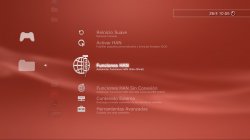
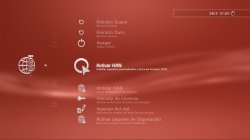
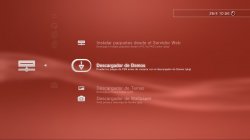
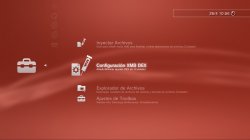
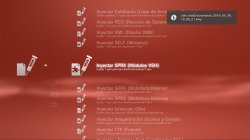
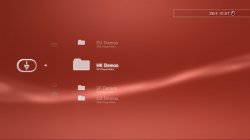
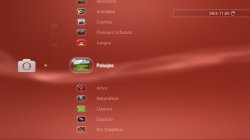
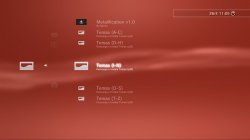
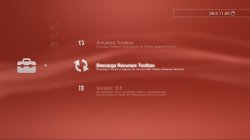

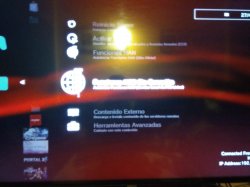
Did you try it? Did you need the fonts?Hmm Arabic is backwards
welp , time to go flip some text
I don't think they will help it flip, just curious if it all displayed without the fonts being added.
Last edited:

Similar threads
-

-
 PS3 PS3 Firmware 4.93 - Update is Live! (CFW and HFW Released)
- Started by LuanTeles
- Replies: 38
-
 PS1 Freeing The Launch PSX Consoles In 2022 - The Story Of The SetSessionSuperUltraCommandSmash
- Started by alexfree
- Replies: 7
-
 PS3 [4.84] SC4RLXNE CFW 4.84 D-REX [Beta 1]
- Started by SC4RLXNE TEAM
- Replies: 5