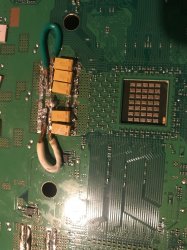
has anyone done any case mods for airflow?

Just to be clear... what i mean is you should use this diameter as a reference
nfdt7IQ.png


If you make it bigger than that is going to be a bit pointless
Making it smaller than that probably is going to have good results


@sandungas would a hole the size of an 80mm case fan be to small or should i make the hole the size of a 120mm case fan?
 
@sandungas would a hole the size of an 80mm case fan be to small or should i make the hole the size of a 120mm case fan?
I cant tell because i dont know the diameter i marked with the red arrow in my previous post, and im not sure how would be the optimal way to do it because i have not readed much reviews of this kind of mods

My guess is that is better to make the hole it a bit smaller than the diameter i painted with the red arrow
Because this way the fan is going to "suction" some air from the other side of the motherboard
 
I don't think PS3 requires airflow hardware mods and i wouldn't recommend any such mods. reasons.

1. The overheating problem with PS3 is because of two main reasons. First, the IHS & bad thermal paste under IHS which decays with time. That's why FATs are most prone to overheating. Secondly, Syscon itself is designed to operate in discreet mode, so it doesn't provide adequate fan speeds to controls temps. This can be overcome with fan control apps.

2. The ventilation & airflow system of PS3 is fine. The console airflow is designed carefully keeping all areas in my mind. So if you create new holes in chassis to cool CELL & RSX, like people do under the Chassis. Then you may create new point of airflow entry and reduce the Temps of CELL & RSX. But its possible that air flow in other parts of PS3 may get reduced like PSU. The airflow entry points in PS3 are designed with a purpose and tampering with it alters the whole ventilation system.
 
@snkplkn my ps3 fat has the newer plastic psu which generates less heat not ot mention that since i cant delid my cpu and rsx a case mod is my next best option kinda hard to watch a bluray movie when your ps3 fan sounds like a jet engine on overload even with webman the fan has to be uber loud to keep temps low
 
Try that rubber trick on back of CELL. And if your paste under IHS is really bad & lost all effectiveness, no air flow mod will be able to cool down PS3.

Regarding delidding. I would suggest that you find someone in your area who has the expertise to do this work. If you can't find anybody, do it yourself. I would advice you to buy a dead motherboard or dead PS3 FAT to practice delidding. You may find dead mother board for $5-10$ depending on where you are. You may find dead FAT models for $15-$20.
 
Try that rubber trick on back of CELL. And if your paste under IHS is really bad & lost all effectiveness, no air flow mod will be able to cool down PS3.

Regarding delidding. I would suggest that you find someone in your area who has the expertise to do this work. If you can't find anybody, do it yourself. I would advice you to buy a dead motherboard or dead PS3 FAT to practice delidding. You may find dead mother board for $5-10$ depending on where you are. You may find dead FAT models for $15-$20.

@snkplkn what kinda of rubber should i but for the trick i dont think a condom will work
 
You can try whatever you want. But that thing should not deform under heat and should be completely NON-conductive. Place it behind CELL as indicated in last page.
 
@sandungas @snkplkn will these work in place of the eraser for the rubber trick they are all i could find

https://www.acehardware.com/departm...ture-hardware/protective-furniture-pads/51477
Looks good to me, and as a bonus you could keep the adhesive side to stick it to the metal square
Also a pack like that contains a lot of them, so you can try to cut them many times

Edit:
If you are asking about that shop because you are going to buy them in it... i been looking at the catalog and this ones could work fine too
https://www.acehardware.com/departm...re-hardware/protective-furniture-pads/5992243

And this others, are bigger, chocolate and cream styles :D
https://www.acehardware.com/departm...ture-hardware/protective-furniture-pads/52728
https://www.acehardware.com/departm...ture-hardware/protective-furniture-pads/52726
 
Last edited:
Looks good to me, and as a bonus you could keep the adhesive side to stick it to the metal square
Also a pack like that contains a lot of them, so you can try to cut them many times

@sandungas sweet i will buy them and let you know how it all goes btw random question i ordered some thermal pads that are about 1.5mm thick so would i be correct in assuming that i since the thermal pads are 1.5mm thick i could use them as a measurement
 
@sandungas on final question how will i know when the silicone bumpers that i linked you to are cut to the right size? i mean liker will they feel a certain way when i assemble without the paste to see if they fit?
 
@sandungas sweet i will buy them and let you know how it all goes btw random question i ordered some thermal pads that are about 1.5mm thick so would i be correct in assuming that i since the thermal pads are 1.5mm thick i could use them as a measurement
@sandungas on final question how will i know when the silicone bumpers that i linked you to are cut to the right size? i mean liker will they feel a certain way when i assemble without the paste to see if they fit?
Yes, now that you are going to use a good material you should try to cut it with the exact height mentioned in the other thread (something around 3.3 or 3.5 milimeters)
Thats pretty much double the thickness of your thermal pads + a bit more
To be hnonest, adjusting that "bit more" is very hard to achieve cutting it manually... is mostly a reference

As mentioned before, the better check to see if you cutted it with the correct thickness is by assembling the PS3 (without thermal paste and no screws)... then press it like a sandwich (one hand on top of the heatsink, and the other hand pressing the square in the clamp
While doing that you should "feel" that the rubber is being compressed a bit... in other words... you should notice that "spring" effect... but you should not be able to compress the rubber entirelly

Keep in mind the clamp have a lot more strenght than our hands
 
As mentioned before, the better check to see if you cutted it with the correct thickness is by assembling the PS3 (without thermal paste and no screws)... then press it like a sandwich (one hand on top of the heatsink, and the other hand pressing the square in the clamp
Im going to quote myself to correct this before you or someone tryes it
Is better to do it without the heatsink

By pressing the sandwich with one hand on top of CELL IHS... and the other hand pressing the metal square (attached to the metal shield)
This should give you a nice feeling of how much is compressed the custom rubber block
 
@sandungas so i bought these in brown they were out of the clear ones my only issue is they look like they might be smaller than the hole will that be a problem i wont really know if they are smaller till this week when i take it apart still waiting on the other parts to arrive

https://www.acehardware.com/departm...ture-hardware/protective-furniture-pads/51477

assuming they are to small what can i put under them so they arent sitting on top of the smd's that sit in the hole under the cpu
 
@sandungas so i bought these in brown they were out of the clear ones my only issue is they look like they might be smaller than the hole will that be a problem i wont really know if they are smaller till this week when i take it apart still waiting on the other parts to arrive

https://www.acehardware.com/departm...ture-hardware/protective-furniture-pads/51477

assuming they are to small what can i put under them so they arent sitting on top of the smd's that sit in the hole under the cpu
I dont know either if are going to be smaller than the area of the hole... and yesterday when reading the tutorial thread i could not see anyone mentioning the sizes of that hole... so dunno
Thats why i suggested in a previous post the other rubber bumpers that was bigger

Anyway... you should not add any other material to the mod, the rubber needs to push the SMD components, thats how everybody did it
 
I dont know either if are going to be smaller than the area of the hole... and yesterday when reading the tutorial thread i could not see anyone mentioning the sizes of that hole... so dunno
Thats why i suggested in a previous post the other rubber bumpers that was bigger

Anyway... you should not add any other material to the mod, the rubber needs to push the SMD components, thats how everybody did it


@sandungas they didnt have anything bigger then what i got and the person giving me the ride didnt wanna go any place else if they end up being to small for the hole ill figure a way to make it work even if i end up having to add two of them side by side or in layers lol
 
@sandungus heres a pic i took off of google it shows the hole under the cpu assuming that my bumpers arent big enough would fitting two of the bumpers side by side work or no? im asking because i really dont want to have to go out searching for bigger bumpers i await your reply
 
@sandungas heres the pic let me know if it helps heres another thought if the rubber bumper ends up being to small i can always cut it down to the bigger wider bottom part and sandwich them together to make it big enough just a thought whatcha think
 

Attachments

  • thumbnail-img-4132.jpg
    thumbnail-img-4132.jpg
    322.7 KB · Views: 46

Similar threads

Back
Top