has anyone done any case mods for airflow?

Wait, you dont feel comfy doing the small mods but you are considering doing a delid ? :D
The mods i mentioned are not so hard to do but a delid is very risky
Right now the difference of 11ºC resulting of your idle tests doesnt seems to require a delid, in my oppinion you are a bit on the borderline of really needing it, but with webman and high speeds it can be conunterfeited as you was able to see in your other tests
So at this point is mostly a matter of how annoying for you are the resulting noise levels of the webman configuration

 
Wait, you dont feel comfy doing the small mods but you are considering doing a delid ? :D
The mods i mentioned are not so hard to do but a delid is very risky
Right now the difference of 11ºC resulting of your idle tests doesnt seems to require a delid, in my oppinion you are a bit on the borderline of really needing it, but with webman and high speeds it can be conunterfeited as you was able to see in your other tests
So at this point is mostly a matter of how annoying for you are the resulting noise levels of the webman configuration



@sandungas ok i have on final question i need you to answer for me before i start taking apart my PS3 this weekend depnding on when the thermal pads arrive

ok so lets assume i take the whole system apart down to an empty case aside from replaying the paste on the cpu and rsx and aside from replacing the old thermal pads with new ones and aside from adding thermal pads to the nectokin caps would cutting a hole right where the internal fan sits help with better airflow? also would it help me power temps or at least help move the hot air out quicker i feel like at this point since the system only costed me 50$ that a case mod wouldnt be a bad idea

i await your reply thanks for your time
 
@sandungas sorry to keep on bothering you but i had a thought you mentioned the eraser method well i dont have an eraser handy nor can i afford to go out and buy one but i do have two sd card adapters on hand that im no longer using i know there not as big but what if i wrap them in electrical tape and use them sure they wont give as much pressure as say an eraser but its worth a try

also you said the eraser isnt permanent what would you suggest i use in place of the eraser thanks for your time
 
I dont have experience with the case hole, but i think is going to reduce the temperatures 10ºC or so (maybe more, im not really sure)

The thermal pads on top of the tokins is a nice detail... do the same on top of the wifi/bt module btw, there is many people that reports wifi/bt modules burnt/damaged and i guess is because the overheats... by adding a thermal pad in it you are preventing it a bit

For the rubber mod, as i said it depends a lot of which kind of materials you find to do it, when i have to do this kind of DIY things i use to walk around my house looking at furniture, objects etc... eventually i use to find something that fits (i been doing that since i was a kid, and my mother and sister was like "OMG he is doing it again, be carefull", lol), the candidates to find a nice material for this mod are:
-toys (toys are always useful to rip them appart, lol)
-office material (like the eraser, or booklets, or something made of silicones)
-sports material
-mechanical/vehicles (lot of stuff related with cars, bikes, bicycles, etc..)

The material you need to find is something like this... but you dont need too much, you just need to cut a rectangle smaller than a coin
slioder4.jpg
 
@sandungas what about the micro sd card adapters like this its not as springy as an eraser but it should be springy enough if i wrap it in electrical tape to make sure it doesnt short out the mobo
 

Attachments

  • AlphX-32gb.jpg
    AlphX-32gb.jpg
    159.2 KB · Views: 31
@sandungas what about the micro sd card adapters like this its not as springy as an eraser but it should be springy enough if i wrap it in electrical tape to make sure it doesnt short out the mobo
But thats not flexible, it needs to be a bit "gummy" because we are not calculating his thickness with huge precission
We do it a bit higher than needed, and when is compressed it auto-adjust to the space available
 
But thats not flexible, it needs to be a bit "gummy" because we are not calculating his thickness with huge precission
We do it a bit higher than needed, and when is compressed it auto-adjust to the space available


@sandungas if i buy some rubber furniture feet how do i figure out how short i need to trim/cut it?
 
@sandungas if i buy some rubber furniture feet how do i figure out how short i need to trim/cut it?
In the other thread are mentioned the sizes, his thickness should be around 3.3 or 3.5 milimeters
cell-jpg.15434


Rought calculations... in the photo of the rubber feet of my prevous post i calculate there is enought material to "cut" 2 or 3 pieces like the ones you need
You need to cut it with a razor blade
 
In the other thread are mentioned the sizes, his thickness should be around 3.3 or 3.5 milimeters
cell-jpg.15434


Rought calculations... in the photo of the rubber feet of my prevous post i calculate there is enought material to "cut" 2 or 3 pieces like the ones you need
You need to cut it with a razor blade


@sandungas the only thing i have to measure with is a tape measure that i got from ace hardware it measures in feet and inches not in mm
 
Convert it with this https://www.rapidtables.com/convert/length/mm-to-inch.html

The best thing you could do is to calculate the thickness yourself by doing this:
1) dissassemble the PS3 completly
2) clean the old thermal paste
3) cut the rubber piece, place it inside the "hole"
4) assemble the PS3 (without thermal paste and without screws) to see if the thickness of the rubber is correct

The goal is the rubber needs to be a bit "compressed" when everything is well assembled... that compression is what gives us the "spring" effect
 
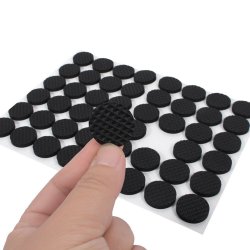
@sandungas will these work they are foam furniture feet/pads i use them to elevate my ps3 so theres room under it for airflow?

48PCS Round Self Adhesive Furniture Leg Foam Felt Pads Anti Slip Mat Black thats what there called
 

Attachments

  • s-l1600 (1).jpg
    s-l1600 (1).jpg
    91.1 KB · Views: 30
@sandungas will these work they are foam furniture feet/pads i use them to elevate my ps3 so theres room under it for airflow?

48PCS Round Self Adhesive Furniture Leg Foam Felt Pads Anti Slip Mat Black thats what there called
The foam is not so good because it have "bubbles" inside and allows to be comrpessed a lot
But i guess you could achieve that spring effect if you make it bigger

Lets say... the height of the hole should be something around 3mm
In the tutorial is suggested to use a eraser of 3.5mm... because that additional 0.5mm is going to be compressed... and when the PS3 is assembled the eraser is going to be compressed down to 3mm thickness

With foam you should make it bigger... something like 5mm (because 2 of them are going to be compressed)
 
@sandungas so if im understanding you correctly i will have to add several of the foam feet on top of each other for the thickness correct i.e. stack the foam feet to achieve the desired thickness am i correct
 
@sandungas so if im understanding you correctly i will have to add several of the foam feet on top of each other for the thickness correct i.e. stack the foam feet to achieve the desired thickness am i correct
I dont know the accurate meassures, but by reading the tutorial of the other thread i can deduce the space available "inside the hole" is something around 3mm (or maybe a bit smaller)

They are suggesting to cut a piece of the eraser with 3.5mm thickness (bigger than the space available), because is going to be compresed when the PS3 is assembled
But that calculation of his height depends of the density of the material

Lets say... the eraser (and the rubber) have a density pretty similar, are solid, but are a bit "gummy"
Your foam is going to be a lot more "gummy" (and less solid)... so the solution is to increase his thickness

You will have to do several pieces to adjust it, first try to cut it with a thickness of 0.2 inches (thats like 6 milimeters, around the double suggested in the tutorial when using the eraser/rubber material)
 
I dont know the accurate meassures, but by reading the tutorial of the other thread i can deduce the space available "inside the hole" is something around 3mm (or maybe a bit smaller)

They are suggesting to cut a piece of the eraser with 3.5mm thickness (bigger than the space available), because is going to be compresed when the PS3 is assembled
And that calculations depends of the density of the material

Lets say... the eraser (and the rubber) have a density pretty similar, are solid, but are a bit "gummy"
Your foam is going to be a lot more "gummy" (and less solid)... so the solution is to increase his thickness

You will have to do several pieces to adjust it, first try to cut it with a thickness of 0.2 inches (thats like 6 milimeters, around the double suggested in the tutorial when using the eraser/rubber material)


@sandungas thanks for the info before i go one final question do you really think the case mod will help at all or be worth it even if it may only drop my temps a few degrees
 
@sandungas thanks for the info before i go one final question do you really think the case mod will help at all or be worth it even if it may only drop my temps a few degrees
I can tell you in a PS3 slim, by removing the top case cover (or by making a hole in it), the temperature is reduced around 6ºC or 8ºC

That hole in the PS3 fat case is going to have pretty much the same effect, but maybe the temperature reduction is bigger because the airflow inside PS3 fats is a bit weird (is a bad design)

But dont make the hole too big, keep an eye at the diameter of the hole in the metal sheet of the fan (are 3 sections that makes a circle), thats a reference that tells how big could be the hole
 
Just to be clear... what i mean is you should use this diameter as a reference
nfdt7IQ.png


If you make it bigger than that is going to be a bit pointless
Making it smaller than that probably is going to have good results
 
Dear friends,

I hope i can give timely advice to users attempting delid. I recently failed CELL Delid on CECHP Fat model. Tools i used were painting knife, modified feeler gauges (0.25 mm edges) & hair dryrer to heat.

Delid should be the LAST option as its highly risky. Somethings i feel that are not mentioned clearly on internet on delidding tutorials.

1. I read on several places that Silicon glue on CELL is like a butter which needs to be carefully cut to remove IHS. I don't think this is accurate description. I found that silicon glue is more like a CEMENT which is very hard to cut. I also tried heating the CELL (until point where i can barely touch). Still the Silicon gave too much resistance for entry point from corners.

2. I think with use of PS3, the Silicon glue becomes crusted and hardens with time. If your PS3 hasn't been used much, your glue may be easier to cut. This is just a speculation. Maybe you need higher temperature (but not too high to effect the solder) to soften the glue with a heat gun. I would recommend you should wear gloves.

3. There are various delidiing videos on youtube but most of them are fake. People are showing delid most likely on motherboards which are actually DEAD. So whether their Delid method is successful or not, you don't know because they don't show after Delid if PS3 is working or not.

There are few users like NSC Modz who are doing Delid correctly. But there is always big risk involved.

4. The entry point to cut Silicon glue is critical. I would advice that, you should first try to get a handle of glue toughness. If glue is soft enough to penetrate from edge of CELL, than you can start delid from edge (with whatever tool you are using). If you find that glue is hard, do NOT attempt to make forceful entry from edge, you will damage the substrate. Your best bet, is to start delid with a sharp angled tool from the center where there is no glue on CELL. Then starting from that point, you should travel all the way around edges. Heat the CELL regularly to soften the glue.

5. One of the misconception i had about CELL, was that CELL connecting paths, those tiny circuit lines going into the chip. They are all beyond the glue and protected under IHS. These lines actually start outside the glue on CELL chip. So trying hard penetration on glue may damage these circuits even before you get into the glue. So protect these connection under the IHS as well as outside the IHS near the edges of CELL chip.

6. Last but a very important fact. You must have a great eye to do delid. I would recommend using a portable table lens (the one like table lamp which you can move & set at a point) to get a clear view of work. I didn't even realize that i damaged the substrate until i took a closer look.
 

Similar threads

Back
Top