has anyone done any case mods for airflow?

@sandungas heres the pic let me know if it helps heres another thought if the rubber bumper ends up being to small i can always cut it down to the bigger wider bottom part and sandwich them together to make it big enough just a thought whatcha think
I know is that hole, but i cant imagine how are going to adjust your bumpers to it, im guessing are going to be a bit smaller than the hole, but im not sure

You mean cutting the bumpers in horizontal and stacking them ?, it could work but i think is not going to be needed, the thickness of 3mm suggested in the other thread is very small (smaller than a grain of rice)
You need to cut them at his bottom (very close to the side with the adhesive)
 
Last edited:
Btw, im figuring a way to cut them in a accurate way

1) Place 2 coins on top of a table (a bit separated from each other)
2) Place the razor blade in horizontal on top of the coins
3) Move the bumper in between the coins
And use globes, to do this is going to be needed to "push" the bumper in the direction of the razor blade with your fingers

For this to work.... you need to find 2 coins with the required thickness (a bit more than 3 milimeters)
The resulting cutted rubber bumper "should" have (if well done) the same thickness than the coins
And the cut should be a very flat surface, perfectly paralell with the other side of the bumper with the adhesive


Edit:
Im just checking it, with euro coins is easy to match the required thickness, a coin of 1€ + another coin of 1 cent on top does a total of 3.7 milimeters :D
 
Last edited:
@sandungas if the bumper is smaller than the hole will that be a problem originally i was just going to use one bumper i only bought the 9 pack so i would have spares just in case
The bigger is the better, but i dont think doing it at a bit smaller size could cause any problem
also @sandungas and idea what type of coin i would need or what i can substitute for a coin all i have in my house are pennies and credit cards sadly
Well, the credit cards probably are going to be more stables than my idea with the coins, but you are going to need to stack several credit cards at each side (3 or 4 each)
 
The bigger is the better, but i dont think doing it at a bit smaller size could cause any problem

Well, the credit cards probably are going to be more stables than my idea with the coins, but you are going to need to stack several credit cards at each side (3 or 4 each)


sweet ill keep you updated but one question before i do this mod what would be the best way for me to benchmark my temps so that when i finish the mod i can compare the new temps to the old temps would say 30 mins with some webman temp /fan settings work or no? cant use syscon as it lets the temp get to 80c way to fast
 
sweet ill keep you updated but one question before i do this mod what would be the best way for me to benchmark my temps so that when i finish the mod i can compare the new temps to the old temps would say 30 mins with some webman temp /fan settings work or no? cant use syscon as it lets the temp get to 80c way to fast
Right now your best way is by repeating the the same idle test you was doing before, some posts ago in this thread you posted the results of that test, are going to be very handy for you to compare them after the mod
https://www.psx-place.com/threads/has-anyone-done-any-case-mods-for-airflow.31218/page-2#post-260343
@sandungas heres the results ran the test 3 times waiting about 3 hours between each test and ran each test for 35 mins

FAN | CELL | RSX
20% | AMBI | AMBI
21% | 74ºC | ?? 63c
22% | 75ºC | ?? 64c
23% | 76ºC | ?? 65c
24% | 77ºC | ?? 66c
25% | 78ºC | ?? 67c
You need to take a look at the difference of temperatures in between CELL and RSX
In some way we are using RSX as a reference, and you had a "deviation" of 11ºC
After the mods the deviation should be smaller
 
Right now your best way is by repeating the the same idle test you was doing before, some posts ago in this thread you posted the results of that test, are going to be very handy for you to compare them after the mod
https://www.psx-place.com/threads/has-anyone-done-any-case-mods-for-airflow.31218/page-2#post-260343

You need to take a look at the difference of temperatures in between CELL and RSX
In some way we are using RSX as a reference, and you had a "deviation" of 11ºC
After the mods the deviation should be smaller


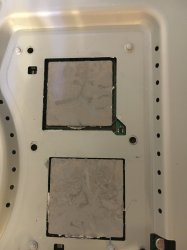
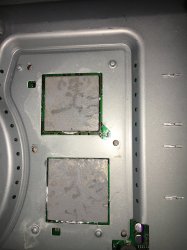
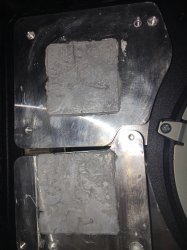
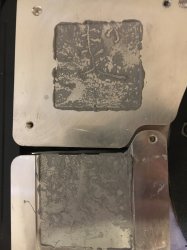
@sandungas i took my system apart so i could add the new thermal pads and i managed to take some pics of the cpu rsx and there heatsinks thought they would give you an idea on how well the thermal paste spread i used the X method so whatcha think
 

Attachments

  • IMG_0189.JPG
    IMG_0189.JPG
    1.3 MB · Views: 46
  • IMG_0190.JPG
    IMG_0190.JPG
    2.2 MB · Views: 44
  • IMG_0191.JPG
    IMG_0191.JPG
    2 MB · Views: 49
  • IMG_0192.JPG
    IMG_0192.JPG
    1.6 MB · Views: 48
@sandungas i took my system apart so i could add the new thermal pads and i managed to take some pics of the cpu rsx and there heatsinks thought they would give you an idea on how well the thermal paste spread i used the X method so whatcha think
The spreading was fine because is covering all the surfaces, the quality im not so sure, in the photos can be seen some areas that are wet and others dry, it looks like it was a bit decomposed
 
The spreading was fine because is covering all the surfaces, the quality im not so sure, in the photos can be seen some areas that are wet and others dry, it looks like it was a bit decomposed

@sandungas im read to cut the case mod for the fan hole and to be honest when i traced the hole inside the red arrow like you suggested it looks pretty small im wondering if i should just trace the inside of the plastic fan shroud and then cut so the hole is bigger whatcha think?
 
The biggest you make it = the less airflow at the other side of the motherboard
There is going to be a size where the airflow at the other side is zero, if you are going to have the PS3 placed in vertical always i guess thats not so bad because the hot air from the other side have a tendence to move in up direction, so is like the air is moving pasivelly
Anyway, i would to try not get to that point... but i dont know where is that point

What i would do is cut the circle with the same diameter of the arrow i painted, and incase is not good enought i would cut it again to increase the diamter a bit... but not much more

Also, there is a point where increasing the diameter of the hole is not going to have any improvement
Lets say... with a diameter X the fan is taking 98% of the air from outside of the case.. and increasing the diameter of the hole more than X is pointless
 
The biggest you make it = the less airflow at the other side of the motherboard
There is going to be a size where the airflow at the other side is zero, if you are going to have the PS3 placed in vertical always i guess thats not so bad because the hot air from the other side have a tendence to move in up direction, so is like the air is moving pasivelly
Anyway, i would to try not get to that point... but i dont know where is that point

What i would do is cut the circle with the same diameter of the arrow i painted, and incase is not good enought i would cut it again to increase the diamter a bit... but not much more

Also, there is a point where increasing the diameter of the hole is not going to have any improvement
Lets say... with a diameter X the fan is taking 98% of the air from outside of the case.. and increasing the diameter of the hole more than X is pointless


@sandungus my uncle whos a pc technician said to cut the hole as big as the fans so they will have unrestricted aitflow i will keep you posted im half way done
 
@sandungus my uncle whos a pc technician said to cut the hole as big as the fans so they will have unrestricted aitflow i will keep you posted im half way done
Exactly what i said, the hole with the same diameter than the red arrow i painted
The fact is it could be even smaller, because we could calculate the area of the fan "holes" (are 3)... and would be smaller than what i suggested

There is an effect you are not getting btw.... think in what i said about extracting the air from the other side of the motherboard... how do you think it does it originally ?
 
Last edited:
Exactly what i said, the hole with the same diameter than the red arrow i painted
The fact is it could be even smaller, because the could calculate the area of the fan "holes" (are 3)... and would be smaller than what i suggested

There is an effect you are not getting btw.... think in what i said about extracting the air from the other side of the motherboard... how do you think it does it originally ?


@sandungus i will keep you posted i appreciate your info
 
@sandungas it didnt work temps were the same as before for the cpu the rsx was lower because it was getting more airflow anyhow thanks for the help im gonna put it in my closet till i decide if i wanna get it reballed or not by these guys https://ps3specialist.com


edit even if i cover up the hole so that there is zero airflow from under the fan temps are still an issue thanks for all your help
 
FAN | CELL | RSX
20% | AMBI | AMBI
21% | 74ºC | ?? 63c
22% | 75ºC | ?? 64c
23% | 76ºC | ?? 65c
24% | 77ºC | ?? 66c
25% | 78ºC | ?? 67c


If you are getting these Temps on FAT model, they are NOT bad. These Temps are okay....because fan speed is quite low. You should test with fan speed at 40% or 45%. Without going into too much detail on fan speeds & Temps, you should put your fan on static 43% fan speed & do some testing. Try to play games like TLOU & Uncharted and see if you can keep Temps below 75c.

Also the difference in CPU & RSX will reduce when you increase the fan speed. At 43% fan speed, your CPU & RSX difference shouldn't be more than 10c. If it is, then you have a problem.
 

Similar threads

Back
Top