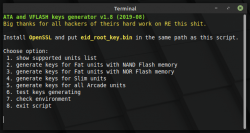
HDD Keys generating scripts

So this means that via WSL it works properly and You can do it on Windows. ;)

Ok, I'll generate them for You. I don't know why it doesn't use appdir.

- - -

Based on Your screenshot, in assumption disk was decrypted and converted to BE, perform:
Code:
sudo losetup loop1 /mnt/hgfs/img/decrypted.img
sudo kpartx -a /dev/loop1
lsblk
And You can start mounting filesystems (to the specific partitions listed if kpartx did the job, and for the list to see is the lsblk).
 
after mounting it as a loop device, and then trying to mount partition 2, i'm getting this error
Code:
minde@minde-virtual-machine:~$ sudo mount /dev/mapper/loop1p2 /mnt/ps3
mount: /mnt/ps3: wrong fs type, bad option, bad superblock on /dev/mapper/loop1p2, missing codepage or helper program, or other error.
minde@minde-virtual-machine:~$
 
Version 1.8
  • improved key checking method (changed from crc32 to diff), so now user no longer need to thinking ;)
  • added option in "check environment" to automatically rename "eid_root_key" and "eid_root_key.bin.bin" to proper name
  • changed ERK name for Arcade units to prevent user from "accidental" overwrite his own unique ERK
  • other minor fixes
//attachment removed
 

Attachments

  • ps3keygen_v18.tar.png
    ps3keygen_v18.tar.png
    85.5 KB · Views: 963
Last edited:
@justanyone You don't need root privileges for my script. Every tools which I using should work as user, on all Linux distributions with standard bash and his posix standards.

Because You doing it wrong. ;) For game partition (the biggest one from this loopdev, I don't know that, You should know that, I just assumed that this mapper loop1p2 based on Your post):
Code:
sudo mount -t ufs -o ufstype=ufs2,ro /dev/mapper/loop1p2 /mnt/ps3

Your keys for DECHJ (Fat with NOR, right?):
https://www.sendspace.com/file/w3uh4t
 
well it mounted, but now another problem, i don't see any files
as far as i understood, i need some kind of app to read ufs, right?
 
edit: ok, I think I know where the problem is. Click right mouse button in there and from context menu choose "open as root". The You should be able to see and managing data.

- - -

No, You don't need any additional apps. UFS2 support is in every Linux kernel at least for read only. And if wouldn't be, You wouldn't be able to mount fs.

Maybe there are some changes in new Cinnamon and/or in Nemo which cause this problem. TBH I never mounting stuff in /mnt as for at least few years ago it is /media for that and I even don't use it, instead directory in my home (I doubt it is the reason but who knows).

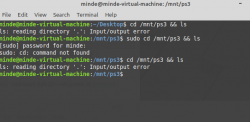
What command line saying? After type below script it will show the files? Because You know, it is impossible to i.e clean all data on PS3HDD from PS3 level, also gdisk show some free/occupied.
Code:
cd /mnt/ps3 && ls

What history is of this HDD? Is this Your unit? Your dump? How did You decrypted it? Maybe filesystem was already damaged on PS3 and that's the strange results? Make another copy of this file or dump only this partition ("sudo dd if=/dev/mapper/loop1p2 of=/home/you/mini_dump.img bs=512B") and attach it as another free dev loop. Then perform "sudo fsck.ufs -b 160 /dev/loop2" (if loop2 will be this mini dump; it is not a mapper, it is not a mistake). I don't know on what level of Linux environment understating You are, but You must know the basics. One mistake in choosing device or fs and You loose data. ;)

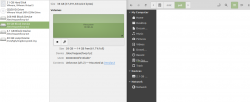
This how it looks for me (after going through on the fly decryption and mounting all; You goes by shortcut so it looks a little different ;)).

ps3hdd_slim_all_works-png.13737


And this view from file manager Nemo (I have mounted game partition in "/home/mint/ps3/dev_hdd0/" and on the right is view from some place there):

nemo_2.png
 
Last edited:
ok, I think I know where the problem is. Click right mouse button in there and from context menu choose "open as root". The You should be able to see and managing data.
same result happens, i think this image was decrypted in the wrong way or something like that
https://img.prototopia.net/image/6NXx

What command line saying? After type below script it will show the files? Because You know, it is impossible to i.e clean all data on PS3HDD from PS3 level, also gdisk show some free/occupied.
getting an error for some reason, probably images fault

https://img.prototopia.net/image/6WIp

What history is of this HDD? Is this Your unit? Your dump? How did You decrypted it?
This HDD dump is taken from one games preservation discord server, so it's not mine. I have decrypted it by using these public tools: https://www.obscuregamers.com/threads/ps3-hdd-decryption-tool-exclusive-to-og.781/

I don't know on what level of Linux environment understating You are, but You must know the basics. One mistake in choosing device or fs and You loose data. ;)
Well then, im below basic understanding lol, also i'm doing everything in virtual machine just in case

I should actually wait for noob-friendly guide how to use encrypted image with generated keys, because i can't understand what should i do there lol
 
If disk image is damaged then You wouldn't be able decrypt it (encryption is made per block but all apps for this will hang in damaged block). This proofs that disk image is ok.

If disk image is not decrypted and/or "byte swapped", then You wouldn't be able to recognize partition table by kpartx and mount filesystem. This proofs that decryption is at least ok for first sectors and sectors occupied by user partition (dev_hdd0 as PS3 name it).

I cannot see what is on those pictures because I don't have there account and I don't want have registering. ;)

If You decrypted image on Windows by tool You mentioned and if You need data only from dev_hdd0 partition, and also doesn't feel strong in Linux world, then why You just don't use PS3 HDD Reader made by @3141card with or without GUI for it made by @aldostools? This applications was written two years ago (or even more, I don't remember now) and can decrypt DECHJ HDD because their decryption is the same as corresponded CECH. Linux way is for those who needs write support and/or access to all partitions, especially those without any file system and/or don't want use Windows for some reason. You choose the way of fly which trying force the glass but near around there is open window. I'm sorry for this compare but I cannot find anything more similar. :D
 
why You just don't use PS3 HDD Reader
well i havent found how to use .img wile with it :p
Linux way is for those who needs write support and/or access to all partitions, especially those without any file system and/or don't want use Windows for some reason.
well i asked for help in other thread and you told me how to do all job on linux, so i thought there it will be easier :D
 
oh and here are those pictures you can't see (however you just need to login there with obscuregamers logins :D)
 

Attachments

  • aaa.png
    aaa.png
    33 KB · Views: 185
  • bbb.png
    bbb.png
    40.6 KB · Views: 218
Oh, right, Protopia is theirs. I forgot. ;p

I think that file system is broken. It would be good if You could attach 'tail' to 'mount' but I didn't use it for ages and forgot the syntax. Anyway, I have another idea: to dump this single partition to another file (command You can find in earlier post) and use on Windows... https://www.diskinternals.com/linux-reader/ ;] It is forensic tool but very easy and quite good (and free with limited functionality).

HDD Reader GUI doesn't offer such functionality as I remember, only CLI. But also I forgot the syntax and I'm not sure if this feature was in normal version or only in debug. Sorry.

You can mount whole image as loop device, then read it to VHD which Windows 10 should mount (if You need this). Or maybe there are some virtual drives like Daemon Tools for discs? Or You can also write this image to real device (HDD, memory card, pendrive etc., not as file in fs obviously).
 
Last edited:
You can mount whole image as loop device, then read it to VHD which Windows 10 should mount (if You need this). Or maybe there are some virtual drives like Daemon Tools for discs? Or You can also write this image to real device (HDD, memory card, pendrive etc., not as file in fs obviously).
tried wtih some software to do so, no success, deisk is not detected but i haven't tried to write into real hdd yet
 
now tried to restore whole backup to disk, but none of those tools allow me to explore. so probably my image is corrupted then.
gonna try creating a dump of loop1p2 now
 
PS3 using custom partition table, that's why I said earlier to dump only user partition if You want use some ordinary tool for UFS/UFS2 exploring. If You want use tool oriented to PS3HDD, You must use encrypted image and provide it ERK.
 
So You did something wrong or doesn't works on Windows 10. ;)
Besides that, disk should be connected directly to SATA, app launch with Administrator privileges.
 
Well, found a solution how to access and restore deleted data from image.
First, you need to decrypt it with obscuregamers tool
Second, launch r-studio, choose image file, scan for ufs filesystems, and you're good to go.
Thanks for all Your help, Berion, I really appreciate it!
 

Similar threads

Back
Top