
Help with " How To Alphabetize All XMB Content "

The issue is that they are sorted by install date normally, this is fine if you only have a couple of games, but very annoying if you have a lot of games as it makes it hard to find anything as they might as well be randomly arranged.

There is no option on OFW to sort by name..
I think the easyest way is by doing this, inside registory.xml
Original
Code:
<Pair key="format_ascend"><String>sort=-Game:Common.stat.rating+Game:Game.gameCategory-Game:Common.timeCreated+Game:Common.titleForSort</String></Pair>
Patched (im just removing the conditional responsible of checking the timestamp)
Code:
<Pair key="format_ascend"><String>sort=-Game:Common.stat.rating+Game:Game.gameCategory+Game:Common.titleForSort</String></Pair>

The search should still work because the last condition is still searching for "Game:Common.titleForSort". The "titleForSort" is an string derived from the "title" (a weird process to make them unique that results in some weird names)

Incase the games are ordered too weird (as a result of that weird string conversion), you could replace "Game:Common.titleForSort" by "Game:Common.title"
The "title" is the exact same string taken from the TITLE of the PARAM.SFO
 
Last edited:
I think the easyest way is by doing this, inside registory.xml
Original
Code:
<Pair key="format_ascend"><String>sort=-Game:Common.stat.rating+Game:Game.gameCategory-Game:Common.timeCreated+Game:Common.titleForSort</String></Pair>
Patched (im just removing the conditional responsible of checking the timestamp)
Code:
<Pair key="format_ascend"><String>sort=-Game:Common.stat.rating+Game:Game.gameCategory+Game:Common.titleForSort</String></Pair>
Yep, edit the registory.xml. There are a few ways to do it.

But then modders also like to edit the XMB text from "Creation Date" to something else like "Alphabetical" so this is why the rco must be edited too.

upload_2021-3-16_6-32-52.png
 
should probably be games' content instead of all xmb (;)), since you other to make other alterations for the rest of the xmb like the music category (which may or may not be possible). I haven't checked anything but the games' section. you can make changes in the explore_view for quick tests, but I believe it's profile specific, and it will be recreated if you change the sorting mechanic. anyway, nice job!
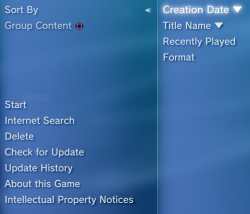
 
Here is how I have my system set up now when it comes to sorting games. I have options for sort by time (Newest to oldest) and sort by name (A to Z).

upload_2021-3-18_4-22-34.png

Works well, also the string "Title Name" is already there in the rco with official translations to 20 languages.
 
That looks nice! :encouragement:I like how it's dual function too!

I'm tempted to copy you, but I don't know about redoing all that work again with all my other projects going on.:cower:
 
This dual function sorting will be an option in the next version of Ultimate Toolbox. It wont be too long now and it will be out, a few days to a week maybe.
 
Here is how I have my system set up now when it comes to sorting games. I have options for sort by time (Newest to oldest) and sort by name (A to Z).

View attachment 32169

Works well, also the string "Title Name" is already there in the rco with official translations to 20 languages.

Yes, I have the same mod, except that I removed the triangles and "Title Name" is the first option (I find it looks better and organized).

I don't recall if you're using +Game:Common.title or +Game:Common.titleForSort, but the second is recommended due the sort is case insensitive.

BTW The triangle in "Title Name" of your picture is inverted.

NOTE: The explore_category_game.rco included the rar has the tex_loading_icon replaced with a white circle to reduce the annoying effect in XMB File Explorer and app_home/PS3_GAME icon is replaced with ★ PlayStation®3
 

Attachments

I don't recall if you're using +Game:Common.title or +Game:Common.titleForSort, but the second is recommended due the sort is case insensitive.
OK, cool, I will check it and add the better one. Thanks.
TW The triangle in "Title Name" of your picture is inverted.
You mean I should have it the other way, pointing up? Ok.

The difference between ascending and descending is a little confusing for me. It depends how you think about it really. In one way we are going UP from A to Z, but they display downwards from A to Z so a down arrow made more sense to me. :)

I might just remove the triangles altogether.

NOTE: The explore_category_game.rco included the rar has the tex_loading_icon replaced with a white circle to reduce the annoying effect in XMB File Explorer and app_home/PS3_GAME icon is replaced with ★ PlayStation®3
That's cool. I have the same thing added in my rco. I just used "PlayStation®" though without the 3. I might add the "3" back.
 
the arrow is an easy mistake to make. iirc, sony screwed up either the rco or the xml, so they're in reverse of what they should be. it's never been corrected.
 
Well either way can be correct really, depending how you think about it, do you go upwards from A to Z like you would normally expect, or do you go downwards from A to Z because that is how XMB displays them
 
You mean I should have it the other way, pointing up? Ok.

The difference between ascending and descending is a little confusing for me. It depends how you think about it really. In one way we are going UP from A to Z, but they display downwards from A to Z so a down arrow made more sense to me. :)

I might just remove the triangles altogether.


That's cool. I have the same thing added in my rco. I just used "PlayStation®" though without the 3. I might add the "3" back.

I suggest to remove the triangles... there is no need to specify the order when we only have 1 option.

Yes the triangles are a bit confusing. If you check Win10, /\ means ascending order (A-Z or 0-9) but in dates it mean new to old :confused:

The app_home/PS3_GAME is for PS3 applications. I guess Sony decided to leave the text "PS3_GAME" in the icon make it clear.
 
I suggest to remove the triangles... there is no need to specify the order when we only have 1 option.

Yes the triangles are a bit confusing. If you check Win10, /\ means ascending order (A-Z or 0-9) but in dates it mean new to old :confused:

The app_home/PS3_GAME is for PS3 applications. I guess Sony decided to leave the text "PS3_GAME" in the icon make it clear.

that is where the confusion lies. I always treat the arrows as the direction the games go alphabetically.
 
In my oppinion the arrows aiming down represents a bit better the sorting, and i agree that technically are a bit pointless because when we read [Sort by]->[Title name] everybody is going to assume the A is going to be at top and Z at bottom (btw nice official string recycling skills), and the other for [Sort by]->[Creation Date], well... is better to have oldest at top, and most modern at bottom, like when you order the contents of a folder in windows "by modification time", and then you start creating files, new ones goes at bottom
 
In my oppinion the arrows aiming down represents a bit better the sorting, and i agree that technically are a bit pointless because when we read [Sort by]->[Title name] everybody is going to assume the A is going to be at top and Z at bottom (btw nice official string recycling skills), and the other for [Sort by]->[Creation Date], well... is better to have oldest at top, and most modern at bottom, like when you order the contents of a folder in windows "by modification time", and then you start creating files, new ones goes at bottom

The reason why Creation Date is sorted in descending order (newer to older) is because the "home" icons (Disc icon, Package Manager, webMAN Games, etc. are found at the top of the Game column). It is more probable that the user try to access a recently installed game, thus it's placed near "home".

If it's sorted in ascending order, the user would have to be scrolling down to access the content recently installed. That can be a problem if the user have tens or hundreds of games installed.
 
unfortunately, both the vita and the ps4 don't have automatic alphabetically sort, that I know of. you have to sort manually, so at least you can do that and sort it any way you want. I like how the switch has alphabetic sort, because I have 143 games for that system. unfortunately, it doesn't have folders, and it messes up some of the games like not adding a space after the first game in a series to keep them in numeric order. don't know if you remember, but @aldostools taught me how to sort roman numerals by using spaces, so I've kept them like that:

upload_2021-3-19_11-4-57.png


some games on the ps3 though are problematic, like Jak and Daxter, because it goes Jak and Daxter 2, then Jak and Daxter III. I changed the param.sfo after alphabetizing for several games. the only troublesome ones were the final fantasy XIII ones, because the default language isn't what was on my screen when I first installed them. it was English, just not default, so I did this (made alphabetical packages for all of my games with just the param.sfo. I had to change Jak and Daxter III to Jak and Daxter 3, I believe, and create a space for part 1:
upload_2021-3-19_11-8-20.png
 
Yes, I have the same mod, except that I removed the triangles and "Title Name" is the first option (I find it looks better and organized).

I don't recall if you're using +Game:Common.title or +Game:Common.titleForSort, but the second is recommended due the sort is case insensitive.

BTW The triangle in "Title Name" of your picture is inverted.

NOTE: The explore_category_game.rco included the rar has the tex_loading_icon replaced with a white circle to reduce the annoying effect in XMB File Explorer and app_home/PS3_GAME icon is replaced with ★ PlayStation®3


Thank you for this, I installed the Ultimate Toolbox from Devil303 but I didn't find the option for this
I had to manually edit the explore_plugin_full.rco as well for this changes to show up

Thank you.
 
Back
Top