PS3 How to Remarry BlueRay Drive on CFW PS3 Step by Step

Both methods does not work for me too.got a CECHC04 with a completle new drive. I bought it withou the OG drive. Installed everything like mentioned in the tutorial, but still going to fail. I put in Discs, no one showes up on XMB. Second method won'T dump any Key at all. console freezes or just throw me back to xmb. Im on that unofficial 4.85 firmware from this TUT.

Do i have to go to a normal CFW to see if it worked or should I see my disc on XMB also on the unofficial NoBD cfw?
 
Try normal CFW, the noBD CFW will not work with discs afaik.

DO NOT UPDATE WHILE IN FSM.
Okay. I will try 4.84 REX Cobra 8.1 as it is always my go to. IF this won't work should I try a non cobra normal CEX cfw instead? or should it also works with cobra rex firmwarres? Some guy on youtube mentioned it could make problems with cobra.
 
Both methods does not work for me too.got a CECHC04 with a completle new drive. I bought it withou the OG drive. Installed everything like mentioned in the tutorial, but still going to fail. I put in Discs, no one showes up on XMB. Second method won'T dump any Key at all. console freezes or just throw me back to xmb. Im on that unofficial 4.85 firmware from this TUT.

Do i have to go to a normal CFW to see if it worked or should I see my disc on XMB also on the unofficial NoBD cfw?
After you complete remarry operation,Try to install normal CFW if you didn't face error 8002F14E meaning BD Drive is successfully married ,after update finish put disc and watch the clock in Top Right XMB it should spin then Blue Disk Icon show in XMB if BD Drive Lens is fine
 
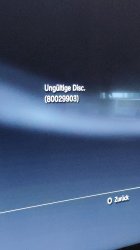
Got a new problem xD now game disc (FIFA 13 EUROPEAN Version) works fine. But when I put in a bluray movie (frozen 2) it shows me an error message something like "invalid disc" or in my language "ungĂĽltige disc". Do i have to reaktivate bd movie playback in some kind?
 
Got a new problem xD now game disc (FIFA 13 EUROPEAN Version) works fine. But when I put in a bluray movie (frozen 2) it shows me an error message something like "invalid disc" or in my language "ungĂĽltige disc". Do i have to reaktivate bd movie playback in some kind?
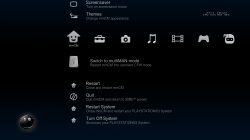
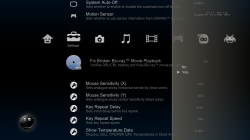
  1. Insert BD Movie disc
  2. Launch multiMan/mmCm
  3. Go to most left column
  4. Scroll down and Press X on Swith to multiMan mode
  5. Multiman will restart go to settings column scroll down and Press X on Fix Broken Blu-ray Movie Playback
  6. Press Yes and wait
 

Attachments

  • Screenshot.png
    Screenshot.png
    294.2 KB · Views: 106
  • Screenshot_1.png
    Screenshot_1.png
    414.3 KB · Views: 105
Oh sorry didn'T see that was on this forum on my phome for a moment.

I made this and it says there is nothing wrong with my drive. put in same movie, same error.
 

Attachments

  • IMG_20210121_163025_1.jpg
    IMG_20210121_163025_1.jpg
    621 KB · Views: 77
Last edited:
Oh sorry didn'T see that was on this forum on my phome for a moment.

I made this and it says there is nothing wrong with my drive. put in same movie, same error.
I fixed that problem by installing normal rebug firmware then I remarried the drive again then the problem was gone hope this help you:sfun oldguy:
 
I will try this one out I will reinstall the nobd remarry firmware install a 4.86 or 7 cfw and look if this will work out. Thx for your help :))
 
I fixed that problem by installing normal rebug firmware then I remarried the drive again then the problem was gone hope this help you:sfun oldguy:
This one worked for me!

I installed at first the tutorial 4.85 nobd firmware so thst im able to use rebug toolbox to successfully dump my eid root key, worked great. Do the remarry process like mentioned in tutorial, it will fail (half way some kind) games work, lainching apps work, only bluray doesn't.

NOW: install 4.84.2 rebug rex do the remarry in this firmware again (just the same like on 4.85 nobd light) now it will show success. Now games work, apps work and bdmovies work just fine!

Awesome!

I guess it is some problem of downgrading cause you do the remarry on 4.85 than go back to 4.84. go newer firmware or redoo the remarry on the lower firmware you want again.
 
This one worked for me!

I installed at first the tutorial 4.85 nobd firmware so thst im able to use rebug toolbox to successfully dump my eid root key, worked great. Do the remarry process like mentioned in tutorial, it will fail (half way some kind) games work, lainching apps work, only bluray doesn't.

NOW: install 4.84.2 rebug rex do the remarry in this firmware again (just the same like on 4.85 nobd light) now it will show success. Now games work, apps work and bdmovies work just fine!

Awesome!

I guess it is some problem of downgrading cause you do the remarry on 4.85 than go back to 4.84. go newer firmware or redoo the remarry on the lower firmware you want again.
Glad to hear you solve it :)
 
I can't seem to get to the "custom firmware tools". I start EID Root Key Dumper and screen goes black, but never recovers. I have to turn the system off. I need help bad.. Trying to remarry this drive. Been at it for days.
 
I can't seem to get to the "custom firmware tools". I start EID Root Key Dumper and screen goes black, but never recovers. I have to turn the system off. I need help bad.. Trying to remarry this drive. Been at it for days.
Try rebug tool box?
 
Downgrade firmware to Louy's no bd rebug firmware, dump root key with rebug tool box .:very drunk:
Thank you.. I'm actually going to try this today when I get home from work. I think that's what my issue is. I don't have the correct CFW installed. I'm also at 4.87 NoBD.

Question: If using the new exploit process is there anything needed to downgrade or would the 4.85 CEX (LOUY) directly install over 4.87? Completely new at this so sorry if this is a ridiculous question.
 
Back
Top