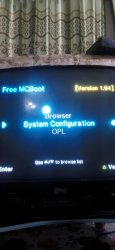
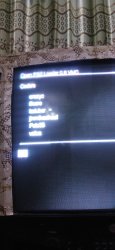
I can't upgrade opl because i don't have anything in the mcboot but the opl

Da3bola

Forum Noob
Hi guys couple of weeks ago my mother bought an old ps2 it's SCPH-70000 I don't think it can run CD/DVD in it slim that came with the OPL on save memory (I think it's not an original one) I started downloading games to the USB but it was only 16GB so I used an old HHD as eternal hard drive connected in the USB place but the games cutscenes lagging too much so I figured I need to upgrade OPL but on the FMCB I have (Browser, System Confi and OPL) so I need to know how I can upgrade it it's OPL 0.8 VMC right now. Photos attached.
IMG_20240202_021514.jpg IMG_20240202_021622.jpg IMG_20240202_023059.jpg
 
Cutscenes lags because the PS2's USB is slow. It's difficult to understand and accept this, but you have to. This is objective reality.
You can read about everything else in other sections of the PS2 forums.
For example, in the Tutorials section, in the Free MCBoot section, in the Open PS2 Loader section.
Spend some of your invaluable time studying the material and theoretical parts, otherwise you will remain a dumb wannabe pirate.

Your memory card contains more than just OPL. Otherwise you wouldn't see what you see on your screens.
OPL does not perform the "jailbreak" itself. This is done by something else called Free MC Boot or FMCB for short.
This Free MC Boot, for example, has such a mechanism as 'Recovery Mode'. Remember these 2 words, you will need them when you finish reading theory.
If you suspect that your memory card is fake, then it is better to make sure of it. It's important to know this for sure. Otherwise, many problems that will be fatal to your venture are likely to arise.

And @moderators.
Get this crap out of the News Stand.
The fact that people are dumb and lazy is, unfortunately, no longer news.
But the fact that they, being such, are also allowed to place their random crap on the News Stand, is already your fault.
 
Last edited:
Cutscenes lags because the PS2's USB is slow. It's difficult to understand and accept this, but you have to. This is objective reality.
You can read about everything else in other sections of the PS2 forums.
For example, in the Tutorials section, in the Free MCBoot section, in the Open PS2 Loader section.
Spend some of your invaluable time studying the material and theoretical parts, otherwise you will remain a dumb wannabe pirate.

Your memory card contains more than just OPL. Otherwise you wouldn't see what you see on your screens.
OPL does not perform the "jailbreak" itself. This is done by something else called Free MC Boot or FMCB for short.
This Free MC Boot, for example, has such a mechanism as 'Recovery Mode'. Remember these 2 words, you will need them when you finish reading theory.
If you suspect that your memory card is fake, then it is better to make sure of it. It's important to know this for sure. Otherwise, many problems that will be fatal to your venture are likely to arise.
I spend the last 2 days searching but I didn't know what to search that's why I always say I think, and I know about the free mcboot otherwise I wouldn't be able to take the second picture because it's stuck on booting the opl
 
I send it without the completing
I spend the last 2 days searching but I didn't know what to search that's why I always say I think, and I know about the FMCB otherwise I wouldn't be able to take the second picture because it always boots with OPL and btw am not a ps2 pirate expert last time i used one was years ago and it didn't lag in cutscenes and was able to play every single game now it's just give me fragment error tried every method but no use and I have 3 memory saves but none is legit they all and the FMCB on one of them with a lot of corrected data
 
OK, the main thing you need (and what you're missing) is file manager and executable launcher. It's called wLaunchELF or wLE in short.
Since you have no idea what you need and why, you simply download the simplest basic 'BOOT.ELF' from there.

But since you don't have it in the menu, even if it is on your card, you won't be able to call it.
So you need to run it some other way. Here you can use what is called FMCB 'Recovery Mode'.
You rename 'BOOT.ELF' into 'RESCUE.ELF' and copy it into root of your FAT32 formatted USB flash drive.
Just like here.
As soon as wLE launches, you can consider that half the work is already done.

Note, it would be a good idea to reinstall FMCB in a normal, human way at this step. But since you don't even know whether your memory card is fake or not, in the case of a fake card you can simply achieve that FMCB will not longer be able to load from this your fake card. Fiasco.
So you don't do it.

Instead, you study the directory structure on your memory card and their contents, looking for where your wLE and OPL are located on your memory card. And update them. If they are not there, then you place them to where they should be. You can get the latest stable OPL v1.2.0 Beta 2049 here.

Next, in order to be able to call wLE from the FMCB menu itself (i.e. w/o 'recovery' trick), you may want to edit the FMCB configuration file to add/edit menu items. With help of special FMCB Configurator.
Just like here. Very carefully and attentively. Reading what you're doing. So to don't screw up.

Fin.

As for the rest of your nonsense, I doubt that anyone anywhere can help you with it in any way.

 
FMCB automatically launch on start "mass:/RESCUE.ELF". So put on USB (FAT32 on MBR) uLE named that way and it will boot right after FMCB without Your attention.

Copy "mc0:/SYS-CONF/FREEMCB.CNF" to USB and edit on PC in eg. Windows notepad.
 
OK, the main thing you need (and what you're missing) is file manager and executable launcher. It's called wLaunchELF or wLE in short.
Since you have no idea what you need and why, you simply download the simplest basic 'BOOT.ELF' from there.

But since you don't have it in the menu, even if it is on your card, you won't be able to call it.
So you need to run it some other way. Here you can use what is called FMCB 'Recovery Mode'.
You rename 'BOOT.ELF' into 'RESCUE.ELF' and copy it into root of your FAT32 formatted USB flash drive.
Just like here.
As soon as wLE launches, you can consider that half the work is already done.

Note, it would be a good idea to reinstall FMCB in a normal, human way at this step. But since you don't even know whether your memory card is fake or not, in the case of a fake card you can simply achieve that FMCB will not longer be able to load from this your fake card. Fiasco.
So you don't do it.

Instead, you study the directory structure on your memory card and their contents, looking for where your wLE and OPL are located on your memory card. And update them. If they are not there, then you place them to where they should be. You can get the latest stable OPL v1.2.0 Beta 2049 here.

Next, in order to be able to call wLE from the FMCB menu itself (i.e. w/o 'recovery' trick), you may want to edit the FMCB configuration file to add/edit menu items. With help of special FMCB Configurator.
Just like here. Very carefully and attentively. Reading what you're doing. So to don't screw up.

Fin.

As for the rest of your nonsense, I doubt that anyone anywhere can help you with it in any way.
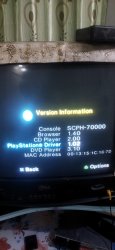
I got a start point from your first comment and search it till I fix it and updated the OPL it wasn't rocket science but I was dumb as hell. the memory cards are fake I have 3 and they all fake but somehow the FMCB still working on them. don't know how to thank you 2 days of searching and nothing. BTW am not good at english it's not my main language thank you man.
 

Similar threads

Back
Top