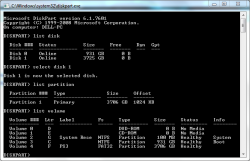
I tried two different hard drives on my CFW fat PS3; can't read NTFS no matter what I do.

If this is on kernel level issue, ALL file systems (FAT32, exFAT, NTFS and all which aren't supported today ;p) in ALL applications will be affected. If this is true, it is "broken by design" by Sony and none of the hackers solved it yet.

Potential workarounds:
  • HPA or DCO limitation of drive if this problem is related to drive capacity (sectors outside HPA/DCO will not be visible by all platforms respecting HPA/DCO).
  • First partition limitation to less than 2TiB if this problem related to partition size (other partitions will not be accessible by PS3).
 
Last edited:
Thanks. Even if I use FAT32 the limit is still 2TB? There ARE ways to format a fat32 drive to 4tb and higher.
The PS3 only supports MBR natively & iirc the maximum size for a MBR disk is 2.2TB because MBR uses 32bit integers to store disk offsets, disk total capacity etc..

You can always test, you don't have anything to lose but you can use all the tricks in the world, if the kernel caps the reading/writing of storage devices to a specific sector count due to 32bit variables limitation, that cap will most likely affect all & every partition/disk no matter the file system or the partitioning type.
Certain functionalities fail, it's like Zar said, when the disk is > 2Tb, the disk size query via syscall returns 0 because the overall sector count is over the limit the storage type can handle, other functions may work partially, for instance you may be able to read/write to a 5Tb disk but only on the first 2Tb, any attempt to read/write on higher sectors would fail.

The only way to get over such a limitation afaik would be to patch the kernel however whether or not this limitation is easily patchable remains to be seen! I doubt it.

If a 2Tb limitation had been introduced independently from the implementation because it made sense for Sony devs to do that at the time, in other words, a somewhat "at random" limitation whereas the implementation itself would in theory support say 4Tb or more, then it might have been easy to remove however, if I am not mistaken, this limitation is the consequence of the choice of variable types used within the implementation (ie 32bit integers vs 64bit integers), this is another story altogether, much more complex to meddle with generally speaking (or even impossible in cases where needed changes cascade into a wide range of other needed changes then some more etc..), bringing 64bit support may impact an awful lot of code, possibly even right down to lv1, I dunno & there might be additional technical difficulties along the way too.
At this stage, there is still a lot of speculation, someone would need to reverse engineer the system storage syscalls to get a better understanding but I am afraid this is a problem that might be quite hard to crack.
 
Last edited:
@Zar

I was thinking that rather than investigate the kernel syscalls, it might be more interesting to test storage device access through ioctl at lv1 level directly.
If at that level, we can access storage devices using 64bit values then there is hope, we may consider adding an ioctl/scsi/ata wrapper in Cobra & hook sys_storage_read/sys_storage_write & get_disk_size & whatever other syscall we need.
And if ever we can't ioctl devices with 64bit values, whatever you may find in kernel reversing won't help much unless you also proceed to RE & patch lv1 because I assume that sys_storage syscalls leverage ioctl at lv1 level, someone correct me if I am wrong.
 
The other day i was reading a post in the forum saying 4tb was working for him too, the post even contained some detailed instructions, but i dont remember it good enought to find it again, sorry :/

One thing that called my attention is it was using a cluster size of 64KB
As far i understood... by using a huge cluster size we are reducing the amount of "entries" that stores the info of the clusters

Not sure if the 64kb clusters was the real reason why it was working for him
 
Last edited:
Well then, if those reports are true, it would mean there is hope.
Maybe the sys_fs syscalls aren't limited & only the sys_storage syscalls are.
sys_fs is used for fat32, sys_storage is used for ntfs & exfat/GPT so it would explain why they only had luck with fat32.
It would also mean that at lv1 level, ioctl/read/write calls can access bigger disks only as long as the total amount of clusters remain under a certain threshold, but maybe that particular limitation is a sys_fs limitation at kernel level.
In this case, the Cobra wrapper & hooks I mentioned earlier could bring ntfs/ext + exfat with GPT support for much bigger disks than 2Tb.
 
Last edited:
Thanks. Even if I use FAT32 the limit is still 2TB? There ARE ways to format a fat32 drive to 4tb and higher.

If not, can I have two USB hard drives plugged in? One 2TB for PS3 games and one 2TB drive for PS1 games?
By standard, MBR is limited to 2Tb & FAT32 is also limited. Consequently, most partitioning tools won't let you use values outside those 2 standards respective specs.
But seemingly some will, for instance:
1. WD Quick Formatter 2.x with XP Compatibility mode should let you create a MBR partition in NTFS to fill your 5Tb disk.
2. EaseUS Partition Master 10 should let you convert the 5Tb NTFS partition to FAT32 using a 16kb or 32kb cluster size (you may even need 64kb, not sure).

In the end, you should get a 5Tb FAT32 MBR partition, well outside standard specs but seemingly usable on the PS3.

You can also check the thread by atreyu187 mentioned by DeViL303 above. He mentions similar steps to follow.

You will probably get better options in the future but for now at least, you have this..
If it works out for you, you will need to adapt to the situation & split your iso files so you can store them on fat32.
It's a small price to pay, backup managers support split isos so it shouldn't be a problem.
 
Last edited:
The other day i was reading a post in the forum saying 4tb was working for him too, the post even contained some detailed instructions, but i dont remember it good enought to find it again, sorry :/

One thing that called my attention is it was using a cluster size of 64KB
As far i understood... by using a huge cluster size we are reducing the amount of "entries" that stores the info of the clusters

Not sure if the 64kb clusters was the real reason why it was working for him

Do you remember if the poster was using fat32? Exfat? NTFS? GPT? MBR?
 
Also is there any way to do split ISOs for PS2 ISOs on the PS3? (Yes I am aware I cannot run PS2 ISOs from the external drive, I just meant if I had no issue with WebManMod copying the game to the internal every time I want to play one).
 
Do you remember if the poster was using fat32? Exfat? NTFS? GPT? MBR?
I use a 4TB MBR External formatted as FAT32 to play everything and I mean all of it. PS1, PS2, PS3, PBP and many old-school roms

https://www.psx-place.com/threads/f...my-huge-ps2-iso-collection.33110/#post-283680

^Maybe it was this thread (as well as others you have made) that you were getting mixed results about FAT32 vs. NTFS

64kb clusters is the largest cluster size that Wii Backup Manager allows when formatting a drive to FAT32

At least, in the case of a WD MyBook with Product# WDBFJK0040HBK-04, FAT32 works without shrinking the drive, yes.

NOTE: I can't recall if I did 32kb or 64kb for FAT32 all those years ago, but I believe it was the default (32kb)

Also if you formatted FAT32 over NTFS without wiping GPT structure & re-partitioning as MBR, that could be the issue too.

I don't think WBM can remove GPT itself, but Wii Backup Manager is good for formatting drives that refuse to become FAT32.
 

Attachments

  • image_2021-03-12_232831.png
    image_2021-03-12_232831.png
    36.1 KB · Views: 43
Last edited:
I use a 4TB MBR External formatted as FAT32 to play everything and I mean all of it. PS1, PS2, PS3, PBP and many old-school roms

https://www.psx-place.com/threads/f...my-huge-ps2-iso-collection.33110/#post-283680

^Maybe it was this thread (as well as others you have made) that you were getting mixed results about FAT32 vs. NTFS

@pinky 64kb clusters is the largest cluster size that Wii Backup Manager allows when formatting a drive to FAT32

At least, in the case of a WD MyBook with Product# WDBFJK0040HBK-04, FAT32 works without shrinking the drive, yes.

NOTE: I can't recall if I did 32kb or 64kb for FAT32 all those years ago, but I believe it was the default (32kb)

Also if you formatted FAT32 over NTFS without wiping GPT structure & re-partitioning as MBR, that could be the issue too.

I don't think WBM can remove GPT itself, but Wii Backup Manager is good for formatting drives that refuse to become FAT32.

What do you do for PS2 games over 4gb in size?
 
What do you do for PS2 games over 4gb in size?

Filezilla should be able to FTP the game from your PC to PS3 without splitting the ISO into pieces... and if the game is 4GB+ & still gives issues, then try 2 different USB's for the copy-over, one as NTFS and one as FAT32. I do not think / remember if there are any issues when copying a PS2ISO to a USB depending on what format it is.

Special case: If the PS2ISO has LaunchELF or Codebreaker inside then it cannot be FTP'd, instead should be copied over a FAT32 USB.

Also keep in mind that PS3 (and PS2) is designed to read all games natively through the FAT32 filesys... and If you are on DEX (like me) then you CANNOT use the PS2 Classics Placeholder to play your PS2ISOs. Also, if your PS3 is NOT a BC MODEL then PS2ISOs will NEVER be playable from external location and will always have to be copied to PS3~dev_hdd0~PS2ISO before playing

Honestly, that's about all there is to tell you on how it should be set up and PS2ISO's should work.

So, if all else fails, then try this:

1. Run cmd as administrator and type "diskpart" to open it
2. Type "list disk" and then "select disk #" for the drive you are about to format
3. Now, when your PS3's external is selected, type "clean" to wipe it 100%
4. Once disk is completely wiped, type "create partition primary"
5. Afterwards, type "list partition" to see this newly made partition
6. Make sure is partition belonging to the test external and then "select partition #"
7. When partition is selected, type "format fs=fat32 quick"

Do quick format or it will take HOURS... and remember that drive should be MBR when doing this. There's a diskpart command for that too but currently can't recall. After those 7 steps (to remove any possible blocks) format the external using Wii Backup Manager one more time.

Now, again, I can't remember if cluster size for FAT32 was 32kb or 64kb but I wanna say try 32kb first, or at least if 64kb fails.

 
Last edited:
I didn't know it was possible to get a FAT32 over 2TiB (my tool haven't this feature). So, as you said it probably possible through lv1, and it's already done : https://github.com/marcan/asbestos/blob/master/stage2/diskio.c
We just need to include this to ntfs or exFAT lib to test it ;)
Well I didn't know marcan had already taken care of this years ago but it does not really surprise me tbh.
The disk_ioctl implementation is exactly what I meant in my previous posts. And it is good to see that lv1_storage_read can do the reading job without needing patches, it makes it all easier.
All this could be implemented in each fs library or directly in Cobra. I think I would favour the latter. marcan only took care of read operations seemingly, adding the write function should not be a problem, it would mostly be a clone of the read function with a couple of tweaks.

And btw I think we might be able to introduce TRIM for ssds in a similar way using an ioctl call at lv1 level.
 
Last edited:
After a second look at the github he used FatFs too ! The exact same lib we used to support exFAT so it will muuuuch more easier to test it ;)
https://github.com/Zarh/ManaGunZ/blob/master/MGZ/lib/fatfs/source/diskio.c
https://github.com/marcan/asbestos/blob/master/stage2/diskio.c

The exact same function, lol... I saw these 2 file hundred of time I just noticied it come from the same lib :p
Even better...
Wishing you luck for testing.. May it work on your first try.. ;-)
 
Also, I can confirm it as true that bypassing FAT32 limitation only works on certain WD drives as far as I have seen

Because the WD MyBook #WDBFJK0040HBK-04 allows me to bypass limitation and use all 4TB of the drive as MBR/FAT32.

But I have a WD MyBook #WDBBGB0060HBK-NA that shrinks from 6TB to 2.2TB if formatted as MBR/FAT32.

EDIT: On that gbatemp post, is theorized that only drives which can natively create 4096kb clusters are the ones that can be used to bypass the OG FAT32 limitation if properly trick-formatted... and yes I've heard of 6TB, 8TB and even 16TB as the highest possible amount that you can fool into working as FAT32, but the most I have ever seen as FAT32 was 6TB or maybe 8TB in a video somewhere.
 
Last edited:
Im late to the reply, but it was this post written by @SKEPTiCK
Is not a complete description of what he did, but while i was reading it i figured the 64kb cluster size was doing the magic :)
https://www.psx-place.com/threads/f...my-huge-ps2-iso-collection.33110/#post-283686

@sandungas it was either the largest cluster size "64kb" or the default cluster size "32kb"

I cannot remember too well because I formatted my PS3's external about 4 years ago and never had to re-format

I seem to recall having a GPT issue all those years ago but total disk wipe, repartition and quick format as FAT32 fixed it.

After that, I just let Wii Backup Manager do it's magical format :highly amused: I know, is intended for Wii's, but worked well in my scenario.

I'm not sure if it's something to do with the "wbfs" writing itself into the MBR/FAT32 structure, without truly converting to WBFS
 
Last edited:
Back
Top