What do you do for PS2 games over 4gb in size?
Filezilla should be able to FTP the game from your PC to PS3 without splitting the ISO into pieces... and if the game is 4GB+ & still gives issues, then try 2 different USB's for the copy-over, one as NTFS and one as FAT32. I do not think / remember if there are any issues when copying a PS2ISO to a USB depending on what format it is.
Special case: If the PS2ISO has LaunchELF or Codebreaker inside then it cannot be FTP'd, instead should be copied over a FAT32 USB.
Also keep in mind that PS3 (and PS2) is designed to read all games natively through the FAT32 filesys... and If you are on DEX (like me) then you CANNOT use the PS2 Classics Placeholder to play your PS2ISOs. Also, if your PS3 is NOT a BC MODEL then PS2ISOs will NEVER be playable from external location and will always have to be copied to PS3~dev_hdd0~PS2ISO before playing
Honestly, that's about all there is to tell you on how it should be set up and PS2ISO's should work.
So, if all else fails, then try this:
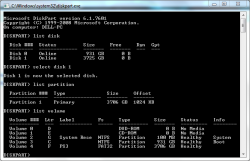
1. Run cmd as administrator and type "diskpart" to open it
2. Type "list disk" and then "select disk #" for the drive you are about to format
3. Now, when your PS3's external is selected, type "clean" to wipe it 100%
4. Once disk is completely wiped, type "create partition primary"
5. Afterwards, type "list partition" to see this newly made partition
6. Make sure is partition belonging to the test external and then "select partition #"
7. When partition is selected, type "format fs=fat32 quick"
Do quick format or it will take HOURS... and remember that drive should be MBR when doing this. There's a diskpart command for that too but currently can't recall. After those 7 steps (to remove any possible blocks) format the external using Wii Backup Manager one more time.
Now, again, I can't remember if cluster size for FAT32 was 32kb or 64kb but
I wanna say try 32kb first, or at least if 64kb fails.




 I know, is intended for Wii's, but worked well in my scenario.