imagefont.bin tool for PS3 and Vita

So. If You need some gfx to me to edit, I need precise information which, what kind of modification it should have, and be in format which doesn't require extra tools to extracting.
It would be cool if you could make some more that match these:
tex_ac_wma.png tex_ac_mp3.png tex_vc_divx.png tex_vc_mpeg4avc.png tex_vc_motionjpeg.png

Using this base from ofw:
tex_vc_none.png

It would be nice if we had ones for CFW file types and terms, for example:

ISO, BIN, CUE, IMG, PKG, P3T, FTP, NTFS, FAT32, USB000, USB001, HDD, SNES, NES etc etc.

Just suggestions..
 
Last edited:
I removed my bins, We should start fresh with better organizing/grouping. TBH I don't mind just offering suggestions for icons to include, and I am happy to let others decide what to include and where. Sorry if it seemed like I was taking over.
 
@aldostools I just getting "PSX-Place - Error" when I clicking on attachment in this area of forum, so I assumed it will not work also for You.
Here is also link to MF: https://www.mediafire.com/file/xfy49dbxfnkgx3l/tmp.7z/file

- - -

That's the closest effect I could achieve. It is not 100% the same but quite similar to original. I have added also project file so You could easily make Your own bitmaps but it will works ok only in Photoshop as font transitions in PSD are not supported properly i.e on Gimp.

Most of those images are useless probably. ;p
 
Last edited:
I removed my bins, We should start fresh with better organizing/grouping. TBH I don't mind just offering suggestions for icons to include, and I am happy to let others decide what to include and where. Sorry if it seemed like I was taking over.
If you said it because my comments, please dont take it so literally, what you was doing was fine :)
Personally my oppinion about this is a bit divided, i think is needed to keep some order to try to prepare it well trying to make it the most generic posible
But i also think is needed someone to make experiments with some passion and you was doing that well

Also, right now the most important projects we should keep in mind are... webman and other projects related with XMB modding
So in other words... aldo and you are the ones that have a better overview of what "we" (the scene) needs

We need to make an effort to try to imagine which other projects could benefit from this custom imagefont.bin's... but personally i cant imagine which others

--------
Btw aldo, i mentioned something days ago (not sure where), is a bit pointless to repeat it because most some of you probably thought in it already

The goal is to allow webman to display icons selectivelly (based in the presence of them inside imagefont.bin)

The first thing needed to do is to read imagefont.bin contents starting from the header
In the header there is an offset that indicates where starts the index (located at bottom of imagefont.bin)
That "jump" from header to the index is very straightforward, and the info in the index is easy (in it you can see the ID of all the icons)
After that you need to store the IDs of the index in a array (or something like that)

Then, in the functions that displays icons basically is needed to do an "if-else"
if custom icon exists in the index array = display it (and the user will have the new look with custom icons)
else = dont display it (and the user will have the old look with official icons only)

 
I think we should try to encourage CFW creators to include the new imagefont.bin when its "finished" so that we can always assume the new icons are available going forward in 4.85 CFW.

Then on top of that, for specific apps that use the new icons like HEN Toolbox or webMAN mod, XMBPD. I think it would be easiest if those apps just installed the latest imagefont.bin with their pkg. This negates the need for any checks or worries about missing icons and its only a few hundred kb to 1MB and "simple", coding checks and multiple ways to write xmls seems like overkill when there is no downside to updating this bin.

Maybe aldo will not want to increase the wmm pkg size by 1MB approx, but for XMB mods like HEN Toolbox or XMBPD it makes very little difference if it installs the imagefont.bin by default as they are 50MB+ already. If there was going to be a constant stream of new versions of the imagefont.bin then it could be an issue, as it will be getting downgraded then by other apps, But I kind of dont expect that really? I think if we can add a decent selection of icons now before a "release" then I doubt it will see many significant changes after that, maybe just upgrades to existing icons which wont break anything either way.

Worst case the user just sees an underscore where the custom icon should be, no real harm done and easy to diagnose/fix.
 
I mentioned it because from a running program is easy to know the presence of custom IDs. Is like a safety check to prevent the underscores and i think is failproof

Not sure how easy or hard could be to convince all CFW devs to use the same imagefont.bin
But convincing people to use the same custom IDs should not be much hard i hope... is the kind of thing that is not needed to modify incase is well made

Is needed to keep some IDs availables btw, incase appears someone that needs to add icons for a new good project
 
Just realized about something interesting, not sure how much related is it with imagefont.bin
Inside system_plugin.rco there are 6 text messages for circle and cross buttons:
Code:
	<Text name="msg_circle"></Text>
	<Text name="msg_cross"></Text>
	<Text name="msg_circle_gaiji"></Text>
	<Text name="msg_cross_gaiji"></Text>
	<Text name="msg_circle_nagaoshi_gaiji"></Text>
	<Text name="msg_cross_nagaoshi_gaiji"></Text>

As you can see are actually 2 (circle and cross)... but with 3 variations each:
-normal
-gaiji
-nagaoshi + gaiji

nagaoshi means... long press (of button, esp. mobile phones)
gaiji means... characters that Unicode doesn't support

https://jlearn.net/Dictionary/Browse/2195220-nagaoshi-ながおし-長押し
http://inamidst.com/whits/2008/gaiji
 
Searching for the work "gaiji" in all rco's of 4.84.... and is used 23 times in 11 files:

Code:
webrender_plugin.rco\Text\English.xml (2 hits)
	Line 49: 	<Text name="msg_l2_gaiji"></Text>
	Line 50: 	<Text name="msg_r2_gaiji"></Text>
	
webbrowser_plugin.rco\Text\English.xml (2 hits)
	Line 49: 	<Text name="msg_l2_gaiji"></Text>
	Line 50: 	<Text name="msg_r2_gaiji"></Text>
	
videoplayer_util.rco\Text\English.xml (3 hits)
	Line 60: 	<Text name="msg_square_gaiji"></Text>
	Line 61: 	<Text name="msg_left_gaiji"></Text>
	Line 62: 	<Text name="msg_right_gaiji"></Text>
	
videoplayer_plugin.rco\Text\English.xml (3 hits)
	Line 60: 	<Text name="msg_square_gaiji"></Text>
	Line 61: 	<Text name="msg_left_gaiji"></Text>
	Line 62: 	<Text name="msg_right_gaiji"></Text>
	
videoeditor_plugin.rco\Text\English.xml (1 hit)
	Line 32: 	<Text name="msg_select_gaiji"></Text>
	
system_plugin.rco\Text\English.xml (4 hits)
	Line 22: 	<Text name="msg_circle_gaiji"></Text>
	Line 23: 	<Text name="msg_cross_gaiji"></Text>
	Line 24: 	<Text name="msg_circle_nagaoshi_gaiji"></Text>
	Line 25: 	<Text name="msg_cross_nagaoshi_gaiji"></Text>
	
photoupload_plugin.rco\Text\English.xml (1 hit)
	Line 16: 	<Text name="msg_select_gaiji"></Text>
	
newstore_plugin.rco\Text\English.xml (1 hit)
	Line 43: 	<Text name="msg_psplus_gaiji"></Text>
	
hknw_plugin.rco\Text\English.xml (4 hits)
	Line 82: 	<Text name="msg_select_gaiji"></Text>
	Line 83: 	<Text name="msg_l1_gaiji"></Text>
	Line 84: 	<Text name="msg_r1_gaiji"></Text>
	Line 85: 	<Text name="msg_r2_gaiji"></Text>
	
friendim_plugin_game.rco\Text\English.xml (1 hit)
	Line 16: 	<Text name="msg_select_gaiji"></Text>
	
friendim_plugin.rco\Text\English.xml (1 hit)
	Line 16: 	<Text name="msg_select_gaiji"></Text>
 
Any closer to releasing those button icons you mentioned?
Yes, but i would like to talk about them after managunz v1.36 release, i will need to rebuild them a bit for imagefont.bin and i would like to ask for your oppinion about what to do
 
Almost 2000 emojis from a PS4 rco. :)

36 pixels high instead of 23, so a nice improvement. Also they are just better :)

upload_2019-10-9_23-35-0.png
 

Attachments

Last edited:
New imagefont building is going well. I have 260 ps4 icons added to ps3 imagefont replacing what is in there with better versions of the same icon.

They are over doubling the pixels in each image (23x23 to 36x36) and so far the file size is much smaller after building, the PS3 imagefont.bin icons were not very well optimized at all so we can save a lot there, With properly optimized images we will be able to increase resolution of all icons, and add a few hundred icons and still only be the same size as original. :)


Some examples of originals:
U+F4A9_frame001.png
U+F4DA_frame001.png
U+F50B_frame001.png
U+F52E_frame001.png
U+F55C_frame001.png
U+F6D6_frame001.png
U+F441_frame001.png
U+F46A_frame001.png
U+F69A_frame001.png
U+F69B_frame001.png
U+F69C_frame001.png
U+F69D_frame001.png
U+F6D5_frame001.png


Upgraded:
U+F4A9_frame001.png
U+F4DA_frame001.png
U+F50B_frame001.png
U+F52E_frame001.png
U+F55C_frame001.png
U+F6D6_frame001.png
U+F44C_frame001.png
U+F46A_frame001.png
U+F69A_frame001.png
U+F69B_frame001.png
U+F69C_frame001.png
U+F69D_frame001.png
U+F6D5_frame001.png
 
Last edited:
Need some help on a couple of things. I am thinking to go back to square one, and just upgrade existing icons for now. Then we can see what icons to add. So far i have almost all replaced, about 50 to do including the animated ones.

These few icons from ps3 I am not 100% sure of what they even are in the first place, and I dont have a replacement in PS4 RCO that I can see.:

U+F507_frame001.png
= is it Sushi? Replace with =
U+F507_frame001.png
?
U+F52A_frame001.png
= is it a Brussell spout? replace with
U+F52A_frame001.png
?
U+F600_frame001.png is it a Mountain? Replace with
U+F600_frame001.png
?

I also did not have replacements for 20 other icons so far from the PS4 or Vita, I have found some, but if anyone has better ones or ideas let me know. Some of the replacements are not great.

U+F4A2_frame001.png
replaced with
U+F4A2_frame001.png

U+F4BE_frame001.png
replaced with
U+F4BE_frame001.png

U+F4BD_frame001.png
replaced with
U+F4BD_frame001.png

U+F4F5_frame001.png
replaced with
U+F4F5_frame001.png

U+F5B5_frame001.png
replaced with
U+F5B5_frame001.png

U+F5BD_frame001.png
replaced with
U+F5BD_frame001.png

U+F5C1_frame001.png
replaced with
U+F5C1_frame001.png

U+F5F4_frame001.png
replaced with
U+F5F4_frame001.png

U+F8B3_frame001.png
replaced with
U+F8B3_frame001.png

U+F52B_frame001.png
replaced with
U+F52B_frame001.png

U+F52F_frame001.png
replaced with
U+F52F_frame001.png

U+F53F_frame001.png
replaced with
U+F53F_frame001.png

U+F55A_frame001.png
replaced with
U+F55A_frame001.png

U+F56D_frame001.png
replaced with
U+F56D_frame001.png

U+F66F_frame001.png
replaced with
U+F66F_frame001.png

U+F494_frame001.png
replaced with
U+F494_frame001.png

U+F495_frame001.png
replaced with
U+F495_frame001.png

U+F595_frame001.png
replaced with
U+F595_frame001.png

U+F640_frame001.png
replaced with
U+F640_frame001.png

U+F671_frame001.png
replaced with
U+F671_frame001.png

U+F672_frame001.png
replaced with
U+F672_frame001.png


Just some smileys left to do and the animated emojis, I dont know how to do those animated ones really. So far I can not make 2 different images use the same pallet.

To be a 100% upgrade we would need to replace these 10 icons too.

U+F8B1_frame001.png
U+F8B2_frame001.png
U+F8B4_frame001.png
U+F8B5_frame001.png
U+F8A5_frame001.png
U+F8A7_frame001.png
U+F8A8_frame001.png
U+F8A9_frame001.png
U+F8AA_frame001.png
U+F8B0_frame001.png
 
Last edited:
Nore sure about some of these ps4 emojis, they are higher res and crisper but some of them have a 2D style where as the PS3 originals were 3D. I guess its not that important anyway. Some of them will probably need tweaking a bit

Current upgraded bin is @ 300KB exactly, Original was 414KB. The newer ones fit into less space too, so you could use more before they would scroll.


Original:
upload_2019-10-20_3-7-31.png


Upgraded:
upload_2019-10-20_3-7-54.png


Original:
upload_2019-10-20_3-12-16.png


Upgraded
upload_2019-10-20_3-13-14.png
 
@DeViL303 sorry for the lazyness, im taking a look at the DualShock icons and i have some doubts
I would like to replace this ones, mostly because i have already made them... in different sizes though
Imagefont.bin_PS3_4.60_contents_%28BUTTONS%29.jpg

All the officials have 23 pixels height, but the width is not 23 in any of them
My icons are perfect squares, what happens if i replace the SELECT and START icons by an squared one ?... is going to be streched ?

I have 2 versions of the icons, at 32x32 (the ones in managunz) and 20x20
I dont want to scale them because will lose a bit of quality, so i need to make a new version at 23x23 ?

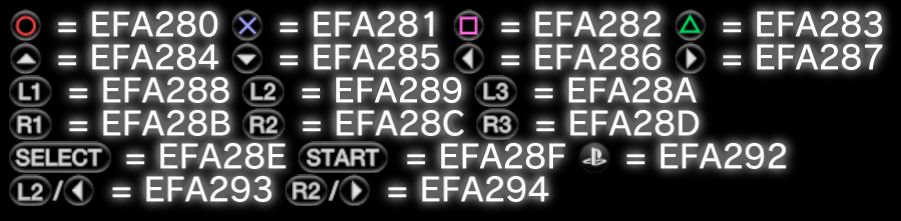
Wtf represents the EFA293 and EFA294 ?... i know is a trigger + dpad but where is used ?

And i have a lot more than the officials, what can we do with them ?, include them or meh ?
J6vmgEF.png

*This screenshot is a test at 20x20 size... the other version for managunz at 32x32 looks better, you can take a better look at some of them from zar git
https://github.com/Zarh/ManaGunZ/tree/master/pkgfiles/USRDIR/GUI/common
 
@DeViL303 sorry for the lazyness, im taking a look at the DualShock icons and i have some doubts
I would like to replace this ones, mostly because i have already made them... in different sizes though

All the officials have 23 pixels height, but the width is not 23 in any of them
My icons are perfect squares, what happens if i replace the SELECT and START icons by an squared one ?... is going to be streched ?
Ah yeah, no rush really but be nice to get something released. No, it wont be stretched, you can make the icons any width without issues, so perfect squares will be fine. Just its best to use the full height if possible so we get the most quality.

I have 2 versions of the icons, at 32x32 (the ones in managunz) and 20x20
I dont want to scale them because will lose a bit of quality, so i need to make a new version at 23x23 ?
I have been using a standard of 36 for height, as that is what all the ps4 icons were at and so far i have got everything at that height.

We should definitely go much higher than the official icons. To me it looks like when they are used as main titles on the XMB, they display at 32 pixels high. Here is a test i did with a full height white image on a black background.

upload_2019-10-21_0-33-9.png


tf represents the EFA293 and EFA294 ?... i know is a trigger + dpad but where is used ?
I have never seen those used but maybe they are somewhere. The Vita also has the same icons in its imagefont.bin.

And i have a lot more than the officials, what can we do with them ?, include them or meh ?
I'm not sure. If we have thousands of spaces we could add everything, but not sure how many spaces we actually have free overall.

This attached bin (and source folder) has approx 90% upgraded to 36 pixels high, Please have a look and if you want to replace any then do so. These are just suggestions really to see what people think.

There are 54 images that still need to be upgraded to make it 100%, i have also included those separately. If anyone wants to help with the animated ones that would be great, as I can not get different frames to use the same pallet.
 
Last edited:
Back
Top