
Integration of game updates to backups

you will have to resign all the SELF/SPRX and EBOOT.BIN as "retail"
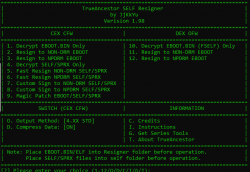
How can you do that? I can't find a suitable option in TrueAncestor SELF Resigner 1.98. There was a "Disc" option in "CFW Eboot & PKG Resigner", which doesn't work right in Windows 10 x64 AMD. I mean, the options in TASR are:
image_2024-03-09_173747097.png

I think these options are only to change the min OFW version the EBOOT need to run. None of them allows me to convert NPDRM (EBOOT in a .PKG update) to Retail-Disc. Didn't them?

Also this conversion may not work for games using EDAT, unless you convert them to SDAT
You mean, ANY EDAT located in the disc, or just specific ones? Because I have seen games with very large EDAT files, and others that seems to me a key or unlock or something like that because it is just a few bytes in size.

PD: @aldostools how to convert EDAT files to SDAT? I thought TrueAncestor Edat Rebuilder would do the trick, but unencrypted EDAT files I got from it are DAT files. I could change the extension to SDAT but I doubt it would be that easy.
 
Last edited:
"Resign to NON-DRM" = "retail"

Renaming EDAT to SDAT will not work. If I recall correctly, TrueAncestor Edat Rebuilder has an option to encrypt as SDAT.

To convert PSN games to ISO is easier to use PSN Liberator by Rudy Rastelli.
 
"Resign to NON-DRM" = "retail"
The resigned EBOOT with TA doesn't work, either with Compression method or without it. I guess I could try with the 5 Output methods variants:
image_2024-03-09_214658567.png

4.XX STD is the default one that I already tried with no luck, and I guess ODE is not my case as my console is CEX, but what's ALT and which version should I pick (3.xx or 4.xx)?

I remember someone in here, in a random post not related to this, said that HEN doesn't like resigned EBOOTs, and he/she suggested a solution. Anyone remembers about it? What was the solution? It could help me, as every resigned EBOOT with True Ancestor I have tried goes direct to a black screen.

Renaming EDAT to SDAT will not work. If I recall correctly, TrueAncestor Edat Rebuilder has an option to encrypt as SDAT.
Yes! You are correct! Thanks. Option 6 allows to encrypt .DAT files to .SDAT. However, the game I am testing doesn't unlock the DLC with either the EDATs not the SDATs located in the .ISO backup.
 
Back
Top
