PS3 HAN Introducing pkg Linker & ps3tools for Mac OSX beta 1

c.link86

Member
hi I've been working on a pet project for a week now with ups and down's and now Beta 1 is released for pkg_linker and ps3 tools using wineskin 1.7 for Mac OS X users :) now for the way things are done and features

1) using your favorite Archiving tool unzip the 2 .app's for ps3tools no extra configuration is required but pkg linker does
Open up (right click and select "show package contents") go to drive C:/users/Wineskin/Downloads/pkg linker (make a folder alias on that folder for the desktop for easy insertion of package files) and drop your idps.hex/act.dat in the bin folder
Next after pkgs and required files are in place exit out finder and double click pkg Linker.app if you know how the windows process works it's basically the same (except click no on extraction cause it already is)
oh and make sure to rebuild the pkg link.pkg and install on your ps3

Credits
Pink1 and Devil for pkg linker
Habib for the resigning tool
Aldos for ps3 tools
PS3Xploit team for Ps3Xploit v 2.0 and 3.0 Aka EtHANol
and of course yours truly for porting the programs to mac

please note this is BETA untested I'm letting you guys test it for me if it doesn't work please tell me in this thread thank you

http://www.psx-place.com/resources/pkg_linker-for-mac.636/

http://www.psx-place.com/resources/ps3-tools-for-mac.637/
 
good job but mac is crap
To each their own. I like macOS on the grounds that it's a well polished unix based OS. Even the most well polished Linux distro isn't as refined as macOS is in terms of usability (IMHO, anyway).

Whatever the case may be, I still use Windows and macOS about equally. It can't be avoided that most tools (especially in console hacking scenes) are developed to be run on Windows anyway.

Thanks c.link86-- sometime this week I may get around to testing this.
 
ok so I may have fixed some settings in the the wrapper itself thanks to observation you need "homebrew' (no pun intended) C&P
/usr/bin/ruby -e "$(curl -fsSL https://raw.githubusercontent.com/Homebrew/install/master/install)"
into terminal then you need the latest Xquartz installed so in terminal after homebrew installs type "brew cask install xquartz" (without quotes) don't forget to log out/back in after install for changes to take effect I think i got the edat resigner working I'll personally test it
 
hi I've been working on a pet project for a week now with ups and down's and now Beta 1 is released for pkg_linker and ps3 tools using wineskin 1.7 for Mac OS X users :) now for the way things are done and features

1) using your favorite Archiving tool unzip the 2 .app's for ps3tools no extra configuration is required but pkg linker does
Open up (right click and select "show package contents") go to drive C:/users/Wineskin/Downloads/pkg linker (make a folder alias on that folder for the desktop for easy insertion of package files) and drop your idps.hex/act.dat in the bin folder
Next after pkgs and required files are in place exit out finder and double click pkg Linker.app if you know how the windows process works it's basically the same (except click no on extraction cause it already is)
oh and make sure to rebuild the pkg link.pkg and install on your ps3

Credits
Pink1 and Devil for pkg linker
Habib for the resigning tool
Aldos for ps3 tools
PS3Xploit team for Ps3Xploit v 2.0 and 3.0 Aka EtHANol
and of course yours truly for porting the programs to mac

please note this is BETA untested I'm letting you guys test it for me if it doesn't work please tell me in this thread thank you

http://www.psx-place.com/resources/pkg_linker-for-mac.636/

http://www.psx-place.com/resources/ps3-tools-for-mac.637/
mate thanks
 
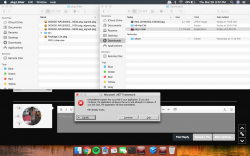
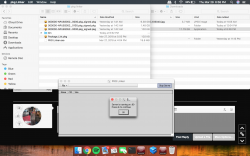
pkglinker is just a blank screen. Tried putting PKGs in same directory as app, as .exe, in bin folder, nothing works...
 
Here's two screenshots
 

Attachments

  • Screen Shot 2018-03-29 at 6.57.50 PM.png
    Screen Shot 2018-03-29 at 6.57.50 PM.png
    1 MB · Views: 1,142
  • Screen Shot 2018-03-29 at 6.58.25 PM.png
    Screen Shot 2018-03-29 at 6.58.25 PM.png
    970.9 KB · Views: 1,233
@ Spewfr have you tried Xquartz and not X11? X11 is the default Xorg like all other Linux's Xquartz is a better open source (the MacOS X11 is propritary by Apple iirc) for those whom need a quick tutorial on how to get Homebrew (MacOS's version of Apt,yum,dnf etc) do this

load up Terminal (found in "other" folder in launch pad or Utilities (command shift U)

type this in
/usr/bin/ruby -e "$(curl -fsSL https://raw.githubusercontent.com/Homebrew/install/master/install)"

push enter it will ask for your admin's password

after install in terminal type: brew cask install xquartz

after install log out then back in This switches X11 with XQuartz


or another option if you rather not use terminal go to http://xquartz.org download the dmg disk image mount it and install the .pkg
 
Last edited:
hmmm well I down graded from high sierra to El capitan maybe it deals with incompatable on 10.13? I'll run test tonight happy easter y'all
 
Here's is a (at least I think it's) working port of the PS3xploit_rifgen_edatresigner for macOS.
I tested it on my Hackintosh with developer tools and on an real iMac without any tools and it seems to sign the pkgs on both.

To use it, you have to put the resigner file into a folder with your idps.hex and act.dat. After that you open up a Terminal window, drag the PS3xpolit_rifgen_edatresign file followed by the pkg or rap file you want to resign and press Enter
www (DOT) dropbox (DOT) com/s/z7vyk0z5s6f82a7/ps3xploit_rifgen_edatresign?dl=0
 
The biggest problem I'm having right now is that I cannot serve PKG above 4gb to my PS3 using my Mac. Rifgen and everything else is fine. Just serving PKG via server is not working.
 
The biggest problem I'm having right now is that I cannot serve PKG above 4gb to my PS3 using my Mac. Rifgen and everything else is fine. Just serving PKG via server is not working.
My solution would be to go the manual way.
1. Download the programm "MAMP" on your mac
2. Place your pkg into the folder "htdocs" under the folder MAMP put into your programms folder
3. Edit the information in ** of the package_link.txt with your own
4. Save the txt file and change its file extension from txt to xml
5. Place this xml file onto the root of a FAT32 usb stick and plug it into your PS3
6. Enable HAN
7. Under Package Manager you have an new option to install your PKG from Network
 

Attachments

yes that would be a good work around sorry for the delay been having issues mostly family issues for now it's on hiatus I plan to port v2 now after my brother's wedding perhaps there is someone with Good Mac knowledge that I can pass info on to?
 
@Engpass I don't exactly understand how you signed the packages thru Terminal? I downloaded the linked file and placed my act and idps in a folder but terminal can't find the command.
 
@Engpass I don't exactly understand how you signed the packages thru Terminal? I downloaded the linked file and placed my act and idps in a folder but terminal can't find the command.
Try putting all files into 1 single folder
After that open up a Terminal and without typing anything in first drag my file followed by the package into it and hitting enter

At least in my case it worked
 
Back
Top