
- Forums
- PlayStation 3 (PS3)
- PS3 Homebrew
- PS3 Homebrew Apps / Plugins / Emulators
- Backup/File Managers & Utilities
- Iris Manager
- ManaGunz (fork)
You are using an out of date browser. It may not display this or other websites correctly.
You should upgrade or use an alternative browser.
You should upgrade or use an alternative browser.

PS3 ManaGunZ - PS3 Backup Manager by Zar v1.41
- Thread starter Zar
- Start date
Thanks for the update! Covers finally work
I've got 2 more questions tho:
1) Is 3d box supposed to be white or can I change it?
2)What are the ISO paths for PSX/PS2/PSP games since mine aren't recognised?
What is the path for ur backups ? by default ManaGunZ scan these folders : GAMES PS3ISO PS2ISO PSXISO PSPISO video data GAMEZ
presse START in main screen then go to "Game backup paths" option and add or remove the paths to scan.
PS3 gamecases are white, and u can't change the colors, sry.
btw, secret button for Flow 3D press L3 to zoom & R3 to turn the box
I've tried to force 480p for games and all I have is sound and black screen, is this normal or I'm doing something wrong?
This patch come from here : http://ps2wide.net/480p.html it doesn't work with every games, the best way to know is to test it.
yes, sry :sthanks, seems I need to test every game.
Can you send me the cover of these files ?And I have a problem with covers, 2 games, Crash 2 and Crash 3 are shown incorrectly, Crash 2 is way to much expanded, with Crash 3 isn't detected at all and Multiman and webMAN see those, the same issue with IrisMAN.
check in following path :
/dev_hdd0/game/MANAGUNZ0/USRDIR/covers
/dev_hdd0/tmp/covers
/dev_hdd0/game/BLES80608/USRDIR/covers
/dev_hdd0/game/BLES80608/USRDIR/covers_retro/psx

EDIT: Just like you've said, 3d covers stop loading after like 5-6 covers. I have around 55 gamesgametdb. com seems to have a fairly large collection of full scans for ps3 3d covers
EDIT2: Games were already in the correct folders but managunz fails to add them
EDIT: Just like you've said, 3d covers stop loading after like 5-6 covers. I have around 55 games
EDIT2: Games were already in the correct folders but managunz fails to add them
it's probably because the rsx memory is full, in other words, I have to improve the code to load only the covers needed and to not load any unecessary texture.
I'll try to fix it in next update sry about the trouble, as u can see i'm not a pro dev

I see..
Didn't think it did, as some of my games have art on opl, but not on PS3.
mb I didn't include them because the cover size of opm was too small. i took covers from
https://psxdatacenter.com/psx2/games2/SLES-53764.html

Haker120
Member
yes, sry :s
Can you send me the cover of these files ?
check in following path :
/dev_hdd0/game/MANAGUNZ0/USRDIR/covers
/dev_hdd0/tmp/covers
/dev_hdd0/game/BLES80608/USRDIR/covers
/dev_hdd0/game/BLES80608/USRDIR/covers_retro/psx
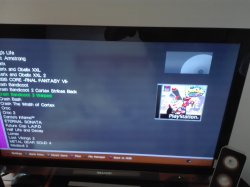
Thanks, I removed empty covers, I mean default ones with no pic only 'cover not available' and something helped but not entirely. All issues shown in attachments.
Attachments
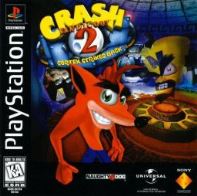
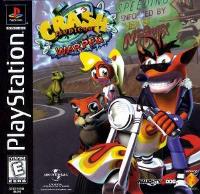
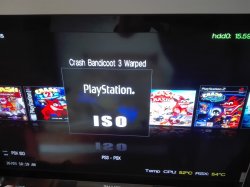
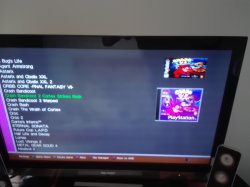

sandungas
Developer
If you are talking about the rectangled icon...
The icon is named generically ICON0.PNG... it was first used on PSP games, and later on PS3 games... all PSP/PS3 games have that icon
But PS1/PS2 games doest have that icon
Instead... managunz displays that generic rectangle with either a disc (represents ISO/BIN) or a dualshock (represents JB format)
What you can do in PS1/PS2 games is to use the option "create ICON"... this process creates an ICON0.PNG by cropping a section of the game cover
For this to work you need to have the cover of the game, of course, heheh
@Haker120 try this in crash bandicot 3
Triangle button ---> create ICO
The icon is named generically ICON0.PNG... it was first used on PSP games, and later on PS3 games... all PSP/PS3 games have that icon
But PS1/PS2 games doest have that icon
Instead... managunz displays that generic rectangle with either a disc (represents ISO/BIN) or a dualshock (represents JB format)
What you can do in PS1/PS2 games is to use the option "create ICON"... this process creates an ICON0.PNG by cropping a section of the game cover
For this to work you need to have the cover of the game, of course, heheh
@Haker120 try this in crash bandicot 3
Triangle button ---> create ICO
Last edited:
@Yamato047 where did u store ur psx iso ? press SQUARE to se if u didn't disable PS1 in filter
@Haker120 crash2 the top icon is the picture having the same name as ur iso. for example /dev_usb000/PS1ISO/Crash2.iso | /dev_usb000/PS1ISO/Crash2.png . As sandungas said u can create a custom ICON0 in game option.
@Haker120 crash2 the top icon is the picture having the same name as ur iso. for example /dev_usb000/PS1ISO/Crash2.iso | /dev_usb000/PS1ISO/Crash2.png . As sandungas said u can create a custom ICON0 in game option.
Similar threads
-
 PS5 Porkfolio All in One PS5 Utility (Game Library, Backporks, FTP Transfers, Cheats, Saves, Pa
- Started by Red
- Replies: 0
-

-

-
PS3 [Tutorial] Update Frankenstein PS3 Firmware That is Too Low to Initialize RSX (< 3.41) (NAND Models)
- Started by byt3swap
- Replies: 0