ManaGunZ

PS3 ManaGunZ - PS3 Backup Manager by Zar v1.41

I don't know... maybe (just because I think everything is possible with time & motivation).
But something for sure it won't be 'easy' like adding few lines in managunz :p

I must say I would have honestly preferred to keep my 256GB flash drive as FAT32 but games that have files larger than 4GB (GT6) when split for FAT32 load a lot slower than usual, at least on wMM.
Also I think wMM increases the fan speed more than the PS3 itself.

I never tried a split GT6 with this loader though as I was still sort of new to this stuff at least on the PS3.

But if you could add this it would be awesome, and I think a first for PS3.
 
Hello @Zar. In v1.41, I'm no longer able to open the settings, or game menu -- when trying to do so, the console just freezes (this wasn't present in 1.40). Another bug I discovered is when trying to backup a game disc to a folder that doesn't exist. I've found that I need to manually create the folder(s) first -- not a big deal, but figured I'd mention it (this also applies to converting a game to/from JB/ISO).
 
  • Like
Reactions: Zar
It may be broken. It'zs not working with every backup, I know for sure it's working with Lego games

I noticed some time ago that the games launched through direct boot use the game id of the backup manager that launches the EBOOT. As result, the saves also have a different content id.

Also the trophies are searched in the directory of the backup manager, instead of use the TROPDIR from the mounted disc. Some games that crashed could boot if I moved the trophies to the backup manager. Early games didn't require trophies, so they booted fine when the feature was introduced.

Additionally some games use hardcoded paths in the EBOOT or selfs. So the wrong game id is part of the issue.

I haven't dedicated much time to research more about direct boot, but I think the compatibility the compatibility could be improved if the game id of the current process is spoofed in LV2 and the trophies are remapped to /dev_hdd0/game/<backup-mgr>/TROPDIR

BTW I found that around 2013 using multiMAN. Maybe current backup managers behave different.
 
It may be broken. It'zs not working with every backup, I know for sure it's working with Lego games

@Zar
I have LEGO The Hobbit so I will test that one.

@aldostools
The issue could also be with me. I am using the same multiMAN from when it worked before but now it doesn't.
In MM there is no option to direct-boot NTFS so I use IRISMAN to extract it to dev/hdd0/GAMES/ and then I test it with all three backup managers and get the same result.

Skyrim used to direct-boot if you unchecked the PS3_EXTRA flag and then tried it extracted in folder format with MM.
 
Last edited:
-Update-

@Zar
@aldostools

LEGO The Hobbit does indeed work on MG with direct-boot. But in-game XMB background music does not, even with the flag enabled.

Unfortunately though only MM works with both direct-boot and in-game XMB background music.
And sadly it requires games to be extracted to the HDD to direct-boot.

It seems the only homebrew app it can boot from HDD is IRISMAN which can allow in-game XMB background music in PSX games if booted first by MM since it only direct-boots PSX games.
 
Last edited:
I noticed some time ago that the games launched through direct boot use the game id of the backup manager that launches the EBOOT. As result, the saves also have a different content id.

Also the trophies are searched in the directory of the backup manager, instead of use the TROPDIR from the mounted disc. Some games that crashed could boot if I moved the trophies to the backup manager. Early games didn't require trophies, so they booted fine when the feature was introduced.

Additionally some games use hardcoded paths in the EBOOT or selfs. So the wrong game id is part of the issue.

I haven't dedicated much time to research more about direct boot, but I think the compatibility the compatibility could be improved if the game id of the current process is spoofed in LV2 and the trophies are remapped to /dev_hdd0/game/<backup-mgr>/TROPDIR

BTW I found that around 2013 using multiMAN. Maybe current backup managers behave different.

I think you are right, it's probably the main reason why the direct boot method doesn't work.

Most of the game use sysGameBootCheck sysGameContentPermit sysGameGetParamString to get the game path.
 
Hi @Zar. I found a minor "bug" (if you wanna call it that). When no games are installed/found, and you insert a game disc, you have to press L3 + R3 in order for it to show.

I also had a suggestion… would it be possible to add a tab/page to Settings (or somewhere else) that displays all of ManaGunZ' button shortcuts? Regardless whether you can/want to, it's cool to see how this project evolves with every update :)
 
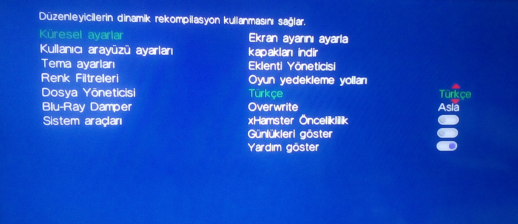
Can someone try go to (at least in v1.41):
Settings -> Global settings -> Language -> Press :dir down: after Turkey:
IMG-20220420-083430.png


All I get is a black screen.
 
Last edited:
  • Like
Reactions: Zar
Quoted from one of the HEN 4.89 threads:
Hey i found a ver strange bug, i cant use file manager of magnagunz with the new HFW, its say new Firmware detected checking for offsets, somebody know someting?
I cant give you an accurate answer, but it looks like a feature, is trying to create some kind of "memory map" because your firmware version is unknown

ManaGunZ have some mounting modes that are not dependant of cobra and requires a "payload" that is specific by firmware version
And there is a tool (integrated inside ManaGunZ as far i know) named "offsetfinder" that does that job of mapping the memory, thats what your warning message indicates... it seems is running the "offsetfinder" :)
 
  • Like
Reactions: Zar
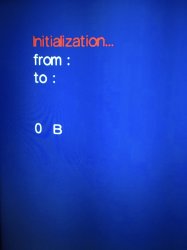
Hi @Zar, I found another bug in ManaGunZ — when making a backup for the first time/after a system format (ISO, not tried normal backup), the console will freeze at 0 B progress. After a reboot, the backup will be completed as normal. I tried enabling mgz log and mgz debug to improve the report, but it doesn't seem to freeze when both options are enabled. I would assume it has something to do with the permissions of tmp, and the dump of erk. Sorry for not providing much info, but hopefully it's something you can work with.
 

Attachments

  • E60D88EB-DB08-4CC8-BE5D-150511ECEE45.jpeg
    E60D88EB-DB08-4CC8-BE5D-150511ECEE45.jpeg
    3.1 MB · Views: 37
  • Like
Reactions: Zar
Hi @Zar, I found another bug in ManaGunZ — when making a backup for the first time/after a system format (ISO, not tried normal backup), the console will freeze at 0 B progress. After a reboot, the backup will be completed as normal. I tried enabling mgz log and mgz debug to improve the report, but it doesn't seem to freeze when both options are enabled. I would assume it has something to do with the permissions of tmp, and the dump of erk. Sorry for not providing much info, but hopefully it's something you can work with.
Do you remember if you had the custom directories already created before making the dump ? (PS3ISO, etc...)
 
I did not. I'm currently trying as hard as possible to reproduce the bug with debug logs enabled. I'll reply again if I find anything.
You was dumping the game to USB or to internal HDD btw ?
From your post i understand that the problem happens only in managunz "first boot", and booted inmediatly after formatting the HDD. But if you reboot the PS3 it works fine

So it should be caused by a difference in between the managunz "first boot" and the other managunz boots. In the first boot managunz creates his own settings file, this is the first time where you can configure the names of the folders where are stored the games (by default PS3ISO, etc... but you can change them)

While looking at your screenshot of the dumper that tells "from" and "to" is when i thought maybe the PS3ISO folder was missing (in other words... the dumper fails because it cant find it)
 
Back
Top