
- Forums
- PlayStation 3 (PS3)
- PS3 Homebrew
- PS3 Homebrew Apps / Plugins / Emulators
- Backup/File Managers & Utilities
- Iris Manager
- ManaGunz (fork)
You are using an out of date browser. It may not display this or other websites correctly.
You should upgrade or use an alternative browser.
You should upgrade or use an alternative browser.

PS3 ManaGunZ - PS3 Backup Manager by Zar v1.41
- Thread starter Zar
- Start date
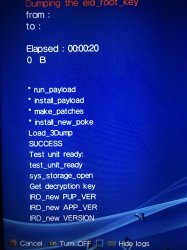
Seems to be an issue with erk dumper. Which firmware are you ? This issue also exist in idpset, I never managed to fix it yet, it seems to be 'randomly' freezing when you launch the payload....
4.87 Ferrox with COBRA 8.20. I wondered whether it could be a memory related problem, caused by the initial PS3 setup. Not sure how logical that is, just throwing some ideas around.
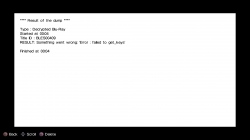
EDIT: I tried dumping the erk first (using ManaGunZ) and it didn't freeze this time. Instead, I got the following error message: (see image).
After even more testing, it seems the bug is actually caused by ManaGunZ' first launch, as apposed to formatting the PS3. I'm able to reproduce the freeze every single time by deleting eid_root_key, 3Dump.bin, and also deleting then reinstalling ManaGunZ.
Attachments
Last edited:
Maybe when it froze the 1st time it generated a corrupted erk. (To get the br disc key we need the erk.)
I just edited the last post with a bit more info. Hopefully it helps narrow down the bug.
It's weird… after multiple erk dumps (even tried using the one from rebug toolbox), multiple restarts, and reinstalling the cfw — every time I try to backup a disc (decrypted iso), I'm getting the "failed to get_keys" error.
EDIT: I downgraded to v1.40 and this bug isn't present. The freeze when dumping erk is still there though.
EDIT: I downgraded to v1.40 and this bug isn't present. The freeze when dumping erk is still there though.
Last edited:
Is it working on the nightly version ? https://github.com/Zarh/ManaGunZ/releases/tag/nightly
Can you enable DEBUG to see every message ?
Can you enable DEBUG to see every message ?
Is it working on the nightly version ? https://github.com/Zarh/ManaGunZ/releases/tag/nightly
Can you enable DEBUG to see every message ?
It's not working on the nightly version, and I'm one of those people that can't use the original v1.41 due to the settings and game menu freeze. The "expanded" log said something like the d1 offsets can't be found. I'll try again later with debug logs and send a screenshot (unless you already know what I'm talking about).
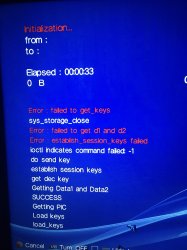
This makes absolutely no sense at all. Enabling MGZ log "fixes" the bug lol. Here's a picture of the errors with MGZ debug enabled…
I also discovered that only decrypted ISO dumps are working. Encrypted ISO and JB backups just show error 80010017 when trying to launch the game.
I also discovered that only decrypted ISO dumps are working. Encrypted ISO and JB backups just show error 80010017 when trying to launch the game.
Attachments
Last edited:
I think i fixed this issue in 1.41.I'll try to fix the other freeze you have in 1.41.
I assume you mean 1.42? The issues I reported are all happening in the latest nightly release.

Any ideas what would cause error 80010017 with encrypted ISO and the "Copy" option? I think it's safe to rule out the disc, since decrypted ISO is working, and also backups from other managers of the same discs work. If you can think of anything at all, let me know and I'll try it  .
.
Would it also be possible to have an option that names game backups to whatever the name of the game is. Not really a big deal, just a quality of life thing I guess.
.Would it also be possible to have an option that names game backups to whatever the name of the game is. Not really a big deal, just a quality of life thing I guess.
Last edited:
it may seems counterintuitive but the encrypted iso aren't decrypted by the PS3 when it's mounted by cobra/mamba. The decryption part isn't supported by rawsceiso (the plugin which handle ISO mounting). So, it's normal for the PS3 to NOT be able to read the EBOOT and to return the 80010017. AFAIK there is only ps3netserv who support mounting with encrypted ISO, it does't the decryption before sending information to the ps3. Redump.org collect information on encrypted iso as it's the raw data of the BR disc.
The error on the "Copy option" isn't normal... can you check the integrity of files ? (with IRD)
The error on the "Copy option" isn't normal... can you check the integrity of files ? (with IRD)
it may seems counterintuitive but the encrypted iso aren't decrypted by the PS3 when it's mounted by cobra/mamba. The decryption part isn't supported by rawsceiso (the plugin which handle ISO mounting). So, it's normal for the PS3 to NOT be able to read the EBOOT and to return the 80010017. AFAIK there is only ps3netserv who support mounting with encrypted ISO, it does't the decryption before sending information to the ps3. Redump.org collect information on encrypted iso as it's the raw data of the BR disc.
The error on the "Copy option" isn't normal... can you check the integrity of files ? (with IRD)
According to the IRD, every single file is "MODIFIED". I'll delete the backup and try again. I'll edit this post with the results later.
EDIT: same thing again. I'll do another backup with debug enabled and attach the log once it's done.
Well, I did it again, but no log file was saved :/
Last edited:
I'm sure this is probably intentional, but figured I'd let you know anyway — "Blu-Ray dumper" options, and "Dump 3Dump.bin" are in the standalone file manager. I'm only mentioning it since there's no way of backing up discs with the file manager (afaik).
Also, "Background" in Theme settings doesn't seem to do anything. Finally, the IRD check in the file manager isn't working (see attached log). None of the "bugs" apply to the full version of ManaGunZ
EDIT: the mount game option in the standalone file manager isn't working either. It just gets stuck on "read_game_setting".
Also, "Background" in Theme settings doesn't seem to do anything. Finally, the IRD check in the file manager isn't working (see attached log). None of the "bugs" apply to the full version of ManaGunZ
EDIT: the mount game option in the standalone file manager isn't working either. It just gets stuck on "read_game_setting".
Attachments
Last edited:
Sorry for all the reports :/
I found another bug. This one applies to both the standalone file manager, as well as ManaGunZ. The "Convert to ISO" option isn't working. The game menu option in ManaGunZ works just fine, it's only an issue with the file manager option.
EDIT: And the "InsertEject" option isn't working. I tried with a mounted game and a physical disc.
I'm also getting error 80029563 when trying to install pkgs created by the file manager.
I found another bug. This one applies to both the standalone file manager, as well as ManaGunZ. The "Convert to ISO" option isn't working. The game menu option in ManaGunZ works just fine, it's only an issue with the file manager option.
EDIT: And the "InsertEject" option isn't working. I tried with a mounted game and a physical disc.
I'm also getting error 80029563 when trying to install pkgs created by the file manager.
Attachments
Last edited:
I'll make a list here to sum up everything.
- Copy in bdvd option : corrupted Eboot.
- "failed to get_keys" : https://www.psx-place.com/attachments/062ef3f2-dbc5-42ca-8561-6188c3aa8900-jpeg.37461/
- ERK : freeze :
- InsertEject : it's not important at all if it's not working for you, I made it for me only because I think my ps3 lens is dying. I have to Eject / insert the disc several times to get detected by the system. So, it's ejecting then re-inserting the disc physically (irl) 10 times or until the BR is mounted.
- 80029563 : Are you talking about shorcut pkg ? seems to be an error code related to DRM. Maybe the eboot is corrupted like with "copy" from dev_bdvd, I'll check if I have the same issue :s
- Resign SPRX : I suspect the same issue with corrupted data on copy. It use the copy function here as well.
- Convert iso : the path of this one is weird, I think I just introduced this bug. I'll fix it. Thanks.
- "Blu-Ray dumper" options : True, I just forgot to add the option.
tell me if i forgot something, please.
thank you, btw.
- Copy in bdvd option : corrupted Eboot.
- "failed to get_keys" : https://www.psx-place.com/attachments/062ef3f2-dbc5-42ca-8561-6188c3aa8900-jpeg.37461/
- ERK : freeze :
After even more testing, it seems the bug is actually caused by ManaGunZ' first launch, as apposed to formatting the PS3. I'm able to reproduce the freeze every single time by deleting eid_root_key, 3Dump.bin, and also deleting then reinstalling ManaGunZ.
- InsertEject : it's not important at all if it's not working for you, I made it for me only because I think my ps3 lens is dying. I have to Eject / insert the disc several times to get detected by the system. So, it's ejecting then re-inserting the disc physically (irl) 10 times or until the BR is mounted.
- 80029563 : Are you talking about shorcut pkg ? seems to be an error code related to DRM. Maybe the eboot is corrupted like with "copy" from dev_bdvd, I'll check if I have the same issue :s
- Resign SPRX : I suspect the same issue with corrupted data on copy. It use the copy function here as well.
- Convert iso : the path of this one is weird, I think I just introduced this bug. I'll fix it. Thanks.
- "Blu-Ray dumper" options : True, I just forgot to add the option.
tell me if i forgot something, please.
thank you, btw.
Similar threads
-
 PS5 Porkfolio All in One PS5 Utility (Game Library, Backporks, FTP Transfers, Cheats, Saves, Pa
- Started by Red
- Replies: 0
-

-

-
PS3 [Tutorial] Update Frankenstein PS3 Firmware That is Too Low to Initialize RSX (< 3.41) (NAND Models)
- Started by byt3swap
- Replies: 0