ManaGunZ

PS3 ManaGunZ - PS3 Backup Manager by Zar v1.41

- 80029563 : Are you talking about shorcut pkg ? seems to be an error code related to DRM. Maybe the eboot is corrupted like with "copy" from dev_bdvd, I'll check if I have the same issue :s

No. The shortcut pkg is fine (at least it was last time I tried it). I was talking about the "Make PKG" option in the file manager.

It seems like you forgot the bug about the ird check and mount game option not working in the standalone file manager — as well as background in theme settings not working. Other than that, I think that's everything :)

The details can be found here: https://www.psx-place.com/posts/336146/
 
Last edited:
  • Like
Reactions: Zar
20220623_092440.jpg

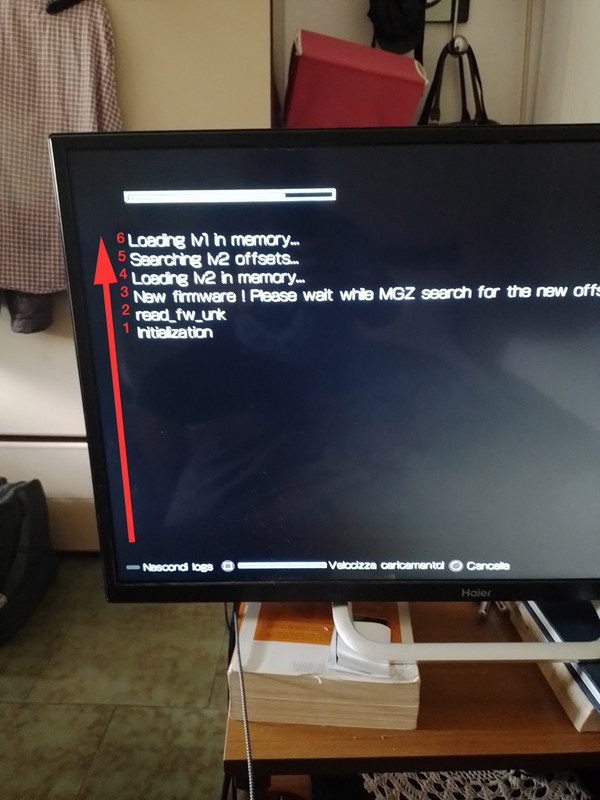
after I start the filemanager I see this... with O can be skip.
 
Someone mentioned this problem before and i passed the report to managunz support thread here ---> https://www.psx-place.com/threads/managunz-ps3-backup-manager-by-zar.1198/page-75#post-334651

Try the "nightly" release published by @Zar in post #1496 of that same thread, it was intended to fix this problem but as far i know it never was reported back
https://www.psx-place.com/threads/managunz-ps3-backup-manager-by-zar.1198/page-75#post-334703

So one way or the other (if it works, or if it doesnt works) report your results to the managunz support thread to advise @Zar if the fix was successful or not :encouragement:
 
  • Like
Reactions: Zar
yes i use the nightly build... the strange thing is that you can skip with O anyway I got this problem after downloading a nightly
 
@Zar can Managunz dump any disc to BIN / CUE?

It may seem odd but I have a Sega Saturn console and I want to dump a CD game with audio tracks but I don't have a CD/DVD drive in my PC so I thought that my PS3 would be a good choice if there is a tool.
I know you are working in a feature for PS3 Game dump that's why I ask you if it could work for my purpose: dump Sega Saturn Game disc with multiple audio tracks (just like PS1 games with audio tracks) in ps3 HDD.
 
hi zar after I try nighlty build your homebrew start with the new offset searching.
20220623_092440.jpg

ps= the speed up loading with squadre is just a joke?
 
It's a 'new firmware' so it's searching offset in lv2 and lv1 to be able to install and use multiMan payload. On the 2nd boot you won't this message anymore.

Is that search necessary? LV1/LV2 offsets haven't changed since 4.75 (June 2015) with exception of 4.80.

Maybe it should test first the offsets of the last known version before try to scan the memory.
 
  • Like
Reactions: Zar
Btw, have you thought in inverting the order of how are printed the logs ?, in my oppinion the actual way is a bit weird, everytime i see someone posting a screenshot i get confused a bit
20220623-092440-copy.jpg


The problem is in the actual implementation we need to read the lines in order "bottom to top"... where the newest line is always at top, and the old lines "dissapears" at bottom when the screen is fully filled
I think it would be better to do it in opposite direction, like when writing in a terminal command line, or in a text editor
 
  • Like
Reactions: Zar
This makes absolutely no sense at all. Enabling MGZ log "fixes" the bug lol.
[…]
I also discovered that only decrypted ISO dumps are working.

Thank-you for posting this! Yes, that solves the problem I've been having as well. To anyone else who may have stumbled here with the following problem:

1. You are trying to dump a decrypted disc.
2. It gives you the "failed to get keys" error instead.

All you need to do is…

3. Make sure that you have the MGZ log turned on first.
 
Good day everyone! Please help me understand the program. I'm trying to take a disk image with an IRD file, the program constantly gives an error as in the photo. I use version 1.41, I tried 1.40, it writes that the firmware is not supported. (Google translator)
 
Good day everyone! Please help me understand the program. I'm trying to take a disk image with an IRD file, the program constantly gives an error as in the photo. I use version 1.41, I tried 1.40, it writes that the firmware is not supported. (Google translator)

1.39 is more stable. It's the version I prefer.
 
Back
Top