PS2 Max Payne freezes on the Rockstar logo

AnInternetCitizen

Forum Noob
Hello everyone.

Recently I've had a problem with Max Payne as it just freezes on the rockstar logo. Someone reported this problem before here on this forum, but nothing worked with me.
I'll welcome anyone trying to help as I didn't find a solution to this problem.
Thank you.
 
Hello everyone.

Recently I've had a problem with Max Payne as it just freezes on the rockstar logo. Someone reported this problem before here on this forum, but nothing worked with me.
I'll welcome anyone trying to help as I didn't find a solution to this problem.
Thank you.

Could you provide the ID?
 
SLUS 202.30
Additionally I tried Compatibility Mode 6 and defragmenting the fragmented files( defraggler, quick format and copying game files). I use USB.

From what I remember this game is larger than 4 GiB:
http://redump.org/disc/8386/,
so you cannot put it easily on a USB device with FAT 32 file system...
You had to "slice it" with e.g. USBUtil, right?

Also please provide md5 checksum for an original ISO:
https://www.psx-place.com/threads/how-to-check-game-md5-checksum.19277/.
 
SLUS 202.30
Additionally I tried Compatibility Mode 6 and defragmenting the fragmented files( defraggler, quick format and copying game files). I use USB.

It is useless to defrag, then copy the game on a just formatted USB device. The fragmentation doesn't happen on the file itself but on the storage device. So, just copy the ISO on the USB device, then defrag it with Auslogics disk defrag as suggested.


It seems the game doesn't start from USB in any way, it freezes at the R Logo as you said.
I tested the USA version SLUS_202.30 MD5: 10dd8182af1e4d4216be61216768f712
Installed the ISO with USBUtil 2.2

I tried quite a few OPL versions (also going back to 0.9.2 and 0.9.1) with the same result. Also PS2ESDL freezes the same way.
Can you try it from ETH?
 
Last edited by a moderator:
From what I remember this game is larger than 4 GiB:
http://redump.org/disc/8386/,
so you cannot put it easily on a USB device with FAT 32 file system...
You had to "slice it" with e.g. USBUtil, right?

Also please provide md5 checksum for an original ISO:
https://www.psx-place.com/threads/how-to-check-game-md5-checksum.19277/.
Yes, you are right.
I used USBUtil v2.2
md5 checksum= 10dd8182af1e4d4216be61216768f712

It seems the game doesn't start from USB in any way, it freezes at the R Logo as you said.
I tested the USA version SLUS_202.30 MD5: 10dd8182af1e4d4216be61216768f712
Installed the ISO with USBUtil 2.2

I tried quite a few OPL versions (also going back to 0.9.2 and 0.9.1) with the same result. Also PS2ESDL freezes the same way.
Can you try it from ETH?
I'll try ETH.

Just tried ETH and it works perfectly fine.
It seems that the problem is USB, but can't there be any fix for this as ETH is not always available for me?
 
Last edited by a moderator:
It seems the game doesn't start from USB in any way, it freezes at the R Logo as you said.

It seems that the problem is USB, but can't there be any fix for this as ETH is not always available for me?

I have tried Max Payne in PAL (SLES_503.26) and in NTSC U/C (SLUS_202.30) version through USB with OPL 1871.

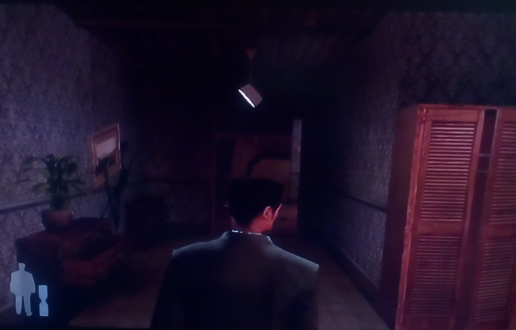
Game boots fine in both versions. I can even start new game.
max-p.png

I also used USBUtil 2.2 REV.1.0 [BETA] to "slice" the games' ISOs.

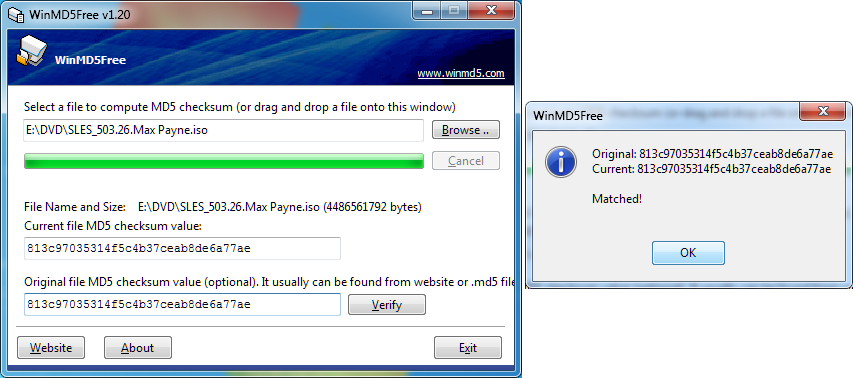
MD5sum:
SLES-503-26-Max-Payne-MD5.png

How it should be:
SLES-503-26-Max-Payne-Confirm.png

http://redump.org/disc/5955/.

EDIT: Check a test with NTSC version:
https://www.psx-place.com/threads/max-payne-freezes-on-the-rockstar-logo.37416/page-2#post-345570.
 
Last edited:
I have tried Max Payne in PAL (SLES_503.26) and in NTSC U/C (SLUS_202.30) version through USB with OPL 1871.

Game boots fine in both versions. I can even start new game.
max-p.png

I also used USBUtil 2.2 REV.1.0 [BETA] to "slice" the games' ISOs.
I tried OPL 1871 as you did and it gave me an error saying that game region is not compatible or something like that which is weird as I could play NTSC games all the time.
Anyway I tried PAL SLES_503.26 and it worked fine.
Thank you so much for your help along with @Peppe90.
Have a great day/night!
 
Let me guess.
You have\had OPL v1.0.0 that does NOT have enabled debug colors... Disable Debug Colors - On

This option has been a lil' bit inverted some time ago. Debug Colors - On
So that is why this message and debug colors appear.
You can check it in Settings.

As for SLUS_202.30, you can try to delete all games' settings:
USB Games -> :but tri: Options -> Remove Settings -> :but tri: All

I had a problem with Ico and I do not why this suggestion worked...
 
I have tried Max Payne in PAL (SLES_503.26) and in NTSC U/C (SLUS_202.30) version through USB with OPL 1871.

Game boots fine in both versions. I can even start new game.
max-p.png

I also used USBUtil 2.2 REV.1.0 [BETA] to "slice" the games' ISOs.

I didn't tested with newer versions yesterday.
You're right it perfectly works from USB without any MODE on OPL 1.2.0 (same on 1.1.0 and 1.0.0), maybe some modification on USB modules solved the issue (the freezes is present on quite new revs, after the last sp193 patching work. So I guess it has been indirectly solved in some rev just before 1.0.0).

Let me guess.
You have\had OPL v1.0.0 that does NOT have enabled debug colors... Disable Debug Colors - On

This option has been a lil' bit inverted some time ago. Debug Colors - On
So that is why this message and debug colors appear.
You can check it in Settings.

As for SLUS_202.30, you can try to delete all games' settings:
USB Games -> :but tri: Options -> Remove Settings -> :but tri: All

I had a problem with Ico and I do not why this suggestion worked...

Indeed it showed the debug colors also for me (not only at games start, but also after the R logo and after the intro), btw everything worked fine, I could start a new game without problems.
 
Last edited by a moderator:
I didn't tested with newer versions yesterday.
You're right it perfectly works from USB without any MODE on OPL 1.2.0 (same on 1.1.0 and 1.0.0), maybe some modification on USB modules solved the issue (the freezes is present on quite new revs, after the last sp193 patching work. So I guess it has been indirectly solved in some rev just before 1.0.0).

To be honest I did not have a problem with loading this game through USB even in previous revs (below v1.0.0). - At least the PAL version.
The only issue I have is that after the game resets 5 times I have white screen:
https://www.psx-place.com/threads/open-ps2-loader-game-bug-reports.19401/page-42#post-209485.
 
Let me guess.
You have\had OPL v1.0.0 that does NOT have enabled debug colors... Disable Debug Colors - On

This option has been a lil' bit inverted some time ago. Debug Colors - On
So that is why this message and debug colors appear.
You can check it in Settings.

As for SLUS_202.30, you can try to delete all games' settings:
USB Games -> :but tri: Options -> Remove Settings -> :but tri: All

I had a problem with Ico and I do not why this suggestion worked...
I indeed have OPL v1.0.0.
Thank you again for your help with OPL and Max Payne.
Now I could enjoy my game without any problems.
 
To be honest I did not have a problem with loading this game through USB even in previous revs (below v1.0.0). - At least the PAL version.
The only issue I have is that after the game resets 5 times I have white screen:
https://www.psx-place.com/threads/open-ps2-loader-game-bug-reports.19401/page-42#post-209485.

On rev. 1319 it freezes for me, I guess you tried some newer version. And btw PAL version can be different, we were testing the NTSC.

About the resets, you mean the same as Deus-Ex? So after changing scenario 5 times it freezes?

If that's the case @AnInternetCitizen could have problems soon or later, assuming that the NTSC versions shares this same issue.
 
On rev. 1319 it freezes for me, I guess you tried some newer version. And btw PAL version can be different, we were testing the NTSC.

You are right!
I have tried SLUS_202.30 with OPL 1319. It freezes after the R⭐ logo as both of you said:
R-star12.png


About the resets, you mean the same as Deus-Ex? So after changing scenario 5 times it freezes?

If that's the case @AnInternetCitizen could have problems soon or later, assuming that the NTSC versions shares this same issue.

Yes after 5th reset I get white screen, but...

In Deus Ex in-game resets are being done when you change levels.

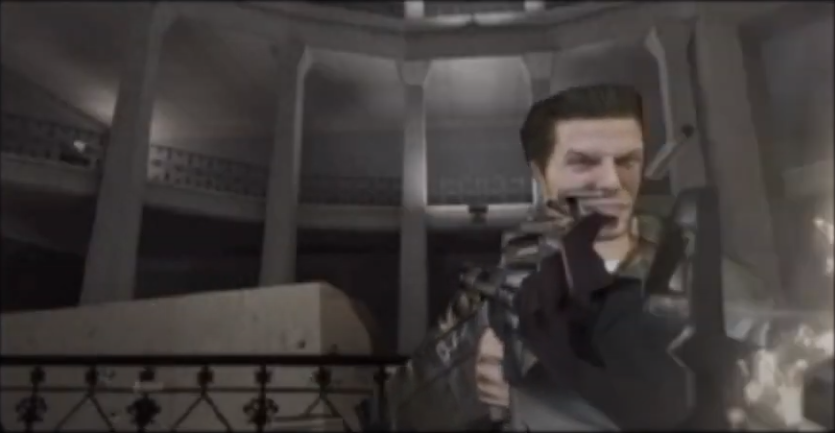
In Max Payne I only noticed these resets after the 1st intro FMV (not between levels):
max-33.png

I mean when the game will launch this FMV do not press any button.
After 5 times this intro should appear, unfortunately you will get a white screen.
 
It'd need to be debugged.

However, being things as you described, the game is perfectly playable. If it will freeze after 5 levels, you just have to reset the Ps2 and load the game (hoping it won't freeze before the automatic save, otherwise you'd have to re-do the last level you done, or you could make sure to do 4 levels at a time, reset the Ps2 and load back).
 

Similar threads

Back
Top