
Workz_777
Senior Member
You don't have to be sorry about anything, nothing happened, I merely explained the situation, it wasn't personal.
Ah o.k i understand, you are right i should have done it myself.
Last edited:

You don't have to be sorry about anything, nothing happened, I merely explained the situation, it wasn't personal.
Just to add to this I am unable to launch the OPL 1629 BDM build and have no disc drive connected to my slim because its broken. I have ordered one and it should be here in the weekThanks for the help. I tried that OPL config directory but it didn't work.
But I recalled that long time ago I used MechaPwn to set the DVD drive to locked mode so I could play DVD-R disks from uLE.
I ran MechaPwn and restored it from the backup and now OPL starts.
With further testing, the upstream version of opl 1.1.0 does not have this issue. Only the BDM3 build does. It manifests as IF you use MechaPwn and change the drive to Retail-DEX and ForceUnlock (which I use to be able to play DVD-R backups) then BDM3 will hang with a black screen upon starting.

Hiya Ronnie, i think for that budget it would need to be made of Gold!
And while i don't have a MX4SIO made of Gold yet to sell you...
....i do however have something for your budget, 24 carrat Gold Lego bricks!
View attachment 35930
Could i interest you in some of these, while you wait for your MX4SIO?
EDIT ....oh wait, hold on, i do actually have a Gold MX4SIO, doh me!
View attachment 35932
View attachment 35933
MX4SIO Gold (After Dark) Edition !
All contacts are gold electro-plated, even the logo!
It just arrived today, just after @Ronnie Sahlberg posted his message, i thought it would be funny to make a little joke before i posted the photos here. I do have a 3D printed case too...
View attachment 35934
View attachment 35935

I wanted to confirm with you what is your pcb thickness, and also the case thickness? Who did you go with to print your PCB and also your 3d case?
Also, I'm planning to get my own PCB and 3d case eventually, and it looks like the microsd slot holder is out of stock everywhere. Does that match your findings as well too?
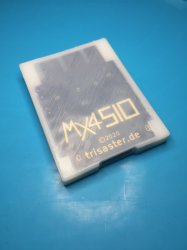
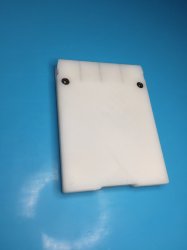

MX4SIO PCB thickness, coming from the PDF manual is 1.55mm (1.6mm).
Its 3D printed case is designed to fit that PCB thickness only. The thinest part of the 3D case is the top-facing side, (with the transparent window effect so we can see the MX4SIO logo), is 0.3mm thick. This can be a problem for some 3D printing firms, who won't print at that minimum thickness (0.3mm). So if for example you want that section thicker, say 0.7mm, then the PCB would need to be changed / reduced from 1.6mm to 1.2mm thickness, else the PCB will sit higher than the case there. Most prototype PCB fabs, like OSHPark etc, print at 1.6mm as standard. Some PCB fabs have different PCB thickness options available like:- 1mm, 1.2mm, 1.6mm, 2mm etc.
BOM / Components, as you mentioned, the biggest issue right now is the world-wide IC / component stock shortages. Making it extremely hard to source the "reversed" Hirose MicroSD and SD connector slots from the MX4SIO BOM list. All the distributors (Mouser, Farnell, Digi-Key, etc) are out of stock. No joke there's currently an eBayer selling the "reversed" MicroSD slot (Hirose - DM3BT-DSF-PEJS) for £15 / $20 - per unit! I ended up sourcing some of the Hirose - DM3BT-DSF-PEJS from a Japanese distributer directly (at the correct price), only they had some stock left (probably because Hirose is also a Japanese company).
I feel at this point in time, it's not (well almost not) possible / feasible to build one until the components are back in stock again. I guess this gives you some time to check out local (to you) 3D printing firms, and PCB fabs that can meet your minimum requirement specs. The Devs of M4XSIO here, asked us to try and go locally for the 3D printing and PCB Fabs, and not to go with Chinese firms. However, if a person only wants 1 x unit of PCB and 1 x unit of 3D printed case, it's not gonna be cheap.
Any good news? Well... because of everything mentioned above, i was not able to only buy 1 x unit of each part needed for the build. In the end i had to buy more than i needed, so i have a few spare ones, just not the LED version.
So i was thinking of giving away, for free, my brand-new spare MX4SIO units to you guys! All assembled and ready to go! I have 5 complete spare units for grabs. To make it fair, maybe we could put some names in a hat and do a draw? Like a free raffle / lottery for those who want one. Then annouce the results here and PM the 5 winners so i can send them their MX4SIO. For transparency, i would aim to record the "pulling names from hat" and post the video here with the winning results.
Assembled:- (MX4SIO PCB + MX4SIO 3D printed case + 47 Ohm resistor + Hirose "reversed" MicroSD connector slot - DM3BT-DSF-PEJS)
View attachment 35994 View attachment 35996
In theory, i would aim to post the Announcement for the free Raffle / Draw here in this thread, and give it say 10 days from then to collect enough names / participants before actually pulling those names from a hat. I have 5 spare MX4SIO to give away for free! Watch this space!
MX4SIO PCB thickness, coming from the PDF manual is 1.55mm (1.6mm).
Its 3D printed case is designed to fit that PCB thickness only. The thinest part of the 3D case is the top-facing side, (with the transparent window effect so we can see the MX4SIO logo), is 0.3mm thick. This can be a problem for some 3D printing firms, who won't print at that minimum thickness (0.3mm). So if for example you want that section thicker, say 0.7mm, then the PCB would need to be changed / reduced from 1.6mm to 1.2mm thickness, else the PCB will sit higher than the case there. Most prototype PCB fabs, like OSHPark etc, print at 1.6mm as standard. Some PCB fabs have different PCB thickness options available like:- 1mm, 1.2mm, 1.6mm, 2mm etc.
BOM / Components, as you mentioned, the biggest issue right now is the world-wide IC / component stock shortages. Making it extremely hard to source the "reversed" Hirose MicroSD and SD connector slots from the MX4SIO BOM list. All the distributors (Mouser, Farnell, Digi-Key, etc) are out of stock. No joke there's currently an eBayer selling the "reversed" MicroSD slot (Hirose - DM3BT-DSF-PEJS) for £15 / $20 - per unit! I ended up sourcing some of the Hirose - DM3BT-DSF-PEJS from a Japanese distributer directly (at the correct price), only they had some stock left (probably because Hirose is also a Japanese company).
I feel at this point in time, it's not (well almost not) possible / feasible to build one until the components are back in stock again. I guess this gives you some time to check out local (to you) 3D printing firms, and PCB fabs that can meet your minimum requirement specs. The Devs of M4XSIO here, asked us to try and go locally for the 3D printing and PCB Fabs, and not to go with Chinese firms. However, if a person only wants 1 x unit of PCB and 1 x unit of 3D printed case, it's not gonna be cheap.
Any good news? Well... because of everything mentioned above, i was not able to only buy 1 x unit of each part needed for the build. In the end i had to buy more than i needed, so i have a few spare ones, just not the LED version.
So i was thinking of giving away, for free, my brand-new spare MX4SIO units to you guys! All assembled and ready to go! I have 5 complete spare units for grabs. To make it fair, maybe we could put some names in a hat and do a draw? Like a free raffle / lottery for those who want one. Then annouce the results here and PM the 5 winners so i can send them their MX4SIO. For transparency, i would aim to record the "pulling names from hat" and post the video here with the winning results.
Assembled:- (MX4SIO PCB + MX4SIO 3D printed case + 47 Ohm resistor + Hirose "reversed" MicroSD connector slot - DM3BT-DSF-PEJS)
View attachment 35994 View attachment 35996
In theory, i would aim to post the Announcement for the free Raffle / Draw here in this thread, and give it say 10 days from then to collect enough names / participants before actually pulling those names from a hat. I have 5 spare MX4SIO to give away for free! Watch this space!

I am very sorry! I should have asked!Moderation Team Note:
FYI
Editing member posts is something the moderation team tends to avoid as much as possible for a number of reasons, some obvious & others less so but just as relevant nonetheless.
Moderators intervene in member's posts when there is a breach of rules, a report issued by a member or to rearrange threads/posts posted in the wrong place, that kind of things.
From time to time, we may intervene to change a thread title or amend the OP's contents when we see wrong or misleading information but we will extremely rarely (if ever) edit a post just for the sake of improving its text or layout.
True! It was an easy edit to pack it into a spoiler though!If, on top of regular moderation duties, we also had to routinely edit member's posts for layout purposes or text improvements, we would definitely need additional staff volunteers, considering that we cannot even fill the spots we have as it is..
I agree! Please "fix" them yourself in the future @Workz_777!Members acquire full editing permissions of their posts quite quickly after signing up, in your case you must have gained those permissions back in April 2020 so why would you "hope for" a moderator to spot the problem & take care of your post layout for you when it would have taken you about 30 seconds to do it yourself?
I had ordered a small pcb batch at 1.2mm thickness. I have the default 3d case files from the MX4SIO website. If I wanted the top case to go from .3mm to .7mm, do I need to edit the file (i'm a 3d printer noob), or can the 3d printer third party be able to adjust on their end?
Please "fix" them yourself in the future @Workz_777!
It's not meant to be mean.
It just takes a burden of us and doesn't get us into "weird situations".
Looks like the microsd slot holder is out of stock everywhere.

No worries, you have absolutely nothing to apologise for either ;-)I am very sorry! I should have asked!
Obviously I don't do that on a daily or even monthly basis!
True! It was an easy edit to pack it into a spoiler though!
I agree! Please "fix" them yourself in the future @Workz_777!
It's not meant to be mean.
It just takes a burden of us and doesn't get us into "weird situations".
Sorry i forgot you said this, and i have some spare MicroSD connector slots, the same reversed one from the MX4SIO BOM. Hirose DM3BT-DSF-PEJS. If you want i can send you one (for free of course) via regular post, PM me if you need one.
Sure, I am in the USA, but wouldn't mind having my own personal copy finally until supply chain gets better. Will PM you for details.
Where did you get the screws for your 3d printed case? Are the two screws really necessary you think, or is the case tight enough once the pcbs is installed?


I have included some pictures of the pcb and shell I designed, I am planning to sell these in a few weeks once I get more sockets in at my website.
This is marked with a Fiber Laser
Hiya, just my thoughts... considering you re-designed your own PCB version, i don't think it can be called "MX4SIO" anymore, because this isn't the original made by the Devs. "MX4SIO", created by the Devs here, is copyrighted. We only have permission to make personal "MX4SIO" units and not for business purposes.
Also, what if your "MX4SIO" version doesn't work, and you sell it, that could give the brand "MX4SIO" a bad name / reputation? What are those extra components on your PCB? Resistors and capacitors, and no LEDS? If you are going with no LEDs populated on the PCB, then you only need 1 x resistor, the 47 ohm one, no?
You're new here, but you've basically rocked up to Coca-Cola H.Q and showed the CEOs there your boot-leg Coca-Cola version, and asked them to help you sell them, for yourself.
Maybe you could call your version:- "MC2SIO" (for example) and explain in your advert - it's your own re-designed version of "MX4SIO", for best transparency? However, i'm just a fan of MX4SIO and have no say, it's just my "5 cents".
EDIT: Also isn't that "PS2" font / logo copy-righted by Sony? If so, printing that "PS2" logo together with the MX4SIO brand, and selling it publically could get the real MX4SIO people in trouble. And even if you change MX4SIO to "MC2SIO" but still print that "PS2" Sony copyrighted logo next to it, then what's stopping you getting in legal trouble? Why take the risks?
I used the MX4SIO name because I assumed this is what this project was called, I can name it something else which is not a big deal. The PS2 logo I can change too but doubtful Sony will come after me for a handful of 3D printed shells. As for the PCB it has the LED and resistor required to run as well, the capacitor is a decoupling capacitor which is common practice to use and it does work as I stated above in the first post I made. I will take your advice though so as not to step on anyone's toes.
So back to my previous post which is why I posted here, the issue with getting the OPL 1629 not working for me or the latest version not being able to save games. Is there any solution I can try to get this working
Nope. Because there is a device with that name on the Atari!considering this project was originally called "SD2SIO" but was later changed to "MX4SIO" because "SD" is copyright.

Nope. Because there is a device with that name on the Atari!
I'm not sure about the name! Only @Takeshi can answer this question!
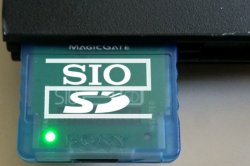
Does anyone know if these are the minimum components needed to work, or do I need to install a capacitor?
Tested on a 50001 and 77001 but was unsuccessful.


 I'm having the exact same problem now as @Thiago Barrios, with only the (minimum requirements) 47 ohm resistor and the "inversed" microSD connector installed on the board. It makes my PS2 turn off when it's connected to a MicroSD card.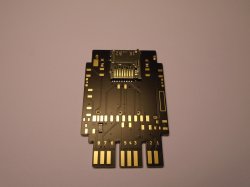
 problem fixed, 2+ pins on the MicroSD socket connector were touching from the soldering and shorting. It looked fine at first by eye, but with a multimeter and magnifying glass the problem was found.
Utilice un traductor la próxima vez. No me importa publicar en su idioma nativo sino en inglés y también ayuda si alguien está buscando información para solucionar el mismo problema.
Utilice un traductor la próxima vez. No me importa publicar en su idioma nativo sino en inglés y también ayuda si alguien está buscando información para solucionar el mismo problema.
[ADJUNTAR=completo]35845[/ADJUNTAR][/CITA]
yes, all right


