

Vendest
Member
Hi, just checking if someone encountered issues loading Blu-ray PS3 game disc after update 4.90?
I have 3 x PS3s and can confirm that all 3 were reading disc fine under 4.89.
- PS3 slim CECH-2000B updated with Evilnat 4.90 CEX does not read disc anymore.
- PS3 slim CECH-3006B updated with Official firmware 4.90 from PSN does not read disc anymore.
- PS3 FAT CECHA01 still on Evilnat 4.89 can read still read disc.
It exhibits the same pattern, the disc seems to reload 20~30s after first insert but nothing shows on XMB, no errors, nothing.
Thanks
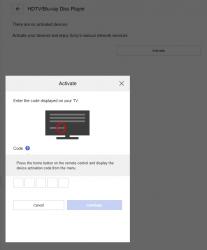
Edit: So apparently it is need to enter new activation code for Blu-ray as per below screenshot, the description on how to obtain the code is far from clear if someone knows how to proceed from here?
I have 3 x PS3s and can confirm that all 3 were reading disc fine under 4.89.
- PS3 slim CECH-2000B updated with Evilnat 4.90 CEX does not read disc anymore.
- PS3 slim CECH-3006B updated with Official firmware 4.90 from PSN does not read disc anymore.
- PS3 FAT CECHA01 still on Evilnat 4.89 can read still read disc.
It exhibits the same pattern, the disc seems to reload 20~30s after first insert but nothing shows on XMB, no errors, nothing.
Thanks
Edit: So apparently it is need to enter new activation code for Blu-ray as per below screenshot, the description on how to obtain the code is far from clear if someone knows how to proceed from here?
Last edited:


