PS2 [Open PS2 Loader] Game Bug Reports

SLES-506-06-COV.png


I decided to test State of emergency (SLES_506.06) through HDD,
because of a this report:
https://github.com/ifcaro/Open-PS2-Loader/issues/158#issuecomment-448377530.

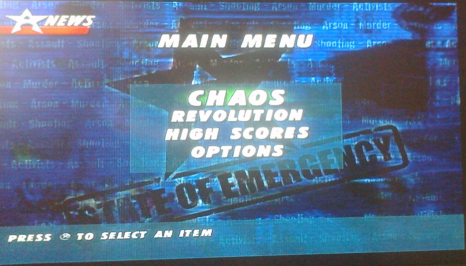
This game seems to work with OPL 0.9.1 & 0.9.2 (without any compatibility modes).
I mean with these versions I can pass 1st loading screen and enter Main menu, start "CHAOS", etc:
state-of-emergency-main-menu.png

I haven't test this game further for now, so probably MODE 2 and MDMA 0 is needed.

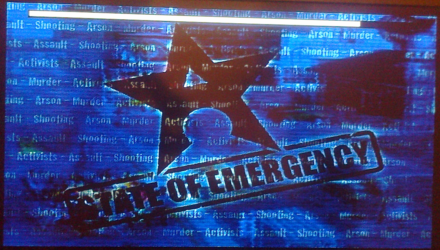
With OPL 0.9.3 or higher (e.g. 1220) I can't pass 1st loading screen:
state-of-emergency-loading.png

No matter how many compatibility modes I'll enable, MDMA 0, I just can't pass it.
 
Would you mind trying it with an OPL-Build that has support for a manually configurable 'Call Back Timer'?

I suppose it could be interesting to test those other two games with it as well... (I suppose it won't work for the one, which accesses the disc through the audio-drivers or similar.) ;)
 
It didn't need CBT before, so I doubt it's a problem. Besides, the CBT value had been carefully optimized for Mode 1 in 0.9.3.

@jolek, can you try higher speeds for Mode 1 + Mode 3 & 6? Go with 100 kB/s increments, if you can.

BTW, this game is compatible with HDL 0.8c, so I highly doubt it does anything special.
 
It didn't need CBT before, so I doubt it's a problem. Besides, the CBT value had been carefully optimized for Mode 1 in 0.9.3.
Which is exactly, why it might have broken some games as well!

It's better to simply test that as well, even tho' you doubt it and would rather want to add more compatibility-functions... That doesn't mean it isn't worth a test, especially because it does NOT need ANY work on OPL just for a test... The builds are available and I merely stated that it would be interesting, to test it at least. So again, I am just stating facts.


Regarding HDL... Like I said in the beginning (which started the whole controversy).
OPL is more performant in multiple ways...


And to put it blantly... The difference between 'bandwidth' and 'answer'-time is NOT marginal and just saying 'speed' doesn't represent the issue appropriately, so this is not just 'mere semantics'.


Multiple users tried to point out to you, that the bandwidth-control merely has a side-effect of causing a game to work on some setups... The same bandwidth-limit will probably not work on setups with other storage-devices, if it is a timing-issue!

That means your workaround (for) the issue might not even work on multiple setups (+ only for those 2 games).

That is simply not a proper fix in development-terms... You might not agree on it, because obviously everything I write is just a load/lot of crap, right?
This would however not change the fact, that this statement remains just that... Factual... (and if I am wrong about that, I'd appreciate a dev to chime in and say so)


On another note: That one person tried to write a patch for it and did not succeed is neither a proof that noone else can patch it properly, nor does it invalidate the fact that this patching indeed IS the best approach to get the best compatibility (and performance as well), hard-&software-wise (especially on our target-platform with it's limited capabilities, where we need to save RAM and CPU-cycles)!


I feel kind of bad to quote Ben S., but he's right in that regard and someone pointed that thing out to me a few months ago.

Here the quote:
Facts don't care about feelings!
 
Last edited:
Which is exactly, why it might have broken some games as well!
But it didn't need CBT when it worked.
Multiple users tried to point out to you, that the bandwidth-control merely has a side-effect of causing a game to work on some setups... The same bandwidth-limit will probably not work on setups with other storage-devices, if it is a timing-issue! That means your workaround (for) the issue might not even work on multiple setups (+ only for those 2 games).
That is nonsense. There might be slight variations via SMB (which is its nature - that's why it's the least reliable option), but it will be the same with the OPL-compatible HDD and USB devices. Also, as it has been pointed out multiple times to you, this is about timing, which we cannot control precisely because of the nature of software CDVD emulation. Realistically, the only thing we can do now is to try different speeds and try to match the timing from a real CDVD, which has variable speeds due to moving through the entire optical disc and having inherent error-correction procedures.
That is simply not a proper fix in development-terms...
The games work perfectly with either 1200 kB/s or 850 kB/s (depending on the game and/or the device used, but 850 kB/s is compatible with both Shadow Man and PS on all devices). That is a fix. Whether the speeds will be picked up automatically via some blacklisting mechanism or picked up manually by the user, the outcome is: the games work perfectly, therefore they are fixed. Everything else is pseudo-semantics. Not even real semantics.
 
Last edited:
But it didn't need CBT when it worked.
Indeed... The CBT had another value before. That change has fixed some games but also could have broken other games.

That is nonsense. There might be slight variations via SMB, but it will be the same with tthe OPL-compatible HDD and USB devices.
Is that a fact or just your opinion again?
You are just assuming things again... 'there might be'... Alright!

Also, as it has been pointed out multiple times to you, this is about timing, which we cannot control precisely due the nature of software CDVD emulation.
These replies were directed at you! I didn't even take part in the thread anymore since how many pages?

LOL... I did understand, that it probably is a timing-issue from the very first reply to you! But you didn't read it obviously... Page 6

Shadow Man: 2econd Coming is a CD game. Since the CD reading is slower, maybe the game is especially prone to glitches if the speed is above a given value? I'm guessing here because I don't have it for testing, but I think it just glitches on 7200RPM HDDs, even with MDMA-0. The only difference with USB would be the reading speed, right? If it works from USB, then the only logical reason for that is slower reading speed.
It is not 'the only' but 'one' possible reason, why it works via USB! ;)
...and you were also wrong that solely the bandwidth is different on those devices...


I am the first tester of OPL (back then USBLD), when it had no GUI and no functionality beside loading a 'MYGAME.ISO' from USB. It wasn't known to anyone and certainly not open back then, but was intended to be open-source right from the first release)
I do know these things since nearly a decade...

In fact I told @Jimmikaelkael and @ifcaro about their projects and the idea of an SMB/LAN-Loader was mine as well, lol (due to the way it already could get the iso from any input-device, SMB/LAN was an interesting thing to try it with).

You are just assuming things, without any factual checking if your statements are correct.
For well over 8 pages now...

Realistically, the only thing we can do now is to try different speeds and try to match the timing from a real CDVD,
Like I said before... I agree... We should have it (a setting to control the read-speed of Mode 1) in a test-build atleast!
Adding the manual CBT-Control back as well (at least for those Test-builds) would be interesting as well.

But you don't like to see that I am agreeing on something with you, because you just want to be 'confrontive', since you are butt-hurt if someone doesn't agree or better 'fall for your false claims'.


However... No, that is not 'the only thing we can do'... Patching the root is a much better approach if applicable!

which has variable speeds during reading due reading from a disc and having an inherent error-correction needs.
Which error-correction are you referring to? We are reading from a file and not the disc... I assume you mean that we should emulate the time this needs as well?! (Edit: Alright, I saw your Edit now.)

The games work perfectly with either 1200 kB/s or 850 kB/s (depending on the game and/or the device used, but 850 kB/s is compatible with both Shadow Man and PS on all devices).
It is not... A 'fix' actually fixes the root of the issue (i.e. like the pcsx2-guy's or @sp193's approach is).

Your approach is just 'fixing cosmetics'... It doesn't fix the root-cause and it doesn't prevent the issue from happening again on different Hardware.

I can give these games a test on an HDD and an SSD, or via LAN on a Slim (and obviously on USB). I wonder if it will work in every case with your approach...

That is a fix.
It doesn't fix the root of the cause, so no... This is 'fixing cosmetics', thus not avoiding the issue from happening on different hardware/setups.

These are all typical suggestion from a guy who has no clue what he is talking about, but wants to have a talk... Sorry if you get butt-hurt about me being too direct and honest...
But we had that kind of suggestions based on assumptions in the past from other persons as well...

But you were already butt-hurt about my first replies and are not able of a factual discussion...

Assumption here, misinformations there, 'maybe', 'could', 'would'... Lol... Keep it up! I will leave this topic and wait for it (the issue with those games) being resolved BY YOUR APPROACH (bandwidth-limit-change).

I really hope that if SP193 or anyone else has found a fix, that he might keep it until we see the test-results of these games and your approach on multiple setups!

Whether the speeds will be picked up automatically via some blacklisting mechanism or put picked up up manually by the user, the outcome is: the games work fine, therefore there are fixed. Everything else is pseudo-semantics. Not even real semantics.
Both of these approaches you mentioned here are just 'fixing cosmetics'...

The way the pcsx2-guy (I can't remember his name.) and SP193 are trying/have tried it, are fixing the root of the problem (if successful) and that is the only proper and valid fix, especially for this platform.

Oh... When you want to point out that 'more accurate cdvd-emulation' would be a proper fix as well, then you are right!

But:
  1. This would need code to run... It is so simple really... Every single extra-code which would run during run-time of a game would be increased for every game, thus breaking other games... We already do break some games and then they work again, due to some rather small code-changes which increase the footprint of OPL's in-game-code in RAM.
  2. A proper fix at the root of an issue is desirable... Ever! Only a fix at the root is a fix... Everything else is 'fixing cosmetics'. You might not agree on that, but I bet every developer would.
  3. A proper fix at the root can also yield a higher performance, thus we would not need to be limited to slower bandwidths ('speeds') and often this kind of fix makes some modes redundant (less modes for a game need to be used...)
  4. etc.
 
Last edited:
For now it's a different problem.
I mean the game, menage to pass first loading screen without any additional modes in OPL 0.9.1 & 0.9.2.
The speed performance hasn't been increased in OPL 0.9.3 through HDD.
I have also tried MDMA 0, many variations of modes (including 1+3+6).
Maybe later this game seems to have problems, but for now let's stick to what we know.

I understand that some games may have different compatibility mode for each release, e.g.:
Marc Ecko's Getting Up: Contents Under Pressure plays without any compatibility modes with OPL 0.9.3,
for OPL 1200 it needs mode 3+6.
Metal Arms: Glitch in the System do not any modes in OPL 0.9.2, with OPL 1200 this game needs modes 1+2.
 
  • Like
Reactions: TnA
@jolek: He's correct on that one...

But he won't like me agreeing to something he said, lol.


Nevertheless THX for some additional Mode-changes in your post (from old to new versions).
 
Stutters Through HDD?
Yes. Onimusha 2 is garbage through HDD in 0.9.2. There was a performance problem within the code of OPL. @sp193 managed to fix that, for which I love him ever since. Onimusha 2 is perfectly smooth starting from 0.9.3. I never even go back to 0.9.2 - that version simply has bad performance. It didn't just happen in Onimusha 2, you see. For example, Xenosaga I-II also had awful stuttering from HDD before 0.9.3. It was playable, but it didn't work right. Oh, and I don't mean any FMV stuttering. This was happening in-game, with 3D graphics.
 
Last edited:
@jolek:

I am not specifically sure for Onimusha2, but there were multiple things which could cause games to also stutter from HDD...

Some are rather not related to the performance-increase (which I still agree is there) of the 'core', but rather things like answering some cdvd-calls in the wrong order or in an unexpected time-frame!

So I am not sure about it being a cause for the game he mentioned (Onimusha2), but he is correct that the performance (which is NOT just bandwidth) has indeed increased and you do/might not ever see any difference in games, but it (a performance-increase compared to older versions) is there!
 
Last edited:
OK, jolek asked me to test State of Emergency and I have this to report: the game works perfectly with both the vanilla 0.9.3 and latest beta (1220).

However, this games needs a specific set of modes to work. The zen combination™ is this: MDMA2 + Mode 2 + Mode 3 + Mode 6 + Mode 8.

If you change MDMA to 0 or 1, it will fail. UDMA0 will also work, but it might be too fast, so I recommend MDMA2.

UDMA1, 2, 3 and 4 don't work at all with this game.
 
Last edited:
  • Like
Reactions: TnA
Once I menage to run it with (OPL 1220) MDMA1 + Mode 2 + Mode 3 + Mode 6 + Mode 8.
Next time I was unable to do it again, I'm getting suck at 1st loading screen.
MDMA2 is not helping me.
I've 7200 RPM HDD inside my PS2.
After so many test I forgot through what method I menage to run it (wLe, FHDB menu).
ysz.gif
 
  • Like
Reactions: TnA
Once I menage to run it with (OPL 1220) MDMA1 + Mode 2 + Mode 3 + Mode 6 + Mode 8.
Next time I was unable to do it again, I'm getting suck at 1st loading screen.
MDMA2 is not helping me.
I've 7200 RPM HDD inside my PS2.
After so many test I forgot through what method I menage to run it (wLe, FHDB menu).
ysz.gif
Turn Mode 1 OFF. It will kill the game.

It works every single time with this specific combination: MDMA2 + Mode 2 + Mode 3 + Mode 6 + Mode 8

I checked both wLe and FHDB. It doesn't matter.
 
Read my post, I haven't enable mode 1. MDMA1 is a different thing. ;)
It will not work with MDMA1, anyway. I wrote it above.

I'm making sure you have Mode 1 turned OFF.

The combination I've posted works each time for me and the game works perfectly. I checked the gameplay as well.

The test was done with vanilla 0.9.3 and 1200.

Of course, you need to turn off GSM etc.
 
Yepp... That's quite likely due to a different setup!
I would bet it would work for @jolek as well, if he had the same setup (same HDD, etc.).


Edit: Oh... @jolek: Would you mind trying it EXACTLY like @Grahf did with the exact same version/build?
 
Back
Top