PS2 [Open PS2 Loader] Game Bug Reports

Hello everyone, there is a problem with the new OPL 1776
it looks like this when we start a new game with a loading configuration, it does not start, but when we take out the memory card, the game starts
View attachment 34785

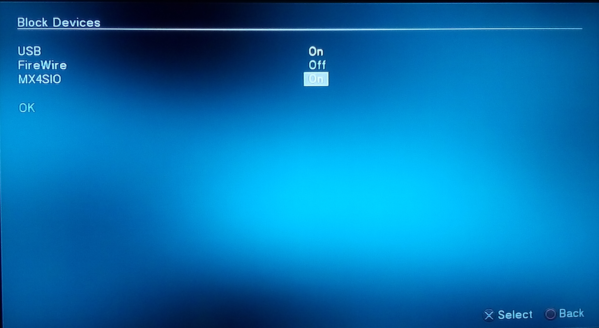
Can you check if you enable MX4SIO in Block Devices:
Block-devices-OPL.png

If yes, turn it off.

Additionally there is a problem with saving setting...
Could you launch OPL 1776 and setting twice? Yes twice...
 
You should have at least 5 peaces of your game (Max Payne):
...SLUS_202.30.00, ...SLUS_202.30.01, ...SLUS_202.30.02, ...SLUS_202.30.03, ...SLUS_202.30.04 + ul.cfg.

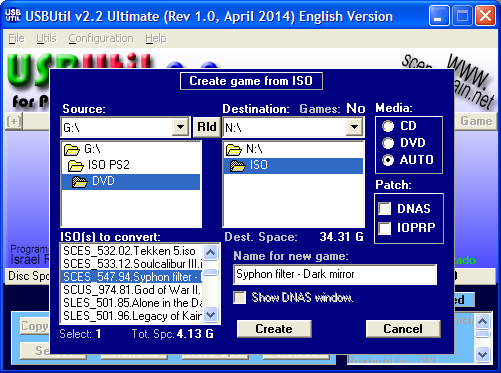
Could you please use USBUtil v2.2 to which previously I gave you link?
Run it as admin.

Do not patch (DNAS\IOPRP) your ISO:
image.png


Instead of de-fragmenting.
1. Copy all data to your HDD.
2. Do a quick format of your removable drive.
3. Copy only ...SLUS_202.30.00, ...SLUS_202.30.01, ...SLUS_202.30.02, ...SLUS_202.30.03, ...SLUS_202.30.04 + ul.cfg
to this drive.
If everything will be fine copy remaining files also on this (removable) drive.
thx that worked
 
Berserk: Millennium Falcon-hen: Seima Senki no Shou SLPM_656.88, seems to have a problem with newer OPL versions:

Mostly, the game just works perfectly, but on save-points or at the end of a level, if I enter the option "The world of Berserk", it freezes the Ps2 with a permanent buzzing sound.
I'm playing on a Ps2 slim through SMB.

With OPL 0.9.3 this problem is not present.
I'll test the game with some other newer OPL versions to be sure and report it more precisely.
 
Berserk: Millennium Falcon-hen: Seima Senki no Shou SLPM_656.88, seems to have a problem with newer OPL versions:

Mostly, the game just works perfectly, but on save-points or at the end of a level, if I enter the option "The world of Berserk", it freezes the Ps2 with a permanent buzzing sound.
I'm playing on a Ps2 slim through SMB.

With OPL 0.9.3 this problem is not present.
I'll test the game with some other newer OPL versions to be sure and report it more precisely.

Did you try mode 1+6, 1+3+6?
 
@jolek, thank you very much. :adoration:
------------------------------------------------------------------------------------------------------------------------------------------
In this past weeks i have continued testing and researching the Tales of the Abys game, and i want
to record it here in case it can be of use to a developer.

I tested the game with more speeds than Mode 1 but it freezed.
I used the opl_hdd Beta 2.elf & HDLoader and it was freezed too.

So i tested the game on the PCSX2 emulator using the save game, and the game works fine,
music works fine in the field and game doesn't freeze.

I looked up information about the past of this game on the PCSX2 and found that before it worked well, it also
had SFX / Music / Freezes related issues.

Specifically on the years 2010/2011 a PCSX2 developer commented that the sound related freezes are
caused by CDVD reads overwriting IOP memory:

https://forums.pcsx2.net/Thread-PCSX2-bug-s?page=2

https://forums.pcsx2.net/Thread-Tales-of-the-Abyss-Sound-Effects-Issue


So i thought it would be interesting to be able to run the game using the OPL on the PCSX2, to see if
problems occur and use the debug option of the PCSX2.

I have managed to successfully load games with the OPL in the PCSX2 in USB mode thanks to a USB plugin
that exists for the PCSX2, (using the "ima" format for creating the game image and files).

But unfortunately there is a limitation of 2GB when i use the Ultraiso to create the image in "ima" format, i
don't know if this limitation is given by the USB plugin or by the "ima" format itself.

And since the game is 3.76 GB in size, i can't test this game through OPL in PCSX2.

I asked the developer of the PCSX2 to find out how they fixed the CDVD problems of this game, and he
answered me the following:


It is clearly that this game is affected about what is explained here, and i hope this helps to any developer in
any way to find a future fix for OPL.

Searching more info, i found also that the PS2 emulation for PS3:

https://www.psdevwiki.com/ps3/PS2_Emulation#Inside_ps2_emu.self

And for PS4:

https://www.psdevwiki.com/ps4/PS2_Emulation#Game_ID.2FDiscID_in_PS20220WD20050620.crack

They have marked Tales of the Abyss in the last table with patches or fixes with:

0X0A = CDVD_READ_DELAY

Ace Combat 5 also appears with this command of 0X0A, and this game have a freeze in the OPL.
They don't have Tales of Legendia, but this game also have music issues in the world map on the OPL, and
maybe have the same cause problem as Tales of the Abyss.

Best regards.


Good evening everyone.

I would like to thank you El_Patas for your amazing research in regards to the problems with this game. hope the freezing problems get fixed in the coming versions of OPL.
So CDVD reads overwriting IOP memory is the cause of the issue is from what I understood from your research.
Just for the record I tried the latest stable build 1.0.0 and the latest beta build v1.1.0-1781 recently
They still yield the same results sadly. The game will freeze in the same location every time. The changelogs in these version didn't mention a fix for the this game. But I thought to give it a try nonetheless.

Best regards
 
Good evening everyone.

I would like to thank you El_Patas for your amazing research in regards to the problems with this game. hope the freezing problems get fixed in the coming versions of OPL.
So CDVD reads overwriting IOP memory is the cause of the issue is from what I understood from your research.
Just for the record I tried the latest stable build 1.0.0 and the latest beta build v1.1.0-1781 recently
They still yield the same results sadly. The game will freeze in the same location every time. The changelogs in these version didn't mention a fix for the this game. But I thought to give it a try nonetheless.

Best regards
@RetroGamer90s, thank you very much, yes, i did a lot of long research on the problem with the Tales of the Abyss game.

And yes, that seems like CDVD reads overwriting IOP memory is the cause, at least it's a CDVD problem.

But don't expect the game to have a fix in the next version of the OPL, there won't be any fixes for any game.

All game specific fixes that were applied for the release of OPL 1.0.0 were done by developer SP193 who has long since retired from OPL development.

Now there are no developers left who have the skills to debug and fix game problems, least of all a difficult problem like the one in Tale of the Abyss, or they don't like work on games, i don't know.

You can't say never, maybe in the future some new developer will appear who has the ability to debug and fix serious problems in games, but i would not wait it if you want to play games that have a serious problem with the OPL.

My advice for games that don't work with OPL is to try other older loaders like HDLoader (HDD) or PS2ESDL (USB), or play from disc using any backup loading method like ESR, modchip, etc, or play with the original disc, or play the game with the PCSX2 emulator.

Best regards.
 
Did you try mode 1+6, 1+3+6?

It doesn't help.

The game usually freezes at the first attempt to access "the world of Berserk" menu. Sometimes though it manages to enter the first time, but if you exit and enter the menu again it will freeze.
Enabling MODE 1+2 I was able to enter the menu 2 times once (it freezed on the third attempt), but it could be a coincidence and in any case it doesn't actually solve the problem.
This time, I tested with OPL 1.1.0. Last time I was testing with a version some revs before 1.0 release (and the bug was already present).

It'd need some good testing to know on wich OPL version the bug started.
At least up to OPL 1319 everything is fine (I can enter "the world of Berserk" menu as often as I want without any problem).
 
Salut @Peppe90

Je constate que tu fais des tests (et aussi, tu joues) à certains jeux que je ne connais pas et que tu pourrais entrer dans la liste que tu connais. Indique aussi la version du OPL que tu testes dans les commentaires associés au jeu soumis.

Merci par avance et à très bientôt.

Algol "le papy".

In English via G-Trad :

I see that you are testing (and also playing) some games that I do not know and that you could enter the list that you know. Also indicate the version of the OPL that you are testing in the comments associated with the game submitted.

Thank you in advance and see you very soon.
 
Salut @Peppe90

Je constate que tu fais des tests (et aussi, tu joues) à certains jeux que je ne connais pas et que tu pourrais entrer dans la liste que tu connais. Indique aussi la version du OPL que tu testes dans les commentaires associés au jeu soumis.

Merci par avance et à très bientôt.

Algol "le papy".

In English via G-Trad :

I see that you are testing (and also playing) some games that I do not know and that you could enter the list that you know. Also indicate the version of the OPL that you are testing in the comments associated with the game submitted.

Thank you in advance and see you very soon.

Hi Algol. I still have some games (about 20/30 games) from my old testing to add to your list, but the PC I was using (where I have all the links, Ps2 related programs, etc...) has a driver problem on the wireless board and it's a trouble to make it to connect to internet.
I'm from my sister PC now, but can't use it very much. I'll see what I can do.

Best Regards!
 
virtua fighter 4: evolution - was stuttering - change mode to 1 and mdma to 0 and works fine :victorious:

How about add at least min info...
OPL version, original NA or 3rd party...

Maybe even:
Code:
Title =
ID =
Media =
OPL version =
Device =
Compatibility Mode(s) used =
VMC =
PADEMU =
IGR =
Compatible =
MD5 Checksum =
Notes =
 
ok updated, i don't see option to edit post:

Title = virtua fighter 4 evolution
ID = slus 206.16
Media =
OPL version = 0.9.6
Device = seagate 500gb HDD, 3rd party gamestar NA
Compatibility Mode(s) used = mode 1 , mdma - 0

virtua fighter 4: evolution - was stuttering - change mode to 1 and mdma to 0 and works fine
 
ok updated, i don't see option to edit post:

Title = virtua fighter 4 evolution
ID = slus 206.16
Media =
OPL version = 0.9.6
Device = seagate 500gb HDD, 3rd party gamestar NA
Compatibility Mode(s) used = mode 1 , mdma - 0

virtua fighter 4: evolution - was stuttering - change mode to 1 and mdma to 0 and works fine
@hightides, reports made with the crapy clone Gamestar NA are not allowed, and will not be taken into consideration,
these clone adapters are notorious for incompatibility issues that they have that do not exist in the original NA.

I never heard that the Virtua Fighter Evolution stutters with the internal HDD.

That the game requires Mode 1 and MDMA 0 seems typical of those clone adapters.

It is possible that it will happen with the original NA, but someone would have to test it to confirm it, and only
using the original NA will the report be taken as valid.

And OPL "0.9.6" does not exist.

Best regards.
 
I seems to remember this game has a little single stutter at the beginning of the fight. I'll check it and edit the post.
In the latest OPL v1.1.0 is possible that the games stutters in the videos with the internal HDD and
the original NA, because a problem caused by the new ps2toolchain compiled with the gcc 11.
This do not happens with OPL 1.0.0.

I don't know in-game, but if you have the original NA you can report your tests.

Best regards.
 
@hightides, reports made with the crapy clone Gamestar NA are not allowed, and will not be taken into consideration,
these clone adapters are notorious for incompatibility issues that they have that do not exist in the original NA.

I never heard that the Virtua Fighter Evolution stutters with the internal HDD.

That the game requires Mode 1 and MDMA 0 seems typical of those clone adapters.

It is possible that it will happen with the original NA, but someone would have to test it to confirm it, and only
using the original NA will the report be taken as valid.

And OPL "0.9.6" does not exist.

Best regards.

actually other people in this thread have reported it stutters at same points it stutters for me. I have the original NA and have had it for over 20 years. So far, haven't noticed issues with my gamestar na.though maybe I can test VF4 on the og NA to see.

OPL 0.9.6 does not exist.
The last version from branch 0.9.x was 0.9.3.
Next one is 1.0.0.
Currently the latest stable is v1.1.0.


3rd party Network Adapters (especially with SATA) in most causes need mode 1 for almost all games...
sorry - i meant to say 0.9.3

and so far not had any issues with my NA, i have original and 3rd party NA.

In the latest OPL v1.1.0 is possible that the games stutters in the videos with the internal HDD and
the original NA, because a problem caused by the new ps2toolchain compiled with the gcc 11.
This do not happens with OPL 1.0.0.

I don't know in-game, but if you have the original NA you can report your tests.

Best regards.

No no, I'm talking from long ago (years ago). It is something that could happen also with other fighting games and from other devices too (i.e. with tekken Tag it can happen from SMB, more or less noticeable depending on settings. Just a little stutter at the very start of a battle, as soon as the characters are displayed. After that everything is 100% smooth).

Anyway I'll report back asap.
 
Last edited by a moderator:
actually other people in this thread have reported it stutters at same points it stutters for me. I have the original NA and have had it for over 20 years. So far, haven't noticed issues with my gamestar na.though maybe I can test VF4 on the og NA to see.
That you don't noticed issues wtih the gamestar NA do not means that don't have them, it is proven that
the clone gamestar have issues and less compatibility compared with the original NA.

Test the game with the original NA and the OPL v1.0.0.

Best regards
 
Virtua fighter 4 Evolution SLES_516.16

It has a couple stutters in the main menu (just for the first couple seconds you can notice some stuttering), then when starting a fight, there's a little stutter as soon as a new stage is displayed (very subtle, depending on the stage, i.e. if the camera doesn't move very quickly, it is impossible to notice).

MODE 1 or MDMA0 solve the menu stutter, but it remains the sublte, single hiccup on stages start.

Tested with original NA with OPL 1319, 1.2.0 (and also a DB version). It behave exactly the same as I remember it was on OPL 0.9.3
I forgot about the issue since it's not a problem at all, I used to play it without any MODE, since also the menu stutter is very subtle and it happens only on the first menu access.

@hightides Is this the problem you're referring too? And btw, never enable MODE 1 and low DMA simultaneously. MODE 1 already slow down the reading speed (lower than MDMA 0), so if you enable MODE 1, leave UDMA4.

Generally you should do so:

If a game has stutter (usually it happens on FMVs/Menu), audio problems or other issues seemingly related to speed, start lowering the DMA one by one, stopping as soon as the issue disappears, so to preserve the greater speed possible. MODE 1 is the last (slower) choice. Also MODE 2, sometimes can solve those kind of issues without compromising the loading speed.

About VF4 specifically, it loads in a blink in any case from HDD, so you're good also with MODE 1
 
Back
Top