PS3 Overheat problems & CELL delidding

I don't think its possible. My PS3 was 11 years old when i changed thermal paste for first time. When i opened up PS3 and separated Motherboard from Heatsinks, it was easy. The old paste on IHS was completely dried up and crumbled....and it was not having any stickiness. So separating Motherboard from IHS was not a problem.
This depends of the paste it had before, you are thinkng only in the original from factory, but there are some that becomes very strong

I have a friend that bought a PS3, and i was chatting with him (live) when he was opening it for first time, he was having problems trying to unstick the heatsink, and at some point after he removed it he was like... "OMG, my PS3 doesnt have an IHS in RSX !!!"
And me... "Thats very weird, are you sure ?... have you took another look to see if it have some other modifyed part?"
And after few minutes he was... "OMG i found the RSX IHS... it was sticked in the heatsink !!!"
So... he made a RSX IHS deliding just by pulling from the heatsink, lol

This is not going to happen in CELL because is sticked to the IHS with a silicone cord, that silicone is flexible and is not going to "break" so easilly... but that flexibility of the silicone allows the IHS to move... and thats bad

Imagine you have the paste under IHS very dry, like talc powder... if you move the IHS up and down and rotate it the powder could cummulate in a small spot... this changes the height of the IHS and only touches the CELL DIE in that spot
Is the only explain i can imagine for having so huge temperatures in CELL

-------------
Btw
The wires for the tristate are not related, you should not change them
DEX doesnt causes an excessive overheat, this is not the cause of the huge overheat
An excess of thermal paste cant be the cause of that huge overheat
The thermal sensors doesnt uses to fail (i never did read a report about it), and you can see if are working just by looking at how the numbers varies
 
Last edited:
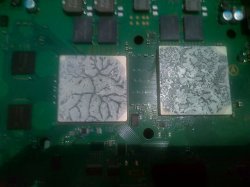
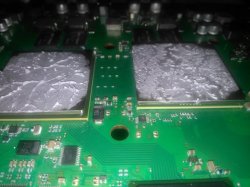
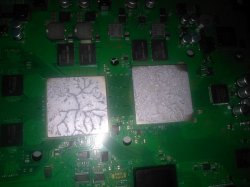
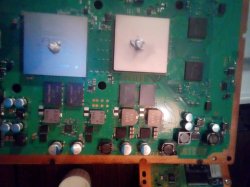
Ok i'm back, in my pictures you will see the state of the paste after opening my ps3. I also have a short video when i'm pulling the motherboard to see the paste on the cpu and rsx.
And i have uploaded on youtube my video after i assembled my ps3.
You will see and hear the problem and see the temps.
Last picture is showing how much paste i added
 

Attachments

  • 69684301_495594047921309_891852110793015296_n.jpg
    69684301_495594047921309_891852110793015296_n.jpg
    134.7 KB · Views: 161
  • 69738320_520479345388524_671510045011214336_n.jpg
    69738320_520479345388524_671510045011214336_n.jpg
    65.6 KB · Views: 169
  • 68952607_556893061781848_4778928076383846400_n.jpg
    68952607_556893061781848_4778928076383846400_n.jpg
    62.7 KB · Views: 160
  • 69654812_1376378775859209_704442870689431552_n.jpg
    69654812_1376378775859209_704442870689431552_n.jpg
    70.3 KB · Views: 163
Try now and let me know
Yes, i could watch it now

What your fan does in the video is something i never heard about before... it accelerates, then it stops... and repeats the same in a infinite loop o_O
And you are telling the fan doesnt stops if you enter in the fancontrol utility ?


Edit:
Hmmm, what happens if you remove the internal hdd and turn ON the PS3 without hdd ?.... the fan does that loop stopping and accelerating again ?
 
Yes, i could watch it now

What your fan does in the video is something i never heard about before... it accelerates, then it stops... and repeats the same in a infinite loop o_O
And you are telling the fan doesnt stops if you enter in the fancontrol utility ?


Edit:
Hmmm, what happens if you remove the internal hdd and turn ON the PS3 without hdd ?.... the fan does that loop stopping and accelerating again ?
OMG i didn't thought about that.. I'm going to try it out
 
Hmmm, what happens if you remove the internal hdd and turn ON the PS3 without hdd ?.... the fan does that loop stopping and accelerating again ?

I started my ps3 up without the hdd and it's different now. it took longer to speed up the fan. Now as i'm writing this comment the fan sped up.... but it is not that fast and noisy as in my video..

I think i should make a video again now so that you can have better understanding.
 
This happens
From what i see here, the CELL is at a critical point, about the fan decreasing and increasing, you saw on the Fan Utility how the CELL value was hovering around 86/87ºCs, basically the Fan Values are acting like it doesn´t know what it wants, so from 86 its a value,as soon as it reaches 87 its another value, regarding the fan loop, that its an odd issue, usually when a Chip is at a critical point, the fan will stay at a stable value, until the chip cools down the syscon will send the same value to the fan, so perhaps here is a syscon issue or at a firmware level, i never saw a toasty unit entering in a fan loop even at 87ºCs.

Now regarding without the HDD, of couse the fan will take a bit longer to kick in, the CELL is basiclly at 0% load, since there is no workload and firmware involved, but you saw how the fan doesn´t enter in a fan-loop, so perhaps there is something at a firmware level that needs to be checked.

Your only choice at the moment is to delid that puppy up, if you have the skills for it, and see the difference, the problem with the PS3 is these usless IHS,which till this day, are bloody annoying, lucky my CELL stays within the desired threshold of 60ºCs during this time of the year, on my CECHC04 60Gb, with a little office eraser mod,i did a while ago, mainly to avoid deliding it,as i am not confortable with it,ever since i delided my CECHG04 in 2011, ended up in a complete disaster.
 
From what i see here, the CELL is at a critical point, about the fan decreasing and increasing, you saw on the Fan Utility how the CELL value was hovering around 86/87ºCs, basically the Fan Values are acting like it doesn´t know what it wants, so from 86 its a value,as soon as it reaches 87 its another value, regarding the fan loop, that its an odd issue, usually when a Chip is at a critical point, the fan will stay at a stable value, until the chip cools down the syscon will send the same value to the fan, so perhaps here is a syscon issue or at a firmware level, i never saw a toasty unit entering in a fan loop even at 87ºCs.

Now regarding without the HDD, of couse the fan will take a bit longer to kick in, the CELL is basiclly at 0% load, since there is no workload and firmware involved, but you saw how the fan doesn´t enter in a fan-loop, so perhaps there is something at a firmware level that needs to be checked.

Your only choice at the moment is to delid that puppy up, if you have the skills for it, and see the difference, the problem with the PS3 is these usless IHS,which till this day, are bloody annoying, lucky my CELL stays within the desired threshold of 60ºCs during this time of the year, on my CECHC04 60Gb, with a little office eraser mod,i did a while ago, mainly to avoid deliding it,as i am not confortable with it,ever since i delided my CECHG04 in 2011, ended up in a complete disaster.
Thanks for tuning in this matter. I also think it is firmware related because it was not overheating before jailbreak. Also i really don't think i should proceed with the cooling paste procedures and the reason for that is because i know the values are not related to cooling paste. Cooling paste looks actually fine. I did alot of computer/laptop repairs where i also used always cooling paste for the cpu, i never had any problem.

Now my question is: What shall i do? Can you write me the steps?
I have E3 flasher in case i need it?
The reason why i ask for steps is because i'm new to this ps3 stuff.
I never knew what DEX means, or CEX etc.. There's too much developed..
So if i have now DEX, what shall i do?

After trying new firmware with bad results i will proceed with the IHS procedure
 
Wait a bit, dont try to remove the CELL IHS yet, i still think it has a problem in CELL... because one way or another the fan is common for CELL and RSX so is not normal for CELL to be so high over RSX
But after watching the new video i think it have also a problem with software because the fan should not stop at any time

Maybe what is happening is you have two (or more) plugins (or other custom stuff like the sm.self) trying to control the fan speeds... and there is a conflict in between them so the fan stops every X seconds then it starts again
Well... i dont know, as i said i never seen a fan that stops before

So if i where you i would try to format that hdd, or use a different hdd
Your motherboard is a DIA-002 (with NOR flash type), so when you replace the hdd is going to ask you to install the firmware from USB
Im not sure if that installation should be considered risky because we dont know how much is overheating with a new hdd... incase the PS3 shuts down in the middle of a firmware installation (because overheat) it could brick
Is good you mentioned you have an E3 though... in that case you could unrick it with the E3... but remember, made a flash dump of your actual flash contents (incase you dont have it already) before starting the firmware installation
And install exactly the same firmware version you have already
 
Last edited:
Btw... i mentioned it before but i feel like i should repeat it... by now you should not attach the plastic top and bottom shell of the PS3 for the tests

In a PS3 slim... just by removing the top plastic shell the temperature is reduced more than 5ºC
In a PS3 fat... i dont know how many, but you need to remove the plastic shell at bottom, i guess is going to be a lot (maybe around 10ºC)
So better do all the tests without the plastics... and be careful about the shorcircuits btw... if you feel like there is some part that is a bit loose or should not touch other part use some cloth in betweem them to isolate them

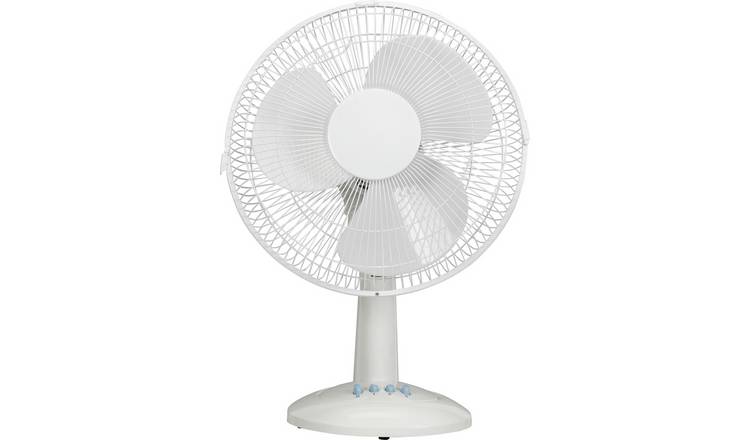
Aaaaand... use an external fan aiming at the heatsink metal block, like this
4251824_R_Z001A_UC17645637


You really need to do this kind of dirty tricks to keep the temperature under control... otherway if you keep using the PS3 at that high temperatures it could die eventually without any advise... it will stop working suddenly and good bye :/
 
Btw... i mentioned it before but i feel like i should repeat it... by now you should not attach the plastic top and bottom shell of the PS3 for the tests

In a PS3 slim... just by removing the top plastic shell the temperature is reduced more than 5ºC
In a PS3 fat... i dont know how many, but you need to remove the plastic shell at bottom, i guess is going to be a lot (maybe around 10ºC)
So better do all the tests without the plastics... and be careful about the shorcircuits btw... if you feel like there is some part that is a bit loose or should not touch other part use some cloth in betweem them to isolate them

Aaaaand... use an external fan aiming at the heatsink metal block, like this
4251824_R_Z001A_UC17645637


You really need to do this kind of dirty tricks to keep the temperature under control... otherway if you keep using the PS3 at that high temperatures it could die eventually without any advise... it will stop working suddenly and good bye :/

Okay thanks, i will try the things out tommorow. I'm from Belgium and i'll be home at 16:00. Going to sleep now.
I really do appreciate how you all want to help. I learned also alot just by reading everybody's brainstorms.
Goodnite
 
Before instaling the firmware is better if you keep the PS3 turned off for several hours, to allow it to return to ambient temperature
You know... the point is at the next boot (with the new hdd) you need to do the firmware installation as faster as posible
After that, turn off the PS3 again for a few hours, and be ready to install a fancontrol software... again as faster as posible, then configure fancontrol, and check temperature
So prepare everything well to install a new firmware and a fancontrol as faster as posible

Btw, you should not try to run 2 different fancontrol softwares in the same session... as mentioned before they could cause incompatibilities with each other and could result in weird failures

You are good to install the fancontrol utility, but dont initiate it together with webman
Before starting the fancontrol utility you should stop webman (or change webman confing and deactivate his fancontrol)
 
Webman can behave weirdly on FAT model but i don't think it put fan speed in loop as you see in the video.

I have installed both webman and control fan utility but use only once. I disable the dynamic fan control and put it on syscon in webman settings. Now i start control fan utility on payload mode every time i boot PS3. I am satisfied with CFU operation.

Also if you have a small table fan, it would be handy to keep it front of PS3 for better air circulation. You should do what @sandungas has advised.

But i am convince that you will need delidding.
 
So what shall i do now. What are the steps i have to take?
Will i need to use E3 flasher?
Thanks.
Well... we was discussing about the CELL overheat problems... but when you posted the second video and we realized the fan was stopping every X seconds this added another problem

So it looks you are having 2 problems, both are very bad but the fan stopping is easyer to fix because probably is related with software (i guess)

But i have doubts about why the fan was stopping in the video... you was not aware that is a bad idea to use several fancontrol softwares in the same session... so maybe all your software is fine but you was not using it correctly

What happens if you start the PS3 and stay idle in XMB (without running any other program, only webman)... the fan stops every X seconds too ?
 
In his XMB menu i see two fan control software. Webman and CFU. CFU is not an auto boot plugin. It doesn't start with every boot and you must launch it manually everytime from XMB to load it. Whereas webman fan control launches automatically on each startup.

When he starts PS3, he's already on webman (unless he has turned off dynamic fan control). But webman behaves strangely with old FATs and i don't use it.

Anyway, i would have advised him to quickly disable webman dynamic fan control, make it syscon. And use PS3 with CFU. But its too risky as his Temps are getting too high.

At this stage, i don't see much room for experimentation because CELL is dangerously overheating. That's why delid is the only option.


Also i don't think fan is actually stopping. Its actually going to low speeds after going high speed. When speed is slow, you can barely hear it and may think that it has stopped. Unless you can actually see it stop.
 
Last edited:
Well... we was discussing about the CELL overheat problems... but when you posted the second video and we realized the fan was stopping every X seconds this added another problem

So it looks you are having 2 problems, both are very bad but the fan stopping is easyer to fix because probably is related with software (i guess)

But i have doubts about why the fan was stopping in the video... you was not aware that is a bad idea to use several fancontrol softwares in the same session... so maybe all your software is fine but you was not using it correctly

What happens if you start the PS3 and stay idle in XMB (without running any other program, only webman)... the fan stops every X seconds too ?
I just deleted webman and CFU to see what would be happening.
I actually first deleted webman to see results but nothing.. then i deleted CFU.
Same old story happens..
So how do you guys advice me to put different firmware to ps3 hdd?
I also want to know if i can use SSD hdd.
I can handle the IHS so i still want to proceed with that action.
 

Similar threads

Back
Top