PS3 Overheat problems & CELL delidding

Yep, the difference in between the kryonaut and the mx-4 is going to be just 3ºC or 4ºC, in the link i posted appeared the exact numbers
Both are good, the kryonaut is a bit more expensive than the mx-4 but doesnt matters
The most important factor that could you make choose one or the other is how hard is to you to find them on sale
If you found a shop nearby with the mx-4 but without the kryonaut... go for the mx-4

In my PS3 i used the mx-4
But next time i will try to find the kryonaut
Ok thanks, i ordered it today.
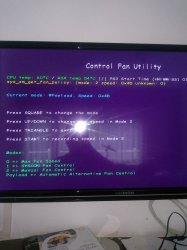
By the way: I played little big planet for more then 1 hour. Then i closed the game and started the fan control utility to check the temps.
Check photo
 

Attachments

  • temps after gameplay.jpg
    temps after gameplay.jpg
    110.3 KB · Views: 354
both of my ps3 are usually around 65 degrees C, but I have seen it go higher. the temp threshold that I use is 68, which is default. kinda sad that we live in an age where you have to worry about an electronic failing due to heat or something. yet, they still continue to push the envelope making systems that are less and less likely to last long.

edit: I've heard several people say that the ps4 pro gets very hot, like burn your hand hot.
 
both of my ps3 are usually around 65 degrees C, but I have seen it go higher. the temp threshold that I use is 68, which is default. kinda sad that we live in an age where you have to worry about an electronic failing due to heat or something. yet, they still continue to push the envelope making systems that are less and less likely to last long.

edit: I've heard several people say that the ps4 pro gets very hot, like burn your hand hot.
Really, default if temp is less than 80 on demanding game there's no problem. The only problem is with old ps3s which have shit solder which causes problems with mb/cpu connection. As the manufacturing node is bigger it has less chance of failure with high temp.

Ps4 pro...idk it's temp but it surely doesn't burn my hand but the fan is irritating when gaming on gow, it spins crazy loud and it's annoying. Xbox one x is super silent in the most demanding tests. This is according to what I have
 
Really, default if temp is less than 80 on demanding game there's no problem. The only problem is with old ps3s which have shit solder which causes problems with mb/cpu connection. As the manufacturing node is bigger it has less chance of failure with high temp.

Ps4 pro...idk it's temp but it surely doesn't burn my hand but the fan is irritating when gaming on gow, it spins crazy loud and it's annoying. Xbox one x is super silent in the most demanding tests. This is according to what I have
Weak solder? [emoji23]

thats-where-youre-wrong-kiddo-29194228.jpg


Sent from my G8141 using Tapatalk
 
Weak solder? [emoji23]

View attachment 20040

Sent from my G8141 using Tapatalk
Yes. Weak bga solder. That's why when you reheat your ps3 in oven it kind of melts them and allows them to reattach. That's why reballing is better(read: bga=ball grid array). And there are types of materials used for solder each allowing higher temperatures. Well fat ps3s atleast didn't had a good one which caused them to ylod
 
Yes. Weak bga solder. That's why when you reheat your ps3 in oven it kind of melts them and allows them to reattach. That's why reballing is better(read: bga=ball grid array). And there are types of materials used for solder each allowing higher temperatures. Well fat ps3s atleast didn't had a good one which caused them to ylod
I am not going to enter in much detail here lad, not going to throw any diss tracks here, but everyone already proven that the BGA isnt the issue on these machines, it never was from the start, its well described in my NEC/TOKIN Repair Guide, i myself have a C04 which had YLOD, never reballed or reflowed, just replaced the capacitors in question, and still runs till this day, with the original 2006 BGA Grid, so is no luck, its just common sense.

Reballing only worked for the wrong reasons, the reasons were the degradation of the NEC/TOKIN capacitors,which lead to insufficient supply of current to the CPU and the GPU, if one fails, the whole unit fails with it, until they are replaced, TOSHIBA laptops had a similar issue with the same capacitors,and by applying heat, they work again, but the time-frame is unknown, but extreme heat,seems to make them last longer, thats why reflow never worked for long,and the hair dryer worked only for 30 min.

The Lead Free aloy has a tolerance point of 217ºCs, at that temperature, the solder can be removed from the MB, the PlayStation3 inside is 70/80ºCs max, that temperature doesnt even make a dent in the BGA Grid, dont you find it odd that the only the Phats and 2000 Slims have the YLOD issue,and the preceding models the 2100 and above dont? Thats because $ony replaced the NEC/TOKINs with proper Tantalum Capacitors,which corrected the flaw,thus increased reliability, the same aloy was used all across generations, nothing changed, the same can be done to the Phats and 2000 Slims, if you want to bring thoes machines back, i had reballed PS3s with Lead-Free solder,and never lasted me as they should, and Reballing Centers,never guarantee you a proper functioning machine

The only console that is worth reballing,and is really need it, are the 1st Gen XBOX360, due to the ATI Chipsets from the era, indeed had bad solder joints, people just created this silly myth without any proper knowledge, and they payed for it,by getting ripped of,bigtime, but Reballing a PS3 at this day and age wont cut it, unless your know your BGA is corroded or you need a chip repalcement.

 
Last edited:
@place2b

Some information. The exact CELL RSX Temps vary during gameplay and XMB. Usually when you quit game and go to XMB, the CELL/RSX Temps drop by few degrees.

Looking at your Temps on XMB after gameplay indicates that you have good cooling now and you are ready to do some Temp testing. If you want to make proper testing of Temps. Here's what you need to do.

First you need to be interested in Temps and fan speeds during the gameplay. Also you need to be testing specific games. Control Fan utility is a good program but it does not show Temps and fan speed during gameplay. To see Temps and fan speed during gameplay, you will need webman. But do NOT use webman fan control and CFU together all it will cause problems.

1. Install webman.
2. I recommend do not use fan control software of webman for fat model as it can behave weirdly.
3. After Installation of Webman and restarting PS3. Do not launch CFU. Right away go to webman settings and disable dynamic fan control and put it on SYSCON.
4. Now your webman fan control is disabled.
5. Every time you start PS3, you MUST launch CFU after booting up. Never forget this because CFU does not autoload with PS3 boot.
6. To check your in game Temps, press PS button during gameplay and Press Start+Select. The Webman Temp and fan speed notification will pop up. If you hold Start+Select for few seconds, you will hear beep and Temp/Fan speed notification will become permanent. Now you can observe PS3 CPU/RSX Temps and Fan speed during gameplay.


Why webman dynamic fan control is not recommended for fat model? I have tried using it on my fat. It randomly and suddenly raise and drop fan speeds at undesired levels. For eg, the fan speed will drop to 30% during cutscenes and suddenly rise to 70% during gameplay. Also fan speeds go very high during startup of PS3. CFU doesn't have these problems.


Which games you need to be testing. The games that came at the end of PS3 life are the most demanding ones. Some specific games are The Last of Us, GTA 5 and Uncharted 3.
These games put max load on my PS3. Try checking Temps and fan speed during gameplay in these games on CFU.

If you can keep your old FAT PS3 under 70c and fan speed below 50% in these games. Then you have acceptable results. Try playing these games for couple of hours and find out.
 
I own a PS3 Slim CECH-2503A, does it require thermal past IHS, or just plain new thermal paste will do it?

Run some tests and see what CELL and RSX temps you have. Just install thermal paste on top of IHS. If you can control your Temps and fan speed at desired levels, no need to remove IHS.
 
Run some tests and see what CELL and RSX temps you have. Just install thermal paste on top of IHS. If you can control your Temps and fan speed at desired levels, no need to remove IHS.
Already delided cell never goes above 50 but rsx is always 10 to 15 degrees hotter but it must be of the thermal paste, all recommend mx4 which was sold out where I usually go bought instead mastergel maker, is good for cpu probably not as good for gpu, the stock thermal paste in top of the die was completely dry from factory. Also rsx die was blue instead of silver which indicates overheat problem. Need to buy mx4 on a complete lockdown economy [emoji4]
 

Similar threads

Back
Top