
POPStarter

PS2 POPStarter 2019/06/05

I've recently tried C-12: Final Resistance (SCES_033.64) with POPStarter from 2019\06\05 through USB.

This game has got strange issue.
If I select anything for the first time except options,
I've to wait ~90 s for that option to appear, including New Game, controller, sound, screen setup...
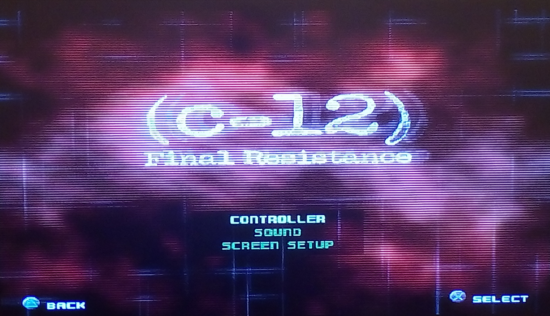
C-12.png

For the second time if I enter this option everything runs smooth.

There is also a problem with missing textures which can be in some way "fix" by adding into
CHEATS.TXT:
Code:
$COMPATIBILITY_0x07

For know this compatibility mode is not fully done, so except glitches.

There are no speech dialog's and subtitles in cut-scenes.
 
Hello Jolek,

i'm confused about what you posted here.
From what the text says that this USB drivers are from 14/01/2019, but in the download
says 20190605.

Then this means you compiled the last proto of POPSTARTER.ELF with the latest
USB drivers from June of 2019? or it is compiled with the ones from January 2019?

Best regards.
 
Hello Jolek.

I'm confused about what you posted here.
From what the text says that this USB drivers are from 14/01/2019, but in the download
says 20190605.

Hi.

Changelog for PS2 USB drivers is here:
https://github.com/ps2dev/ps2sdk/commits/master/iop/usb.
Currently latest drivers are from 25\01\2019.

Then this means you compiled the last proto of POPSTARTER.ELF with the latest
USB drivers from June of 2019? or it is compiled with the ones from January 2019?

This version was compiled on 05\06\2019 (2019/06/05) with USB drivers from 14/01/2019 by @krHACKen.
It is quite stable version from my few test...

More info from webarchive (look for post #2468):
https://web.archive.org/web/2019110...eads/ps2-pops-stuff-popstarter.45347/page-124.
 
PS1 Disc Format's better than POPSTARTER for PS2,PS1,PS3,PSX
POPSTARTER's always Graphics bug,Freeze,Black Screen,Sound Bug and also Glitches
Please,Don't use POPSTARTER
USE PS1 Disc format because smoothly run than POPSTARTER
 
POPSTARTER is very good emulator of ps one and if was open source i think could be an achievement i hope someday someone can make this emulator better than is right now,
So i say use Popstarter is good and can run games from usb, smb and hdd
 
POPSTARTER is very good emulator of ps one and if was open source i think could be an achievement i hope someday someone can make this emulator better than is right now,
So i say use Popstarter is good and can run games from usb, smb and hdd
you're so wrong
POPSTARTER always give trouble & dramatic problem
PS1 Disc format have more advantage & useful because you can use these Disc on many console like PSX,PS1,PS2,PS3 and Emulator
AM I RIGHT?
 
Hi.

Changelog for PS2 USB drivers is here:
https://github.com/ps2dev/ps2sdk/commits/master/iop/usb.
Currently latest drivers are from 25\01\2019.


This version was compiled on 05\06\2019 (2019/06/05) with USB drivers from 14/01/2019 by @krHACKen.
It is quite stable version from my few test...

More info from webarchive (look for post #2468):
https://web.archive.org/web/2019110...eads/ps2-pops-stuff-popstarter.45347/page-124.
@jolek,
thank you very much, now i understand, one thing is the date of the emulator compilation and another is the date of the creation of the USB drivers.

As i read in an entry of @krHACKen in that same assembly thread, in the end he discovered that the worst performance of the latest RIP 06 version is a certain garbage code that appeared, and not so much a problem produced by USB drivers, since he said that the performance was somewhat lower even on internal HDD in RIP 06 compared to the previous Beta 17.

Presumably, in all those prototypes published after RIP 06, and compiled with numerous new USB drivers, he corrected that garbage code.

Apart from that, updating the USB drivers correcting errors surely also helps the performance of the emulator for USB.

Then we could say that this latest version compiled in June 2019 is the best of all, specially compared with RIP 06, if i'm not wrong, and although it has been little tested.

I would like @krHACKen to confirm if he fixed this garbage code for that latest prototype or test version, and if it could be given a name like
RIP 07 for giving it a definitive name, after all that was what it said it wanted to do.

But otherwise we will always have this latest version, whatever it is.

Best regards.
 
i tried run popstarter on mini router gl-mt300n-v2 and goes to popstarter logon failed 0 but can run games from smb with guest account on OPL what i'm doing wrong ?
 
i tried run popstarter on mini router gl-mt300n-v2 and goes to popstarter logon failed 0 but can run games from smb with guest account on OPL what i'm doing wrong ?
@Fanhais, loading the PSX games throught SMB with POPS do not works as loading the
PS2 games with OPL.

Also OPL only loads PS2 games, and all the settings of the program works only for the PS2 games.

In the OPL the executables of the POPS emulator games can be linked, but just to take
advantage of being able to have a graphical interface and covers, you have to configure
the POPS emulator itself so that it can load the PSX games.

Download the package of the emulator, and follow the quick start guide for SMB from here:

https://bitbucket.org/ShaolinAssassin/popstarter-documentation-stuff/wiki/quickstart-smb

Best regards.
 
Recommended for everyone
PLEASE USE PS1 Disc format because more advantageful & useful and also you can use these Disc on many console like PSX,PS1,PS2,PS3,PS5 and Emulator
 
@Fanhais, loading the PSX games throught SMB with POPS do not works as loading the
PS2 games with OPL.

Also OPL only loads PS2 games, and all the settings of the program works only for the PS2 games.

In the OPL the executables of the POPS emulator games can be linked, but just to take
advantage of being able to have a graphical interface and covers, you have to configure
the POPS emulator itself so that it can load the PSX games.

Download the package of the emulator, and follow the quick start guide for SMB from here:

https://bitbucket.org/ShaolinAssassin/popstarter-documentation-stuff/wiki/quickstart-smb

Best regards.
i figured out is working now, and one small text in answer for other users say to use cd of ps1 i agreed with them but i want save my laser of my ps2 so I Backup my ten games of ps one and play on popstater
 
i figured out is working now, and one small text in answer for other users say to use cd of ps1 i agreed with them but i want save my laser of my ps2 so I Backup my ten games of ps one and play on popstater
@Fanhais, then it is working for you now? i'm glad of this, i use popstarter and i enjoy it a lot.

Best regards.
 
Hello good morning, I am new to the group, I joined to give feedback of the project,
I have noticed that some fixes do not work in some cases, such as in akumajou dracula X NITM,
it has the automatic fix of 0×01, but when you play the voices are still being cut, this fix worked
for megaman 8 and megaman x4 but they don't work anymore, also the fix for chrono trigger and xenogears
stopped working on this build, I don't know if it's the popstarter or the update of ulaunchelf,
i update both tonight and the problems appeared. In megaman 8 the sounds stop unexpectedly horrible,
I'm sure the fixes worked before, greetings.
 
Hello good morning, I am new to the group, I joined to give feedback of the project,
I have noticed that some fixes do not work in some cases, such as in akumajou dracula X NITM,
it has the automatic fix of 0×01, but when you play the voices are still being cut, this fix worked
for megaman 8 and megaman x4 but they don't work anymore, also the fix for chrono trigger and xenogears
stopped working on this build, I don't know if it's the popstarter or the update of ulaunchelf,
i update both tonight and the problems appeared. In megaman 8 the sounds stop unexpectedly horrible,
I'm sure the fixes worked before, greetings.

Update: I've been trying several versions of popstarter from the last stable to the current one. same result as above.
using megaman 8 as a test, Ulaunchelf it didn't make a difference either,i try this bios with the mention pops versions:

version - boot? - patch fixes work
popsbios - YES - NO
100jp - NO - NO
101US - NO - NO
1001US - NO - NO
DTLH1101 - NO - NO
DTLH3000 - NO - NO
CPH18000 - NO - NO
PSP6.60 - YES -YES

I try these games with the same BIOS and pops versions (This games used to work with this patchs):
Akumajou Dracula X NITML $COMPATIBILITY_0x01
Castlevania SONT $COMPATIBILITY_0x01
Xenogears $COMPATIBILITY_0x04
Chrono Trigger $COMPATIBILITY_0x04
Megaman X4 $COMPATIBILITY_0x01

version - boot? - patch fixes work
popsbios - YES - NO
100jp - YES - NO
101US - YES - NO
1001US - YES - NO
DTLH1101 - YES - NO
DTLH3000 - YES - NO
CPH18000 - NO - NO
PSP6.60 - YES - NO

Hope this helps.
EDIT: I use the newest opl, ulauncher;
Using USB and SMB mode for all the mention games, last proto popstarter is the fastest in usb mode.
 
Last edited:
@Roshea, you don't mention nowhere any version of popstarter in your two tests with
all those bios or in your messages.

You tried with the last popstarter version "Beta 2019/06/05"?

In which version exactly the sound of MegaMan 8 runs fine?

From which region is the MegaMan 8 you tried, PAL, NTSC-U or NTSC-J?

Best regards.
 
@Roshea, you don't mention nowhere any version of popstarter in your two tests with
all those bios or in your messages.

You tried with the last popstarter version "Beta 2019/06/05"?

In which version exactly the sound of MegaMan 8 runs fine?

From which region is the MegaMan 8 you tried, PAL, NTSC-U or NTSC-J?

Best regards.
@El Patas
sorry it's true. i used the RIP 06 PUBLIC RELEASE (2017-10-20) -> Beta 2019/06/05
And this bios files:
DEFAULTBIOS
100jp
101US
1001US
DTLH1101
DTLH3000
CPH18000
PSP6.60

I used a ripped iso from my retail NTSC-U disc, the NTSC-U iso from some site and the undub NTSC-U patched version.
With the mentioned bios files with both versions and my 3 isos, and practically the result was the same.

both popstarter versions sounds correctly with the PSPBIOS6.60 and the fix 0×01.
But... both popstarter versions failed to load the game, if any other bios is used, just showing the bios intro on JP US and development
bios files, showing a black screen at the end.

the default bios load the game but the fixes don't work, at least none of the 0x01->0x03, 0x05 that have the similar fix, but i have a reaction with the pspbios, crashing the game or do something random with the graphics and sound/music.

This games boot with any bios but no fix worked with them:
Akumajou Dracula X NITML $COMPATIBILITY_0x01 (alucard voice cuts sometimes, broken candles, werewolf howls, etc..)
Castlevania SONT $COMPATIBILITY_0x01 (same as above)
Xenogears $COMPATIBILITY_0x04 (the game continues to flick)
Chrono Trigger $COMPATIBILITY_0x04 (sound slowdown if you talk to any people)
Megaman X4 $COMPATIBILITY_0x01 (X charge and voice cuts at random)
These fixs are indicated on several pages referring to popstarter compatibility lists, and i remember some of them worked
as intented years ago.

I'm going to try the PAL and the NTSCJ versions of megaman 8 if the results are similar.
Best regards.
 
@Roshea,

About the game Chrono Trigger, i remember that i had the problem that the sound slowed down when
entering and leaving the places and menus, there was no compatibility mode that fixed it, and from what i
know Mode 4 was never integrated in the emulator.
Apart from that, Mode 4 does not fix sound problems.
And i talk about the NTSC-U version integrated in the Final Fantasy Chronicles compilation,
not about the NTSC-J version.

Regarding the Xenogears game, it also never had Mode 4 integrated, and this compatibility Mode could
never fix the big flicker that the game has.
Nothing can fix the flickering of this game, it was always unplayable and still unplayable, there is no fix.
Mode 4 does not fix the flickering, nor fix anything in this game, it never did.

About Castlevania Symphony of the Night, he still has the problems he always had, even if
he has Mode 1 integrated in the emulator, he still has those problems.
Although the problem of broken candles and other graphic problems, if i remember
correctly they were fixed after RIP 06, because this was broken in RIP 06, they should
work well after this version.

On the MegaMan x4 never had Mode 1 integrated into the emulator, nor did it ever have any problem
with the sound.

Do not use alternative BIOS files to fix the games as they can cause problems to the
games, you should only use an alternative BIOS if a game really needs it, and it is
clearly not the case with these games.
Is strange that in MegaMan 8 the sound works fine with the PSP BIOS, never needed it.

About this question:

"In which version exactly the sound of MegaMan 8 runs fine?"

I mean completely fine, without sound problems and crashes, and without using
any alternative BIOS?

This weekend i will have time, i will try the MegaMan 8 (NTSC-U) on the internal hard drive to
see if the sound is going bad for me too.

The last version that was tested and that worked well with this game was r13.2, but it has
been a long time since that version:

https://elpatas.000webhostapp.com/pops/popsM.html

Best regards.
 

Similar threads

Back
Top