
You are using an out of date browser. It may not display this or other websites correctly.
You should upgrade or use an alternative browser.
You should upgrade or use an alternative browser.


El_Patas
Member
@Peppe90, very strange, i remember that the freeze of loading screen of Temple RuinsCrash Bandicoot USA version SCUS_949.00
It freezes at Temple Ruins loading screen.
I'm using the last official POPStarter plus the TROJAN_7.BIN posted in this page.
I attacked the VMC with the save on that level if someone could verify it.
was fixed during the POPStarter development, and i have reports that the game
works fine with the latest version (2019/06/05).
And why you use the TROJAN_7.BIN?
This file do not have any fix for the Crash Bandicoot game, has nothing for this game.
Best regards.
EDIT: I tested the game with your saved game and the Temple Ruins loads perfectly fine for me.
Loaded in the internal HDD using the official Network Adapter and IDE HDD.
The problem is in your side.
Last edited:
@Peppe90, very strange, i remember that the freeze of loading screen of Temple Ruins
was fixed during the POPStarter development, and i have reports that the game
works fine with the latest version (2019/06/05).
And why you use the TROJAN_7.BIN?
This file do not have any fix for the Crash Bandicoot game, has nothing for this game.
Best regards.
EDIT: I tested the game with your saved game and the Temple Ruins loads perfectly fine for me.
Loaded in the internal HDD using the official Network Adapter and IDE HDD.
The problem is in your side.
Thank you for the test.
I simply have the TROJAN_7.BIN into POPS folder since it has the latest updates (I don't even know for what games).
It shoudn't cause problems but I'll try removing it.
I cannot try the game from HDD, I forgot to mention I was playing from USB.
I'll report if I can figure out what's the problem.
EDIT: (Problem solved, it was a bad rip... It was not) EDIT**: https://www.psx-place.com/threads/popstarter.19139/page-9#post-302010
Last edited:
truemaster
Member
wrong latest popstarter has the updates. trojan are needed for specific games. so a test without it would be good start. also is your usb drive defragmented? if not defrag it
@Peppe90, very strange, i remember that the freeze of loading screen of Temple Ruins
was fixed during the POPStarter development, and i have reports that the game
works fine with the latest version (2019/06/05).
Due to this your statement (I didn't know it was a known bug) I double checked it and it wasn't actually a bad rip.
I was using Crash Bandicoot merged in one ISO with crash 2 and crash 3. I thought it could be some error when ripping Crash 1 or when merging the ISOs (like something got overwritten in Crash 1 ISO).
But trying the merged ISO with any other emulator it perfectly works. So I think that POPSstarter simply doesn't apply the Crash 1 Temple Ruins fix due to the merging ISO because it hasn't the ID POPStarter is expecting into System.CNF (I guess the fixes are applied per game's ID, correct me if I'm wrong).
Thus with POPStarter you must play from the Crash 1 single ISO/clean rip or maybe also manually putting the Crash 1 fix (if it exists stand-alone) into the game's VMC folder, this way it should work even with the merged ISOs.
I know many people use merged ISOs, even today there's not much awareness about the changing disc feature (in almost every POPStarter tutorial on YT about multi-disc games like Metal Gear Solid, they suggested to merge the ISOs), I guess also Metal Gear Solid need to manually put the fix if used in a merged ISO.
If that's the case the merging should be not recommended for playing with POPStarter
Last edited:
wrong latest popstarter has the updates. trojan are needed for specific games. so a test without it would be good start. also is your usb drive defragmented? if not defrag it
As you can se, latest POPStarter version is from 2019/06/05
There are subsequent cumulative fixes (the file is named TROJAN_7.BIN) from 2020/05/20 that havent't been merged yet, KrHACKen posted it in the previous page, here:
https://www.psx-place.com/threads/popstarter.19139/page-8#post-298564
Last edited:
El_Patas
Member
@Peppe90, i'm glad you found your problem.Thank you for the test.
I simply have the TROJAN_7.BIN into POPS folder since it has the latest updates (I don't even know for what games).
It shoudn't cause problems but I'll try removing it.
I cannot try the game from HDD, I forgot to mention I was playing from USB.
I'll report if I can figure out what's the problem.
EDIT: Problem solved, it was a bad rip.
Using merged ISOS of games is not a good idea, the fixes was made for the original individual games.
About the TROJAN_7.BIN file i have in the past made a custom changelog file that includes the information
of the fixes included in the trojan, and that i put in the PS2 Discord emulation channel.
It basically has fixes for these 16 games:
Choro Q
Choro Q 2
Codename Tenka USA v1.1
Countdown Vampires
Genei Tougi: Shadow Struggle
Metal Slug X
NBA Jam Tournament Edition
Penny Racers
Philosoma
Racingroovy VS
Space Debris Spain
Speedball 2100
Wipeout XL USA
Worms Armaggedon
Yu-Gi-Oh! Forbidden Memories
Zeus II: Carnage Heart
And the fixes do not imply that all these games work 100%, some of this fixes pass the problem fixed,
but then the game still not works due to another problem or shows problems of another kind.
I don't know if having this file in use can cause some kind of problem for other games, but to test
problems it is better to remove it.
Best regards.
Last edited:
@Peppe90, i'm glad to know that the problem was due to a bad rip of your game.
About the TROJAN_7.BIN file i have in the past made a custom changelog file that includes the information
of the fixes included in the trojan, and that i put in the PS2 Discord channel.
It basically has fixes for these 16 games:
Choro Q
Choro Q 2
Codename Tenka USA v1.1
Countdown Vampires
Genei Tougi: Shadow Struggle
Metal Slug X
NBA Jam Tournament Edition
Penny Racers
Philosoma
Racingroovy VS
Space Debris Spain
Speedball 2100
Wipeout XL USA
Worms Armaggedon
Yu-Gi-Oh! Forbidden Memories
Zeus II: Carnage Heart
And the fixes do not imply that all these games work 100%, some of this fixes pass the problem fixed,
but then the game still not works due to another problem or shows problems of another kind.
I don't know if having this file in use can cause some kind of problem for other games, but to test
problems it is better to remove it.
Best regards.
Thank you very much! I'm on the discord group but I can't keep up with them

See also my other post, I figured out more precisely what the problem was.
El_Patas
Member
You are welcome, yes i saw your new answers, i edited also my post.Thank you very much! I'm on the discord group but I can't keep up with them
See also my other post, I figured out more precisely what the problem was.
I'm glad anyway you found the cause.
Best regards.

Arcueid
Member
you don't need to disable password protection, neither use the guest account, all you need to do is to make a new user account with a password, and give that account the access rights to the folder, that's all you need to do.@ShaolinAssassin what do you think about add additional info for smb sharing (especially in Windows 10)
in you wiki?
- I need to turn off password protect sharing in win 10 to share folder with POPStarter,
Control Panel -> Network and sharing center -> Advanced sharing setting:
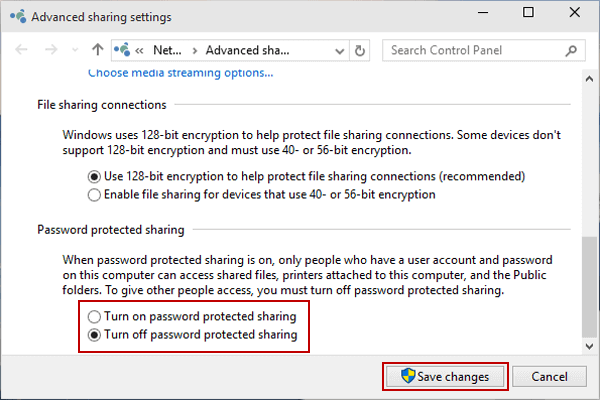
With this option turn on, POPStarter cannot (at least in my case) enter shared folder.

antonioks
Member
@krHACKen @hugopocked
Would there be any cheats to avoid the image freeze at the beginning of the second phase of Ninpuu Sentai Hurricaneger?
Would there be any cheats to avoid the image freeze at the beginning of the second phase of Ninpuu Sentai Hurricaneger?
@antonioks.
Hello mon ami, je constate que tu es de retour sur la scène PS1, c'est excellent.
Tu sais que je t'apprécie beaucoup. Tu as été excellent du temps des tests de POPStarter pour kHn (krHACKen).
A bientôt, ton ami Algol.
In English via G-Trad :
Hello my friend, I see that you are back on the PS1 stage, it's excellent.
You know I like you very much. You were excellent during the POPStarter tests for kHn (krHACKen).
See you soon, your friend Algol.
Hello mon ami, je constate que tu es de retour sur la scène PS1, c'est excellent.
Tu sais que je t'apprécie beaucoup. Tu as été excellent du temps des tests de POPStarter pour kHn (krHACKen).
A bientôt, ton ami Algol.
In English via G-Trad :
Hello my friend, I see that you are back on the PS1 stage, it's excellent.
You know I like you very much. You were excellent during the POPStarter tests for kHn (krHACKen).
See you soon, your friend Algol.
antonioks
Member
@antonioks.
Hello mon ami, je constate que tu es de retour sur la scène PS1, c'est excellent.
Tu sais que je t'apprécie beaucoup. Tu as été excellent du temps des tests de POPStarter pour kHn (krHACKen).
A bientôt, ton ami Algol.
In English via G-Trad :
Hello my friend, I see that you are back on the PS1 stage, it's excellent.
You know I like you very much. You were excellent during the POPStarter tests for kHn (krHACKen).
See you soon, your friend Algol.
Thank you my dear friend Algol, good times we live with intense testing to get the best out of popstarter, something I greatly admire that even popstarter hasn't been updated since June 2019, every day I watch someone dealing with it and asking about it , I believe that the seed that the (krHACKen) generated wonderful fruits. A heartfelt hug from your friend who loves you and your friend (krHACKen) too.
A question out of curiosity:
About POPStarter's VMCs. I thought that when creating a VMC, it reserved the 128kb of space so to always put gamesaves into there.
But I can't figure out why VMCs got fragmented after saving from POPS Ps1 games.
In my experience it has never been a problem, but my sister is having some issues playing Disney Tarzan SCES_125.18
In practice when she goes to load screen, the save's not present. There's another Tarzan save that's always correctly detected.
Indeed only the save she's using/overwriting (and so got fragmented) is missing.
Defragging the 16GB pendrive, the save get readable again.
Now that I thought about it, I remember time ago when I was playing King's Field (the first japan-only one, with english patch. Played from a 500GB Toshiba USB HDD). It perfectly works with MODE 0x04 (it has slowdowns without) but I got random freezes when saving. I guess those freezes have to do with VMC fragmentation.
About POPStarter's VMCs. I thought that when creating a VMC, it reserved the 128kb of space so to always put gamesaves into there.
But I can't figure out why VMCs got fragmented after saving from POPS Ps1 games.
In my experience it has never been a problem, but my sister is having some issues playing Disney Tarzan SCES_125.18
In practice when she goes to load screen, the save's not present. There's another Tarzan save that's always correctly detected.
Indeed only the save she's using/overwriting (and so got fragmented) is missing.
Defragging the 16GB pendrive, the save get readable again.
Now that I thought about it, I remember time ago when I was playing King's Field (the first japan-only one, with english patch. Played from a 500GB Toshiba USB HDD). It perfectly works with MODE 0x04 (it has slowdowns without) but I got random freezes when saving. I guess those freezes have to do with VMC fragmentation.
Salut @Peppe90.
Il y a de très fortes probabilités que la clef USB utilisée par ta soeur soit mal reconnue par la PS2 qu'elle utilise. Crois en mon expérience de "Béta-testeur" pour kHn (krHACKen), je n'ai jamais rencontré ce genre de souci avec les multiples clefs USB que j'ai utilisé.
J'ai utilisé de la clef USB1 puis de la USB2 et enfin de l'USB3 mais toutes ces clefs étaient d'excellente qualité.
Par exemple de la 8 ou 16GB "PATRIOT XT XPORTER" voire de la "PATRIOT Supersonic RAGE" de 32GB. Je suis même allé jusqu'à utiliser de la "SUPERSONIC RAGE2" très chères mais parfaites à tous points de vue. Je suis totalement sûr que c'est un problème de clef ou de compatibilité. Il se peut qu'il y ai quelques octets défectueux qui ne sont pas détectés par les logiciels de tests.
Je te souhaite de passer une bonne soirée, et que ta soeur et toi continuiez à jouer à de très bons jeux pour nos vieilles PS1 ou PS2.
Tu peux continuer à faire des rapports sur les listes si tu le souhaites ainsi que ta soeur.
Très cordialement.
In English via G-Trad :
There is a very high probability that the USB key used by your sister is poorly recognized by the PS2 she is using. Believe in my experience of "Beta-tester" for kHn (krHACKen), I have never encountered this kind of problem with the multiple USB keys that I have used.
I used the USB1 key then the USB2 and finally the USB3 but all these keys were of excellent quality.
For example the 8 or 16GB "PATRIOT XT XPORTER" or even the "PATRIOT Supersonic RAGE" of 32GB. I even went so far as to use very expensive "SUPERSONIC RAGE2" but perfect in every way. I'm totally sure it's a key or a compatibility issue. There may be a few bad bytes that are not detected by the testing software.
I wish you a good evening, and you and your sister continue to play great games for our old PS1 or PS2.
You can continue to report on the lists if you want and so can your sister.
Sincerely yours.
Il y a de très fortes probabilités que la clef USB utilisée par ta soeur soit mal reconnue par la PS2 qu'elle utilise. Crois en mon expérience de "Béta-testeur" pour kHn (krHACKen), je n'ai jamais rencontré ce genre de souci avec les multiples clefs USB que j'ai utilisé.
J'ai utilisé de la clef USB1 puis de la USB2 et enfin de l'USB3 mais toutes ces clefs étaient d'excellente qualité.
Par exemple de la 8 ou 16GB "PATRIOT XT XPORTER" voire de la "PATRIOT Supersonic RAGE" de 32GB. Je suis même allé jusqu'à utiliser de la "SUPERSONIC RAGE2" très chères mais parfaites à tous points de vue. Je suis totalement sûr que c'est un problème de clef ou de compatibilité. Il se peut qu'il y ai quelques octets défectueux qui ne sont pas détectés par les logiciels de tests.
Je te souhaite de passer une bonne soirée, et que ta soeur et toi continuiez à jouer à de très bons jeux pour nos vieilles PS1 ou PS2.
Tu peux continuer à faire des rapports sur les listes si tu le souhaites ainsi que ta soeur.
Très cordialement.
In English via G-Trad :
There is a very high probability that the USB key used by your sister is poorly recognized by the PS2 she is using. Believe in my experience of "Beta-tester" for kHn (krHACKen), I have never encountered this kind of problem with the multiple USB keys that I have used.
I used the USB1 key then the USB2 and finally the USB3 but all these keys were of excellent quality.
For example the 8 or 16GB "PATRIOT XT XPORTER" or even the "PATRIOT Supersonic RAGE" of 32GB. I even went so far as to use very expensive "SUPERSONIC RAGE2" but perfect in every way. I'm totally sure it's a key or a compatibility issue. There may be a few bad bytes that are not detected by the testing software.
I wish you a good evening, and you and your sister continue to play great games for our old PS1 or PS2.
You can continue to report on the lists if you want and so can your sister.
Sincerely yours.

Salut @Peppe90.
Il y a de très fortes probabilités que la clef USB utilisée par ta soeur soit mal reconnue par la PS2 qu'elle utilise. Crois en mon expérience de "Béta-testeur" pour kHn (krHACKen), je n'ai jamais rencontré ce genre de souci avec les multiples clefs USB que j'ai utilisé.
J'ai utilisé de la clef USB1 puis de la USB2 et enfin de l'USB3 mais toutes ces clefs étaient d'excellente qualité.
Par exemple de la 8 ou 16GB "PATRIOT XT XPORTER" voire de la "PATRIOT Supersonic RAGE" de 32GB. Je suis même allé jusqu'à utiliser de la "SUPERSONIC RAGE2" très chères mais parfaites à tous points de vue. Je suis totalement sûr que c'est un problème de clef ou de compatibilité. Il se peut qu'il y ai quelques octets défectueux qui ne sont pas détectés par les logiciels de tests.
Je te souhaite de passer une bonne soirée, et que ta soeur et toi continuiez à jouer à de très bons jeux pour nos vieilles PS1 ou PS2.
Tu peux continuer à faire des rapports sur les listes si tu le souhaites ainsi que ta soeur.
Très cordialement.
In English via G-Trad :
There is a very high probability that the USB key used by your sister is poorly recognized by the PS2 she is using. Believe in my experience of "Beta-tester" for kHn (krHACKen), I have never encountered this kind of problem with the multiple USB keys that I have used.
I used the USB1 key then the USB2 and finally the USB3 but all these keys were of excellent quality.
For example the 8 or 16GB "PATRIOT XT XPORTER" or even the "PATRIOT Supersonic RAGE" of 32GB. I even went so far as to use very expensive "SUPERSONIC RAGE2" but perfect in every way. I'm totally sure it's a key or a compatibility issue. There may be a few bad bytes that are not detected by the testing software.
I wish you a good evening, and you and your sister continue to play great games for our old PS1 or PS2.
You can continue to report on the lists if you want and so can your sister.
Sincerely yours.
I know what you're talking about. Also it seems there are differences between Ps2 models.
For example, either FAT (39004) and slims (2 75004 and one 77004) Ps2 I have, always perfectly read the Toshiba 500GB HDD (it is known indeed that HDDs usually have better stability than pendrives on Ps2).
With the 16GB pendrive though, I have issues on the FAT Ps2 (entering it through ULE it shows it as empty, then exiting and entering again it shows the content, but it's random. It can happen to launch POPStarter and get a BSOD, however once it reads the game it keep recognizing the pendrive, the game doesn't freeze while playing.
This issue isn't present using the slim Ps2s. They can always read the 16GB pendrive.
Btw even on slims I get this VMC fragmentation problem, either on pendrives and on the USB HDD.
Anyway it could be some sort of reading problem that lead the program to miss the correct sectors as you said.
You never get VMC fragmentation on certain your USB devices??
I have encountered VMC fragmentation MULTIPLE times, leaving the game unlaunchable until I defrag the VMC.
With all my other games, VMC fragmentation isn't a problem (I can load and save games correctly even when the VMC is fragmented). Also with King's Field I hadn't any problem loading the save, it only freezes, sometimes, when saving (I'm not sure, but it can be related to fragmentation, I'd have to verify it).
This is the first time that happened this issue, with Disney Tarzan. The fragmented gamesave simply doesn't appears on the loading screen (it correctly appears another gamesave present on the VMC).
With unlaunchable you meant my same issue or could you see the savegame but it crashed/freezed when loading it?
Je n'ai jamais rencontré de souci de fragmentation avec mes clefs USB. Par ailleurs, chaque fois que je devais tester des jeux sur différents supports USB (sauf DD sur USB), je formatais totalement la clef puis j'y copiais les jeux, je laissai une place libre puis je lançai chaque jeux à leurs tours. Les VMCs s'y créaient et tout allait très bien, je n'ai jamais fait autrement. Dans certaines VMCs, j'y recopiai les données présentes sur mes SAVEs physiques pour pouvoir les continuer.
I have never encountered a fragmentation problem with my USB keys. In addition, each time I had to test games on different USB media (except HDD on USB), I completely formatted the key then I copied the games there, I left a free space then I launched each game in turn. The VMCs were created there and everything was going very well, I never did otherwise. In some VMCs, I recopy the data present on my physical SAVEs to be able to continue them.
I have never encountered a fragmentation problem with my USB keys. In addition, each time I had to test games on different USB media (except HDD on USB), I completely formatted the key then I copied the games there, I left a free space then I launched each game in turn. The VMCs were created there and everything was going very well, I never did otherwise. In some VMCs, I recopy the data present on my physical SAVEs to be able to continue them.


