POPStarter

PS2 POPStarter 2019/06/05

POPStarter Wiki answers this!

BTW, since you mention the wiki, 2 things :
- I completely lost access to my bitbucket account, so I can not restore it back online and so I can not transfer write access to it ;
- I do not plan to update it (if it wasn't obvious, I'm off from every PS2 related stuff)

To anyone who wants, feel free to use it as a base if you want to update it - as long as it remains free of charge. Same goes with OPL guide (to whoever had save it from bitbucket graves and put it back online, thank you very much, I thought it was lost forever).
 

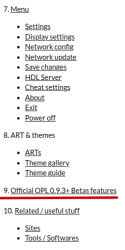
Thanks for your work @jolek . Didn't know internet archive also had a backup, cool. It even has some WIP pages that I did not complete, like this one (Official OPL 0.9.3+ Betas features, not indexed in the wiki).
 
like this one (Official OPL 0.9.3+ Betas features, not indexed in the wiki).

Added:
added2.png
 
BTW, since you mention the wiki, 2 things :
- I completely lost access to my bitbucket account, so I can not restore it back online and so I can not transfer write access to it ;
- I do not plan to update it (if it wasn't obvious, I'm off from every PS2 related stuff)

To anyone who wants, feel free to use it as a base if you want to update it - as long as it remains free of charge. Same goes with OPL guide (to whoever had save it from bitbucket graves and put it back online, thank you very much, I thought it was lost forever).

I felt unsatisfied with this decision so I changed my mind and I'm working - slowly but surely - on it. New wiki is around 70% completed and private only ATM. No ETA, it will be back online when it's ready. This will be my final contribution to the scene.

If you noticed any mistake(s) in the bitbucket wiki, it's the right time to let me know about it/them.
If you know any tool/app related to POPStarter that are not listed in the first post of this thread, please notify me. I plan to add dedicated pages for these (with proper credits to their authors of course).
I might need some help to write a small guide about to properly setup POPStarter launchers with OPL. OPL "10 anniversary" DB fork is still being use widely, I can read about it almost everyday on reddit (where I am registered using a different nickname) and that still pissed me off.
 

Attachments

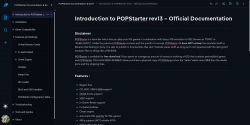
  • wiki-preview.png
    wiki-preview.png
    212.8 KB · Views: 50
I felt unsatisfied with this decision so I changed my mind and I'm working - slowly but surely - on it. New wiki is around 70% completed and private only ATM. No ETA, it will be back online when it's ready. This will be my final contribution to the scene.

If you noticed any mistake(s) in the bitbucket wiki, it's the right time to let me know about it/them.
If you know any tool/app related to POPStarter that are not listed in the first post of this thread, please notify me. I plan to add dedicated pages for these (with proper credits to their authors of course).
I might need some help to write a small guide about to properly setup POPStarter launchers with OPL. OPL "10 anniversary" DB fork is still being use widely, I can read about it almost everyday on reddit (where I am registered using a different nickname) and that still pissed me off.
Maybe mention my BDM assault drivers

They're not part of popstarter but a nice utility

The driver for EXFAT USB, the one for MMCE devices and the one for MX4SIO device
 
Maybe mention my BDM assault drivers

They're not part of popstarter but a nice utility

The driver for EXFAT USB, the one for MMCE devices and the one for MX4SIO device

Your drivers - along with your POPSLoader - were already on my to-do list and will have their dedicated pages in the wiki (with direct links to your repos). ;)
 
If you know any tool/app related to POPStarter that are not listed in the first post of this thread, please notify me. I plan to add dedicated pages for these (with proper credits to their authors of course).

What about info about alternatives?
 
It seemed to be harder to make VMCDIR.txt on the POPS naming format with the GAMEID included.

Do I have to include the GAMEID each time I make a VMCDIR.txt on each multidisk game like RE2, or better yet, Armored Core MoA?
 
Maybe mention my BDM assault drivers

They're not part of popstarter but a nice utility

The driver for EXFAT USB, the one for MMCE devices and the one for MX4SIO device
I would like to ask if it's possible to somehow add MX4SIO or MMCE functions with EXFAT SSD functions, merged on a future revision? If not, I would understand that, but the conflict of the OPL DB back then and the current OPL build somehow messes up the saved options when switching play modes between both systems.

Besides, the constant pasting between the SSD and the MX4 can be taxing, even if I have solid backup of those files.


As for DiskPooper, it seemed like it follows the "only game name" naming format, and not the "SLUS_XXX.XX.GAMENAME.VCD" format used today on each recent OPL versions.
 
As for DiskPooper, it seemed like it follows the "only game name" naming format, and not the "SLUS_XXX.XX.GAMENAME.VCD" format used today on each recent OPL versions.

For a 2 discs games :

DISCS.TXT :
Code:
SLUS_XXX.XX.GAMENAME-CD1.VCD
SLUS_XXX.XX.GAMENAME-CD2.VCD

VMCDIR:
Code:
SLUS_XXX.XX.GAMENAME-CD1

Files structure :

Code:
.../POPS/SLUS_XXX.XX.GAMENAME-CD1.VCD
.../POPS/SLUS_XXX.XX.GAMENAME-CD2.VCD
.../POPS/SLUS_XXX.XX.GAMENAME-CD1/DISCS.TXT
.../POPS/SLUS_XXX.XX.GAMENAME-CD1/VMCDIR.TXT
.../POPS/SLUS_XXX.XX.GAMENAME-CD2/DISCS.TXT
.../POPS/SLUS_XXX.XX.GAMENAME-CD2/VMCDIR.TXT
.../POPS/SLUS_XXX.XX.GAMENAME-CD1/SLOT0.VMC
.../POPS/SLUS_XXX.XX.GAMENAME-CD1/SLOT1.VMC
 
ShaolinAssassin, it might be interesting to check this out, my PS1 games did work on USB mode, and it didn't work over SMB through OPL, then I discovered what was the problem. The elf game prefix was XX, it had to be SB as I described here:
https://github.com/ps2homebrew/Open-PS2-Loader/issues/1593

How did I mess it up? It's because I was trying to use the same USB Flash drive that I previously inserted on my PS2 (USB-MODE). After I had the idea to try SMB share, so I got the same USB Flash drive and inserted into my Router. Every user must update its title.cfg and rename the files if they want to swap from USB mode to SMB mode.

Suggestions:

#1 I suggest that somewhere, like a FAQ, to add that you can't use the same USB setup into the Router with SMB, because you have to rename the files and prefixes (and edit the title.cfg) according to its use (USB Mode to SMB Mode, vice and versa). It's kind of obvious reading now but it may give a light for those other people that experiment this.

#2 Also if you want to recommend this PC Tool to manage POPStarter installation (Games, VCDs and Required files):
POPS-VCD-Manage by El_isra

#3 Also warn users that accessories other than controllers probably won't work at all. I did read in your wiki that multitap doesn't work, but I assume that lightguns like Guncom and Justifier may not work as well.

#4 Any recommentations for formating USB Flash drives? hugopocked recommended 16 KB cluster size for games that hang or crash a lot, like Soul Blade as seen on one of his notes:
hugopocked said:
#ATTENTION this game is very delicate with the emulated CD reading, it works perfectly through SMB and internal HDD, to be able to play it without problems on a USB must be formatted either in FAT32 or Exfat but with a cluster size of 16 kilobytes , higher values will cause the game to load corrupt data which will lead to crashes.
And his notes are very true, because of his cluster size advice the game played better and even better over SMB.


Great wiki btw!
Thanks for your contribution to the scene.
 
Last edited:
Thanks for your feedback @Lambada

#1 - I will add it as a note on the SMB & USB setup pages ;
#2 - Already planned to give @El_isra tool a dedicated page ;
#4 - It will then be a note for USB page ;
#3 - Back when ASSEMblergames was the official place for POPStarter, I remember that AkuHaK managed to get a PS1 gun or something similar running with POPS and gave the instructions to get special devices working. Based on these instructions, I wrote this page. But yeah, getting special devices to work requieres trial and errors and may not work at all. I still will include the instructions, but with a proper warning.
 
Last edited:
#3 - Back when ASSEMblergames was the official place for POPStarter, I remember that AkuHaK managed to get a PS1 gun or something similar running with POPS and gave the instructions to get special devices working. Based on these instructions, I wrote this page. But yeah, getting special devices to work requieres trial and errors and may not work at all. I still will include the instructions, but with a proper warning.
Do you know if those lightgun modules can be placed inside the VMC subfolder of that game or if it will only work on POPS root folder?
I don't have a lightgun but I was just wondering.
 
Do you know if those lightgun modules can be placed inside the VMC subfolder of that game or if it will only work on POPS root folder?
I don't have a lightgun but I was just wondering.

POPStarter wiki said:
POPStarter allows the user to load up to 10 modules (as IRX files) after the IOP was reset with the POPS IOPRP. Modules have to be named MODULE_0.IRX, MODULE_1.IRX… up to MODULE_9.IRX and put in the POPS folder. They will not be loaded from the VMC game folder.

from IRX Loader page. I can't remember where I got the info from - it might be from a private discussion with krHACKen.

Original instructions from AkuHaK :

AkuHak said:
Full instruction for adding irx files:
  1. Get game that supports your special device (I mean PS2 title) and look inside it content.
  2. Look for some IRX files at the disk
  3. First file that you need is SIO2MAN.IRX. You need this module for making other modules working.
  4. Copy it into POPS folder and rename as MODULE_0.IRX
  5. Search for your specific IRX files. I cant help you in recognizing what exactly you need. It can be one file or multiple files. I hope that for light gun it is USBD.IRX and USBGUN.IRX
  6. Rename them as MODULE_1.IRX, MODULE_2.IRX, ... etc. I dont know about exact order you have to experiment with it. For example I hope that for light gun first have to be usbd and second usbgun.
  7. Copy it into POPS folder and lets play

If you got special device to work - fun! If you have no luck - you can copy specific IOPRPxxx.IMG from game into pops folder and rename it as IOPRP252.IMG. In such way you have to delete POPS.PAK and use only POPS.ELF + IOPRP252.IMG If still no way you can also try to add more modules from game into 6th step, you can try to change module order in 6th step. Just good luck )) I cant post any link - all files belong to sony! Don't forget that usb devices may not work if you use esb version of pops! And of course these mainpulations doesn't mean that you will be able to use all special functions. These steps only means that your device will be recognized properly (so all standard functions will work).
 
It could be useful to add a troubleshooting suggestion in the USB setup information for those who have issues booting games, such as those using slow USB devices. They could consult a page with information about Popstarter's custom access delay. The same suggestion could also be useful for MMCE and MX4SIO setups.

I gathered suggestions posted in the forum and on the Discord PS2 Scene and condensed them into a draft in a few lines like this:
Access delay after the execution of the POPStarter embedded USB modules can be customized.
Useful for USB, MX4SIO and MMCE access issues when using BDM Assault and MMCEMAN modules.
POPSTARTER default value is `0×02`, increase it if POPStarter fails to access your USB device.
Use a `POPSTARTER.ELF` with higher delay to try resolve launch issues.
If saving does not work or the VMC files get recreated every time, try with 4 or 5.
Recommended delay for external HDDs and similar devices: 5.
 

Similar threads

Back
Top