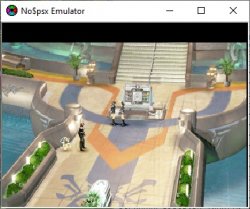
PS1 Problem burning FFVIII

Cannot remember anything... But I found this archive in an old HDD. Some old programs of mine. No idea how they work, context of the weird screenshot notes and stuff. I see there is two versions of each tool, possibly because of bugs or false positive routine detection, I don't know...
Don't know if disc images are supported either, but if they are, no ECC correction is done so you should fix them (with ECC Regen for example) after the disc image is patched.

I checked some things.

What I had in mind (converting back PAL version exactly as it originally was in NTSC) isn't actually possible. I don't know which values they changed in the official conversion and PAL4U/Zapper 2000 can't help. These programs simply change color pattern and those couple Y-pos values. Indeed reverting back those couple lines, the iso became completely clean as a fresh dump.

I saw also that pal4u and Z2K put completely different values on color pattern (and the official USA version has also different values).
Simply changing the color pattern of PAL version to the NTSC-U one will make the ps1 (emus or real hw) to output the game in NTSC.
Also changing some Y values will do the same (even keeping PAL color pattern the game will output in NTSC if Y values are set in a certain way).

Your patch for example convert the game from PAL to NTSC without touching the color pattern.

I found out that changing a couple Y-pos values (all at the same address) is enough for having the game outputtting NTSC with perfect centering.
So I think I'll go this way for doing the cleanest possible patch, 'cause you patch is 485 bytes, it changes a lot in different areas. Maybe you was also trying to patch the game to work with POPS? Adding trainers??

About no&psx, it actually has a setting to eliminate any centering and behave as real HW, so I'm using it (quicker than POPS). I changed the Y-pos values while running the game but there's no change in real-time and if I select Reset & Run all values are restored to default. How should I do?

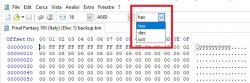
@Berion thank you for the suggestion about HxD, it is better than XVI32, much faster, it opens the game's iso instantly even on this old PC I'm using (XVI32 takes 10/15 seconds) and compare function is perfect for this job. I was used to XVI32 ui that gives you also dec. value on the address you are at the bottom screen, but I think I can enable it on some option also in HxD.
 
You're welcome. ^^
I was used to XVI32 ui that gives you also dec. value on the address you are at the bottom screen, but I think I can enable it on some option also in HxD.
Unfortunately no, You cannot. You can changed offsets displaying instead of hex to i.e decimal (options >> view card >> shifting base >> set to decimal) but, I don't think it is good idea. ;)

As an alternatives helps in Your hex journey: ;)
https://calcuworld.com/math/hexadecimal-calculator/
https://calcuworld.com/business-calculators/bytes-calculator/
https://www.wolframalpha.com/

Also I recommending great calculator called Qalculate (Linux only).
 
You're welcome. ^^

Unfortunately no, You cannot. You can changed offsets displaying instead of hex to i.e decimal (options >> view card >> shifting base >> set to decimal) but, I don't think it is good idea. ;)

Yes I saw that, also I can just toggle the check in the bar:

hxd.jpg

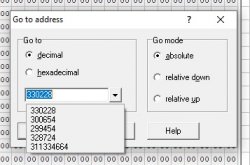
The only thing I miss from XVI32 is that it remember things you searched (values or addresses). There's a drop down menu, see here for example, it makes much quicker going to Y-pos and color pattern addresses in both PAL ans USA versions of the game:

xvi32.jpg

With HxD I have to write the values/adresses every time.

As an alternatives helps in Your hex journey: ;)
https://calcuworld.com/math/hexadecimal-calculator/
https://calcuworld.com/business-calculators/bytes-calculator/
https://www.wolframalpha.com/

Also I recommending great calculator called Qalculate (Linux only).

That's useful, thank you :D
 
Last edited:
I have in mind that compare feature in HxD is hard to read for human. Horrible UI design for that. But works and is free.

>> 4. When You will be satisfied from the results, create PPF3 or XDELTA patch to avoid this gehenna with FF8 in future (from final image and from proper clean dump). Just in case. Better be *.xdelta because You can find it in any Linux and plenty of Windows tools, while *.ppf is ancient, limited and used only by some scene tools.

If I create the patch using the bin file (a imgburn bin+cue rip) it will work also for img (ccd, img, sub) format, right?
I have a old ccd rip and the img file MD5 perfectly matches with the bin I'm using now.
 
I'll go this way:

- Change the PAL color pattern to the NTSC-U values (no need of it but just to be sure)

- Change 3 Y-pos values to the ones of krHACKen patch

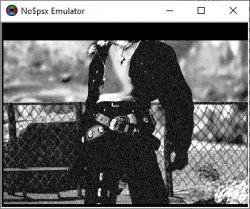
To be picky, there's just one thing that's not centered. The intro credits/slideshow:

pal-khn-intro.jpg

I have to set a value from khn patch dec. 15 to 00 for it to be perfectly centered as in USA version. But also everything else will be shifted upwards.
 
Perhaps the CEC code is incomplete... Have you tried the tool codes ?
Attached are the tools logs for the disc 1 executable and their respective disc 1 image patches.
On a side note, the tools patch a default Y-Pos value of -8 (FFF8h) and the Y-Pos value of the CEC code is +15 (Fh) it seems o_O.
I haven't tried that on no$psx or disassembled the routines...
 

Attachments

Perhaps the CEC code is incomplete... Have you tried the tool codes ?
Attached are the tools logs for the disc 1 executable and their respective disc 1 image patches.
On a side note, the tools patch a default Y-Pos value of -8 (FFF8h) and the Y-Pos value of the CEC code is +15 (Fh) it seems o_O.
I haven't tried that on no$psx or disassembled the routines...

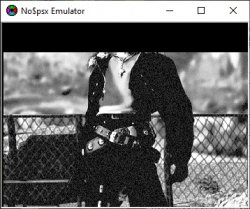
Indeed the tool patch makes thing worse:

tool-intro.jpg tool-hall.jpg

The menu is good though. On a first glance it seems that those patches revert back Y-pos as default. They don't make the game to run in NTSC.
I used CEC patch first, then tool 8 and 9 (I also tried 8 again to see if 9 was making problems but nothing changed).

Btw as I said a couple posts above, I'm more concerned about the size of your patches, CEC changes 485 bytes and the tool ones about 700 bytes each one, maybe you wasn't only trying to adjust the Y-fix.

On a fresh rip, aside the protection fix, you only need to change 2 values on color pattern for making the game to output in NTSC, then adjust 3 more values for having the Y-pos as in your patch. That's a 5 bytes patch.

I'm also going to compare USA version to PAL-ENG version. I discarded the idea at first since they're different versions (I know they corrected some dialogs for example) so I'll find many different values not related to NTSC-PAL conversion. But it is worth a try.
 
Yes, it is just filename. Can be *.bin, *.img, *.iso or whatever You want. *.cue tells app where tracks are, the same *.ccd, *.mds, *.cu2 etc. (all of them have different structure, they are different formats) *.sub are subchanel data, alternatives formats are *.sbi and *.lsd.

HxD have not such feature.
 
The CEC patch changes 5 bytes for the NTSC video mode and the Y-Fix. The other changed bytes are on the disc sector headers.

I see. I hex compared a fresh ISO with one patched with CEC and indeed there were a lot of changed bytes. So the patcher do it automatically? Also a Xdelta patch would do the same?

I made the comparison 'cause I was curious to know where your patch changes the color pattern values, cause it doesn't seem to do anything on the address where Pal4U and Zapper 2k patch (with your patch those values remain as PAL but the game keeps outputting in NTSC mode).
I stopped the search since I was finding a lot of changed bytes and couldn't recognize if they're about color pattern or else.
 
I hex compared a fresh ISO with one patched with CEC and indeed there were a lot of changed bytes
Hex compare the game executables to locate the changes instead.

So the patcher do it automatically?
My patcher patches game files extracted from disc images, it doesn't rebuild ECCs.
My PPF files contain corrected ECCs, yeah, otherwise they'd be useless lol.

I made the comparison 'cause I was curious to know where your patch changes the color pattern values, cause it doesn't seem to do anything on the address where Pal4U and Zapper 2k patch (with your patch those values remain as PAL but the game keeps outputting in NTSC mode).
The CEC code and patch probably change the vmode parameter before the function call. My patcher (probably Pal4U and Zapper 2000 too) do hardcode it in the function.

I stopped the search since I was finding a lot of changed bytes and couldn't recognize if they're about color pattern or else.
Use a disassembler. The hex values you're looking at are parts of MIPS instructions.
 
Hex compare the game executables to locate the changes instead.

Indeed 5 bytes.

My patcher patches game files extracted from disc images, it doesn't rebuild ECCs.
My PPF files contain corrected ECCs, yeah, otherwise they'd be useless lol.


The CEC code and patch probably change the vmode parameter before the function call. My patcher (probably Pal4U and Zapper 2000 too) do hardcode it in the function.

I quickly searched online for making an idea about what's that ECC data you're talking about, now it's a little more clear.


Use a disassembler. The hex values you're looking at are parts of MIPS instructions.

I don't even know where I'm planted. I'd like having the time to seriously deepen these things...

I saw those "disassembler" functions on no$psx, I might do some more of my blind tests (many times I get good results even with my lack of technical knowledge :D ).

However it seems you remembered enough about your patch, it should be completely safe, so I can go with it (maybe I'll do a Xdelta patch that include both your patch and the protection fix). Also my sister said she doesn't mind about the intro/credit movie being not centered.
 
Hex compare the game executables to locate the changes instead.


My patcher patches game files extracted from disc images, it doesn't rebuild ECCs.
My PPF files contain corrected ECCs, yeah, otherwise they'd be useless lol.


The CEC code and patch probably change the vmode parameter before the function call. My patcher (probably Pal4U and Zapper 2000 too) do hardcode it in the function.


Use a disassembler. The hex values you're looking at are parts of MIPS instructions.

At last I made the patch manually changing the 5 bytes at Z2K addresses. So even if I'd forget/lose the readme, with a quick Z2K scan I (or anyone else) could easilly find the addresses again. I writed them down in the readme (addresses and how bytes have been changed) so that anyone can try other combinations.

I gived credit to B.A.D. team for the protection fix and to you for the Y-fix values.

I writed a note about the intro credits and change disc pictures low centering. No one should complain since both of them have horizontal black bars, so everything results entirely on screen anyway, just not centered.

I tried changing the Y-pos values (most of them, starting from 0A byte at 509F4) in a lot of ways but it seems that intro and change disc screen cannot be centered separately.
Intro credits and disc changing pictures are the only screens displayed at full resolution (480i/576i, while all the rest is 240p/288p). It is even possible they remade those files for PAL version, making them natively at 576i. Perhaps that could be the reason why they aren't centered when converting to NTSC. Just guessing.
 
Everything seems to work perfectly aside some G.F audio in battles (and probably also some other spell's sounds). The most noticeable is when using Shiva, the energy ball and ice sounds don't play at all. Ifrid don't seems to have this problem (maybe some little desynchronization but all sounds can be heard).

Thus I won't upload the patch. I'll do it when/ìf I'll manage to solve this audio problem (if it's only Shiva it shouldn't be that difficult to solve but I fear also other G.F. could have this problem).
Best thing would be to insert italian texts into USA version (as someone have done with other games, like Bug Bunny lost in time), we'll see.

Update: my sister is playing right now and on a Boss battle Shiva sound worked perfectly once (when there were a lot of enemies on screen), second time (with only one enemy remained) it sounded cut as the other times. I guess with the screen full of enemies/characters performances slows down and thus the audio manages to keep up.

I'll also check if changing battle speed makes some difference.
 
Back
Top