PS2 PS2HDMI - Internal mod(board) in the works!

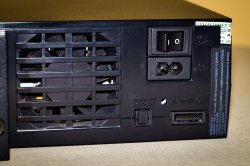
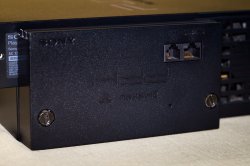
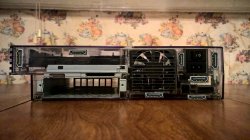
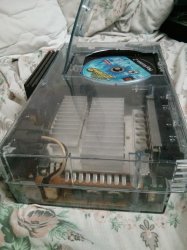
No, there is zero room on the backside of the fat console.
Got it! Hm... That's unfortunate...
But...
The slim was going to the be the only console support but after much push back I designed a fat version.
I rather have support for (some) FAT PS2s - regardless if it needs a PSU-Mod - , instead of no support at all for these models.
Btw.: Pushback?

The PS2 GPU outputs digital RGB all the time. So it doesn't make any sense to convert to YCbCr on the HDMI output.
Also when you set it to YPbPr in the Settings or when you output in HiRes-Modes (AFAIK it's RGsB/RGB with sync on green). o_O
Or are these things handled 'afterwards' usually (without your board)?

Again there is zero space
Again? Well... I see you have already stated that in the beginning of this/your post, but that really makes it seem as if you or someone else had already stated that ahead of my reply. This is not the case, so my reply was still a valid 'observation' and request!
So 'again'...
'Got it! But... I rather have support for (some) FAT PS2s - regardless if it needs a PSU-Mod - , instead of no support at all for these models.'
Which means... (including the previous reply you've quoted), that it isn't a deal-breaker for me. It just would be preferable to a lot of people, if it were possible (i.e. if enough space were available)! ;)

With the internal power supply removed, the board could fit in the bottom of the case. But then the case needs to be cut.
It is possible to position the hdmi to the side but then the unit could not sit vertically.
Naaah... All these variations sound worse than the current implementation. ^^

Btw.: Is it compatible to an SCPH-90004 as well? I am not sure, which model I would prefer to have that mod.
A slim has no HDD-Support usually, but the PSU-Mod seems a bit intrusive. Hm... Hard decision.

Can some admin give me more permissions. Im not able to post images or links. I'm trying to give a link to mini hdmi cables on amazon. Also post an image of the backside of a fat ps2 showing why there is no room.
Aaah! I wondered, which pictures you were referring to in the beginning of your post!
 
Well it is interesting that fat ps2 is big, but to find good spot for HDMI interface at back could be tough task to do.
I am glad that Slim ps2s got HDMI in right spot after Ethernet LAN port except latest slim model SCPH-90001.

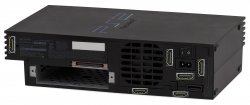
Its amazing like how sony designed back of ps2 fat that almost all is occupied with something, but at same time I edit some pics where I think could be candidate place for HDMI port. Not sure if they are good--you guys decide yourself.
Another thing most of people will install network adapter because you need to have HDD and Ethernet port--so this area is busy and cant be used for HDMI.

I have a question:
PS2-HDMI-Mod-Chip has built-in Wi-Fi for updating firmware--is it possible to somehow utilize Wi-Fi and use for PS2 fat to use as Network access to stream games over network through OPL?

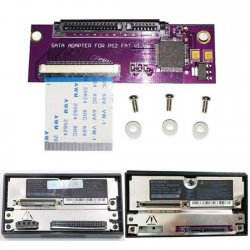
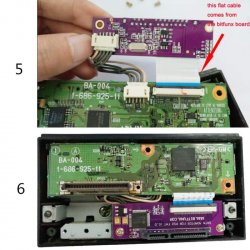
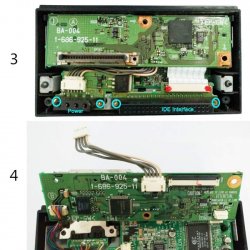
Also I saw recently there is SATA upgrade board for original PS2 Network Adapter in order to migrate to SATA HDDs--I just wonder if speeds are at least not worse than through IDE to SATA converters?

Also--is it possible to develop LAN(Ethernet)-Mod-Chip for ps2--which possibly could somehow internally connect to PS2s PCMCIA(Expansion Bay) and add Ethernet port to fat ps2 without Network Adaptor?
 

Attachments

  • 19290810088_7b06be5332_b.jpg
    19290810088_7b06be5332_b.jpg
    183.2 KB · Views: 1,125
  • 19452344156_40a7377b7a_b.jpg
    19452344156_40a7377b7a_b.jpg
    168.4 KB · Views: 897
  • places for hdmi on ps2.jpg
    places for hdmi on ps2.jpg
    329.3 KB · Views: 898
  • hdmi spots on fat ps2.jpg
    hdmi spots on fat ps2.jpg
    948.8 KB · Views: 1,194
  • BitFunx-USED-Original-SONY-network-adapter-for-ps2-with-sata-upgrade-kit-installed-by-yourself-.jpg
    BitFunx-USED-Original-SONY-network-adapter-for-ps2-with-sata-upgrade-kit-installed-by-yourself-.jpg
    93.9 KB · Views: 1,095
  • BitFunx-USED-Original-SONY-network-adapter-for-ps2-with-sata-upgrade-kit-installed-by-yourself-q.jpg
    BitFunx-USED-Original-SONY-network-adapter-for-ps2-with-sata-upgrade-kit-installed-by-yourself-q.jpg
    113.1 KB · Views: 1,088
  • BitFunx-USED-Original-SONY-network-adapter-for-ps2-with-sata-upgrade-kit-installed-by-yourself-w.jpg
    BitFunx-USED-Original-SONY-network-adapter-for-ps2-with-sata-upgrade-kit-installed-by-yourself-w.jpg
    115.6 KB · Views: 1,063
  • 3QjYsHz.jpg
    3QjYsHz.jpg
    105.9 KB · Views: 983
  • s-l160077.jpg
    s-l160077.jpg
    200.8 KB · Views: 988
  • s-l160088.jpg
    s-l160088.jpg
    183.3 KB · Views: 947
Last edited:
Made some tests and looks like Composite and Svideo are worst connections ever, Composite is blurry and Svideo lacks details and shows colors wrong.
Composite was connected directly to TV and svideo through couple of svideo to hdmi converters.
I think that people should stop using at all composite and svideo does not matter if its old console --with Composite you get blurry with crawl-dots picture and Svideo shows distorted colors and plus on both signlas you missing details--they like hidden. If you look at picture you can not see Ant-Bully eyes.
 

Attachments

  • Composite PS2 1.jpg
    Composite PS2 1.jpg
    4.2 MB · Views: 558
  • Composite PS2 2.jpg
    Composite PS2 2.jpg
    4.2 MB · Views: 518
  • Composite PS2 3.jpg
    Composite PS2 3.jpg
    7.6 MB · Views: 504
  • Svideo PS2 1.jpg
    Svideo PS2 1.jpg
    4.7 MB · Views: 535
  • Svideo PS2 2.jpg
    Svideo PS2 2.jpg
    4.2 MB · Views: 535
  • Svideo PS2 3.jpg
    Svideo PS2 3.jpg
    3.6 MB · Views: 467
  • Svideo PS2 4.jpg
    Svideo PS2 4.jpg
    7.3 MB · Views: 536
Last edited:
Component Video ( Y Pb Pr) is better that it looks like it shows full 720x480i picture, also you can see boys eyes, picture is clean and sharp--no dot-crawls, but to my opinion colors are not as good as when PS2 outputs through its Video out Analog RGB signal.
 

Attachments

  • Component PS2 1.jpg
    Component PS2 1.jpg
    3.9 MB · Views: 398
  • Component PS2 2.jpg
    Component PS2 2.jpg
    4 MB · Views: 408
  • Component PS2 3.jpg
    Component PS2 3.jpg
    4.9 MB · Views: 378
  • Component PS2 4.jpg
    Component PS2 4.jpg
    5.8 MB · Views: 388
To my opinion King here is RGB which comes also out of PS2s Component Video Out.
I used for this ScartRGBtoHDMI converter, one time with composite sync on composite video and another time with SyncStripper built by RetroRGB Guide in order to see what is the difference. I think SyncStripper reduces artifacts which could be on composite link, I did not try yet Y(luma) from Svideo with and without syncstripper--just wonder if there is difference in quality, but in anycase RGB is the King and its privilege is color reproduction--colors like all Glow--I like it so much.
And I used for now just cheap PS2 ScartRGB cable from ebay. Need to build a good one, shielded in future from the best shielded ten times cables. Have ideas how to do it. Project for the future time.

I think why RGB in PS2 is the best because we get Analog RGB 15khz interlace or progressive (The best PS2 DAC can output by the way) and convert it directly to Digital Upscaled 1080p60FPS HDMI RGB (From RGB to RGB ):

Better than the analog King RGB can be only Direct Digital HDMIRGB-mod-chip ):
 

Attachments

  • RGB PS2 1.jpg
    RGB PS2 1.jpg
    4.7 MB · Views: 480
  • RGB PS2 2.JPG
    RGB PS2 2.JPG
    112.2 KB · Views: 429
  • RGB PS2 3.jpg
    RGB PS2 3.jpg
    5.8 MB · Views: 475
  • RGB PS2 4.jpg
    RGB PS2 4.jpg
    5 MB · Views: 360
  • RGB PS2 5.jpg
    RGB PS2 5.jpg
    5 MB · Views: 480
  • RGB PS2 6.jpg
    RGB PS2 6.jpg
    5.1 MB · Views: 457
  • RGB PS2 7.JPG
    RGB PS2 7.JPG
    111.3 KB · Views: 428
  • RGB SyncStripper on composite PS2 1.jpg
    RGB SyncStripper on composite PS2 1.jpg
    4.4 MB · Views: 390
  • RGB SyncStripper on composite PS2 2.jpg
    RGB SyncStripper on composite PS2 2.jpg
    5.6 MB · Views: 492
  • RGB SyncStripper on composite PS2 3.jpg
    RGB SyncStripper on composite PS2 3.jpg
    5.3 MB · Views: 315
  • RGB SyncStripper on composite PS2 4.jpg
    RGB SyncStripper on composite PS2 4.jpg
    5.7 MB · Views: 463
  • RGB SyncStripper on composite PS2 5.jpg
    RGB SyncStripper on composite PS2 5.jpg
    4.1 MB · Views: 457
  • RGB SyncStripper on composite PS2 6.jpg
    RGB SyncStripper on composite PS2 6.jpg
    6.6 MB · Views: 480
  • RGB SyncStripper on composite PS2 7.jpg
    RGB SyncStripper on composite PS2 7.jpg
    6.6 MB · Views: 440
  • RGB PS2 8.JPG
    RGB PS2 8.JPG
    154.3 KB · Views: 430
Last edited:
  • Like
Reactions: TnA
Well it is interesting that fat ps2 is big, but to find good spot for HDMI interface at back could be tough task to do.
I am glad that Slim ps2s got HDMI in right spot after Ethernet LAN port except latest slim model SCPH-90001.
Oooh... No 90k... Well... Then I will have to dig off one of the others from the basement.

Its amazing like how sony designed back of ps2 fat that almost all is occupied with something, but at same time I edit some pics where I think could be candidate place for HDMI port. Not sure if they are good--you guys decide yourself.
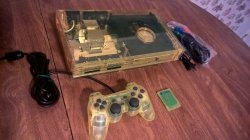
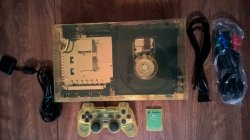
The transparent PS2 gave a good insight! THX!
Btw. He intends to use the smaller HDMI-Port, so there might be even more locations for the port itself.

However... The board itself has to be 'fitted' in there as well.
There is certainly almost no space...

What about a two-board-configuration/setup, connected via a flex-cable or so?

I have a question:
PS2-HDMI-Mod-Chip has built-in Wi-Fi for updating firmware--is it possible to somehow utilize Wi-Fi and use for PS2 fat to use as Network access to stream games over network through OPL?
2 ways pop into my mind...

Either connecting the board via another flex-cable to one of the SIO-Channels and treat it like an own device, which would need specific support on the board to communicate with the PS2, which might be quite marginal to implement, but it would also need support in OPL (or other apps) for a new 'device', like the SD-Gecko (MC-Slot-SD-Adapter) and FireWire potentially also could get.

The other way would be to hijack LAN... That would only require implementation on the board-software-side which @Citrus3000psi has total control over + a flex-cable and it certainly would be interesting to replace LAN with WiFi via this approach!

Since the flex-cable would go to the same chip but just other channels, it might even be possible to do that for both.


HOWEVER! This is not really, what this project is intended for.

BUT... If it could be implemented and possibly that's even possible just via software and an additional flex-cable, than that would VERY MUCH qualify for the price! It could spread WAY MORE than just to the few thousand enthusiasts! The amount of implementation to revenue 'ratio' for both - the creator citrus3000psi (+?) and the user - would be quite nice, IMO.


This feature Btw. would be PERFECT for those who are using a Clone-HDD-Adapter without LAN!!! SATA HDD + HDMI-Board which also adds WiFi!
GREAT IDEA @SkyNet!!!

But... (Yes there is one...)
I think the FPGA can NOT be used for it and I don't know if the ESP offers enough connections, bandwidth and if it is feasible to implement.
Since the firmware and UI probably run on it, the connection would be quite direct and without to much layers of abstraction, thus the responsiveness might be even good.

Better than 'HD-Pro'... ^^

Also--is it possible to develop LAN(Ethernet)-Mod-Chip for ps2--which possibly could somehow internally connect to PS2s PCMCIA(Expansion Bay) and add Ethernet port to fat ps2 without Network Adaptor?
Possible, but I think not all of the interfaces can be emulated without some additional hardware, but I am not sure about it. Maybe it is possible without upgrades to the hardware of the board.
But... Vice versa you also have to account for those who have something connected there (ExpansionBay or Pseudo-PCMCIA). In that case, the 'own device approach' instead of 'hijacking mode' would make more sense.

Made some tests and looks like Composite and Svideo are worst connections ever, Composite is blurry and Svideo lacks details and shows colors wrong.
Composite was connected directly to TV and svideo through couple of svideo to hdmi converters.
I think that people should stop using at all composite and svideo does not matter if its old console --with Composite you get blurry with crawl-dots picture and Svideo looksshows distorted colors and plus on both signlas you missing details--they like hidden. If you look at picture you can not see Ant-Bully eyes.
Yes these suck.
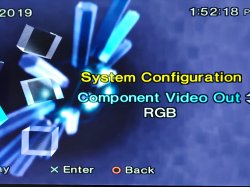
But component has an issue as well... The modified color-space of the output, since the PS2 renders it in RGB AFAIK.

The way of using RGB with an RGB-SCART-Cable with sync on Luma or c + a VGA-Adapter on an HDTV seems to be quite neat, as long as the TV supports these resolutions via VGA.

Some TVs work with the interlaced modes via VGA, so the picture is even better and the colors look better, even tho' it is not FULL-RGB but limited/TV-RGB (for the output I think... I could be wrong here.)

Component Video ( Y Pb Pr) is better that it looks like it shows full 720x480i picture, also you can see boys eyes, picture is clean and sharp--no dot-crawls, but to my opinion colors are not as good as when PS2 outputs through its Video out Analog RGB signal.
That is not just your opinion, but an observable fact! ;)
Colorspace-Conversion&Reduction + Transmission-Loss + signal-mixing due to only having 6 'poles' (3 cables), which requires mixing of signals through a wire (see Composite... 1 cable/2poles) causes this.
...and you get some more 'noise', which is especially noticeable on dark colors like the black in the OSDSYS.


But (a good one this time)... PS2HDMI uses RGB directly! Yeeeeehhhaaaa! :D

To my opinion King here is RGB which comes also out of PS2s Component Video Out.
True, but multiplexed/merged with other signals and 'overlapping sections' of the transformed signals cause interference (or wave collapse), causing artifacts, wrong colors or 'flickering pixels' ('noise').

But this mod should not have these problems, just as it should avoid the added noise and milkyness/blurryness of the PS2's DACs.

I used for this ScartRGBtoHDMI converter, one time with composite sync on composite video and another time with SyncStripper built by RetroRGB Guide in order to see what is the difference. I think SyncStripper reduces artifacts which could be on composite link, I did not try yet Y(luma) from Svideo with and without syncstripper--just wonder if there is difference in quality,
I don't think that it will work this way.. You might get a small improvement, but since the signals are merged to begin with, the signal won't clear up that much, just because you separate them afterwards with your chip set, instead of your TVs internal one... There can be an improvement, but it won't recover the already distorted signal to it's original wave-Form.

PS2HDMI possibly can avoid these issues! I can't wait for a test-video!

but in anycase RGB is the King and its privilege is color reproduction--colors like all Glow--I like it so much.
Yepp. The color via RGB is gorgeous, as well as the picture-clarity if the signals are separated right from the start and in PS2HDMI's case even internally and digitally!

And I used for now just cheap PS2 ScartRGB cable from ebay. Need to build a good one, shielded in future from the best shielded ten times cables. Have ideas how to do it. Project for the future time.
Indeed... I got 'ghosting' on a cable which wasn't well shielded and it was so shitty, that it back-induced the signal into itself... You have to lay those straight instead of a circle and certainly not along a line which there is quite some power drawn from at the time you are playing with it.
These cables are so bad, that I don't even keep them and sometimes I do keep quite some stuff for consoles.

I think why RGB in PS2 is the best because we get Analog RGB 15khz interlace or progressive (The best PS2 DAC can output by the way) and convert it directly to Digital HDMI RGB9 From RGB to RGB ):
What you are missing is, that this device even skips the DACs and does it's processing ahead of them! :)

Better than the analog King RGB can be only Direct Digital HDMIRGB-mod-chip ):
Well actually... That's what it is and supports!


What I am concerned about are the weird and high resolutions (also those 'tricks' with frame-composits of frames which are shifted vertically to createa full frame, a.k.a @Maximus32 's Hires-Stuff)!
 
Last edited:
Is PS2 render inside EmotionEngine GPU image in RGB but inInterlace? No progressive scan inside GPU--sounds weird? In Fact it should be Progressive Scan --and then when it goes do DAC coder--transferred into Interlace because consumers in 2000y did not have Progreesive Scan TVs, plus video connections been interlace mostly.

So, it all starts from Software on CD or DVD code, instructions go to CPU, RAM, GPU---processed picture, goes to DAC, to Composite, Svideo, Component and ScartRGB and all starting from beginning and until appears on TV Screen in Interlace---????
Weird design, really weird.

I heard there been 480p patches to DVDs which forced games to Progressive processing--wonder if that movement was further developed?
There was also Exploder HDTV Player forcing games to Progressive Scan Processing.

Just wonder--is there Anyway from Hardware point of view on PS2 motherboard disconnect or solder some pin or pins which will force PS2 through Y Pb PR or RGB to always process games in progressive scan quality--even menu of PS2 BIOS ????

I think Sony made design flaws when designing PS2.
Sony could make PS2 process everything Internally starting from Menu of PS2, Games in GPU in Progressive Scan, and when Video comes to DAC---then DAC at same time sends video in Progressive Scan and Interlace at same Time---so it would send all the time Progressive Scan tp Y Pb Pr or RGB (Based on what you chose in Video Output) and in parallel it would send Interlace to S-video or Composite. So technically it is the same picture, at same time, just different technique of processing the same image at same time to different video-outputs through noisy DAC:))))

Also--sony could design better AV Multi Out connector, really could. Look at competition, Microsoft, Nintendo, even Sega made way bigger and with more pins video connectors--so it was easier to solder yourself video-cable, plus since pins are not so close one to another in competitive video outputs---picture was more cleaner since analog nature of video in close location of pins could make crosstalk and produce other effects.

Why only 12 pins in AV Multi out? First of all it is not enough nor to output at same time Y PB PR and RGB, also when you switch to RGB--sony did not provide Dedicated Sync Pin for RGB in RGB would be clean and would work with Monitor or Scart or Arcade cabinet or anything you throw it at to.
In other words bad design, lack of design, they could at least if you switch to RGB mode in Menu---make it Progressive Scan and make 5th Pin which is S-video Y to become (Complete Clean HV Sync Pin for RGB Mode)--lack of engineer time and design of AV Multi Out.

I just wonder---Emotion Engine GPU in PS2---Does it have Digital but Interlaced RGB plus Sync clean Outputs?
Why Flex Cable for PS@HDMI-Mod-Chip needs so many contacts soldered to Emotion Engine GPU?

Can developers of PS2HDMi-Mod_Chip include in Final product not just outputting RAW 4:3 RGB HDMI Picture since 4:3 on 16:9 HDTV is not fun, but also include bunch of options of Stretching, LetterBoxing and other different options in order users would feel more happy seeing PS2 HDMI Output on their 16:9 or sometimes even on 21:9 TVs or computer monitors?????

Is ther any updates or videoes or captures with algato capture cards of what is going on with this project? Because Twitter is silent, Devs not say a word, kind of like have feeling that project is not really in active state form right now:(((((((((
 
Is PS2 render inside EmotionEngine GPU image in RGB but inInterlace? No progressive scan inside GPU--sounds weird? In Fact it should be Progressive Scan --and then when it goes do DAC coder--transferred into Interlace because consumers in 2000y did not have Progreesive Scan TVs, plus video connections been interlace mostly.
What? No!
What you say here is non-sense!
The DACs also have nothing to do with the picture being interlaced or not, but are 'signal converters'... they are not 'smart' and 'do something', but are simple and only do one task continually...

About the Interleaving/Interlacing:
Yes... The framebuffers are interlaced, because that halves the amount of vertical pixels which need to be rendered (while effectively having the exact same visual experience) + decreasing bandwidth to the GS per frame.

Please read up on those things...:
  • Framebuffer
  • DAC
  • ...

So, it all starts from Software on CD or DVD code,
Well, we can start code and games from other devices as well, but yes that's the intended media...

instructions go to CPU, RAM, GPU---processed picture, goes to DAC, to Composite, Svideo, Component and ScartRGB
A bit oversimplified, but essentially yes...

and all starting from beginning
That's too oversimplified... It doesn't do ALL 'from the beginning'...

Maybe 'draw calls' is something you should look up...

and until appears on TV Screen in Interlace---????
Weird design, really weird.
Not at all... It is very logical and I ought to remember that multiple people already have tried to explain it to you...

Why should the console render for example in 720*480, when it only shows 720*240 during one 'half-frame'? That would be a waste of processing-power and bandwidth! They can include a lot more effects, higher polygon-count and so on doing it this way...

It is LOGICAL, to do it this way!

Look up 'half-frame'...

I heard there been 480p patches to DVDs which forced games to Progressive processing--wonder if that movement was further developed?
I bet you mean ASModean's (I think it was his...) 480p-patcher, which applies the patch directly to the ISO or ELF.
No further development there, AFAIK!

There was also Exploder HDTV Player
No, it is called Xploder HDTV Player...

forcing games to Progressive Scan Processing.
THAT'S UTTERLY WRONG, what you claim here!
It does NOT change the internal processing! In-fact it only changes the output-video-mode, but not the internal rendering...

When, oh when will you finally comprehend the difference of both... o_O

Just wonder--is there Anyway from Hardware point of view on PS2 motherboard disconnect or solder some pin or pins which will force PS2 through Y Pb PR or RGB to always process games in progressive scan quality--even menu of PS2 BIOS ????
No, because the internal resolution is up to the software which renders it...
The output-VMode can be affected via something like that (like modchips do), but GSM can just do it as well and probably better, because it has some influence on the software-side... (like modchips, but unlike your proposal/request)

I think Sony made design flaws when designing PS2.
While that generally is true, I think it is not in the case you think of...

Sony could make PS2 process everything Internally
Loool... It DOES process everything internally... The PS2 is a Playstation, NOT a 'StreamStation'!

starting from Menu of PS2
Well, they could have implemented progressive scan for that, but what would have happened, if someone switched that setting and his TV would not have supported the V-Mode? BlackScreen...

Games in GPU in Progressive Scan,
That would have been utterly wrong for various reasons like the aforementioned efficiency and it would have forced Devs to support that VMode or not get all out of the hardware...

Sorry @SkyNet, but that's an utterly stupid suggestion, because your knowledge of how it works is way too limited (or you wouldn't say it).

and when Video comes to DAC---then DAC at same time sends video in Progressive Scan and Interlace at same Time---
Duuuuhuuude...
You don't even understand/know how stupid that sounds, because you prove to miss some utter basics regarding IT/Electronics...
  1. The DACs are NOT 'smart' but signal-converters (wave-form-change, etc...)!
  2. The internal render-resolution and the output-resolution is NOT the same... You can claim now that you know that, but you OBVIOUSLY haven't comprehended the difference as of now, because you are mixing it all together (even unrelated things)...
  3. Interlaced and progressive picture at once? That's entirely voiding at least 2 of the utter most basic things in IT and Electronics, namely efficiency and avoiding redundancy! This would also require the rendered content to be progressive every time, regardless of the output... That would almost double the amount of RAM, bandwidth and processing-power...

so it would send all the time Progressive Scan tp Y Pb Pr or RGB (Based on what you chose in Video Output) and in parallel it would send Interlace to S-video or Composite.
Not possible
  • using the same lines on a Multi-AV-Out...
  • with the 'non-smart'/dumb DACs...
  • when a game doesn't use a progressive Framebuffers and progressive internal rendering.
  • without wasting almost half of precious processing-power, RAM and bandwidth + more latencies...

So technically it is the same picture,
Wrong... Very wrong... Even if the internal source WOULD BE 'the same picture' (which it is not), the output certainly is NOT the same... Look up 'full frames' and 'half-frames' or even 'frame-composition' and so on...

at same time, just different technique of processing the same image at same time to different video-outputs through noisy DAC:))))
That would require:
  • Smart DACs
  • It being internally rendered in progressive all the time...
  • Another connection than Multi-AV-Out...
But the DACs are indeed not so good, so you are right about that, IMO.

Also--sony could design better AV Multi Out connector, really could. Look at competition, Microsoft, Nintendo, even Sega made way bigger and with more pins video connectors--so it was easier to solder yourself video-cable, plus since pins are not so close one to another in competitive video outputs---picture was more cleaner since analog nature of video in close location of pins could make crosstalk and produce other effects.
Well... It's from the PS1, lol.

Why only 12 pins in AV Multi out?
Why not? It is enough for all standards! 12 separated signals + shielding for ground is PLENTY of possible standards...
It's quite close to VGA...

First of all it is not enough nor to output at same time Y PB PR and RGB, also when you switch to RGB--sony did not provide Dedicated Sync Pin for RGB in RGB would be clean and would work with Monitor or Scart or Arcade cabinet or anything you throw it at to.
In other words bad design, lack of design, they could at least if you switch to RGB mode in Menu---make it Progressive Scan and make 5th Pin which is S-video Y to become (Complete Clean HV Sync Pin for RGB Mode)--lack of engineer time and design of AV Multi Out.
I don't have the pinout in mind, but I see absolutely no sense in outputting in both at once...

I just wonder---Emotion Engine GPU in PS2
The EE is the CPU and NOT the GPU, even tho' it is often also used for rendering (via it's VU specifically)...
The GS is the GPU...

---Does it have Digital but Interlaced RGB plus Sync clean Outputs?
...and you mix it all up again...
If a picture is INTERNALLY rendered in interlaced or progressive is ENTIRELY up to the software...
The games INTERNALLY render with RGB-Colorspace, but that might get converted (based on the setting in the OSDSYS).
Oh... and a color-space is neither interlaced nor progressive... The frame-composition or the output-resolution is...

I am not sure about a separate sync via Multi-AV-Ou. II thought there is/was, but it should be available internally at least.

Why Flex Cable for PS@HDMI-Mod-Chip needs so many contacts soldered to Emotion Engine GPU?
Haven't seen it yet... Does it?
Well, that sounds good, because it indicates that he might hook some code into the RAM...
Imagine pressing all Shoulder-Buttons + Select + X (or SB + Start + Down) and bringing up the config-menu running on the ESP32. You can change visuals during runtime and compare it per game!
It might even be possible to have separate settings 'per game'!

Can developers of PS2HDMi-Mod_Chip include in Final product not just outputting RAW 4:3 RGB HDMI Picture since 4:3 on 16:9 HDTV is not fun, but also include bunch of options of Stretching,
Technically I think the wide-screen-patches are a better approach!
The good news: He could implement those into his firmware, if he can recognize which game has been started! :)

LetterBoxing and other different options in order users would feel more happy seeing PS2 HDMI Output on their 16:9 or sometimes even on 21:9 TVs or computer monitors?????
Wide-screen-patches...

Is ther any updates or videoes or captures with algato capture cards of what is going on with this project? Because Twitter is silent, Devs not say a word, kind of like have feeling that project is not really in active state form right now:(((((((((
I certainly hope for a video as well! :D
 
So if you change in ps2 games which support Progressive Scan originally through menu of game to Progressive Scan--it will not change visual quality of game since it does not change rendering of game but will output 480p instead of 480i only?
Then what is the point in Progressive Scan if it does not change visual quality? Just less flicker? Plus, 480i60=480p30, so to output in 480p60 would require more than half bandwidth.
Why PS2 was not designed With Bandwidth in mind? Why all those Different rendering and different outputting techniques ? I know why--it was designed in 1998-99 years where nobody had even knowledge what Progressive Scan is--but PS2 had to compete with Original Xbox which was designed later...

Also If I understood you correctly PS2 is mostly interlaced system?
Why original xbox and sega dreamcast had better support for progressive scan if progressive scan consumes more of cpu and gpu bandwidth? as far as I know Sega dreamcast was less powerful than ps2, it had only 16mb of ram and less clocked cpu, but dreamcast supported much more 480p games.

Maybe interlace is good for saving bandwidth--but it is not good for eyes--I just wonder if you ever played on PAL 50 HZ CRT TV connected to PS2? With HDTVs it probably does not matter, but I can tell you your eyes on CRT could feel very tired afterwards after couple of hours...


I think you got me wrong---have you seen hdmi to composite converters? THey could have it all rendered in Progressive scan and then just have internal chip which downgrades to 480i for svideo and composite---but the reason why they did ps2 system interlace mostly is because HDTVs were not everywhere, which makes process of converting nowadays ps2 output to progressive not the best--(Interlace is evil--but it comes from TV Channels transmitting Era).

Anyway PS2 has many problems, to my opinion better to buy PS3 and up (100$), or PC (more Pricey)and have HDMI and Progressive scan all the time and not worry about interlace.
 
So if you change in ps2 games which support Progressive Scan originally through menu of game to Progressive Scan--it will not change visual quality of game since it does not change rendering of game but will output 480p instead of 480i only?
No! How do you come to that conclusion? It's the opposite of what I was just explaining to you + you mix up internal and external resolutions AGAIN!

I told you before, that it would be stupid to internally render a full frame, when only a half-frame (interlaced) is shown...

Now if a full frame is shown, the internal rendering is adapted to NOT use interlaced rendering, but renders full instead of half frames...

Read up on 'interlaced' and 'progressive' thoroughly, because you do not even know the utter basic of half-&full-frames...

How do you expect us to teach you math, when you don't even know the numbers? (Metaphor)
i.e. THE UTTER BASICS!

Then what is the point in Progressive Scan if it does not change visual quality
Where are you pulling this assumption from again? Neither did I say that, nor is it that way!

It DOES change visual quality! De-interlacing interlaced/interleaved content will never produce an as exact picture as outputting it progressive to begin with, regardless how well it blends the half-frames together...

Just less flicker?
No... Especially less combing-artifacts and a generally sharper picture, especially on horizontal movement.

Plus, 480i60=480p30
Actually 480i60=480i60 and 480p30=480p30...

I get what you want to say, tho'.
Once the TV has deinterlaced them, it essentially becomes 480p30, but since it is interlaced to begin with, the 480p-full frames will never be as sharp as they would be, if it were rendered and outputted at progressive from the start. That's especially noticeable during horizonal movements, because the next half-frame will have for example a slightly other 'angle of view', causing 'combing-artifacts'. How more it moves, so more/wider are the combing-lines and so more the effect and blurryness becomes noticeable. Essentially how faster it moves left/right, so blurrier (even on interleaved hardware/TVs/CRTs) the picture gets!

so to output in 480p60 would require more than half bandwidth.
I suppose you meant to say 'almost doubled bandwidth'! ;)

Why PS2 was not designed With Bandwidth in mind?
Actually it is!!! Look at the bandwidth between EE & GS... 2560Bit per Hz! That's ludacris! It's insane! The newest HBM2-RAM (parallelized and stacked & DDR-Dies + a Controller-chip) only transfer with 512Bit per Chip... (or am I wrong?)

It is not the console's, but the developer's fault! They had too less experience with the hardware (in the beginning) and a time-schedule for the release, so they simply went the easier way of sparing bandwidth and memory and CPU-cycles and GPU-cycles.

I think you will hardly find a PS2-game released within the first 2 years, which supports progressive for that reason! :)

Why all those Different rendering and different outputting techniques ?
Due to developers which had to finish development on a game and due to it being a commercial project usually, which includes a time-frame for the release...

New hardware; no time; easier way to accomplish something on a new and foreign platform/hardware, etc.

I know why--it was designed in 1998-99 years where nobody had even knowledge what Progressive Scan is--but PS2 had to compete with Original Xbox which was designed later...
Naaah... The developers DEFINITELY knew that, lol... But they also knew, that the Hardware is not widespread yet...

Also If I understood you correctly PS2 is mostly interlaced system?
No and yes...

No... The Hardware can be programmed either way. It is the Software which decides/determines, how the hardware is used!
I think the GS might even be capable of outputting in 2560*1440, lol!
...and...

Yes... Most software was interlaced for various reasons.

Why original xbox and sega dreamcast had better support for progressive scan if progressive scan consumes more of cpu and gpu bandwidth? as far as I know Sega dreamcast was less powerful than ps2, it had only 16mb of ram and less clocked cpu, but dreamcast supported much more 480p games.
Because it is not about the RAM, but rather the VRAM which is the bottleneck on the PS2, which also causes things (texture-reloads and more draw-calls and more) to be continuoually streamed from EE to GS&VRAM...
Didn't the DC have 8MB of VRAM and Hardware-Texture-compression?
The PS2 has only 4MB of VRAM and as far as I remember, no hardware-support for compressed textures... (only palletized, even down to 4Bit)

Maybe interlace is good for saving bandwidth--
Yes, it is.

but it is not good for eyes--
I think 480p@30fps would be worse for your eyes than 480i@60(half-)fps.
This goes into the Utter basics of why the interleaving/interlacing was invented for sparing bandwidth... Because of the slowness of a (or most) human eye(s).

I just wonder if you ever played on PAL 50 HZ CRT TV connected to PS2?
Obviously - since I am living in Germany -, I did... I even played on a PS2 via a Composite-connection + a SCART-Adapter connected to the back of a VCR and tuned the VCR to 'Channel 36' or so and connected that to the TV via RF, because that old 1992-PHILIPS-TV didn't have anything else, lol... I know what shitty quality is. :'-D

With HDTVs it probably does not matter, but I can tell you your eyes on CRT could feel very tired afterwards after couple of hours...
That's due to the low refresh-rate and has nothing to do with the PS2 or it's content (the software running)...
Even a progressive picture on a PC-CRT will be tiresome for your eyes, if it isn't running at 85Hz or faster...

I think you got me wrong---
In what regard? If I did, you might want to try to express yourself better? :P

have you seen hdmi to composite converters? THey could have it all rendered in Progressive scan and then just have internal chip which downgrades to 480i for svideo and composite---
Possibly... But the simple DACs were cheaper and those in those converters are not really smart either + the VRAM is rather a bottleneck there, so...
'sparing recources' combined with a new fringe hardware, was the main-reason, IMO.

but the reason why they did ps2 system interlace mostly is because HDTVs were not everywhere, which makes process of converting nowadays ps2 output to progressive not the best--(Interlace is evil--but it comes from TV Channels transmitting Era).
Correct!
Anyway PS2 has many problems, to my opinion better to buy PS3 and up (100$), or PC (more Pricey)and have HDMI and Progressive scan all the time and not worry about interlace.
Well... But those only emulate, except for the very first PS3 from Japan and even that uses Hardware-Components, but isn't an entire PS2...
 
Hey TnA, thank you for the information.
On a side note, wanted to ask you about tv in your country. I heard that Germany switches from DVB-T Mpeg2 to DVB-T2 HEVC?Will there be 4k broadcasts or just 1080p?

USA in a same stage right now, this digital ATSC Mpeg2 standard which was finished switch to in 2009 no good anymore accordingly to current requirements---that's why there is movement towards ATSC 3.0 HEVC, but at least there should be 4k broadcasts in parallel with 1080p ones.

Its funny how in previous years 1080i was top of the line for HDMI, including xbox 360, ps3, Tv broadcasts, and now nobody even implements lets say--1440i, 2160i and 4320i---everybody just switched to p version in all resolutions(When new version of HDMI comes out each time) ---which I think the way to go--is better...(CE industry always 20-10 years behind PC Industry. PC always had Progressive Scan--now CE has it everywhere. The difference is that PC had Progressive Scan on CRTs which required always high refresh rate--85-100, but CE was not ready for Progressive Scan in CRT). But I hope that Manufacturers will support both signals on HDMI--TMDS and FRL--And HDMI promised that their standard will be always compatible with all versions of HDMI--this is first significant change in HDMI Signaling--lets hope all will be alright in future.
And I think in order to overcome recent DisplayPorts leap to 77.4Gbit--Hdmi will have to use only Active Fiber cables--there no other way to increase speed of copper. Fiber rocks.

About PS2: For simplicity is probably component output is best, but I noticed that I prefer to use ScartRGB to HDMI Converter for some reason, maybe because I know that RGB is the best there is, does not matter if it is analog RGB or Digital RGB HDMI>
Plus in future I want to do some experiment: want to build ScartRGBSync on LumaY(Pin5) with SyncCleaner--and try to send it over Extron RGB in order to always get Sync---when PS2 outputs in Interlace RGB Mode--Sync Comes from Pin 5 Y Svideo, and when PS2 switches to Progressive Scan RGB mode where Sync travels on Green--Extron device will on the fly extract Sync from Green and send itas it would go always separately on. Want to see if this ScartRGBto HDMI converter from Ebay supports Progressive Scan RGB, because it definitely does not understand sync on green. Will see what will happen.

Would be nice to see at least some updates form Devs of PS2-HDMI-Mod-Chip ,fotos, videos, explanations how they do it--how they extract Video from Ps2 and convert to HDMI---it is just very interesting.

Also would be interesting to see comparisons on same size and brand of TV--when ps2 connected through component, scart rgb and through This HDMI mod Chip--and see how it is different.
 
Last edited:
Hey TnA, thank you for the information.
No problem.

On a side note, wanted to ask you about tv in your country. I heard that Germany switches from DVB-T Mpeg2 to DVB-T2 HEVC?Will there be 4k broadcasts or just 1080p?
We switched quite some years ago... It is so wide-spread (quite high range and almost everywhere accessible) that most or all private DVB-T-Broadcasts have been turned off at least months ago and even those state-funded TV-stations will turn it off soon!
4k-Broadcasts are still very seldom, at least from normal TV-stations. The hardware (to receive it and send it to the screen) is available, tho'.

USA in a same stage right now, this digital ATSC Mpeg2 standard which was finished switch to in 2009 no good anymore
If I remember correctly, it was finished in Germany in 2005/2006 or so... (ahead of the Soccer-Championship)

accordingly to current requirements---that's why there is movement towards ATSC 3.0 HEVC, but at least there should be 4k broadcasts in parallel with 1080p ones.

Its funny how in previous years 1080i was top of the line for HDMI, including xbox 360, ps3, Tv broadcasts, and now nobody even implements lets say--1440i, 2160i and 4320i---everybody just switched to p version in all resolutions(When new version of HDMI comes out each time) ---which I think the way to go--is better...(CE industry always 20-10 years behind PC Industry. PC always had Progressive Scan--now CE has it everywhere. The difference is that PC had Progressive Scan on CRTs which required always high refresh rate--85-100, but CE was not ready for Progressive Scan in CRT). But I hope that Manufacturers will support both signals on HDMI--TMDS and FRL--And HDMI promised that their standard will be always compatible with all versions of HDMI--this is first significant change in HDMI Signaling--lets hope all will be alright in future.
And I think in order to overcome recent DisplayPorts leap to 77.4Gbit--Hdmi will have to use only Active Fiber cables--there no other way to increase speed of copper. Fiber rocks.
Actually there are 2line 200GBit/s connections available via COAX since years!
I don't know the modulation, but I suppose it's QAM512 or similar within the GHz-range and 3-5TBit/s might be possible. But yes, there is a physical limit to it and light is within the THz-range, soo...

Regarding the funky resolutions... I suppose the GS could be programmed to output in 2560*1440, but I am not sure, what the maximum theoretical limit is.
Textures are limited to 1024*1024, but that obviously is not true for the internal rendering (see @Maximus32 's / @rickgaiser' s modified Teapot demo with some rendering-tricks) and the output-mode (we obviously can output in 1080i and 1080p, or 1280*960 etc.).

About PS2: For simplicity is probably component output is best, but I noticed that I prefer to use ScartRGB to HDMI Converter for some reason, maybe because I know that RGB is the best there is, does not matter if it is analog RGB or Digital RGB HDMI>
The color is definetly better than via component! :)

Plus in future I want to do some experiment: want to build ScartRGBSync on LumaY(Pin5) with SyncCleaner--and try to send it over Extron RGB in order to always get Sync---when PS2 outputs in Interlace RGB Mode--Sync Comes from Pin 5 Y Svideo, and when PS2 switches to Progressive Scan RGB mode where Sync travels on Green--Extron device will on the fly extract Sync from Green and send itas it would go always separately on. Want to see if this ScartRGBto HDMI converter from Ebay supports Progressive Scan RGB, because it definitely does not understand sync on green. Will see what will happen.
Well a sync-stripper and a signal-cleaner can make the picture a bit better, but it will still not reach the quality of the internal HDMI-Board. But an interesting test nonetheless especially because some cheap things can yield a great quality! :)

Would be nice to see at least some updates form Devs of PS2-HDMI-Mod-Chip ,fotos, videos, explanations how they do it--how they extract Video from Ps2 and convert to HDMI---it is just very interesting.

Also would be interesting to see comparisons on same size and brand of TV--when ps2 connected through component, scart rgb and through This HDMI mod Chip--and see how it is different.
Yes, indeed!
 
Last edited:
Could always make a custom connector, drilling a hold near the USB ports, run it through there and have the board itself be external. Assuming there won't be any issues with signal loss or the like.
 
Sorry for being so silent, these things just take a lot of time.

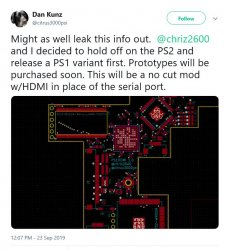
PS1 is close to being ready and the PS2 should follow up shortly after. I've also been working on the PS2 hardware, refining the installation method.

The first release of the PS2 will be be slim only and we have decided to cut down on model support.
Because its pain to manufacture multiple separate pieces to make it work and ps2s are cheap so just grab the models that work.

The models list:

V12 Parital Support SCPH-7000X
YES GH-032-XX
NO GH-035-XX

V13 Parital Support - SCPH-7000X
YES GH-032-XX
NO GH-035-XX

V14 Parital Support - SCPH-7500X
YES GH-037-XX
NO GH-040-XX
UNKNOWN GH-41-XX

V15 - SCPH-7700X
YES GH-051-XX
YES GH-052-XX

V16 SCPH-7900X
NO GH-061-XX

V18 SCPH-9000X
Might work in future with fat board.

Its easy to identify GH-032 & GH-037 boards by looking at the heatsinks through the rear vents.

The digital audio is now being pulled from the encoder before it was from the SPDIF. This was changed after learning that some games did not support SPDIF.

A quick solder board has also been designed that will grab audio/power/controller and will connect to the flex.

RlfLN8v.jpg
 
Last edited:
Back
Top