PS3 PS3 1.75 tb internal hdd upgrade formatting utility

I apologize for Google translate.
Is this topic relevant?
You can install a 2Tb drive on any version of the PS3. It is not necessary to downgrade the firmware.
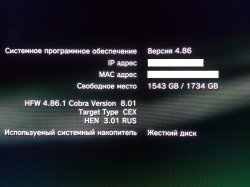
I installed 2TB hdd on SuperSlim. Firmware Version 4.86. LBA I got more than 3633537126. (+ 2Gb)
Problems:
File system check does not work. Even if you reduce the volume of the HDD to 1.5 TB - the check still does not work.
user510458_pic794_1588184342.jpg
 
You can install a 2Tb drive on any version of the PS3. It is not necessary to downgrade the firmware.
I installed 2TB hdd on SuperSlim. Firmware Version 4.86. LBA I got more than 3633537126. (+ 2Gb)
Problems:
File system check does not work. Even if you reduce the volume of the HDD to 1.5 TB - the check still does not work.

It's nothing but hassle installing 2TB in a PS3.... That's why I removed the 2TB from one of my slims after a file system check forced a format of the HDD... No way was I reinstalling 2TB worth of game's and DLC for the 3rd time.

If you have a 2TB in your PS3 just beware that this can happen from time to time.
 
It's nothing but hassle installing 2TB in a PS3.... That's why I removed the 2TB from one of my slims after a file system check forced a format of the HDD... No way was I reinstalling 2TB worth of game's and DLC for the 3rd time.

If you have a 2TB in your PS3 just beware that this can happen from time to time.

You weren't able to bypass the file system check by reinstalling the same firmware your PS3 is on via recovery mode?

Works for me.
 
HPA is not working
Why?
https://hddguru.com/software/2005.10.02-MHDD/mhdd_manual.en.html
Cutting the drive (size change)

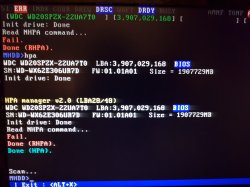
Use HPA command to limit size of a drive. You will be asked about new MaxLBA number, just enter how many sectors you want to use. To uncut the drive, use NHPA command. Please repower the drive before using NHPA command. According to ATA/ATAPI standard, you can use HPA functions only once per drive's power cycle.
In the line most at at top you can see how many sectors are visibles in your hdd = 3,907,029,168
That counter doesnt includes the sectors hidden by HPA... but at this point you are not sure if your hdd already have HPA enabled

As far i remember... you can find the real number of sectors (visibles+hidden) by using the RHPA command, is going to show you a number, if the number matches it means that hdd doesnt have the HPA enabled

Incase the hdd had HPA enabled you need to use the command NHPA to disable it, this should make the number at top to change (and the hdd capacity increases a bit)

And the next step is to enable HPA again... the command is going to ask you for a new number of sectors (it needs to be something smaller than the 3,907,029,168, because this seems to be the total of your hdd)

----------------
But something very important... you need to have the hdd connected by SATA (port0 preferably) in your PC motherboard, otherway if you connected it by USB or other means there are some commands that doesnt works
MHDD is really a "low level" hdd tool, the way how it communicates with the hdd is a bit special... this is why is so slow doing tasks... but is the most relliable hdd tool i know

 
Last edited:
And use this command too (just for info purposes, dont modify any settings with it), it should tell if your hdd supports HPA
Im mot sure if is this command though, but in the MHDD tool there is a way to see if the HPA is disabled or enabled
Device Configuration

You can view and change current drive configuration by using CONFIG command. It will allow you to view or set the maximum UDMA mode, Security support, SMART support, LBA48 mode support, AAM and HPA support etc. You can also cut or uncut the drive by using this command. Some manufacturers are using Device Configuration to reduce the size of a disk.
 
Last edited:
Instead of MHDD, You can use hdparm (below is syntax for Linux but there is also port for Windows, however I dunno how devices is named for this OS).

Replace sdx by Your drive (sda, sdb, sdc and so on).
Replace 12345 by real sector count (1 sector = 512) which will be Your HDD capacity after setting HPA.
Code:
hdparm -N p12345 --yes-i-know-what-i-am-doing /dev/sdx

If You get unable to set HPA there is four possible known to me reasons:
  • drive is in frozen state (You must unfroze it first)
  • mobo automatically remove HPA (some ugly BIOSes and UEFI's doing that), try on different PC then
  • some external controllers doesn't support all ata commands
  • some external controllers emulating LBA48 support
If You for some reason cannot set HPA space, try with DCO (no one tested but PS3 also should accept it).
 
Last edited:
Then you did not have so many, are more usual than you think, everybody in CFW is used to them :P
And canceling the filesystem check is not a good idea... if that filesystem check appears to you is because there is a real problem in the filesystem, so if you cancel the check this error in the filesystem will remain, so you are going to cummulate errors in the filesystem everytime this happens to you until you get to a point where the PS3 forces you to format the whole hdd (because is imposible to repair the fylesystem with that huge amount of cummulated errors)... and you will lose all its contents

For this reasons i dont think is a good idea to do what you are suggesting
I remember having read somewhere on reddit that to ensure that both of theses option work properly , owner MUST be sure to not go over a certain amount of files on his internal HDD , like around 550 or 850 of a 1.5TB HDD (Max size accepted) , its that true ?
 
I remember having read somewhere on reddit that to ensure that both of theses option work properly , owner MUST be sure to not go over a certain amount of files on his internal HDD , like around 550 or 850 of a 1.5TB HDD (Max size accepted) , its that true ?
I always copy the PS3 games to internal hdd, and eventually the game is in JB format (lot of files), and eventually i had several games with thousands of files inside them (lets say, more than 10.000) and the rebuild databsse was working fine, so i can say that limit of 850 in the number of files is not true

Im sure a huge number of files could cause problems because the TOC of the filesystem is going to increase too much... but we dont know where is that limit
All i can say is the dev_hdd0 filesystem can handle 10.000 without noticeable problems (probably some more up to 25.000 or 50.000, dunno)
 
little big planet has 50,000 or so files by itself. games are indexed, which means only common files are read at one time, then you can load a game, which will read all files for that game. it's not like the 360, which reads all files. you have to think if it's better to have installs to where games are indexed like the ps3, vita, ps4 and wii u or drag and drop like the 360. which is faster? technically, the 360 version is faster unless you want to see what's installed. then, it's wait 2-3 minutes on a 1TB drive.

edit: btw, the 360 has no problems with 2TB internally either.
 
I always copy the PS3 games to internal hdd, and eventually the game is in JB format (lot of files), and eventually i had several games with thousands of files inside them (lets say, more than 10.000) and the rebuild databsse was working fine, so i can say that limit of 850 in the number of files is not true

Im sure a huge number of files could cause problems because the TOC of the filesystem is going to increase too much... but we dont know where is that limit
All i can say is the dev_hdd0 filesystem can handle 10.000 without noticeable problems (probably some more up to 25.000 or 50.000, dunno)
Ive read that a major member here , just cannot remember his name , LTSCard something ? :S mentionned that its better to have all the PS3 games transformed in ISO , (rare games only work in folder format like Vampire Rain) on a external HDD.
could it be better ?
 
Ive read that a major member here , just cannot remember his name , LTSCard something ? :S mentionned that its better to have all the PS3 games transformed in ISO , (rare games only work in folder format like Vampire Rain) on a external HDD.
could it be better ?
Yes, the reason why sometimes i have the PS3 games in JB format is because either
1) I just made a backup from the original disc, so the program created the files in dev_hdd0, and i just keep them to do some tests to see if the game boots, ec...
2) Because im doing some tests trying to reduce the game total size (by removing audio languages, or extra videos, etc...), having the game in JB format is handy because it allows me to replace game files in a easy way (by ftp usually), then boot the game and see if it continues working after my butchering

But after the experiments i always convert them to ISO for storing purposes
 
never had an issue with an iso game. you can check jb rip or iso with its ird. I can see something being wrong if there's a problem, but that's never happened to me personally.
 
never had an issue with an iso game. you can check jb rip or iso with its ird. I can see something being wrong if there's a problem, but that's never happened to me personally.
me too never got a single problems because my iso are took from my physical discs collection. but i know somes having problems with their iso , but this matter is another talk ;)
 
So,
a) Is there a way around the unavailable filesystem check functionality when using a 2TB HDD with the formatting utility?
b) Does setting a bigger "host protected area" fixes this?
c) Is it absolutely necessary to downgrade the cfw to 4.46 for hdd partitioning? I am currently in CEX rebug 4.86.
d) Is this method bound to a particular hdd brand/model?

thanks
 
Ad.b) High probably yes, because available space for use will be lower by setting up HPA limit. From PS3 (and other devices), HDD ending where HPA starting. Consider it as disabling from use sector range on HDD firmware level.

Ad.c) No. Why would be?

Ad.d) HDD firmware must support ata command for it and accept it. Most of the devices so rather don't worry. However, some mother boards doesn't allow to set HPA and/or DCO, and removing it right after set it.
 
This doesn't really matter. If You set HPA zone, You need format HDD on PS3 whatever firmware is now in use (any OFW, any CFW, any HFW, any MFW, literally any kind of fw). PS3 doesn't know there is HPA, and doesn't understand it (that's the reason why HPA works in the first place for this purpose).
 
This doesn't really matter. If You set HPA zone, You need format HDD on PS3 whatever firmware is now in use (any OFW, any CFW, any HFW, any MFW, literally any kind of fw). PS3 doesn't know there is HPA, and doesn't understand it (that's the reason why HPA works in the first place for this purpose).

It's just about the size, not the fact it's modified
y0urh34d said:
The thing was that 1.75tb hdd works just fine on 4.81 cfw but when I tried to format it, it said the hdd isnt supported but on 4.55 cfw, it formatted just fine.

I think we could probably swap the sprx related to hdd formatting. I might look into it.
 
Last edited:
Back
Top