PS3 PS3 FAT CECHC04 - COK-002 - GLOD - no video on HDMI and Component

Yep, amazing when done; however, how many have been done successfully, and how many MB's have been ruined trying to perform this process?

Sent from my SM-G988B using Tapatalk
Sacrifices needs to be made to accomplish win.
But this is how it goes. Im Trying to save as many fats as I can. Im glad I've found you guys in this thread. <3
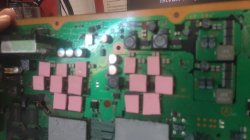
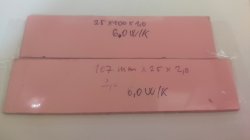
Anyways. The pads are here. So I'll fix the cpu stress press,and see how it goes. But now I need to sit in "school". Lol IMG_20220324_105848.jpg
 
Sacrifices needs to be made to accomplish win.
But this is how it goes. Im Trying to save as many fats as I can. Im glad I've found you guys in this thread. <3
Anyways. The pads are here. So I'll fix the cpu stress press,and see how it goes. But now I need to sit in "school". Lol View attachment 36730
The force is not strong in this one. :(
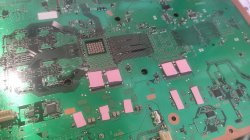
I've put 5pcs of 1mil and one 2mil thermal pad (old) under the CPU, =7mm. But no luck.
I'll try with one more 1mil pad at 8mm but this seems it's not this problem. What else might cause it? Saw on yt a guy half asleep that he just soldered another piece of capacitor near the existing ones, and it started working again. Or it really might be the GPU and/or syscon ? I've ordered yesterday two bga chips, in a month they'll come. So see you in a month guys. (hopefully not, in the meantime I have a RLOD one, which might get this as well (that's a H version) and the capacitor thing)
Thank you for your time folks!
IMG_20220324_120646.jpg IMG_20220324_120551.jpg
 
Last edited:
Tried to enter safe mode. lights should be blue and green, right? After the double beep, is stays green.
Tried another hdmi cable, and no change. :(
 
You need about 6mm in small pads and 4mm in large pads, that's 2 large pads at 2.2cmX2.2cm. Just the small pads alone won't do. Does the controller connect?

Sent from my SM-G988B using Tapatalk
 
a good one I can give you:

instead of using a thermal pad, use a rubber, the same used at school, with a thickness of 3 to 5 mm, as they are much longer lasting and will not deform so much when pressing with the springs.

in Rsx you put it behind it and it worked, in Cell you must put it around that hole on the board, you must not put the rubber touching the processor (in the case of the capacitors that are soldered behind the capacitor)
I have a paint file that explains well what I meant but I can't send it now, I'm on my cell phone but in the afternoon I'll be with the notebook and I'll send the photo =)
 
You need about 6mm in small pads and 4mm in large pads, that's 2 large pads at 2.2cmX2.2cm. Just the small pads alone won't do. Does the controller connect?

Sent from my SM-G988B using Tapatalk
Hey! Thank you!
So the 5+2mm doesnt enough? :O Good lord.
In GLOD it comes on in nr1 when attached by cable, yes.
 
Try a video reset; hold down the power button until you hear it beep then let go

Sent from my SM-G988B using Tapatalk
 
If your controller is connecting, then make sure you have your hard drive connected and try to perform a video reset. Make sure you're using a HDMI cable that works! Make sure your TV is on the right channel. If a video rest don't work try entering safe mode


Sent from my SM-G988B using Tapatalk
 
If your controller is connecting, then make sure you have your hard drive connected and try to perform a video reset. Make sure you're using a HDMI cable that works! Make sure your TV is on the right channel. If a video rest don't work try entering safe mode


Sent from my SM-G988B using Tapatalk

I did all this. after the video reset it was acting like nothing happened. strange
 
Could you connect the controller again?

Sent from my SM-G988B using Tapatalk
Yes. But still no change. Even after the CPU+GPU pressure mod.
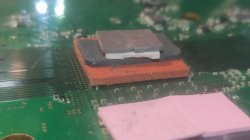
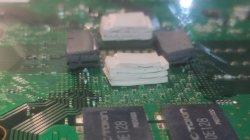
The red thing is the GPU with 2+2+1+1mm the grey and white is the CPU surrounded by 5x1mm pads. But this seems to be not enough.
 

Attachments

  • IMG_20220324_190905.jpg
    IMG_20220324_190905.jpg
    2.7 MB · Views: 87
  • IMG_20220324_190911.jpg
    IMG_20220324_190911.jpg
    2.8 MB · Views: 85
It needs to go in the middle, like I showed you on the YouTube tutorial. I wouldn't place any pressure on the GPU to begin with.

Sent from my SM-G988B using Tapatalk
 
@carr
I will try to help you with everything I currently have.

now, with all that pressure you've put on the CPU and GPU, is the time for YLOD to occur after trying to turn it on, taking longer than before, when there was nothing? or the time until the yellow led appears after the green is still the same? This is quite important...
 
It needs to go in the middle, like I showed you on the YouTube tutorial. I wouldn't place any pressure on the GPU to begin with.

Sent from my SM-G988B using Tapatalk
you mean the pressure on the cpu should be exactly in the center? but when doing this, the pressure will be applied directly to the CPU, it will only push the CPU against the heatsink, the way he did in the photo is pushing the MB, the BGA's and the CPU.
Can you understand what I mean? I don't think I was very clear.
 
Not if you have the two larger pads on top, please look at my video, I have performed this mod six times with them all working

Sent from my SM-G988B using Tapatalk
 
watch your video, not the entirety, but the main parts and I understand the way you made the Pressure Mod, but I'm suspicious that the carr PS3 is not having BGA problems but some other problem
 
Back
Top