PS3 PS3 MultiEmu Downloader - All in One OFW Emulator

Also want know about this MSX emulator Removed link//kozarovv Possible make work it good? This emulator is boot and have some selector but after u chose it show only blue screen without chose folder with roms! Maybe someone can fix it?
Emulator Link
 
Nintendo Classic Games Set Vol.1(no ROMs) Link you need have ultra iso or cdgen soft for add ROMs, then use PS2Classic Gui from ps3 tools and create file for transfer to ps3! Here ROM list with playble games on these emulators Link
Have you (or someone) tryed to rebuild the ISO with 7zip ?

with 7zip installed:
1) double click in the ISO (so it opens a preview of the ISO contents in a filebrowser window)
2) drag and drop some roms in the filebrowser window
3) save changes

I never tryed it, so not sure if is going to work, but maybe it works
I guess by doing it this way it should preserve the original ISO format (because original contents are not extracted... just some files was added)
 
Have you (or someone) tryed to rebuild the ISO with 7zip ?

with 7zip installed:
1) double click in the ISO (so it opens a preview of the ISO contents in a filebrowser window)
2) drag and drop some roms in the filebrowser window
3) save changes

I never tryed it, so not sure if is going to work, but maybe it works
I guess by doing it this way it should preserve the original ISO format (because original contents are not extracted... just some files was added)
All isos will be exracted by ultra iso or daemon tools software
 
All isos will be exracted by ultra iso or daemon tools software
But 7zip is free, lot of people have it installed already, and i think there is even a "portable" version (no need to install it) for people that doesnt wants to install any of this programs
I think is the easyer way

Is just an idea incase you want to add some explain about how to rebuild it. Actually, you could add a readme.txt with the ISO
 
But 7zip is free, lot of people have it installed already, and i think there is even a "portable" version (no need to install it) for people that doesnt wants to install any of this programs
I think is the easyer way

Is just an idea incase you want to add some explain about how to rebuild it. Actually, you could add a readme.txt with the ISO
im not developer of this iso, im will ask friend about readme.txt
 
I've found that the "Mortal Kombat Arcade Hack Kollection (by AKuHAK)" makes for a great skeleton for loading ELFs from cdfs.
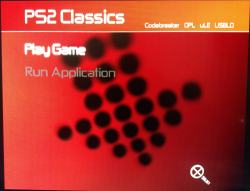
I know uLE already does all this and more, but this makes for a Simple and Easily Modifiable GUI-Goodness Menu with Large Fonts.
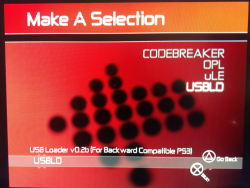
Great potential for making AIO Emulator ISOs, or just including Codebreaker in all your PS2 Classic ISOs.

I'm using UltraISO to Drag only the 'SUDCLDR1' Folder and 'SLES_000.00' into the root of an existing PS2.BIN/ISO.
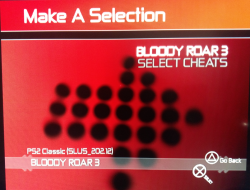
Renaming 'SLES_000.00' to whatever the PS2 Game ID is (eg. Bloody Roar 3 -> SLUS_202.12)
Renaming the original 'SLUS_202.12' to MyGame.ELF or whatever .ELF to be launched later.
Modify the 'CONFIG.TXT' in the 'SUDCLDR1' Folder Link/Launch ELFs.
Here's a basic example:
# -----------------------------------------------------------------------
*option=OPTION_1STCATEGORY_ITEM01
NAME=BLOODY ROAR 3
LINK_DESC=PS2 Classic (SLUS_202.12)
LINK=LINK_1STCATEGORY_ITEM01
#ETA=0

*link=LINK_1STCATEGORY_ITEM01
NAME=BLOODY ROAR 3
TYPE=PLAYABLE
FILENAME=SLUS_202.12.ELF
#IOPIMAGE=213
#INACTIVITY=60
#PLAYTIME=240
SPLASH=Launching PS2 Classic Game ...
# -----------------------------------------------------------------------
To change the basic Black/White GUI:
TOPBAR_ARGBLEFT=00A91416
TOPBAR_ARGBRIGHT=00B94113
BG_ARGBTOPLEFT=00A6261F
BG_ARGBTOPRIGHT=00300303
BG_ARGBBOTTOMLEFT=00A6261F
BG_ARGBBOTTOMRIGHT=00000000

cxPiUYP

g01p7SP

aV7P89Q
 

Attachments

  • MKAHK_Test_01.png
    MKAHK_Test_01.png
    1.2 MB · Views: 336
  • MKAHK_Test_02.png
    MKAHK_Test_02.png
    1.3 MB · Views: 309
  • MKAHK_Test_03.png
    MKAHK_Test_03.png
    1.5 MB · Views: 385
I've found that the "Mortal Kombat Arcade Hack Kollection (by AKuHAK)" makes for a great skeleton for loading ELFs from cdfs.
I know uLE already does all this and more, but this makes for a Simple and Easily Modifiable GUI-Goodness Menu with Large Fonts.
Great potential for making AIO Emulator ISOs, or just including Codebreaker in all your PS2 Classic ISOs.

I'm using UltraISO to Drag only the 'SUDCLDR1' Folder and 'SLES_000.00' into the root of an existing PS2.BIN/ISO.
Renaming 'SLES_000.00' to whatever the PS2 Game ID is (eg. Bloody Roar 3 -> SLUS_202.12)
Renaming the original 'SLUS_202.12' to MyGame.ELF or whatever .ELF to be launched later.
Modify the 'CONFIG.TXT' in the 'SUDCLDR1' Folder Link/Launch ELFs.
Here's a basic example:
# -----------------------------------------------------------------------
*option=OPTION_1STCATEGORY_ITEM01
NAME=BLOODY ROAR 3
LINK_DESC=PS2 Classic (SLUS_202.12)
LINK=LINK_1STCATEGORY_ITEM01
#ETA=0

*link=LINK_1STCATEGORY_ITEM01
NAME=BLOODY ROAR 3
TYPE=PLAYABLE
FILENAME=SLUS_202.12.ELF
#IOPIMAGE=213
#INACTIVITY=60
#PLAYTIME=240
SPLASH=Launching PS2 Classic Game ...
# -----------------------------------------------------------------------
To change the basic Black/White GUI:
TOPBAR_ARGBLEFT=00A91416
TOPBAR_ARGBRIGHT=00B94113
BG_ARGBTOPLEFT=00A6261F
BG_ARGBTOPRIGHT=00300303
BG_ARGBBOTTOMLEFT=00A6261F
BG_ARGBBOTTOMRIGHT=00000000

cxPiUYP

g01p7SP

aV7P89Q

Not understand alot, but probably will be great )))
 
Not understand alot, but probably will be great )))

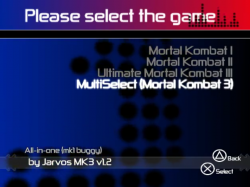
I'm simply using the "Mortal Kombat Arcade Hack Kollection (by AKuHAK)" as a Template for a Custom ELF Multiloader.
Since loading ELFs from ISO/BIN/cdfs is what we're doing these days, I was looking for a Multiloader that was Easy-to-Modify Plus has a Nice GUI.
CDLoader v7_b3 is average all around.
uLE is GREAT Functionality, but GUI is could be better.
OPL is Nice GUI, but need ELFs and conf_apps.cnf on MC, and even tho I got 32MB MC working on my CFW, I still can't get 32MB MC working in PS2 Classic VME format on HAN for some reason :|
I have no idea the origins of the Multiloader utilized in "Mortal Kombat Arcade Hack Kollection (by AKuHAK)", but it appears to have a lot of potential as a Multiloader for PS2 Classics, and even ability to specify/load IOPIMAGEs.

I'm working on an AIO Emulator ISO/BIN that includes most if not all of the working Emulators mentioned in this Amazing Thread.
I'd planned on building utilizing this Multiloader, but I'm not sure I can upload anything yet considering some of the files included (such as LIBSD.IRX).
Plus I'm not sure if it's based on any $ony Demo type code or not, although the GUI kinda reminds me of SMS Media Player a bit...
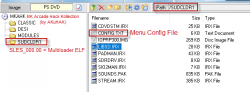
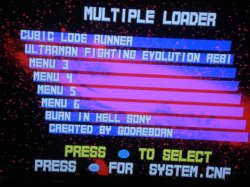
For now I'll include some images of the needed Files from MKAHK filesystem, and the 0riginal MKAHK Multiloader Menu for reference.
Only the 'SUDCLDR1' Folder and 'SLES_000.00' file from MKAHK are required to load it in an ISO/BIN (and SYSTEM.CNF of course).
 

Attachments

  • MultiloaderMenu_0riginal_MKAHK.png
    MultiloaderMenu_0riginal_MKAHK.png
    321.6 KB · Views: 568
  • Multiloader_MKAHK_FILEs.png
    Multiloader_MKAHK_FILEs.png
    25 KB · Views: 500
  • MultiloaderMenu_CDLoader_v7b3.jpg
    MultiloaderMenu_CDLoader_v7b3.jpg
    57 KB · Views: 452
I'm not sure that this loader isn't copyrighted by $ony. In case that you want to use alternative then you can use Homebrew Multiloader.

MANY THANKS.
This is exactly what I was looking for to share with the community.

My goal is to have every PS2 Classic I open feel like my 0LD FAT PS2 w/ FreeMCBoot, or at least as close to it as possible.
I want to see a simple GUI with access to simple Apps like Codebreaker and OPL, but also have Optional access to more Functional Apps like uLE, may be MCA.
I really like the Multiloader from MKAHK, but am unsure if its copyrighted or not, if anyone knows, please share...

I will probably end up making ISO/BIN Templates based on Multiloader v1.41, uLE, OPL, and the GUI-Goodness Multiloader from MKAHK.
If anyone has a blank 32MB Memory Card VMC/VME that actually works with PS2 Classics on HAN, please share or PM a link to me.
Not really sure if it's even possible on HAN, and I know support for large MCs is limited for some if not most PS2 games.
But it'd be nice to include 32MB MC in an AIO Emulator PKG since I'll already be including VMC with Saves/Settings such as SNESStation -> Interlacing-OFF...
 
' I see said the blind man . . .'
SUDCLDR -> $ony Utility Discs Converted Loader . . .
Utility Disc Tools for optimizing PS2 ATA HDDs.
I'm guessing that means copyrighted -> And No sharing links for it here :(

Homebrew Multiloader looks pretty good but seems to be limited to x6 entries.

Will also be testing out PSMS Reloaded (version 0.4).
PSMS Reloaded attempts to bring PSMS 1.2 (by Sjeep) back to life! It now
supports following devices, without relying on any special "FILES.TXT" index:
:. Memory Card
:. USB Devices
:. CD/DVD
:. HDD
 
If you want to use this iso and configure uLaunch config to remain, create a folder "SYS-CONF" in the mc0 virtual memory card - (right click) once in mc0 (as saving uLaunch config did not occur otherwise)

You may then configure uLaunch to
-autoboot a particular emulator/elf
-create shortcuts on uLaunch menu straight to Emulator elfs for easy launch
-change the autoboot time out down less/more seconds (careful doing it down to 0 as you may not have time to configure again as ps3 controller syncs)
-change the [X] and [O] buttons round for confirm
and a little more (but a it wasnt made for ps3 i just stick to basics)

What I actually did as I had the non multi iso at the time was to create a SNES only DVD but i had to copy the file \SNES\SLUS_200.90 and rename it SNES.ELF. I then made uLaunch autooboot that elf. OF course with the multi iso the emulators are all elfs

Also rom file naming in snesstation is picky at least it was for my .smc roms. things like "-" or too long a name made the roms not show.
I am not sure what the correct 7z/zipping if any procedure is if any.

Also a few questions why was this particular version of uLaunch used when there are newer out of interest.
Does anyone have the correct naming structure of roms for snesstation
Can you add zip or 7z (and at any compression)

And of Course well done to the OP, much appreciated
 
Anyone able to write up a quick guide on how to install imbNES lol?

I understand you are supposed to generate some files with rombank.exe, and then generate an ISO and convert it using the psx method. What I don't understand is how to generate an ISO out of the files rombank.exe generates, and then converting the ISO for HAN. (rombank.exe only generated a cue and some other file in my case.)

EDIT:

Was also wondering, is Sega Model 2 emulation possible on ps3 or if anyone has tried it?
 
Last edited:
Did someone figure out how to install a working gba emulator? i tried to follow the guide but i keep getting errors, tried with regba
 
Did someone figure out how to install a working gba emulator? i tried to follow the guide but i keep getting errors, tried with regba

I tried too with regba, had problems so I said fuckit not worth the time. This thread needs to be updated more, with better applicable information that's readable and understandable. :topsy turvy:

I'm still having trouble getting imbNES, or any NES emulator installed. There's no information relevant to getting these installed correctly. I'm guessing Sega Model 2 emulation would be impossible.
 
Back
Top