PS3 PS3 PRO MOD Release/Information Thread

Status
Not open for further replies.
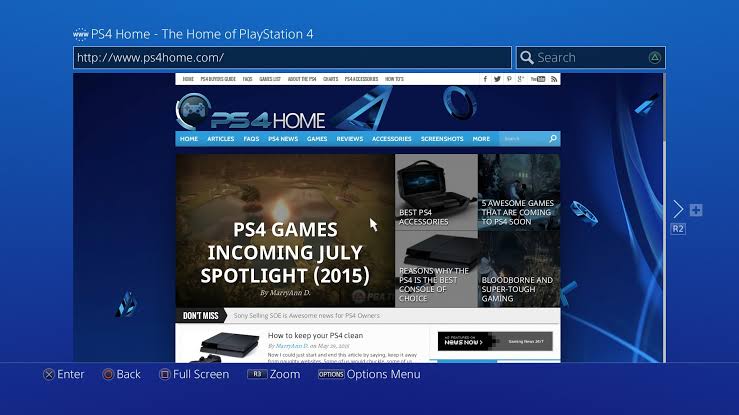
@LuanTeles ... here is another idea for your mod ... adding the buttons in the bottom browser bar ... would be cool ... but I imagine it takes a lot of work to do this. If you are interested in adding these buttons in the browser, use the buttons on PS4..it will be very good.
images

I got it working =) do you have the buttons extracted from the ps4?

@Danxx444 @DeViL303
 
I got it working =) do you have the buttons extracted from the ps4?

@Danxx444 @DeViL303
GREAT...Yes I have ... but I can only send you tomorrow ... but to make your life easier ... download the program and the rco's that I made available and extract the rco with the name "..... accessibility "in the end ... you will also find it in the" web browser "section ... extract these two and you will see (but to tell the truth there are in others too, but they are minimal) ... besides if you can. ... add the PS4 buttons to impose_plugin.rco and other places where the buttons are seen. :)
 
@sandungas @DeViL303 @pinky

Each language that i change the align changes, how to align it on right? so all languages will work? i think it is related to any texunk tags but which one?

Also other problem is that the Standard mode ( that is standard) the icon is like the image, but if set to full pixel they will be out of the bottom pane.

English
tw5GyQR.png


Portuguese
Y01EOtC.png
 
Last edited:
GREAT...Yes I have ... but I can only send you tomorrow ... but to make your life easier ... download the program and the rco's that I made available and extract the rco with the name "..... accessibility "in the end ... you will also find it in the" web browser "section ... extract these two and you will see (but to tell the truth there are in others too, but they are minimal) ... besides if you can. ... add the PS4 buttons to impose_plugin.rco and other places where the buttons are seen. :)

do you know which file is for the keyboard? so i can swap the images
 
EDIT

I found how to make it re-position with the STANDARD to Full Pixel and vice versa


See the icons change its position of the bar when changing to Full pixel, but the new one R3 Button will Reposition =)

Now i need just to redo in this way.


But the align is still a problem in other languages
 
do you know which file is for the keyboard? so i can swap the images
If I'm not mistaken ... there is one in these that you download, but in it does not sample what we are looking for, maybe it is in another rco because the package that DeViL303 made me available, has 96 rco's and "those are just the rcos from one app, its not like on ps3 where they are all in one folder, each plugin/part of the FW on PS4 is like an app with its own rcos in its own folder" - @DeViL303 said
I extracted almost all (missing some two to extract yet) Some 3 rco's that I extracted, the images came out in "dds" format and maybe the keyboard images are in one of those 3 rco's. I don't know how many rco's the PS4 has, maybe if you could take a look at how many it has and extract them all for me, I can look for the images for you.
 
Last edited:
@sandungas @DeViL303 @pinky

Each language that i change the align changes, how to align it on right? so all languages will work? i think it is related to any texunk tags but which one?

Also other problem is that the Standard mode ( that is standard) the icon is like the image, but if set to full pixel they will be out of the bottom pane.

English
tw5GyQR.png


Portuguese
Y01EOtC.png
It was cool .. I liked it...good work bro
 
EDIT 3: Changing modes FIXED


Still missing align in other languages @sandungas @DeViL303
Amazing dude !...Hey man ... if it doesn't bother you ... would you be able to add these PS4 X and O buttons ... in the original impose_plugin.rco of 4.85 (without being modified with anything else, in other words ... being in its normal state)? ... You will just add these buttons.:D
 
@sandungas @DeViL303 @pinky

Each language that i change the align changes, how to align it on right? so all languages will work? i think it is related to any texunk tags but which one?

Also other problem is that the Standard mode ( that is standard) the icon is like the image, but if set to full pixel they will be out of the bottom pane.

English
tw5GyQR.png


Portuguese
Y01EOtC.png
I don't know if you purposely did it for the test or went unnoticed ... but in "Window List" you put the R3 button, but the right one is L3 instead of R3.
 
@LuanTeles...Here .... I selected some images for you to check and case you want to add or replace in the PS3.
 

Attachments

I don't know if you purposely did it for the test or went unnoticed ... but in "Window List" you put the R3 button, but the right one is L3 instead of R3.

Yeap i know, it was just a test ( The L1 one button when converted to gim was not showing), i already fixed it and reallocated the icons positions, i just need to find out how to change the alignment from center to right side, other wise only English will fit.
 
Amazing dude !...Hey man ... if it doesn't bother you ... would you be able to add these PS4 X and O buttons ... in the original impose_plugin.rco of 4.85 (without being modified with anything else, in other words ... being in its normal state)? ... You will just add these buttons.:D

I can, but i'll not add to the mod since i use different button layout, i can send to you after i finish things up
 
Yeap i know, it was just a test ( The L1 one button when converted to gim was not showing), i already fixed it and reallocated the icons positions, i just need to find out how to change the alignment from center to right side, other wise only English will fit.
Hey..
I know why it didn't show up, which setting did you use rgba8888 or dxt5? .. If you used rgba8888, use the dxt5, I modified this photo icon with the setting rgba8888 and it didn't appear, then I changed it setting the image to dxt5 and it worked perfectly.
See:
20190927_184819.jpg
 
Status
Not open for further replies.

Similar threads

Back
Top