PS3 Ps3 Syscon and YLOD Help (Rx and Tx pads gone, can't solder to them)

PS3GenerationZ

Forum Noob
Hello to all, I am looking some assistance with syscon and getting my system back up and running. Following syscon guides on youtube, I tried connecting jumper wires via soldering to my cok-002 RX and TX which worked, however the temperature was too high and ripped off the pads. Is there another test point for Rx and Tx on the same motherboard. I am trying to shave off some of the PCB to expose the copper but it is so resistant. My original E01 model didn't ylod due to overheating but due to being dropped. I have reflowed it a couple of times and no success so far. I really want to revive my childhood bestfriend and get back my data.

I was able to successfully use syscon to fix a G01 model last night, I used the correct temperature at 300C and didn't repeat my mistake before and saw RSX was common issue (4032 and 3034 error codes).. Did a reflow for about 5 minutes and voila. Not worried about it much since I cleaned it well and applied good thermal paste and will mainly use it as a backup to my superslim and blu-ray player if anything, will probably add CFW too.

Anyways, does anyone have any advice for me? Any other test points I can soldier to? I will attach a picture of the issue at hand. If I can't seem to check syscon logs, should I reflow the Southbridge and EE instead of RSX and Cell? I noticed they also popped up as reason for ylod on the ps3 dev wiki syscon error codes. Has anyone else god a ylod from fall damage? I know anything on the motherboard could have been damaged but what would come to mind to you? I know the PSU is not the issue since I tried with the PSU from the G01. What to do?

Thanks
 
The Diag, RxD, and TxD pins of the syscon are always connected to a service connector... and additionally have "testpads" (where you soldered the wires)

The pinout of the service connector of your COK-002 motherboard is shown here:
https://www.psdevwiki.com/ps3/Service_Connectors#CN4009
Is the row of copper pads that appears at right border of this image:
https://www.psdevwiki.com/ps3/File:COK-002_SC_UART_testpads.jpg

But this is tricky to explain... and depends of the circuit design of every motherboard, by looking at that photo im not so sure if you can use the alternative solder points of the service connector

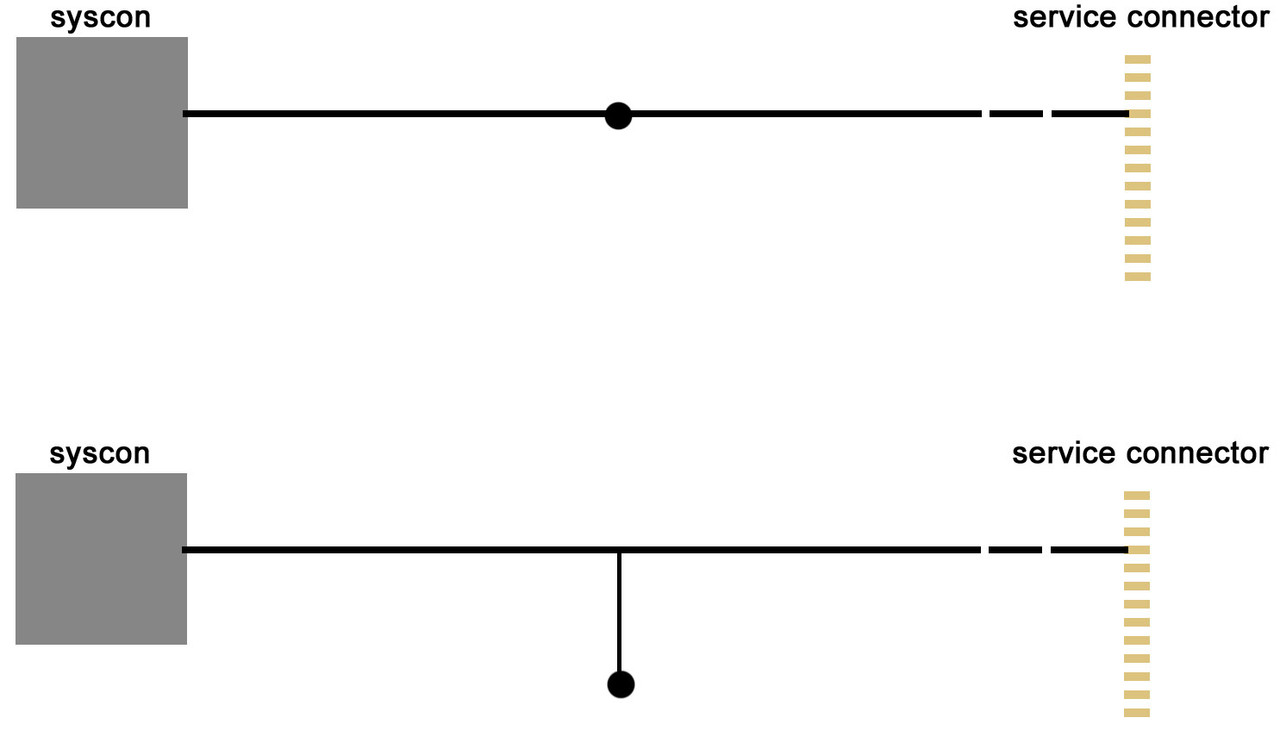
The problem is... imagine you draw a straight line from point A (syscon) to point B (the service connector), and then you add a testpad in the middle of the line and rip off the testpad... well... by doing that you are breaking the connection in between A and B, right ?

But instead of that... imagine you draw a "T" with syscon at top-left, service connector at top-right, and the testpad at bottom-middle of the "T"... and then you rip off the testpad... in this case the connection in between A (syscon) and B (the service connector) is still intact :)
I think is made this way in most PS3 motherboard models, but i dont think sony was following any rule to do it always the same in all them... they just did whatever was more convenient to simplify the circuit

So you need to check by yourself with a multimeter... and also, keep in mind a lot of that lines in between syscon and the service connector was designed with intermediate resistors of 0 ohms (a bridge) that are not present in retail PS3 motherboards
If you follow the lines with the multimeter you are going to find the solder pads (for that missing resistors) but unpopulated
What you need to do is to restore the bridges with a solder iron and a blob of solder (or a tiny wire)
For every line in between syscon and the service connector you are going to find one (or two) missing resistors that needs to be restored
 
I would suggest to use a scalpel or some very sharp cutting tool (even a needle) in order to shave off the PCB and expose the copper. It just takes time and is safer than working over other parts of the motherboard. There are many YouTube videos that fix this kind of issue and give very nice tips (try searching for "circuit board ripped pads").

What @sandungas instructed is a very clear and to the point solution, but I know myself that I wouldn't attempt to go that route because I don't have all the tools, nor the components nor the skills (I'm an animal :p). But that's just me, I prefer the safer way.
 
The Diag, RxD, and TxD pins of the syscon are always connected to a service connector... and additionally have "testpads" (where you soldered the wires)

The pinout of the service connector of your COK-002 motherboard is shown here:
https://www.psdevwiki.com/ps3/Service_Connectors#CN4009
Is the row of copper pads that appears at right border of this image:
https://www.psdevwiki.com/ps3/File:COK-002_SC_UART_testpads.jpg

But this is tricky to explain... and depends of the circuit design of every motherboard, by looking at that photo im not so sure if you can use the alternative solder points of the service connector

The problem is... imagine you draw a straight line from point A (syscon) to point B (the service connector), and then you add a testpad in the middle of the line and rip off the testpad... well... by doing that you are breaking the connection in between A and B, right ?

But instead of that... imagine you draw a "T" with syscon at top-left, service connector at top-right, and the testpad at bottom-middle of the "T"... and then you rip off the testpad... in this case the connection in between A (syscon) and B (the service connector) is still intact :)
I think is made this way in most PS3 motherboard models, but i dont think sony was following any rule to do it always the same in all them... they just did whatever was more convenient to simplify the circuit

So you need to check by yourself with a multimeter... and also, keep in mind a lot of that lines in between syscon and the service connector was designed with intermediate resistors of 0 ohms (a bridge) that are not present in retail PS3 motherboards
If you follow the lines with the multimeter you are going to find the solder pads (for that missing resistors) but unpopulated
What you need to do is to restore the bridges with a solder iron and a blob of solder (or a tiny wire)
For every line in between syscon and the service connector you are going to find one (or two) missing resistors that needs to be restored

Thank you for your detailed response I really appreciate it. I understood everything clearly up until the last paragraph. I'm very novice with using a multimeter and I don't exactly understand what and how to do what you said to determine which trace connects to the service connector.

I'm going to attach a picture of what my PCB looks like now.

messenger_media

messenger_media


According to you, I can't scrape off the motherboard anymore to expose the copper? You think the connection is broken?
 
I would suggest to use a scalpel or some very sharp cutting tool (even a needle) in order to shave off the PCB and expose the copper. It just takes time and is safer than working over other parts of the motherboard. There are many YouTube videos that fix this kind of issue and give very nice tips (try searching for "circuit board ripped pads").

What @sandungas instructed is a very clear and to the point solution, but I know myself that I wouldn't attempt to go that route because I don't have all the tools, nor the components nor the skills (I'm an animal :p). But that's just me, I prefer the safer way.

I was thinking of getting a fibreglass brush which is apparently really good to remove silkscreen and brush off those areas. As well as for replacing the NEC/Tokin capacitors.

Also, Yea I looked at quite a couple of videos on youtube however all the pads they dealt with were soldier pads that were rectangular in shape. I couldn't find anything similar to the circular pads we have on the ps3. If you know of a video, please share it.
 
Last edited:
I also want to emphasize that I have reflowed the motherboard RSX and Cell a couple of times already and even once for the EE and Graphics synthesizer chipsets. The only last solution that I could possibly do to fix would be replacing the NEC/Tokin capacitors with trial and error starting with the RSX first. Ideally I want to do the parallel piggy back method but I can't seem to find a dummy proof explanation or video of how to do it. I'd rather not remove the Tokins if they can act as bridges to the positive pads. Considering reballing is to expensive and doesn't seem to be available near me, (I'm not gonna reball with a heat gun nor do I think I can successfully do it), do you guys recommend I continue trying to connect to the syscon or just trial and error with the capacitors. Recall that my ps3 dropped, but considering how many times I reflowed it I don't think any soldier balls were damaged but something else on the motherboard.
 
I was thinking of getting a fibreglass brush which is apparently really good to remove silkscreen and brush off those areas. As well as for replacing the NEC/Tokin capacitors.

Also, Yea I looked at quite a couple of videos on youtube however all the pads they dealt with were soldier pads that were rectangular in shape. I couldn't find anything similar to the circular pads we have on the ps3. If you know of a video, please share it.

Indeed, there are no videos that deal with circular pads. But rest assured, it's the same... only a little smaller and circular. The test points in the PS3 are flat, no holes in there, so once you can expose the copper line it's just a matter of applying flux and some lead + tin solder alloy (which is stronger than lead-free solder) in order to "fill the circle" where the pad was.
 
Indeed, there are no videos that deal with circular pads. But rest assured, it's the same... only a little smaller and circular. The test points in the PS3 are flat, no holes in there, so once you can expose the copper line it's just a matter of applying flux and some lead + tin solder alloy (which is stronger than lead-free solder) in order to "fill the circle" where the pad was.

Alright. I'm going to keep going at it with that technique. Just a quick question, it may be sometime before I can get my hands on a fibreglass brush, before I was going at it with a flathead screwdriver. Should I keep doing trying to expose the copper with a screwdriver or is that too dangerous and just wait to use fibreglass? Once its exposed ill just add some flux and solder wire like u said to create something atleast that I can connect to.
 
If you are going to use a flat screwdriver, then I suggest that you are very gentle with the scratching force. I don't know how hard the PS3 motherboard is, so go with baby steps.

Here is a video that uses a flat screwdriver to scratch the PCB (min. 2:35):
 
Edit, I just re-read your comment. The solder wire I got from china
If you are going to use a flat screwdriver, then I suggest that you are very gentle with the scratching force. I don't know how hard the PS3 motherboard is, so go with baby steps.

Here is a video that uses a flat screwdriver to scratch the PCB (min. 2:35):

Thanks for the video it was very informational. Compared to what he did in the video, I don't think I scraped as hard. So I was able solder onto the pads. I ended up having lead + tin solder which worked as you said. I'm not sure if I exposed the copper or just the white part like the guy says in the vid but I did manage to form solder. So I connected the jumper wires from the UART to the new soldering. Unfortunately I've tried to AUTH so many times and it keeps being invalid. I tried switching the wires, shutting on and off the power and trying both CXR and SW but it's not connecting :/. If anything I might try to scrape off more of the PCB. It's just hard to see because it's such a tiny area. Man this is driving me nuts. If only we could get the EID root key of a HDD without the console, then all this wouldn't be necessary.
 
Sounds like the solder is not making contact with the copper. You will have to remove more of the PCB.

If you are not sure about what you see is copper or not, try using a multimeter or some other tool that can detect continuity between 2 points. One point is where you are trying to expose the copper, and the other can be the service test pad that @sandungas mentioned before (just check the pictures for your motherboard model).

That way you will not waste solder material, or even dirty the area :encouragement:.
 
Last edited:
Sounds like the solder is not making contact with the copper. You will have to remove more of the PCB.

If you are not sure about what you see is copper or not, try using a multimeter or some other tool that can detect continuity between 2 points. One point is where you are trying to expose the copper, and the other can be the service test pad that @sandungas mentioned before (just check the pictures for your motherboard model).

That way you will not waste solder material, or even dirty the area :encouragement:.

Alright, I'm going to go at it again now hopefully I can get some results to share. Will keep you posted. Thanks for all the info again!
 
Ops, yesterday i tryed to reply but i wrote in a different thread, im going to copy my message here
I cant see the photos, but the easy rule to know if the ripped off testpad "cutted" the line in between syscon and the service connector is to count how many traces was connected to the testpad

If there was only 1 trace connected to the testpad it means the trace in between syscon and the service connector is still intact
Untitled-1-copy.jpg


The point is... this circuit depends of the motherboard model, and for every line in between syscon and the service connector, and you can figure it just by counting how many lines are connected to the testpad you ripped off
If the are 2 (or more) lines there is a huge probablility that the circuit is like the drawing at top... so by ripping the tespad you are "cutting" the line in between syscon and the service connector

But if there is only 1 line connected to the testpad the circuit is like what i drawn at bottom... and ripping the testapd doesnt "cuts" the line in between syscon and the service connector

*And the "intermitent" cuts i drawn at right of the line are the missing resistors that you need to restore, i cant guide you to find them because his location is different in every motherboard, you need to find them following the lines with a multimeter (or visually) like a bloodhound
 
Hello to all, I just wanted to say thanks for all the help. I got another ylod chece01 and I did not mess up the soldering. This time I put flux and used only 300C and got the right syscon connection. Now here's the thing, at first i was getting errors 3034 and 4422 -> leading to RSX failure. I reflowed the motherboard and it still had the ylod. I reconnected to see syscon errlog and this time im getting A0213013 and A0202120 all up until ERRLOG GET 16 which gives me back the old errlogs relating to 3034 and RSX. So I did a google search and apparently this is related to a blown out fuse. Now, I just wanted to ask here for anyone that has in depth experience on this for some help before I proceed.
 
Ops, yesterday i tryed to reply but i wrote in a different thread, im going to copy my message here

Untitled-1-copy.jpg


The point is... this circuit depends of the motherboard model, and for every line in between syscon and the service connector, and you can figure it just by counting how many lines are connected to the testpad you ripped off
If the are 2 (or more) lines there is a huge probablility that the circuit is like the drawing at top... so by ripping the tespad you are "cutting" the line in between syscon and the service connector

But if there is only 1 line connected to the testpad the circuit is like what i drawn at bottom... and ripping the testapd doesnt "cuts" the line in between syscon and the service connector

*And the "intermitent" cuts i drawn at right of the line are the missing resistors that you need to restore, i cant guide you to find them because his location is different in every motherboard, you need to find them following the lines with a multimeter (or visually) like a bloodhound

Thank you for this, I am going to take a further look at my own E01 and follow the tracks. It has a cok-002 motherboard which doesn't trace into the system connector making it hard to trace. For the other E01 I got access to the syscon, I actually changed the jumper wires on my UART that kind of melted and it connected. Now I'm going to try with these new jumper wires to get a connection and I'll get back to this.
 
Hello to all, I just wanted to say thanks for all the help. I got another ylod chece01 and I did not mess up the soldering. This time I put flux and used only 300C and got the right syscon connection. Now here's the thing, at first i was getting errors 3034 and 4422 -> leading to RSX failure. I reflowed the motherboard and it still had the ylod. I reconnected to see syscon errlog and this time im getting A0213013 and A0202120 all up until ERRLOG GET 16 which gives me back the old errlogs relating to 3034 and RSX. So I did a google search and apparently this is related to a blown out fuse. Now, I just wanted to ask here for anyone that has in depth experience on this for some help before I proceed.

Here you will find the answer to your question: https://www.psx-place.com/threads/r...s-replacement-ylod.25260/page-254#post-340677
 

thank you for this! this just keeps getting deeper and deeper lol. While I was initially pissed off, this might be a good thing. The new e01 i got ylods exactly the same time as my old one. So even though I can't connect to the syscon of my og e01, maybe the fault is the same considered it dropped and a fuse blew out. So if I can fault find this maybe I can fault find the other. Wish me luck
 

I want to ask a quick question. On the ps3 dev wiki it says that the fault a023013 is related to a dead Cell also and people get this error code when they mess up a delid or smtg. I only got this error code once in my log and the rest are a020120. Before I go through the process of trying to find a faulty fuse, is it possible that I destroyed my Cell while reflowing? I reflowed for about 2.5 minutes at 290C both chips. This is what I did with the G01 that I was able to fix. I kept the surface relatively flat and let it cool for 30 min. Im really bummed out rn and my confidence is wiped out
 
It could be many things, and remember that the logs are from most recent (GET 00) to less recent. For example, my broken Slim has some error codes regarding the CELL among many regarding the RSX. It is a good practice to run a clearerrlog command before turning on the PS3, so that your logs are accurate.

I will try to solve the issues from most frequent errors to less. In my case, first attack the RSX solder joint issues (don't have a heatgun yet), and then the CELL overheating (which is quiet obvious as it doesn't have the cooler on it).
 
It could be many things. For example, my broken Slim has some error codes regarding the CELL among many regarding the RSX. I will try to solve the issues from most frequent errors to less. In my case, first attack the RSX solder joint issues (don't have a heatgun yet), and then the CELL overheating (which is quiet obvious as it doesn't have the cooler on it).

what is bothering me is that these error codes were not there in the beginning. These only came after I reflowed. Therefore I am not sure if I actually did more damage then there was, or if there was two problems and I only fixed one. I don't know if when you power on a ps3, if it first communicates with RSX and then moves on to other stuff or vice versa. If it first talks to RSX then what I did is good, since those error codes are gone if not then what I did messed it up even more.
 
Back
Top