• PS3HEN is now supporting 4.93 Firmware

    View Official Release Post for additional information HERE
PS3HEN

PS3HEN PS3HEN - Official Release Thread (Homebrew Enabler for the PS3) v3.5.0 (4.93 support)

well i though so...the thing is why hen isn`t working, if i check in the Hybrid Firmware Tools it says hen is installed with the version and all and yet i get the error "hen failure" everytime. han functions work normally even with that error and today i got it working at ramdon times without touching or changing anything...i´m really lost here
if you even see HFW Tools, HEN is enabled
 
if you even see HFW Tools, HEN is enabled
the hfw tools appear even if i get the "hen failure restart ps3 and retry" error, if i try to update hen via the tool i´ll get the 80010017 error too, if i run multiman, irisman etc despite the hen error the console just freeze on a black screen..so i don`t think hen is actually enabled...well the error even say it and yes i tried deleting the cache and all that and nothing too

about the rate being low, don´t know if 4 times out of 50 with so many re-installations (yeah i counted them) can be called low. also i´m using the files in the zip on the post
 
the hfw tools appear even if i get the "hen failure restart ps3 and retry" error, if i try to update hen via the tool i´ll get the 80010017 error too, if i run multiman, irisman etc despite the hen error the console just freeze on a black screen..so i don`t think hen is actually enabled...well the error even say it and yes i tried deleting the cache and all that and nothing too

about the rate being low, don´t know if 4 times out of 50 with so many re-installations (yeah i counted them) can be called low. also i´m using the files in the zip on the post

No offence mate, but you must be doing a step wrong. Consider watching a tutorial on youtube.
 
img_20190604_131142-jpg.18228


img_20190604_131146_1-jpg.18227
 

Attachments

  • IMG_20190604_131146_1.jpg
    IMG_20190604_131146_1.jpg
    3.3 MB · Views: 1,030
  • IMG_20190604_131142.jpg
    IMG_20190604_131142.jpg
    3 MB · Views: 1,040
No offence mate, but you must be doing a step wrong. Consider watching a tutorial on youtube.
well mate i have lost count how many tutorials i´ve seen and i can tell you i´m just following the steps for the installation, i´m not adding steps nor removing ones

hfw - han - hen - reboot - hen enable - hen failure
 
the hfw tools appear even if i get the "hen failure restart ps3 and retry" error, if i try to update hen via the tool i´ll get the 80010017 error too, if i run multiman, irisman etc despite the hen error the console just freeze on a black screen..so i don`t think hen is actually enabled...well the error even say it and yes i tried deleting the cache and all that and nothing too

about the rate being low, don´t know if 4 times out of 50 with so many re-installations (yeah i counted them) can be called low. also i´m using the files in the zip on the post
So you're having trouble enabling HEN, well, I had this problem in one of the previous versions, (but it was not quite like yours) I solved it like this ... clearing the browser cache, clearing the cache and everything the browser helps you solve this kind of problem, if you go to a lot of research on your PS3 or even occasionally visit some sites, it is not enough to just clear the history, but rather the entire browser. You can clear the cache in XMB, just go on. PlayStation®Store on the "game" tab (it can be on the PSN tab in What's New) and press the triangle button, will appear some options, you choose to clear the cache. do not worry if you stop it a little, it's normal, depending on how much cache you have, it will take a while. do it two or three times, but I recommend two because more than this the PS3 freezes, I do not know why but when I was in HAN I used this option as many times as I wanted ... well do it and see if it solves, for me it solved . ah and another thing, do all this before you try to enable HEN.
If it succeeds, restart the console and try to enable HEN again, if it gives an error, restart and clear the cache, if it works, then the problem is the cache, do this until you do not give more error when enabling HEN.

 
Last edited:
well mate i have lost count how many tutorials i´ve seen and i can tell you i´m just following the steps for the installation, i´m not adding steps nor removing ones

hfw - han - hen - reboot - hen enable - hen failure
I did this on my first try and it works like a charm, already jailbroken 3 super slims, the AIO guide itself was already noob friendly at most.
 
well mate i have lost count how many tutorials i´ve seen and i can tell you i´m just following the steps for the installation, i´m not adding steps nor removing ones

hfw - han - hen - reboot - hen enable - hen failure
Before installing hen did you run /html/han_flash_mount.html
from psx-place, instead of just enabling han?
 
So you're having trouble enabling HEN, well, I had this problem in one of the previous versions, (but it was not quite like yours) I solved it like this ... clearing the browser cache, clearing the cache and everything the browser helps you solve this kind of problem, if you go to a lot of research on your PS3 or even occasionally visit some sites, it is not enough to just clear the history, but rather the entire browser. You can clear the cache in XMB, just go on. PlayStation®Store on the "game" tab (it can be on the PSN tab in What's New) and press the triangle button, will appear some options, you choose to clear the cache. do not worry if you stop it a little, it's normal, depending on how much cache you have, it will take a while. do it two or three times, but I recommend two because more than this the PS3 freezes, I do not know why but when I was in HAN I used this option as many times as I wanted ... well do it and see if it solves, for me it solved . ah and another thing, do all this before you try to enable HEN.
If it succeeds, restart the console and try to enable HEN again, if it gives an error, restart and clear the cache, if it works, then the problem is the cache, do this until you do not give more error when enabling HEN.
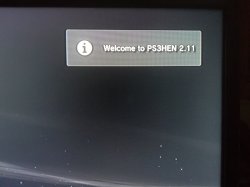
You are great!!!!!!! You solve my problem! Hen now is enabled!
The playstation store cache cause the problem!

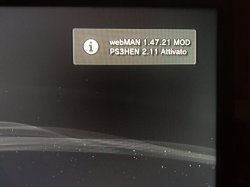
Hen is enabled but i don't have any notify of webman mod
 
You are great!!!!!!! You solve my problem! Hen now is enabled!
The playstation store cache cause the problem!

Hen is enabled but i don't have any notify of webman mod
You need to upgrade the webMAN to the new version 1.47.21. before you install, delete the webMAN you are in,open the webMAN MOD>Settings> Uninstall webMAN ... restart and install the new version, install the webMAN installer, hold L1 and then press X (With L1 still pressed) it will restart the PS3, then when you enable the HEN, you will see the webMAN notification and the HEN enabled.
 
Last edited:
i got HFW installed Hen enabled and webman irisman and managunz installed

all updated to latest version

however, my PSN logo never change to red? it's still blue.

i can FTP to the console np.

however, no matter what backup i try to launch, no matter what format it is in, it always go to black screen and freeze and I must unplug and plug back. i thought maybe bad dumps but I try several different ones anyone get a recommendation for a title that works for sure?


thanx
 
So your issue is HEN success rate being low, are you using HDD version which can be enabled via Game Category without launching internet browser?

I thought I install HDD version but when I click Enable HEN under Game Category it launches internet browser in order to enable HEN. is this correct or I did something wrong?
 
@esc0rtd3w @Joonie Its possible that the pup for HFW 4.84 to have the check for bluray drive disable?
I'm gonna try to fix a ps3 (fat nand) without the bluray drive and is for sure i will have problem to install the firmware on it...
 
Last edited:
i got HFW installed Hen enabled and webman irisman and managunz installed

all updated to latest version

however, my PSN logo never change to red? it's still blue.

i can FTP to the console np.

however, no matter what backup i try to launch, no matter what format it is in, it always go to black screen and freeze and I must unplug and plug back. i thought maybe bad dumps but I try several different ones anyone get a recommendation for a title that works for sure?


thanx
If you want the red PSN icons, just change the theme go to Hybrid Firmware Tools and choose the folder with the theme name, there you will find several, what you want is the name of REBUG_THEME. just install, they will turn red (restart the console when installing the theme). About the games backups, I have three and I have no problems, can be the Eboot, or you can solve by simply downloading the game update, if those games you have to ask update, download them, this will prevent black screen, I had this Metal Gear Solid: Ground Zeroes, gave black screen, downloaded the update and took it normally. try to see if that was it.
 
i got HFW installed Hen enabled and webman irisman and managunz installed

all updated to latest version

however, my PSN logo never change to red? it's still blue.

i can FTP to the console np.

however, no matter what backup i try to launch, no matter what format it is in, it always go to black screen and freeze and I must unplug and plug back. i thought maybe bad dumps but I try several different ones anyone get a recommendation for a title that works for sure?


thanx
Here, enter this site:https://archive.midnightchannel.net/SonyPS/PS3/Disc Repair/
thanks to @Joonie, look for the games that are giving black screen, download the files of each game, unzip and replace by the current, do this if the game updates did not work.
 
You need to upgrade the webMAN to the new version 1.47.21. before you install, delete the webMAN you are in,open the webMAN MOD>Settings> Uninstall webMAN ... restart and install the new version, install the webMAN installer, hold L1 and then press X (With L1 still pressed) it will restart the PS3, then when you enable the HEN, you will see the webMAN notification and the HEN enabled.
Thanks! Works all ok! Thanks a lot

For devs: it is the case to update guide with clear cache psn network suggested by danxx444?
 
Back
Top