PSX-FPKG

PS4 PSX-FPKG (by Jabu) - A Tool to convert PS1 (PSX) games for use on PS4 v0.3

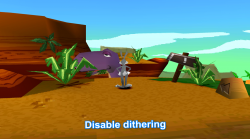
Ok after wasteing all day! Want to show some cool thing from Super Cyber1000!
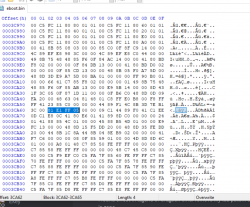
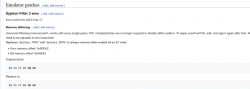
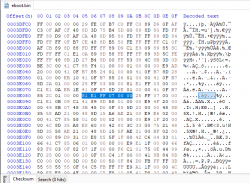
It Universal No-dithering patch for all PSX games! (He patched eboot.bin)
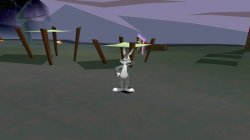
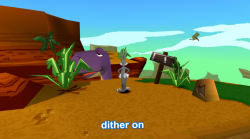
Tested just with Bugs Bunny Lost in Time (that game never have personal No-dither patch) and seems it works!
 

Attachments

  • 01.png
    01.png
    1.5 MB · Views: 152
  • 02.png
    02.png
    837.9 KB · Views: 142
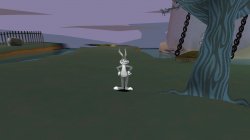
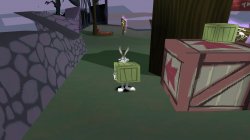
More Screens from Bugs Bunny Lost in Time (Syphon Filter 3 emu) with Disable dithering cheat!
 

Attachments

  • 01.jpg
    01.jpg
    375.7 KB · Views: 91
  • 02.jpg
    02.jpg
    445.6 KB · Views: 87
  • 03.jpg
    03.jpg
    486.3 KB · Views: 92
  • 04.jpg
    04.jpg
    377.9 KB · Views: 97
@wigwrm, @Vika23

To disable dithering does every PSX emulator eboot has to be patched at different offsets? Would you release offsets for other eboots like Syphon Filter 1 and 3? Thanks in advance
 
@wigwrm, @Vika23

To disable dithering does every PSX emulator eboot has to be patched at different offsets? Would you release offsets for other eboots like Syphon Filter 1 and 3? Thanks in advance
The offsets are different for each game release that I've seen so far. I'd recommend using syphon filter 3 or the legend of dragoon emulator releases. They are the most recent that are available to us at this time.
 
Thrill Kill - (SLUS00752)

Code:
# Thrill Kill (all regions)

--sim-analog-pad=0x2020
--ps1-title-id=SLUS00752
--gpu-scanout-fps-override=ntsc

# PlayStation BIOS Dumps

--bios-hide-sce-osd=1
--has-shown-start-select-help=1

# Use the new multitap?

--multitap=always

# Use the new shared image directory

--image-dir=data

--force-pad-connect=0b1

# Enable LopnorSPU to fix some audio issues
--use-lopnor-spu=1

# following settings are machine-generated

--ps4-trophies=0
--ps5-uds=0
--trophies=0

--globalgamedata-dir=global
--force-frame-blend=false

# Allow the user to change between PAL and NTSC
--userui-region-selector=false

# Fixd Coning

--gamma=5
--brightness=9
--contrast=8

# Emu used = Syphon Filter 3
SLUS00752.lua
Code:
-- Title: Thrill Kill - USA (SLUS00752)
-- ported to PS4 lua by JSimesen
-- emu used= Legend of Dragoon - Syphon Filter 3

local patcher = function()

-- Disable dithering
R3K_WriteMem16(0x8006A808,0x0000) --E1000200
R3K_WriteMem16(0x8006AA90,0x0000) --E1000200
R3K_WriteMem16(0x8007C894,0x0000) --E1000200
R3K_WriteMem16(0x8007E1B0,0x0000) --E1000200
R3K_WriteMem16(0x8007F5E8,0x0000) --E1001000
end

EM_AddVsyncHook(patcher)
app_boot.lua
Code:
require "disc-selection"

local pal_disc_map = {
    en = { "name_en_pal.bin" },
    de = { "name_de_pal.bin" },
    it = { "name_it_pal.bin" },
    es = { "name_es_pal.bin" },
    fr = { "name_fr_pal.bin" },
}

local ntsc_disc_map = {
    en = { "ThrillKill.bin" }
}

RegisterDiscs(pal_disc_map, ntsc_disc_map)
Pic1.png File
 

Attachments

Last edited:
Addie no Okurimono: To Moze from Addie - (SCPS-10126)

config-title.txt
Code:
# Addie no Okurimono: To Moze from Addie (all regions)

--ctlanalog=true

# PlayStation BIOS Dumps

--bios-hide-sce-osd=1
--has-shown-start-select-help=1
--ps1-title-id=SCPS10126
--gpu-scanout-fps-override=60

# Use the new shared image directory

--image-dir=data

--force-pad-connect=0b1

# following settings are machine-generated

--ps4-trophies=0
--ps5-uds=0
--trophies=0

--globalgamedata-dir=global

--force-frame-blend=false

# Allow the user to change between PAL and NTSC

--userui-region-selector=false

# fix black screen

--cdrom-cmd-time=100
--cdrom-max-seek=true

# Fixd Coning

--gamma=5
--brightness=9
--contrast=8

# Emu used = The Legend of Dragoon

SCPS10126.lua
Code:
-- Addie no Okurimono: To Moze from Addie (Japan) (SCPS-10126)
-- ported to PS4 lua by JSimesen
-- emu used= Legend of Dragoon

local patcher = function()
end

EM_AddVsyncHook(patcher)

app_boot.lua
Code:
require "disc-selection"

local pal_disc_map = {
en = { "name_en_pal.bin" },
de = { "name_de_pal.bin" },
it = { "name_it_pal.bin" },
es = { "name_es_pal.bin" },
fr = { "name_fr_pal.bin" },
}

local ntsc_disc_map = {
en = { "Addie no Okurimono To Moze from Addie (English Available).bin" }
}

RegisterDiscs(pal_disc_map, ntsc_disc_map)

package-ps4.conf
Code:
# CONFIG FOR PS4 PACKAGE ENVIRONMENT
# Contents of this file are added to every package.conf
# Sets running environment suitable for consumers

--scale=1

English Patched Version 1.0
 

Attachments

Last edited:
Hello, @Jabu
May I request a feature for your converter please? Im on windows 7 and python script cue2toc.exe is throwing an error during pkg creation. Seems the cause of this is the fact that this script is for python 3.9 at least which is the version not supported by Win 7 anymore. Could you add a check mark option to skip cue2toc conversion before pkg creation? Or maybe use a python 3.8 which is last ver supported Windows 7.
Now I can only create psx pkgs if I create dummy toc file with same name as my bin,cue before running psx-fpkg.
I appreciate you reply
@Jabu Wanted to bump this since you are working on new version of PSX-FPKG. Anything can be done with this by chance in new version?
 
Super Mario Bros Special 35th Anniversary Edition\\\Various Hacks NESonPS4 Test

Code:
-- emu used=syphonfilter v2
 
Animetic Story Game 1: Card Captor Sakura - (SLPS01830, SLPS01831)

config-title.txt

Code:
# Animetic Story Game 1: Cardcaptor Sakura (all regions)

--ctlanalog=true
--sim-analog-pad=0x2020

# PlayStation BIOS Dumps

--bios-hide-sce-osd=1
--has-shown-start-select-help=1
--enable-change-disc-ui=true
--bios=SCPH101.bin

--imageName0="Animetic Story Game 1 [English Patch] V1.0"
--imageName1="Animetic Story Game 1 [English Patch] V1.0"

--image0="data/[EN 1.0] Animetic Story Game 1 - Card Captor Sakura (Japan) (Disc 1).bin"
--image1="data/[EN 1.0] Animetic Story Game 1 - Card Captor Sakura (Japan) (Disc 2).bin"

# PS1 ID

--ps1-title-id=SLPS01830

# FPS = 60, ntsc, pal, false

--gpu-scanout-fps-override=ntsc

# Emu used = Syphon Filter 3
app_boot.lua
Code:
require "disc-selection"

local default_disc_map = {
    en = { "[EN 1.0] Animetic Story Game 1 - Card Captor Sakura (Japan) (Disc 1).bin",
           "[EN 1.0] Animetic Story Game 1 - Card Captor Sakura (Japan) (Disc 2).bin" }
}

RegisterDiscs(default_disc_map)

English Patched Version 1.0
 

Attachments

Heads up for those who refuse to give up precious Windows 7 :chuncky:. Turns out there are unofficial builds compiled for Python 3.9+. Here is the post in another thread.
By installing newest Python I was able to run PSX-FPKG and create a pkg without a typical error connected to cue2toc not supporting python 3.8 (Windows 7)
NOTES: Make sure to install Windows6.1-KB3063858-x64.msu update first, then download api-ms-win-core-path-l1-1-0.dll and toss it to Windows/System32 folder. Now you can install pythons 3.9+ and run newer apps based on python on Windows 7.
 
Could use some help here. I've tried both PSX-FPKG 0.3 and PSX2PS4 1.5.1 but still can't produce working PKGs for the Japanese versions of Silent Hill (SLPM-86192) and Ape Escape (Saru! Get You!) (SCPS-10091). Silent Hill will crash after the initial warning screens, Ape Escape won't boot at all. Any hints or suggestions would be helpful. Thanks in advance...
 
Excalibur 2555 A.D. - (SLUS00541)

config-title.txt
Code:
# Excalibur 2555 A.D. (all regions)

--ctlanalog=true

--bios-hide-sce-osd=1
--has-shown-start-select-help=1

--sim-analog-pad=0x2020

--bios=SCPH101.bin

# Use the new shared image directory
--image-dir=data

# following settings are machine-generated
--ps4-trophies=0
--ps5-uds=0
--trophies=0

--globalgamedata-dir=global

--force-frame-blend=false

# Allow the user to change between PAL and NTSC
--userui-region-selector=true

# Emu used = The Legend of Dragoon
# Website: ps4storepkgclassic.wordpress.com

app_boot.lua
Code:
require "disc-selection"

local pal_disc_map = {
    en = { "Excalibur_2555_A.D._SLES00478.bin" },
    de = { "Excalibur_2555_A.D._SLES00478.bin" },
    it = { "Excalibur_2555_A.D._SLES00478.bin" },
    es = { "Excalibur_2555_A.D._SLES00478.bin" },
    fr = { "Excalibur_2555_A.D._SLES00478.bin" },
}

local ntsc_disc_map = {
   en = { "Excalibur_2555_A.D._SLUS00541.bin" }
}

RegisterDiscs(pal_disc_map, ntsc_disc_map)

SLUS00541.zip file Download!
 
I tried legend of dragoon emu for AC3 before while making ultimate eng translated AC3 japanese version with full story unfortunately still same broken draw distance on horizon as you fly around.
 
Back
Top