PS4 Recover savefiles from internal hard drive

@Charles_n_town If you mean this
https://www.psxhax.com/threads/orbisman-beta-ps4-homebrew-application-by-lightningmods.5970/page-5
I think it's only for 4.55 and 5.05 fw, I'm on 7.02.

What's the difference with the tool @Berion suggested?
That's it. I asked him about it, since I encountered a bug with a later goldhen and dumping the file system iirc. It would dump infinitely. He doesn't want to work on it anymore, and that was a long time ago.

Sorry, not sure which app. That script is just the one I used. I've had covid for the past four days, so my sleep has been erratic and I can't think straight, so I may be misremembering some stuff.
 
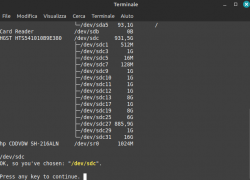
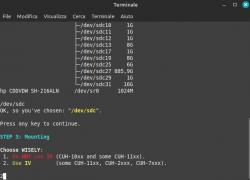
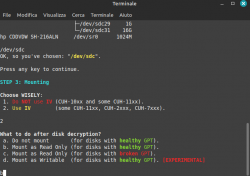
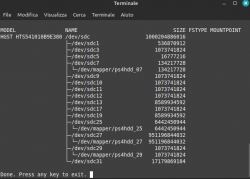
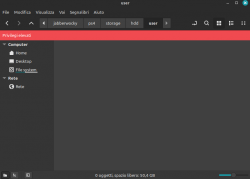
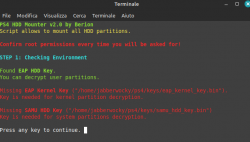
@Berion I used your toolkit and mounted/decrypted successfully but the problem is, all folders inside /storage are empty.

(in "mounting3.png" I typed "b" because my ps4 model is cuh-7116b).
 

Attachments

  • mounting1.png
    mounting1.png
    34.4 KB · Views: 40
  • mounting2.png
    mounting2.png
    48 KB · Views: 43
  • mounting3.png
    mounting3.png
    43.7 KB · Views: 41
  • mounting4.png
    mounting4.png
    51.4 KB · Views: 41
  • mounting5.png
    mounting5.png
    62.7 KB · Views: 45
  • empty.png
    empty.png
    24 KB · Views: 39
I managed to dump the sflash0 file with binary connection but its size is 33.6mb, is it ok still? I read it had to be 32mb.
32MiB = 33.55MB
By default, Nemo (default file manager in Linux Mint) using MB notation for some stupid reason (can be changed in options). Windows using MiB but showing it improperly as MB... ;)
What's the difference with the tool @Berion suggested?
Zero difference. Toolkit invoking that script to extract EAP HDD Key from SFLASH0. I changed Zecoxao script a little bit only to work with different filename, all the rest is the same code.

ps4hdh_keygen.png


I used your toolkit and mounted/decrypted successfully but the problem is, all folders inside /storage are empty.
That's because partitions wasn't mounted, and that's because wasn't decrypted, and that's because probably bad key or bad choice (you should choose IV as script suggesting for CUH-7xxx, so you did fine... but try "do NOT use IV" and see the results).

If this still will not result in mounting, please do:
Code:
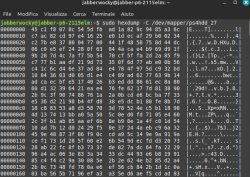
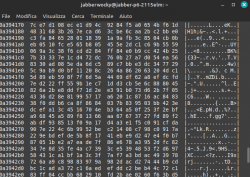
sudo hexdemup -C /dev/mapper/ps4hdd_27 | head 8
and paste here the results (this will tell me if it is decrypted or not, no private data there). Between tests, use Umounter script because it removes mappers, which must be cleared before trying different option.

If both cases results garbage (you should seen mostly zeroes from hexdump output), that means key is wrong.

BTW: If decryption will be performed properly, you would see the same mount points as on image below (screen came from older version, that's why is little different than yours):

ps3hddddh_toolkit_2-png.41912
 
Last edited:
That's because partitions wasn't mounted
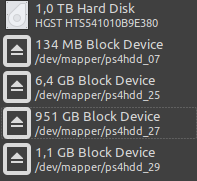
I think partitions are mounted, I can see them in disk utility after I use Mounter.sh, however, I get the error shown in "error.png".
but try "do NOT use IV" and see the results
Tried it and still, folders are empty.

As you can see in "mounting3.png" in my previous post, fs type and mountpoints columns are empty.

Btw, do I have to run Keygen.sh as well? I don't have any of those packages listed (python2, python-pip etc).

Update: even after installing all python packages and running Keygen.sh, I get the same error when mounting.
 

Attachments

  • diskutility.png
    diskutility.png
    10.5 KB · Views: 39
  • hexdump1.png
    hexdump1.png
    81.7 KB · Views: 42
  • hexdump2.png
    hexdump2.png
    78.5 KB · Views: 39
  • error.png
    error.png
    24.6 KB · Views: 42
Last edited:
They are empty for reasons I mentioned, which at the end of chain of results: not mounting. Please, don't argue with me about that. I know how it works. ;) Look, disk have not encrypted and standard partition table called GPT. On GPT, there are several partitions (listed on your screen from gdisk) encrypted by EAP and SAMU keys. /dev/mapper/* are virtual devices after decryption on the fly. dmcrypt don't know if he decrypting anything properly - it is not his job - it doing only some math operations which user asking for. So by whatever you feed dmcrypt, math magic will be performed. If key, algo etc. etc. is good, it will output decrypted data. If not, then "random" values as on your screens which cannot be interpreted by anything. So in summary, you didn't decrypted partitions. Because of wrong key and/or bad IV. I put bet on wrong key.

"PS4 HDD Keygen.sh" is for getting proper EAP HDD Key from: kernel dump EAP extraction or extraction and decryption from "sflash0.bin". Each script have its purpose, so I don't understand your question.

PS: Yes, I always looking at all screenshots and logs attached.
PS2: What exactly is your model? If CUH-71xx then you cannot extract EAP HDD Key from SFLASH0 because southbridge used in those models encrypting it currently in unknown way. If 70xx, then should be fine. For 71xx you need good payload or app which will dump EAP HDD Key on console itself (some doing it improperly on other southbridges than Aeolia!).
 
Last edited:
I'm not trying to argue with you at all, I'm just a total noob when it comes to these things so I need explanation for everything.

Yes, my ps4 model is CUH-7116b so now you're telling me the key is not valid? Do you have any payloads that you recommend to dump the eap directly from the console? And on which host (I tried mira and goldhen so far and only on goldhen I was able to dump the sflash0 via ftp). Thanks
 
Yes, I'm pretty sure EAP HDD Key has been not dump valid (you can try reverse it by using 1st option in keygen, maybe payload/app author just forgot to do that at the end of process? Just blind shot).

I don't. My PS4 are slim on 8.03 stuck due to dead optical disc drive, and first fat on newest fw. So I'm out of hacks range, not to mention specific model like yours to check some. Maybe @Colek know some. @Thefirebeast have Belize 2 and dumped proper key on it on a console because he send me some sample back in the past.

SFLASH0 dumping is fine. EAP HDD Key extraction from it doesn't - for your specific model. In future it will be possible (actually kernel dumps are needed and free time and good will of Zecoxao to add it :D) but for now it is not.
 
Last edited:
I have a few questions:
- Do I have to attach the disk image to a loop device (sudo losetup -f <disk image>) if I'm using another hdd as the image? Or is there a case where I don't need to attach it to a loop device? And do I have to do that before mounting the hdd using your script?

-Is it ok if I use the original ps4 hdd for mounting or do I need to use the hdd with the image?

-Also what does zecoxao mean here? "Make sure the magic at 0x1C91FC is 0xE5E5E501 !" How can I check that?

Thank you
 
If you using image file and want working with it, then yes you must. "-f" means it will take first free slot (/dev/loop0, /dev/loop1, /dev/loop2 etc).

Yes you must.

You can use real device. Script allows to mount stuff in read only mode.

I dunno, I no longer have image and eap key, so I cannot check what partition he referring to.
 
Do you know if psn account info is stored on the ps4 hdd or is it like ps3 that it's stored on the mobo? I'm asking in case I want to share my kernel dump and don't want to give other people my psn account info. i have inserted a new hdd in my ps4 and reinstalled the fw so if I dump the kernel now, will there be data of past psn accounts in there?
 
Do you know if psn account info is stored on the ps4 hdd or is it like ps3 that it's stored on the mobo? I'm asking in case I want to share my kernel dump and don't want to give other people my psn account info. i have inserted a new hdd in my ps4 and reinstalled the fw so if I dump the kernel now, will there be data of past psn accounts in there?

if you mean the idps, last time I checked, you could only get half of it, and that was back on 5.05. I think you could get the full one on 1.76, but they obfuscated it in later firmwares.
 
I wouldn't share anything publicly, even though there's still a lot we can't do with PS4 stuff that doesn't require the system. Tbh, I'm so paranoid, personally, about getting banned, that I won't even publicly share nor show an image of my legit PSN name.
 
Do you know if psn account info is stored on the ps4 hdd or is it like ps3 that it's stored on the mobo?
Neither on PS3 or PS4, SEN stuff is placed on anywhere but HDD (except are PS3's with NAND).
I'm asking in case I want to share my kernel dump and don't want to give other people my psn account info. i have inserted a new hdd in my ps4 and reinstalled the fw so if I dump the kernel now, will there be data of past psn accounts in there?
I don't know what is kernel dump exactly. If it is only decrypted kernel, then for sure not.
 

Similar threads

Back
Top