
You are using an out of date browser. It may not display this or other websites correctly.
You should upgrade or use an alternative browser.
You should upgrade or use an alternative browser.

PS3 [RELEASE] ★ Ultimate Toolbox v2.03 - It Only Does Everything! v2.03 (FW 4.84 - 4.91)

pinky
Retired
Extra spaces between items is not an issue, but extra spaces in the middle of the class variable or src variable are no good.
I didn't notice those extra spaces until you mentioned it, but I only skimmed the xml code. that's one area I didn't delve into much when I was exploring the ps3.

KuroRuiz
Forum Noob
Yes. I am not going to post something where you need to add random extra spaces, obviously it was meant for copy and paste.
So much thanks, now i can install and use Ultimate Toolbox, and thanks for that useful hombrew!

In the latest commit of wMM, I fixed the default folder for themes. It now downloads the p3t in /dev_hdd0/theme folder
Which web command? http://192.168.0.19/install.ps3?url=http://devil303.com/Themes/files.php?file=2Fast2Furious.p3t is downloading now to dev_hdd0 instead of /packages folder like before
http://192.168.0.19/download.ps3?url=http://devil303.com/Themes/files.php?file=2Fast2Furious.p3t
same thing, downloads to dev_hdd0.
Edit 1:
Code:
http://192.168.0.19/download.ps3?to=/dev_hdd0/theme&url=http://devil303.com/Themes/files.php?file=2Fast2Furious.p3tThis one does the job =)
Edit 2
Is there a command to install the downloaded file without using multiple commands
instead of
Code:
http://192.168.0.19/download.ps3?to=/dev_hdd0/theme&url=http://devil303.com/Themes/files.php?file=2Fast2Furious.p3t;/install.ps3/dev_hdd0/theme/2Fast2Furious.pt3one like this
/download&install?to=<path>&url=<url>
Just to not need to repeat the path again.
Last edited:

Which web command? http://192.168.0.19/install.ps3?url=http://devil303.com/Themes/files.php?file=2Fast2Furious.p3t is downloading now to dev_hdd0 instead of /packages folder like before
http://192.168.0.19/download.ps3?url=http://devil303.com/Themes/files.php?file=2Fast2Furious.p3t
same thing, downloads to dev_hdd0.
Edit 1:
Code:http://192.168.0.19/download.ps3?to=/dev_hdd0/theme&url=http://devil303.com/Themes/files.php?file=2Fast2Furious.p3t
This one does the job =)
Edit 2
Is there a command to install the downloaded file without using multiple commands
instead of
Code:http://192.168.0.19/download.ps3?to=/dev_hdd0/themes&url=http://devil303.com/Themes/files.php?file=2Fast2Furious.p3t;/install.ps3/dev_hdd0/theme/2Fast2Furious.pt3
one like this
/download&install?to=<path>&url=<url>
Try /install.ps3?to=<path>&url=<url>
/download.ps3?url=<url-of-p3t> was supposed to be fixed. I checked it again, but it isn't. I will fix it in the next update.
Try /install.ps3?to=<path>&url=<url>
/download.ps3?url=<url-of-p3t> was supposed to be fixed. I checked it again, but it isn't. I will fix it in the next update.
It just downloaded the file like the previous command, no install.
Code:
http://192.168.0.19/install.ps3?to=/dev_hdd0/theme&url=http://devil303.com/Themes/files.php?file=2Fast2Furious.p3tI still need to set the path again and the file name to make it download and apply, using the /install command 2 times.
Code:
http://192.168.0.19/install.ps3?to=/dev_hdd0/theme&url=http://devil303.com/Themes/files.php?file=007.p3t;/install.ps3/dev_hdd0/theme/007.p3t
Last edited:

Yes, HEN will always need the category_game.xml modifying. HEN has no query for XMBM anymore, not sure why they removed it tbh.could someone tell me if i install version 1.03 full, i need to edit in category game xml? I'm using hen 3.0.2 4.86 hfw
You will need to add the query yourself.
Code:
<Query
class="type:x-xmb/folder-pixmap"
key="game_xmbm_hdd0"
src="xmb://localhost/dev_hdd0/game/XMBMANPLS/USRDIR/game_main.xml#seg_xmb_hdd0_app"
/>No. Someone can if they wanted, but not me. This is mostly for CFW, some features work on HEN but it's not officially supported on HEN so I will not be doing any testing on HEN or making any changes to suit HEN.Can u make toolbox hidden when hen is disabled
Last edited:
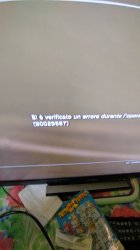
Hello... I get error when I try to download ps2 netemu resources View attachment 30681
Wrong ID?

Naxil
Member
How i can fix that id??Wrong ID?
Are you on HEN or CFW?Hello... I get error when I try to download ps2 netemu resources View attachment 30681
It looks like you don't have HEN enabled or something like that. That error is something related to pkg signing check.
Last edited:
Naxil
Member
Iam on cfw evilnatAre you on HEN or CFW?
It looks like you don't have HEN enabled or something like that. That error is something related to pkg signing check.
Iam on cfw evilnat
Try install the extended download plugin from firmware settings. That should sort it.

tom1tom
Member
Have the thing now times installed !
Appears NOWHERE
Have tried it a 2nd time.
Same result --- Appears Nowher
Have also the PS3 times 5 Min. Power off.
Even after switching on appears nowhere!
In which folder do I have to look to get the dingends back from the system
Because what use me so a toolbox that I can not use
Use Rebug Lite 4.86.1
Query did not appear
Have all menu items through nowhere appears what
Well then just have to go without. And what can I delete now ?
So that the SupaDupa Toolbox is disintegrated again from the system.
lg
And as long as it is not a "must have" it is not important.
I just wanted to have a look at it in more detail
I would not know how to get the .xml into the system, especially in which folder.
Tom
Translated with www.DeepL.com/Translator (free version)
Appears NOWHERE
Have tried it a 2nd time.
Same result --- Appears Nowher
Have also the PS3 times 5 Min. Power off.
Even after switching on appears nowhere!
In which folder do I have to look to get the dingends back from the system
Because what use me so a toolbox that I can not use
Use Rebug Lite 4.86.1
Query did not appear
Have all menu items through nowhere appears what
Well then just have to go without. And what can I delete now ?
So that the SupaDupa Toolbox is disintegrated again from the system.
lg
And as long as it is not a "must have" it is not important.
I just wanted to have a look at it in more detail
I would not know how to get the .xml into the system, especially in which folder.
Tom
Translated with www.DeepL.com/Translator (free version)
Last edited by a moderator:
It works perfectly on Rebug 4.86.1, I suggest you reinstall your CFW if you have modded it to break compatibility.Because what use me so a toolbox that I can not use ?
Use Rebug Lite 4.86.1
Do not come here complaining about things you have broken like they are my fault.
Delete the dev_hdd0/game/XMBMANPLS Folder. Then it will be gone.And what can I delete now ?

Last edited:
tom1tom
Member
I have not modified anything.
Downloaded the CFW Rebug Lite 4.86.1 from REBUG.
Where the page had still worked.
Have they even installed in safe mode.
So what is this to try to convince me that it's me?
I do not claim that it is because of YOU.
And if I delete below said folder is the Multiman gone and have to reinstall it.
So please without so funny things to recommend.
greetings from Berlin
Tom
Translated with www.DeepL.com/Translator (free version)
Downloaded the CFW Rebug Lite 4.86.1 from REBUG.
Where the page had still worked.
Have they even installed in safe mode.
So what is this to try to convince me that it's me?
I do not claim that it is because of YOU.
And if I delete below said folder is the Multiman gone and have to reinstall it.
So please without so funny things to recommend.
greetings from Berlin
Tom
Translated with www.DeepL.com/Translator (free version)
The XMBMANPLS folder has no relation to Multiman.
Install Rebug 4.86.1 again and it will work fine, Here is a link https://mega.nz/folder/EE10GCyC#Tis8Xz4C_YQr7b3lopXLcQ
My guess is you have modded some files to use some dodgy Store or something.
Install Rebug 4.86.1 again and it will work fine, Here is a link https://mega.nz/folder/EE10GCyC#Tis8Xz4C_YQr7b3lopXLcQ
My guess is you have modded some files to use some dodgy Store or something.
Similar threads
-

-
-
-
 PS3 Pixel Art w/ custom imagefont.bin (By DeViL303) for XMB & Pixel Art Editor (by Aldostools)
- Started by STLcardsWS
- Replies: 3