I have been looking at this background audio idea again. Not with MP3s for now, just with a long ac3 running from HDD. Just want to get this info down in case someone else decides to look into this someday.
My patch to custom_render_plugin.rco that allows the coldboot audio to keep playing has a couple of bugs, this patch simply involves removing this line from the animation script. This is the key.
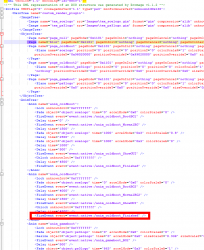
The 2 main side effects of this patch are
- The clock only shows for a couple of seconds after booting up.
- The web browser has no mouse pointer
I have a partial work around for these issues, One is that it seems that any notifications like webMAN MOD are part of the issue with the clock or at least it's related to pop ups somehow. Disabling wMMs pop up makes the clock stay on screen, until you get any other notification at least, like low battery on controller etc.
With this other work around I can make it so the background audio will play as long as you want up until when you enter a folder on the XMB, for example package manager or webman games, then I can have the blur effect seen in folders also trigger "event:native:/anim_coldboot_Finished" which fixes all the bugs and stops the audio.
I am doing that like this:
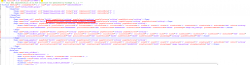
So now with these 2 workarounds you could say its partially working up until you enter a folder. I really need to know exactly what the event anim_coldboot_Finished is specifically doing behind the scenes. I suspect it is doing a few things and stopping the coldboot audio is just one of them. I would say its possible to patch it to do everything else it needs to do, but leave the ac3 playing.
Here are the files I have right now if anyone wants to see where I am at. To use these you need
- webMAN mod notification disabled in setup.ps3
- The BGM.ac3 file in dev_hdd0/tmp/
- Then put this patched custom_render_plugin.rco/sprx on flash.
You will see the audio plays for as long as you want, until you enter a folder on the XMB. This is done on purpose for now for testing.
The sprx is simply a small patch to read the ac3 from HDD instead of flash. Nothing more:
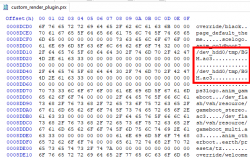
And the 2 small patches to the rco shown above,
1. this line removed
Code:
<FireEvent event="event:native:/anim_coldboot_Finished" />
2. And then added to the blur page for oninit:
Code:
event:native:/anim_coldboot_Finished
I have included all files plus a sample BGM.ac3 for testing if anyone thinks they might be able to help here. It really all comes down to this rco event.




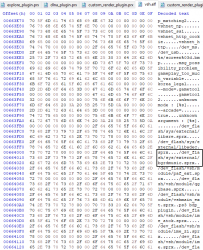
 I have not found the exact limit yet but its somewhere between 70MB and 160MB

