PS3 (Research/Experimental) - NEC/TOKIN Capacitors Replacement - YLOD

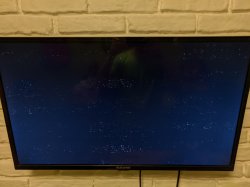
Now I have another fat PS3, in this case a CECHB00, never opened, that does not display anything at all, only sound, if I run the video reset all I get is a black screen with coloured dots. Is this RSX dead or is there anything I can do to rescue it?

Picture of the screen:
IMG_20200510_190506.jpg

Edit: Gonna make a new thread as this is not the issue to be discussed in this thread.
 
Last edited:
reballing if tantalum doesn't work or your board have shortcut

I think that you are correct in saying that my PS3 is in need of a reballing...

So, after becoming very despite to get this PS3 working I decided to attempt a reflow of the CELL and RSX. I know that this is very risky as it can literally destroy the RSX but since this board was not working at all after replacing the capacitors I decided to go ahead with it. After reflowing both of them, my PS3 now boots and is able to play games! :excitement: I've only played a little bit of FF XIII on it for a few minutes so I have no clue how long this "fix" will last before needing to have it reballed. I also repasted the RSX and CELL with some kryonaut as the old paste was pretty dry. I think now I'm going to install rebug so I can control the fan speed as it run pretty hot (I have only ever had PS3 slims before no I had no idea how hot the phats run).

My guess is to as why reflowing the board made this PS3 run again is due to my (potentially) rough removal of the NEC/TOKINs on the board. Maybe I somehow cracked solder balls under the CELL or RSX while I was putting pressure on the board while removing the old capacitors? Anyway, I'm happy to have it working now.

Thank you guys for your help! :victorious:
 
I think that you are correct in saying that my PS3 is in need of a reballing...

So, after becoming very despite to get this PS3 working I decided to attempt a reflow of the CELL and RSX. I know that this is very risky as it can literally destroy the RSX but since this board was not working at all after replacing the capacitors I decided to go ahead with it. After reflowing both of them, my PS3 now boots and is able to play games! :excitement: I've only played a little bit of FF XIII on it for a few minutes so I have no clue how long this "fix" will last before needing to have it reballed. I also repasted the RSX and CELL with some kryonaut as the old paste was pretty dry. I think now I'm going to install rebug so I can control the fan speed as it run pretty hot (I have only ever had PS3 slims before no I had no idea how hot the phats run).

My guess is to as why reflowing the board made this PS3 run again is due to my (potentially) rough removal of the NEC/TOKINs on the board. Maybe I somehow cracked solder balls under the CELL or RSX while I was putting pressure on the board while removing the old capacitors? Anyway, I'm happy to have it working now.

Thank you guys for your help! :victorious:

Hey, could you explain to me how you did the reflow? I'm planning on doing this and I'd appreciate if you could share some tips, the tools you used or something important you may have experienced. Thanks!
 
Hey, could you explain to me how you did the reflow? I'm planning on doing this and I'd appreciate if you could share some tips, the tools you used or something important you may have experienced. Thanks!

Sure, I can provide a little more detail about what I did (This is pretty off topic now through as it kinda doesn't relate to the NEC/TOKIN replacement anymore... so mods delete this if you think it is not helpful?).

Before anything else I'm going to paraphrase Naked_Snake1995: 'DISCLAIMER - Do this at your own risk, I am not responsible if your PlayStation 3 catches fire or blows in a Thermo - Nuclear fashion, proceed with the upmost extreme caution'

Anyway, I pretty much watched various videos of how others were able to reflow their PS3 motherboards. I mainly looked at the old IFIXIT guide on how they reflowed their motherboard. I heated both the RSX and CELL for around ~60 seconds at a time individually and kept switching between them about 3 times. So in total I applied heat for around 6 minutes and I heated them individually for around 2 to 3 minutes total in these 60 second sessions. I also heated the RAM chips on the board for about 30 seconds (I think another user somewhere in this thread mentioned they did this too?). I should mention I used a heat gun I had (I know this is a bad way to do this as you cannot properly control the temperate of the heat gun) on the lowest setting to do the reflow.

Again, this is probably a very bad way to "fix" a PS3 and there are people out there who are definitely more qualified to comment on this than I am. I would not do this to any of your PS3s unless you have exhausted all other options (such as replacing capacitors and etc...).

It is probably better to get your PS3 reballed professionally if you are able to do so. IMO this can probably bring more harm than good if something messes up.
 
@Workz_777 don't waste your time with the tantalums. If they are showing values with a multimeter, then the problem is somewhere else. You could remove the RSX IHS to see if there's any short on those caps, or even, if you have no more ideas, applying a little reflow to see any changes. Use flux. Also, it's very important to see if there's any changes on screen when the console turns on, 'cause if it gives any signal to the TV, before the YLOD, that PS3 is trying its best to come back to life.

@Revak3115 That's probably the CELL. If the console syncs with the joystick, then the CELL is fine and that could be the RSX, if not, then perform the CELL test (using your finger).
 
@Workz_777 don't waste your time with the tantalums. If they are showing values with a multimeter, then the problem is somewhere else. You could remove the RSX IHS to see if there's any short on those caps, or even, if you have no more ideas, applying a little reflow to see any changes. Use flux. Also, it's very important to see if there's any changes on screen when the console turns on, 'cause if it gives any signal to the TV, before the YLOD, that PS3 is trying its best to come back to life. Perfom a video reset to make sure you will receive image on both outputs.

@Revak3115 That's probably the CELL. If the console syncs with the joystick, then the CELL is fine and that could be the RSX, if not, then perform the CELL test (using your finger).
Wym by "Cell Test With your Finger"?
 
It's the "coin test" without the coin, and without screwing up the bgas. On BC PS3 you have to remove the psu, then using your weight apply pressure over the CELL's clamp. If the damage is slightly, you should get image. But you have cases and cases with these things..
 
I think that I'm in the same situation as you are with your PS3. On my CECHA01, I still get YLOD when using the AUX or the Panasonic tantalum capacitors (check my first post to see the model numbers for them). I have tried adding more jumper wires on both sides of the board and also trying it with just the jumpers on a single side of the board (top and bottom sides). I have also gone through and checked all the marked fuses on the motherboard (the ones that have silkscreen on the PCB) and then I used the service manual to find and test the unmarked ones. I did the same with the thermistors (at room temp) and they all appear to be fine. Have you had a chance to use any thicker wire for the jumpers? I believe I have been using 20 AWG solid core wire and maybe this is why I still have YLOD?

Hiya bro, at first i used 22 - 23AWG solid wire, then went to using 16AWG solid wire, but i still have the same result, ylod. I like to run the fan test and pretend it's fixed :D lol
 
The side of the board where the BD connects bottom of the chipsets

Ahhh right, got it, so the side without the CELL / RSX showing. The easier side to change the caps without anything getting in the way. Are you still using those yellow (AVX) type capacitors?
 
@Workz_777 don't waste your time with the tantalums. If they are showing values with a multimeter, then the problem is somewhere else. You could remove the RSX IHS to see if there's any short on those caps, or even, if you have no more ideas, applying a little reflow to see any changes. Use flux. Also, it's very important to see if there's any changes on screen when the console turns on, 'cause if it gives any signal to the TV, before the YLOD, that PS3 is trying its best to come back to life.

@Revak3115 That's probably the CELL. If the console syncs with the joystick, then the CELL is fine and that could be the RSX, if not, then perform the CELL test (using your finger).

Hiya @ElGris ...yeah i checked every single cap before i soldered them in, i even put a-side any that were slightly lower than 470uF and only picked the ones that were above that value, so they seem o.k.

Like you say, i was thinking about doing a reflow on everything that has a BGA. I really didn't want to de-lid yet, only as a last resort after trying everything else. Was it you that was recommending using nylon fishing-line for de-lidding, which thickness / size do you recommend using? I have some 0.08mm cutting wire, but maybe that could damage / scratch something, being metal? I think i will get some fishing-line instead.

P.S. i haven't plugged in the HDMi cable / AV cable yet when testing, i will try that today and see what happens.

Edit:- So just tested it with AV cable, when switching on the PS3 the T.V enters the AV channel automatically as it should, but then the ylod kicks in and the screen stays black doing nothing.
 
Last edited:
Excellent! Thank you for your time and effort on putting this together, much appreciated. Time to get my soldering on!

Hiya @Rich F ...let us know how you get on. Take your time when soldering on your PS3. Slow & easy wins the race.

When soldering, you'll notice the PS3 board sucks up alot of heat, as a result you might have to go as high as 400+ degrees C.

For me i was getting cold solders unless i was above 430°C, then the solder would wet & flow nicely. Note, for anyone new to soldering about to do this, try not to spend too much time with the soldering iron on the board at such high temps. I like to count slowly to about 3 seconds per solder. Depending on the size of the soldering iron tip. However, a small tip won't work very well, i found a 3mm - 5mm flat tip worked well.

And if you can (optional but recommended) get some Kapton (heat-proof) tape to help protect around the areas where soldering.

Also as a suggestion, when removing the NEC/Tokins, beforehand place some electrical tape as close as possible all around those capacitors, and then if a slip happens with a tool it should help proctect against knocking off any little components near-by. And the electrical tape helps to keep things clean and stop any debris going into places it shouldn't. Think how in surgery they place cloth / drapes around the area the surgeon is working on, try doing the same with electrical tape.

Just some tips / suggestions, although maybe you shouldn't pay any attention to what i say, lol, i still didn't fix my PS3 yet, so i have zero credability. And to add, i have seen many here get great working results with dirty soldering work. I guess:- "where there's a will there's a way", meaning:- if all you want is a working PS3 then that's maybe what you will get. But if you want to play around soldering for fun (like me) then that's just what i got lol. I just need to ramp up my desire for my Ps3 to work, rather than the desire to perfect my solder work.

Sorry i must sound like a right dick-head. :rolleyes::confused:
 
Last edited:
Just tried this on an E01 phat.

Well, I should say, I used the idea. I ended up just soldering two wires, one to negative, and one to positive, and then ran to two 2200uf 6.3v caps for testing and it boots right up.

I initially tried with one, thinking at least one was bad, but that actually kinda worked, but after about 10 seconds would cut off. After connecting the 2nd cap to make 4400uf total, it booted right up.

I think this method would be easier for people who don't want to take a chance destroying their existing caps. They are a bitch to remove.

I'm gonna wrap the new caps up in kapton and snug them to the inside of case! Done lol
IMG_20200511_114257.jpg
IMG_20200511_114506.jpg


Anyways, good stuff. :)

Edit:
In case of confusion, those pics are from test lol. I will solder them securely and wrap them to protect.
 
Hiya @ElGris ...yeah i checked every single cap before i soldered them in, i even put a-side any that were slightly lower than 470uF and only picked the ones that were above that value, so they seem o.k.

Like you say, i was thinking about doing a reflow on everything that has a BGA. I really didn't want to de-lid yet, only as a last resort after trying everything else. Was it you that was recommending using nylon fishing-line for de-lidding, which thickness / size do you recommend using? I have some 0.08mm cutting wire, but maybe that could damage / scratch something, being metal? I think i will get some fishing-line instead.

P.S. i haven't plugged in the HDMi cable / AV cable yet when testing, i will try that today and see what happens.

Edit:- So just tested it with AV cable, when switching on the PS3 the T.V enters the AV channel automatically as it should, but then the ylod kicks in and the screen stays black doing nothing.
Don't touch the CELL just yet, I was referring to the RSX. Having A/V signal before the YLOD is really something. What about HDMI?
The RSX has a few ceramic caps, those likes to go in short, if one of them is in short, you'll have to remove them, if the problem is still there, then you'll need a replacement. It could be that some bga could be out of place touching each other, it's a possibility, but that only can be seen by removing the processor.

That cutting wire is perfect for the CELL delid, I'm gonna do a quick tutorial about that in the next days, so people won't be killing their consoles, no more.

My method is simple, using the cutting wire, i.e: https://i.imgur.com/GtAJHFz.jpg

Cut the four corners, without fear, you won't be able to cut the rest, maybe, I couldn't. Then using some really thing piece of maleable metal, you can cut easily the four sides horizontally and vertically, apply a little bit of heat over the IHS to warm a bit the damn glue, and that's all. Really easy.
 
Just tried this on an E01 phat.

Well, I should say, I used the idea. I ended up just soldering two wires, one to negative, and one to positive, and then ran to two 2200uf 6.3v caps for testing and it boots right up.

I initially tried with one, thinking at least one was bad, but that actually kinda worked, but after about 10 seconds would cut off. After connecting the 2nd cap to make 4400uf total, it booted right up.

I think this method would be easier for people who don't want to take a chance destroying their existing caps. They are a bitch to remove.

I'm gonna wrap the new caps up in kapton and snug them to the inside of case! Done lolView attachment 25810 View attachment 25811

Anyways, good stuff. :)

Edit:
In case of confusion, those pics are from test lol. I will solder them securely and wrap them to protect.

That's a great way to first test if the caps need replacing, i'm gonna aim to try that for my 2nd PS3, now just got to find some 2200uF caps. :D
 
Don't touch the CELL just yet, I was referring to the RSX. Having A/V signal before the YLOD is really something. What about HDMI?
The RSX has a few ceramic caps, those likes to go in short, if one of them is in short, you'll have to remove them, if the problem is still there, then you'll need a replacement. It could be that some bga could be out of place touching each other, it's a possibility, but that only can be seen by removing the processor.

That cutting wire is perfect for the CELL delid, I'm gonna do a quick tutorial about that in the next days, so people won't be killing their consoles, no more.

My method is simple, using the cutting wire, i.e: https://i.imgur.com/GtAJHFz.jpg

Cut the four corners, without fear, you won't be able to cut the rest, maybe, I couldn't. Then using some really thing piece of maleable metal, you can cut easily the four sides horizontally and vertically, apply a little bit of heat over the IHS to warm a bit the damn glue, and that's all. Really easy.

Thanks mate, will aim to give it a try, see what we find. :encouragement:
 
Just tried this on an E01 phat.

Well, I should say, I used the idea. I ended up just soldering two wires, one to negative, and one to positive, and then ran to two 2200uf 6.3v caps for testing and it boots right up.

I initially tried with one, thinking at least one was bad, but that actually kinda worked, but after about 10 seconds would cut off. After connecting the 2nd cap to make 4400uf total, it booted right up.

I think this method would be easier for people who don't want to take a chance destroying their existing caps. They are a bitch to remove.

I'm gonna wrap the new caps up in kapton and snug them to the inside of case! Done lolView attachment 25810 View attachment 25811

Anyways, good stuff. :)

Edit:
In case of confusion, those pics are from test lol. I will solder them securely and wrap them to protect.

This is excellent! Can't wait to see the finished product
 
Hiya @Rich F ...let us know how you get on. Take your time when soldering on your PS3. Slow & easy wins the race.

When soldering, you'll notice the PS3 board sucks up alot of heat, as a result you might have to go as high as 400+ degrees C.

For me i was getting cold solders unless i was above 430°C, then the solder would wet & flow nicely. Note, for anyone new to soldering about to do this, try not to spend too much time with the soldering iron on the board at such high temps. I like to count slowly to about 3 seconds per solder. Depending on the size of the soldering iron tip. However, a small tip won't work very well, i found a 3mm - 5mm flat tip worked well.

And if you can (optional but recommended) get some Kapton (heat-proof) tape to help protect around the areas where soldering.

Also as a suggestion, when removing the NEC/Tokins, beforehand place some electrical tape as close as possible all around those capacitors, and then if a slip happens with a tool it should help proctect against knocking off any little components near-by. And the electrical tape helps to keep things clean and stop any debris going into places it shouldn't. Think how in surgery they place cloth / drapes around the area the surgeon is working on, try doing the same with electrical tape.

Just some tips / suggestions, although maybe you shouldn't pay any attention to what i say, lol, i still didn't fix my PS3 yet, so i have zero credability. And to add, i have seen many here get great working results with dirty soldering work. I guess:- "where there's a will there's a way", meaning:- if all you want is a working PS3 then that's maybe what you will get. But if you want to play around soldering for fun (like me) then that's just what i got lol. I just need to ramp up my desire for my Ps3 to work, rather than the desire to perfect my solder work.

Sorry i must sound like a right dick-head. :rolleyes::confused:


Hey mate, thank you I will post up my results and findings. Thank for the tips and suggestions, appreciate it!
 
Back
Top