PS3 (Research/Experimental) - NEC/TOKIN Capacitors Replacement - YLOD

What high gauge wire do you recommend?
Well iam no expert in wire guages, but take a look at the picture above, use a decent gauge wire, not to thin because it will overload and cause the wire to burn, due to incapacity to handle such high currents, and not to thick to a point that you can't even solder it or adapt it with the motherboard.

A quick math i should say a 0.25/0.35mm wire is the ideal, if that type of wire thickness exists "this is all quick math, but choose the right thickness carefully".

Sent from my G8141 using Tapatalk
 
Why is that? You can remove all of them, in fact it makes your repair and life easier, you do a one time full replacement and never touch the machine again, as with Partial replacement, you'll have to worry when your machine its going to die again, so you can replace one more NEC again.

Sent from my G8141 using Tapatalk
i only say this because
when i removed only 2 NECs 1 for CELL and one for RSX it ran perfectly fine no issues...
when i replaced all NECs it started to give me LOADS of issues
in my experience. but thats more of my errors
 
i only say this because
when i removed only 2 NECs 1 for CELL and one for RSX it ran perfectly fine no issues...
when i replaced all NECs it started to give me LOADS of issues
in my experience. but thats more of my errors
The GPU can fail at anytime, at any second.

Tantalums has nothing to do with the GPU Artifacting, they simply control and filter any current ripple, to avoid overloading and instability.

GPU Artifacting can be caused by a faulty VRAM Memory, even if the other 3 are fine, its enough to provoke a Video Artifacting and a Chip Substrate Failure, and by the looks of the artifacting, it looks like one of your memory chips has gone bad.

Sent from my G8141 using Tapatalk
 
The GPU can fail at anytime, at any second.

Tantalums has nothing to do with the GPU Artifacting, they simply control and filter any current ripple, to avoid overloading and instability.

GPU Artifacting can be caused by a faulty VRAM Memory, even if the other 3 are fine, its enough to provoke a Video Artifacting and a Chip Substrate Failure, and by the looks of the artifacting, it looks like one of your memory chips has gone bad.

Sent from my G8141 using Tapatalk
I guess
At this point I've given up for now... my new "Dead" CECHA01 will be here tomorrow so I'll see if replacing all the top side caps will make it work again
 
I guess
At this point I've given up for now... my new "Dead" CECHA01 will be here tomorrow so I'll see if replacing all the top side caps will make it work again
This time,just replace 2 NECs, on the RSX and CELL, leave the others in they´re original form,but of you want you can preform the replacement for them all again.
 
Dunno, but whatever is happening is related with he RSX, that visual artifacts of your last photo are very typical
Btw, when i said this i meant in general... not only the RSX but the tokins connected to the RSX too

You know, there are 4 tokins which have the V_OUT connected together, and connected also to RSX
In other words... that 4 tokins are part of the power line that feeds RSX... so incase there is some problem with that 4 tokins the RSX could show artifacts because doesnt have enought power
Think in the RSX as composed by lot of internal circuits... some are working ok, but others dont

Also, @Revak3115 in your first tests you had a short circuit in between a tantalum capacitor and the metal shield (if i remember right) with sparks, smoke and fireworks... one tantalum capacitor was fryed in "the incident"
But remember what was displayed in screen that days with the short circuit ?... you was having visual artifacts too

At that point i thought the RSX could be damaged by the short circuit, but later you fixed it just by resoldering and replacing the tantalum capacitors (this was a miracle)
So... it looks you are again in a pretty similar scenario... the group of 4 tokins that "feeds" the RSX have a problem ;) (lets hope is only this)
 
I guess
At this point I've given up for now... my new "Dead" CECHA01 will be here tomorrow so I'll see if replacing all the top side caps will make it work again
Replacing the 4 tokins of a single side of the motherboard doesnt makes much sense because 2 of them are for CELL and the other 2 for RSX

What makes sense is to replace first the 4 tokins for RSX (2 of them are located in a side of the motherboard, and the other 2 in the other side)
*And use 1 (or more) wire to ground them

The reason why i think this is the best approach is because the power requirements of RSX are a lot more variable than CELL, so the tokins for RSX suffers a bigger stress, in the long run should be more prone to failure

The temperatures of CELL/RSX are an indirect way to imagine how much power is demanding each
Inside a game the temperature of CELL is a lot more stable
But RSX varies a lot because there are areas of the game with low graphic load, then others with big graphic load, and additionally the RSX have violent temperature peaks of +5ºC max that happens very fast
 
Btw, when i said this i meant in general... not only the RSX but the tokins connected to the RSX too

You know, there are 4 tokins which have the V_OUT connected together, and connected also to RSX
In other words... that 4 tokins are part of the power line that feeds RSX... so incase there is some problem with that 4 tokins the RSX could show artifacts because doesnt have enought power
Think in the RSX as composed by lot of internal circuits... some are working ok, but others dont

Also, @Revak3115 in your first tests you had a short circuit in between a tantalum capacitor and the metal shield (if i remember right) with sparks, smoke and fireworks... one tantalum capacitor was fryed in "the incident"
But remember what was displayed in screen that days with the short circuit ?... you was having visual artifacts too

At that point i thought the RSX could be damaged by the short circuit, but later you fixed it just by resoldering and replacing the tantalum capacitors (this was a miracle)
So... it looks you are again in a pretty similar scenario... the group of 4 tokins that "feeds" the RSX have a problem ;) (lets hope is only this)
should i just scratch the varnish off the board next to the Negative point on the board? and have all 4 Tantalums on the same ground where i scratch the varnish? i want to make the Tantalums flat and straight not at an angle
 
should i just scratch the varnish off the board next to the Negative point on the board? and have all 4 Tantalums on the same ground where i scratch the varnish? i want to make the Tantalums flat and straight not at an angle
Yes. Mask with tape and use sand paper.
 
Btw, when i said this i meant in general... not only the RSX but the tokins connected to the RSX too

You know, there are 4 tokins which have the V_OUT connected together, and connected also to RSX
In other words... that 4 tokins are part of the power line that feeds RSX... so incase there is some problem with that 4 tokins the RSX could show artifacts because doesnt have enought power
Think in the RSX as composed by lot of internal circuits... some are working ok, but others dont

Also, @Revak3115 in your first tests you had a short circuit in between a tantalum capacitor and the metal shield (if i remember right) with sparks, smoke and fireworks... one tantalum capacitor was fryed in "the incident"
But remember what was displayed in screen that days with the short circuit ?... you was having visual artifacts too

At that point i thought the RSX could be damaged by the short circuit, but later you fixed it just by resoldering and replacing the tantalum capacitors (this was a miracle)
So... it looks you are again in a pretty similar scenario... the group of 4 tokins that "feeds" the RSX have a problem ;) (lets hope is only this)
it might be my Caps are bad.
i redid all of them(solder wise) and it worked for a but without the BD putting pressure on it.
i plugged in my USB LED Controller and it artifacts heavily as i plugged it in. its most likely a CELL Cap issue
also my controllers don't sync without a USB and when i use the usb it takes over 10 sec for it to work and they flat out don't work in PS2 mode. maybe my Controller board ribbon is torn. anyways this ps3 has become one massive chore and i'm about to call it quits and start over with the A01 i will be receiving tomorrow.
 
I think you are having a problem at how the tin is solidifying, is not normal to lift the solder components just by pulling of a tape sticked on top of them, i guess that ones that went off was not very well soldered

What im going to say is a bit tricky to achieve, but what you need to do is to heat up the 2 metals before adding the tin
Lets say
Metal A is the copper of the motherboard surface
Metal B is the metal in a side of the tantalum capacitor
And C is the tin

So... you need to place the capacitor on top of the motherboard, and try to touch both A and B with the solder iron tip (but dont add the tin yet)
This way A and B heats up a lot together at the same temprature
And after that (and before removing the solder iron) add the tin trying to touch A, B, and the solder iron tip

This is going to create a pretty shinny solder surface where the metal alloys have cristalized pretty well at atomic level (and with good electrical conductivity)
The trick to know visually if a solder is well made is... the most shiny is the solder surface = the better organized are the atoms of the alloy

There is a liquid named "flux" that helps a lot to achieve this shinny solders, it does some "chemical" magic

Also, incase of ordering some other tools you should consider to buy a roll of "desolder wick" to cleanup the old tin from the metal surfaces, the goal is to dont mix 2 different tins (the old and the new one) because the alloy composition changes and could result in problems (like a tin hard to melt because his melting point increased)
So, to achieve a "pro" look is good to start using the desolder wick, is going to make the next steps easyer
 
it might be my Caps are bad.
i redid all of them(solder wise) and it worked for a but without the BD putting pressure on it.
i plugged in my USB LED Controller and it artifacts heavily as i plugged it in. its most likely a CELL Cap issue
also my controllers don't sync without a USB and when i use the usb it takes over 10 sec for it to work and they flat out don't work in PS2 mode. maybe my Controller board ribbon is torn. anyways this ps3 has become one massive chore and i'm about to call it quits and start over with the A01 i will be receiving tomorrow.
Dont throw the towell with that one, you are in a bad situation with it thought becaue you was testing different things so is hard to know if there are other components damaged, specially because the shorcuircuit, the only good thing of that shortcircuit is you had the PS3 working a couple of times after that, so feeeew... it looks none of the components was "instakilled"... so all them "should" be fine, but we are not sure if are completly fine

So... the posible components damaged by the short circuit was...
-CELL
-RSX
-The tantalum capacitors
-PSU

I know... what im going to say is like looping infinitelly around the same stuff... but at this point what i would do is:
-Remove all tantalum capacitors, and meassure them with a multimeter
-Replace the PSU by either another made by sony, or find a tutorial to connect a PC ATX to your PS3

We should consider CELL and RSX are fine, we dont know
But the PSU and the tantalum capacitors could be partially damaged
 
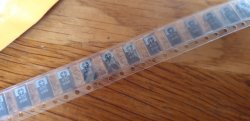
Helloooooooo caps.

20190807_183237.jpg

Now I have to find a soldering iron as mine decided to suddenly stop working -_-
 
I got about 50 330uF 2.5v coming. Will be ripping NEC/Tokins off Slims and posting pics by the end of the month most likely.
 
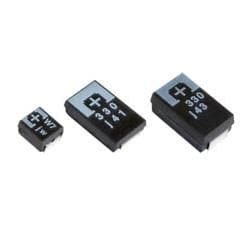
I've come to a new conclusion about my CECHB01 Caps I think the caps I have now are too big maybe I need to order smaller ones
Example:
These caps are the ones I've seen in most NEC repairs
And they look a few MM thinner(middle cap) then mine right now(right cap)
 

Attachments

  • A1CE6107-F5F2-4344-A296-7FCFABEF2978.jpeg
    A1CE6107-F5F2-4344-A296-7FCFABEF2978.jpeg
    8.8 KB · Views: 366
Back
Top