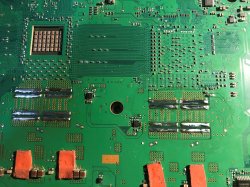
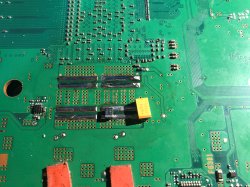
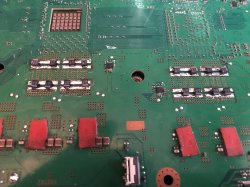
PS3 (Research/Experimental) - NEC/TOKIN Capacitors Replacement - YLOD

floating faults

Nothing floating. It's a problem with leakage current. The output waveform fundamentally changes when a TOKIN is bad (look back over the images I posted, it's unmistakable for anything else - including when I just ripped the TOKINS off and fired it up). On the tiny handful of actually verified bad TOKIN consoles I've seen, with the scope hooked up there was zero change to the output waveform from any amount of pressure, heat, or manhandling. Which is why I keep repeating that the heat test is meaningless at best, and at worst it means you have a BGA defect.
 
Nothing floating. It's a problem with leakage current. The output waveform fundamentally changes when a TOKIN is bad (look back over the images I posted, it's unmistakable for anything else - including when I just ripped the TOKINS off and fired it up). On the tiny handful of actually verified bad TOKIN consoles I've seen, with the scope hooked up there was zero change to the output waveform from any amount of pressure, heat, or manhandling. Which is why I keep repeating that the heat test is meaningless at best, and at worst it means you have a BGA defect.

How, then, can you explain the fact that the prefix stopped working after the RSX reballing? I've been doing rebollings not the first day, all according to the regulations, with the necessary equipment. before reballing she worked - after reballing instant YLOD
 
How, then, can you explain the fact that the prefix stopped working after the RSX reballing? I've been doing rebollings not the first day, all according to the regulations, with the necessary equipment. before reballing she worked - after reballing instant YLOD

I'm not getting how this is related, sorry if I'm misunderstanding.

A few guesses, though:

1.) The RSX is tricky. For whatever reason, the RAM bricks on the top are highly susceptible to solder bleed and IR makes it worse. A tiny poof of air shoots out the tiniest amount of solder through a microscopic hole in the underfill. If you saw what you thought was a 0.2mm solder ball near the RAM bricks after rework, it's dead. The RSX needs a good 8 hour bake before it's ready to work on, and at least on my station the top heat has to be more than 2 inches away. If you're used to just tossing a board on the station and going straight to work, the RSX will probably pop.

2.) The RSX is garbage. Even if you did everything right, it will still shit the bed and blame it on the dog.

3.) Obviously heat kills things, so if your TOKIN caps were on the way out, the rework heat may have pushed them over the edge. One of the only bad TOKIN caps I've seen was on a board I forgot about and left in the drying oven for a month straight.
 
I'm not getting how this is related, sorry if I'm misunderstanding.

A few guesses, though:

1.) The RSX is tricky. For whatever reason, the RAM bricks on the top are highly susceptible to solder bleed and IR makes it worse. A tiny poof of air shoots out the tiniest amount of solder through a microscopic hole in the underfill. If you saw what you thought was a 0.2mm solder ball near the RAM bricks after rework, it's dead. The RSX needs a good 8 hour bake before it's ready to work on, and at least on my station the top heat has to be more than 2 inches away. If you're used to just tossing a board on the station and going straight to work, the RSX will probably pop.

2.) The RSX is garbage. Even if you did everything right, it will still shit the bed and blame it on the dog.

3.) Obviously heat kills things, so if your TOKIN caps were on the way out, the rework heat may have pushed them over the edge. One of the only bad TOKIN caps I've seen was on a board I forgot about and left in the drying oven for a month straight.

lol, my friend, 2 point, thanks laughed.

yes, you are right, the memory on the chip could hypothetically displace the balls under the compound, but I didn't see any of them, the compound was applied hermetically, and such problems never arise on the same chip in principle. I met this when repairing an iPhone, where the balls like to crawl out at a high temperature of a chip flooded with a compound. mostly cpu. in technology, a larger solution in the form of such a sandwich is the first time I solder, but I think everything is in order there, the bottom is 160 degrees 3-5 minutes, the top is 225-230 degrees Celsius, I shoot on the camera as soon as the balls begin to float, 10 seconds and turn off the heaters . In general, around the memory, I did not see the solder after soldering. I don't think that is the point. why dry the old board, I only dry new chips, and they often come in good, free of moisture. no soldering bubbles or crackers occur. I did not change the chip, I just did a reballing of the workstation, I live in Russia, you know here, the air is not humid)))
so I think that my case is point 3. it's good that you checked the defects of the tokens for a floating defect. Well, if they are not subject to such a defect, and on how many tokens you tried to exert heating and pressure while taking the waveform, is this the only sample, or is there some more comprehensive statistics on several copies?
 
is this the only sample, or is there some more comprehensive statistics on several copies?

I've tried messing with them on every failed set I have found. The grand total sits at 3 TOKIN failures in around 80 YLOD consoles. Since I can't convince anyone else to buy an oscilloscope, those three sets are the only actually verified bad caps in this thread.
 
I've tried messing with them on every failed set I have found. The grand total sits at 3 TOKIN failures in around 80 YLOD consoles. Since I can't convince anyone else to buy an oscilloscope, those three sets are the only actually verified bad caps in this thread.

the number of people who were helped simply by replacing the tokens inexplicably contradicts the fact that broken tokens are a rare case, oddly enough) despite the fact that they basically do not have equipment, they do not provide heat on the pch, they use old tokens to knock with a knife, how do they manage to restore the consoles - a riddle. You do not assume that the problem is directly in the bridges inside the tokens that do not provide sufficient conductivity for the supply current? there must be some explanation
 
UPDATE: I really need some help.

I have tried every possible combination in order to remove the metal strips visible on the positive sides of the old tokin remains, but I have had no luck. I'm tired, unwell and very unmotivated to keep going with this thing.

I need to know if the tiny metal strips from the old tokin will prevent any solder current flow if I was to just solder the tantalums directly over? I have tried prongs, blades, wick, solder, flux and god knows what else but cannot get them to budge.

Please let me know if it's okay to proceed? I'm very worried I've ruined it to begin with anyway. See below picture.

4E0378E5-BB4C-4EE3-AB3F-649E43462625.jpeg
 
I have tried every possible combination in order to remove the metal strips

use rose's alloy

The "FAST CHIP" brand low melt alloy is widely available and trusted. A little goes a long way with some added flux. Amazon has it, but Prime is currently delayed up to a week. May I also politely suggest that your soldering iron could use an upgrade.

how do they manage to restore the consoles

In 2008 or so, there were tens of thousands of people reporting that they had "fixed" their YLOD by replacing their thermal paste (which was temporary because they had inadvertently caused a BGA crack to make mechanical contact again). Until I can convince people to buy some cheap oscilloscopes to share with each other, I'm sticking by that idea.
 
I need to know if the tiny metal strips from the old tokin will prevent any solder current flow if I was to just solder the tantalums directly over? I have tried prongs, blades, wick, solder, flux and god knows what else but cannot get them to budge.

The motherboard soaks up A TON of heat.

This is the first electronic project I've had with my station where I struggled getting these strips off. They didn't come off nice and easy like NSC's recent video with using a heat gun. Who knew a $20 product would kick out more heat than my $120 rework station

You'll have to hold heat to these pads constantly and introduce new, low melt, solder to those pads and just move the solder around for a bit. Adding some slight pressure to the strips stuck to these pads will eventually allow them to budge. Once you get even the slightest movement from the strip, try to lift the iron and see if the surface tension of the melted solder keeps the strip holding on to the iron. This worked for one strip and came off easy. The other strip I had to actually 'flick' it with the iron to get it to move off the pad enough so that I can get tweezers.

Once you have the strips off, load the pads with a little more solder and take your time using braid to soak up all the old solder. Then introduce all brand new solder.


I had this exact issue. Patience is a virtue. Take a break if you need to. It took a bit of a fight to just do one cap, but the other came off faster and easier because I found to simply use the iron to coax these strips off the board.


2A722EC6-7328-44A8-8676-0368C1E9DDE1.jpeg
BABE4A7A-7441-41EA-B447-6E4E8A1421E9.jpeg

Here's what's left, nice clean pads with brand new solder. It's probably a bit too much solder, but should be plenty for when I'm ready to put in the new caps. I only did this with the CELL for the moment, as I'll attack the RSX ones this weekend - it took way too much time than I'm willing to admit to get these little fuckers off. You can tell i marred up one area pretty good, but this shouldn't affect it much as I'll be scraping away a little bit of solder mask from the center area as I won't be installing my new caps at an angle like most people are doing. I prefer those who are installing them perpendicular like others I've seen
 
Last edited:
UPDATE: I really need some help.

I have tried every possible combination in order to remove the metal strips visible on the positive sides of the old tokin remains, but I have had no luck. I'm tired, unwell and very unmotivated to keep going with this thing.

I need to know if the tiny metal strips from the old tokin will prevent any solder current flow if I was to just solder the tantalums directly over? I have tried prongs, blades, wick, solder, flux and god knows what else but cannot get them to budge.

Please let me know if it's okay to proceed? I'm very worried I've ruined it to begin with anyway. See below picture.

View attachment 25584

I ran into that as well. I agree with Squeept, that Fast Chip stuff is pretty good. I don't have any on hand right now, so what I did to remove those bars on mine was to apply flux, a little bit of fresh solder, and then apply heat with the iron until the solder melts. I then use a metal pick to VERY, VERY GENTLY separate the metal bar from the pad. Notice I said separate, NOT pry! You don't want to risk scratching the board or slipping and cutting a gash through the board. Since you don't have all the proper tools (hey, I don't either!) you'll need patience and a steady hand.
 
Hello everyone, I know this is not the right place to talk about the subject, but I would like to know about this Thermal Grizzly Carbonaut I would like to know if it is possible to put on top of the IHS without causing a short circuit, remembering that the Carbonaut is electrically conductive.
My doubt is that perhaps contact with the shield can cause damage.

thermal-grizzly-carbonaut-thermal-pad-31x25mm-rtx-2080ti-D_NQ_NP_613122-MLB31217519685_062019-F.jpg
 
UPDATE: I really need some help.

I have tried every possible combination in order to remove the metal strips visible on the positive sides of the old tokin remains, but I have had no luck. I'm tired, unwell and very unmotivated to keep going with this thing.

I need to know if the tiny metal strips from the old tokin will prevent any solder current flow if I was to just solder the tantalums directly over? I have tried prongs, blades, wick, solder, flux and god knows what else but cannot get them to budge.

Please let me know if it's okay to proceed? I'm very worried I've ruined it to begin with anyway. See below picture.

What temp is ur Iron set at? u should be working with around 350*- 400*, if ur iron cant reach those temps it could be why ur struggling so the low melt alloy would be ur best bet.

So far looks good still just check that blob to the left of the F6301 thats printed on the board.

Only issue u may run into if u dont remove the strips is if the new caps height then hit on the metal frame. That side of the board u only have 2.8mm maximum in height to work with that will clear the frame.
 
Hello everyone, I know this is not the right place to talk about the subject, but I would like to know about this Thermal Grizzly Carbonaut I would like to know if it is possible to put on top of the IHS without causing a short circuit, remembering that the Carbonaut is electrically conductive.
My doubt is that perhaps contact with the shield can cause damage.

View attachment 25587
This would be fine. It would work much better in our case where we have to disassemble PS3s multiple times before we have a successful repair.

Just make sure it's slightly smaller than the IHS and there shouldn't cause a short.

Maybe a very small dab of paste to hold it in place too as I have one on a PC test bench and it slides around a bit
 
And here's my work in progress! I didn't have enough caps for all 8 tokins and needed to by more anyway, so I just bought 30 on a smaller size. I was afraid they were going to be harder to install, but they were actually easier since they're so tiny they fit straight into the pads.

I've already replaced all 4 tokens on the bottom side of the board, but no dice so far, I still get a delayed YLOD. My next step is to do the top side... but it's so cramped in there! I'm going to try the hair dryer on those first, and see if that gets me anywhere. What's the latest thinking on straight-on hair dryer times?
 

Attachments

  • 20200428_035005177_iOS (2).jpg
    20200428_035005177_iOS (2).jpg
    3 MB · Views: 141
  • 20200428_035032346_iOS (2).jpg
    20200428_035032346_iOS (2).jpg
    2.5 MB · Views: 152
  • 20200428_125442664_iOS (2).jpg
    20200428_125442664_iOS (2).jpg
    2.7 MB · Views: 155
@squeept , Well, if people fixed instant YLOD by disassembling, replacing the thermal interface and collecting it, this, of course, is 100% of the readings for rebolling or searching for microcracks elsewhere. But not just assembly, it's weird. What do you think of Vram? grind the connection with a microdrill, try to reball it? such a complex connection, a small chance of success. Of course, it's very strange to get ylod after rsx reballing.

@Gus21 , crystals do not conduct current, but make sure that the gasket does not touch the capacitors in the harness, it is worth covering them with varnish / silicone / liquid solder mask. How effective is this gasket? maybe MX2 or MX4 will be quite enough, and even gd900. if you smear something else, it is better to use liquid metal then it is probably more effective than this thermal rubber band.

@SeanRanklin , the only way out of your situation is a rose alloy. and a soldering iron, preferably 100 watts. In no case should you solder the capacitors on top of this garbage. to achieve the objectively necessary contact in all places will not work, there will be high resistance at the contacts = ylod. and can lead to other troubles.
 
Alright! Another Nec replacement success story.. so far. The last ps3 that arrived in the mail was the one that worked for me. (24 USD!) the replacement fixed ylod right away. I replaced one NEC on the RSX and it booted right up, RSX was at 67c idle. Thought it was kinda high... installed CFW... then the system died.... I Replaced the second NEC on the RSX and cleaned up my work with the first. Booted it up and it has been running for 6 hours copying files. At the time of this writing CELL is at 57c and RSX is at 48c....thats a nice temperature drop. I have been able to play Guilty Gear Rev2 and MW2 just fine. I know they arnt super taxing but those are the only 2 ps3 games I have atm... Played a handfull of ps2 titles with no issue.

Fingers crossed I have no more issues! Glad the replacement is working as expected. Thanks @Naked_Snake1995

@ElGris I am gonna try to fix the GLOD ps3 next...
 
Update
Hello everyone,

So if you remember I originally replaced 1 Nec/Tokin on the bottom side for the RSX. I had success and put many hours on the system and played many different games with no issues. On Thursday I played Dead Space for about 2 hours then decided to play GTA 4. My system crashed during a mission but I was able to turn the system on again eject the disc and play modern warfare 4 for the rest of the evening. The next evening I booted the system after work and everything was fine. Decided to pop in GTA 4 again. I new that more Tokin replacements were in my future so I went for it. Started the game and BOOM crashed instantly. Tried to boot again and YLOD.

Fast forward to Monday evening. Time to replace more Tokins. I replaced the other 3 tokins on the bottom side of the board. I used the same ones as before. 470uf 2.5v Panasonic tantalums. Put it back together and BOOM. Still YLOD: Crushed:

Tonight I opened it up again. I had nothing to lose so I removed the rest of the Tokins on my CECHA01 that I bought at launch. I only added 2 tantalums per Tokin on the top side instead of 4 like I did on the bottom. This brought my total capacitance to 5640 uf for the RSX and the CPU: Overkill:

I took 18 awg wire and used it to jumper the positive pads for each Tokin on the top side. Cleaned up the board. Laid down kapton tape over the tantalums.

Put everything back together and it works!:joy:

I thought that after doing a full cap replacement I should really put the system to the test. I played The Last of Us for 1 Hour and 59 minutes with out any issues at all! Made to the capital building before Tess gets killed. After that I played GTA since it was the game it originally crashed on the game ran great.


3d2c8c86246e2322313e456bc0608c77.jpg


e519f2ab2d7855927bbf4201220089f9.jpg


Here's my original post where I only replaced one Nec/Tokin.


https://r.tapatalk.com/shareLink/to...hp?posts/238118/&share_type=t&link_source=app


ba7e161ca0841d52a3f953c32db6c18d.jpg

b3ff0ed01c7e3459e4557734d310fa42.jpg

b8f5cff0167d43107c7db989e03785ee.jpg


Sent from my iPhone using Tapatalk
 
The "FAST CHIP" brand low melt alloy is widely available and trusted. A little goes a long way with some added flux. Amazon has it, but Prime is currently delayed up to a week. May I also politely suggest that your soldering iron could use an upgrade.

I didn't even know what that was until today. I will investigate it along with another solder, as i dont really know the specs of this board, other than its a 30w solder iron. Old one my family had lying around.


The motherboard soaks up A TON of heat.

This is the first electronic project I've had with my station where I struggled getting these strips off. They didn't come off nice and easy like NSC's recent video with using a heat gun. Who knew a $20 product would kick out more heat than my $120 rework station

You'll have to hold heat to these pads constantly and introduce new, low melt, solder to those pads and just move the solder around for a bit. Adding some slight pressure to the strips stuck to these pads will eventually allow them to budge. Once you get even the slightest movement from the strip, try to lift the iron and see if the surface tension of the melted solder keeps the strip holding on to the iron. This worked for one strip and came off easy. The other strip I had to actually 'flick' it with the iron to get it to move off the pad enough so that I can get tweezers.

Once you have the strips off, load the pads with a little more solder and take your time using braid to soak up all the old solder. Then introduce all brand new solder.

I had this exact issue. Patience is a virtue. Take a break if you need to. It took a bit of a fight to just do one cap, but the other came off faster and easier because I found to simply use the iron to coax these strips off the board.

I have gotten the negative strips to the point where the iron will move the solder around but even with a wick, i cant seem to get a good flush strip. For the positive poles, I cant melt the strips. All that happens is my iron turns black and i have to keep adding solder. I'll try again but not very optimistic with the tools i have. Your photos look amazing though, glad you got them so clean.

I ran into that as well. I agree with Squeept, that Fast Chip stuff is pretty good. I don't have any on hand right now, so what I did to remove those bars on mine was to apply flux, a little bit of fresh solder, and then apply heat with the iron until the solder melts. I then use a metal pick to VERY, VERY GENTLY separate the metal bar from the pad. Notice I said separate, NOT pry! You don't want to risk scratching the board or slipping and cutting a gash through the board. Since you don't have all the proper tools (hey, I don't either!) you'll need patience and a steady hand.

Yeah i am cautious of that. I wish my soldering iron had a flat head tip instead of a pointy tip. Would be much easier to remove. Thank you for the tips.

What temp is ur Iron set at? u should be working with around 350*- 400*, if ur iron cant reach those temps it could be why ur struggling so the low melt alloy would be ur best bet.

So far looks good still just check that blob to the left of the F6301 thats printed on the board.

Only issue u may run into if u dont remove the strips is if the new caps height then hit on the metal frame. That side of the board u only have 2.8mm maximum in height to work with that will clear the frame.

I have no idea what temperature it reaches. All I know is it's a 30w iron. Thanks for the heads up on the solder lying on the board! Didn't even notice! So by saying it looks good so far, would you think its safe to solder on if i cant seem to get them any better?
 
I have gotten the negative strips to the point where the iron will move the solder around but even with a wick, i cant seem to get a good flush strip. For the positive poles, I cant melt the strips. All that happens is my iron turns black and i have to keep adding solder. I'll try again but not very optimistic with the tools i have. Your photos look amazing though, glad you got them so clean.

Keep moving the iron back and forth to keep the heat even, while using the tip of the iron to push the strip off. You have to add quite a bit of fresh solder to get this to work, as the lead-free solder has a higher melting temp so you'll need to add quite a bit of fresh solder to get it to melt. On my first NEC that I was fighting with, i had to press my iron right on top of the strip to get a little more heat on the strip itself which allowed the solder underneath to melt enough to start to be able to move.

Sometimes a little bit of force is needed to scrape remnants of old components as well. I've routinely had to do this, scraping gently with my iron and a fair amount of solder to remove corrosion and actual rust from pads due to water damage.

The strip will eventually come off, I promise.

Once the strip is off, use solder braid to remove all of the solder as you will have junk in it. Then lay down fresh solder and you'll have strips as clean as mine.
 
@SeanRanklin , the only way out of your situation is a rose alloy. and a soldering iron, preferably 100 watts. In no case should you solder the capacitors on top of this garbage. to achieve the objectively necessary contact in all places will not work, there will be high resistance at the contacts = ylod. and can lead to other troubles.
Ah, I
Keep moving the iron back and forth to keep the heat even, while using the tip of the iron to push the strip off. You have to add quite a bit of fresh solder to get this to work, as the lead-free solder has a higher melting temp so you'll need to add quite a bit of fresh solder to get it to melt. On my first NEC that I was fighting with, i had to press my iron right on top of the strip to get a little more heat on the strip itself which allowed the solder underneath to melt enough to start to be able to move.

Sometimes a little bit of force is needed to scrape remnants of old components as well. I've routinely had to do this, scraping gently with my iron and a fair amount of solder to remove corrosion and actual rust from pads due to water damage.

The strip will eventually come off, I promise.

Once the strip is off, use solder braid to remove all of the solder as you will have junk in it. Then lay down fresh solder and you'll have strips as clean as mine.
I will give this a try later on. I'm just worried if I keep the iron on too long, it may burn through the strip/board or something. So I should feel relatively safe to keep the iron on there for long periods until I see something melt?

Also when you say add solder, do you add it on the board or on the iron itself away from the board?

Sorry if I sound extremely inexperienced, because well, I am, lol. Kinda feel I've bitten off more than I can chew here.
 
Back
Top