PS3 (Research/Experimental) - NEC/TOKIN Capacitors Replacement - YLOD

Having some issues with both units tho with the CECHB00 i think that it is failing to shut down correctly because when it turns of it has a blinking red light which needs to be pressed to then go into normal standby with solid red light, this interferes with things like reboot in webman, not sure what the issue is here.
Sounds like error 2120, can you dump errorlog to confirm. You can use PS3 advanced tools now that it boots. If you are getting a 2120 on shutdown, it could be a failing HDMI transmitter, or potentially the RSX VRAM is going bad. Hopefully not the latter, as that's game over!

Also i'm having an issue on the silver unit not sure if its to do with the cap replacement or not but i've never experienced this before when using webman. Prior to this ive only used rebug though so maybe evilnat is jsut not as polished. Been trying to play modern warfare 2 and it keeps crashing to a black screen ive tried 2 different isos. I have been playing black ops 2 on the same unit without any issues though so not sure what to think of it

That could be an issue we've seen before. webMAN mod and evilnat are not compatible. Evilnat has builtin fan control features that if you enable at the same time with webMAN has been reported to cause a GLOD. It's reversible, but scary. I'd recommend downgrading to the most recent rebug or not using webMAN.

Update on modern warfare 2 tested it on the CECHB00 also both us and pal version. I get crashes at the menu or like 30 seconds into a multiplayer match but its different to the crashes on the CECHH00 the CECHB00 will turn off with beeps/red light like it is overheating, i dont think it is overheating though because I delidded. The CECH00 just black screens and I have to hold power to force the console off. Wondering if modern warfare 2 is using some part of the cpu or gpu and causing crashes that are not happening in blackops/blackops2 because the engines are different. Could be a sign the cap replacement hasn't worked?
Wait, so does the B00 flash a yellow LED leading upto the shutdown? That's the normal behavior before overheating. And when you say you delided, do you mean the RSX or CPU? Because the CPU is the one that overheats, we have never actually seen an RSX overheat.

I'm getting confused about the Models. The H model is the silver one giving black screens, Yes? And it's the one with Evilnat and webMAN mod enabled, yes? If so, then yeah, we've seen that behavior before. You can't use webMAN with evilnat (well, unless he's fixed the incompatibility causing this GLOD). Now, this could be a different issue. The GLOD in evilnat reported before was when both webMAN and evilnats built in fan controls were enabled at the same time. This would be the first time we've heard of it GLODing without Evilnat's built in fan controls enabled (I'm assuming you didn't enable them anyway).
 
Guys if you're using ERRLOG GET, you would need to check the dates of the errors, which are at the end of the error.. And they are in HEX in this case. But your latest error could be any of them. It doesn't have to start at 00, it could be any other. Depending how full was the log from beginning. From my understanding, say it was half full and ended at 10 when you turned on the machine and then it YLODed, then your ran ERRLOG GET, in this case the latest error would start at 11 and everything before that is not necessarily related to YLOD. Like 1001 could be there from a forced shutdown.

I'd recommend against external mode because you might be getting old errors mixed with new. Best to clear the log and get a fresh one from internal mode.
 
Guys if you're using ERRLOG GET, you would need to check the dates of the errors, which are at the end of the error.. And they are in HEX in this case. But your latest error could be any of them. It doesn't have to start at 00, it could be any other. Depending how full was the log from beginning. From my understanding, say it was half full and ended at 10 when you turned on the machine and then it YLODed, then your ran ERRLOG GET, in this case the latest error would start at 11 and everything before that is not necessarily related to YLOD. Like 1001 could be there from a forced shutdown.

I'd recommend against external mode because you might be getting old errors mixed with new. Best to clear the log and get a fresh one from internal mode.
In external (CXR) mode 00 is the latest, 01 is second most. In internal (CXRF) mode the last error listed is the most recent. I think that's where the confusion is coming from. Also, @M4j0r's implementation of the SYSCON errorlog into PS3 Advanced Tools lists them with the latest error at the top, like external mode.And that's not to be confused with the windows GUI executable that was made, which only returns 20 errors, skipping the other 12 due to a misunderstanding of how hexidecimals work.

It can be confusing, but when you get used to looking at the logs it's not so bad.
 
In external (CXR) mode 00 is the latest, 01 is second most. In internal (CXRF) mode the last error listed is the most recent. I think that's where the confusion is coming from. Also, @M4j0r's implementation of the SYSCON errorlog into PS3 Advanced Tools lists them with the latest error at the top, like external mode.And that's not to be confused with the windows GUI executable that was made, which only returns 20 errors, skipping the other 12 due to a misunderstanding of how hexidecimals work.

It can be confusing, but when you get used to looking at the logs it's not so bad.

I was just talking to @M4j0r about that. 00 is not always the latest. The latest can be any. You'd have to read all 20 and check the dates on each to see which is the last. That is the confusion. But his advanced tool does it differently. Windows GUI was removed, while it was a good proof of concept, it also was not quite reliable since the last error could be any. Though the main reason is that it was against the license under which @M4j0r script was released.

I don't really understand why anybody is using ERRLOG GET to check for errors when you can just go into internal mode and check them properly. Alternatively, advanced tools is another simple way, if the console still boots.
 
Last edited:
Sounds like error 2120, can you dump errorlog to confirm. You can use PS3 advanced tools now that it boots. If you are getting a 2120 on shutdown, it could be a failing HDMI transmitter, or potentially the RSX VRAM is going bad. Hopefully not the latter, as that's game over!


That could be an issue we've seen before. webMAN mod and evilnat are not compatible. Evilnat has builtin fan control features that if you enable at the same time with webMAN has been reported to cause a GLOD. It's reversible, but scary. I'd recommend downgrading to the most recent rebug or not using webMAN.


Wait, so does the B00 flash a yellow LED leading upto the shutdown? That's the normal behavior before overheating. And when you say you delided, do you mean the RSX or CPU? Because the CPU is the one that overheats, we have never actually seen an RSX overheat.

I'm getting confused about the Models. The H model is the silver one giving black screens, Yes? And it's the one with Evilnat and webMAN mod enabled, yes? If so, then yeah, we've seen that behavior before. You can't use webMAN with evilnat (well, unless he's fixed the incompatibility causing this GLOD). Now, this could be a different issue. The GLOD in evilnat reported before was when both webMAN and evilnats built in fan controls were enabled at the same time. This would be the first time we've heard of it GLODing without Evilnat's built in fan controls enabled (I'm assuming you didn't enable them anyway).

Heres the error log i'm a bit confused now though. There are no 1002 errors here like when I dumped before changing the capacitors, also the dates are all incorrect it was definitely set right on the system at the time of the crash because I was able to connect to multiplayer
Product Sub Code: 00 02
Hardware Config: 0000FFFF0003FFFF
Syscon Fimware Version: 0C16.0001000100030003 (EEPROM: 0001000100030003)

Bringup Count: 1469, Shutdown Count: 1304
Runtime: 101 Days, 21 Hours, 40 Minutes, 21 Seconds

Error Log
01: A0801001 Tue Jan 3 03:00:24 2006
02: A0101001 Tue Jan 3 02:05:07 2006
03: A0901001 Tue Jan 3 02:05:00 2006
04: A0801001 Tue Jan 3 02:04:25 2006
05: A0801001 Tue Jan 3 01:17:27 2006
06: A0801001 Tue Jan 3 00:51:01 2006
07: A0901001 Sat Dec 31 03:44:30 2005
08: A0901001 Sat Dec 31 03:25:44 2005
09: A0901001 Sat Dec 31 01:32:24 2005
10: A0901001 Sat Dec 31 01:20:19 2005
11: A0611001 Sat Dec 31 01:19:17 2005
12: A0901001 Sat Dec 31 00:35:35 2005
13: A0902120 Sat Dec 31 00:34:19 2005
14: A0611001 Sat Dec 31 00:34:19 2005
15: A0901001 Sat Dec 31 00:30:37 2005
16: A0901001 Sat Dec 31 00:15:21 2005
17: A0801004 Sat Dec 31 00:03:39 2005
18: A0801001 Sat Dec 31 01:33:23 2005
19: A0801001 Sat Dec 31 01:33:15 2005
20: A0801001 Sat Dec 31 01:32:59 2005
21: A0801001 Sat Dec 31 01:28:51 2005
22: A0801001 Sat Dec 31 01:28:12 2005
23: A0901001 Sat Dec 31 01:22:44 2005
24: A0801001 Sat Dec 31 01:02:54 2005
25: A0901001 Sat Dec 31 00:01:23 2005
26: A0901001 Sat Dec 31 00:01:05 2005
27: A0101001 Fri Dec 31 23:59:59 1999
28: A0902120 Fri Dec 31 23:59:59 1999
29: A0611001 Fri Dec 31 23:59:59 1999
30: A0902203 Fri Dec 31 23:59:59 1999
31: A0801200 Fri Dec 31 23:59:59 1999
32: FFFFFFFF Fri Dec 31 23:59:59 1999

Delidded both cpu and rsx doing just one is pointless lol, Okay so errors on the B00 are as follows

- After some normal shutdowns it will be stuck with blinking red light instead of solid sometimes
- When trying to play modern warfare 2 it crashed with a red light and turned off.

The crashing observed in modern warfare 2 was different on both units though. The B00 was a crash to power off with red blinking/beeps. The silver unit crashed with solid greenlight/black screen and needed a force shutoff.

Regarding the silver unit I went out and got a mw2 disk so can confirm it was webman/evilnat causing the crashing there I think it just wasn't playing nicely with mw2. Dont think its to do with fans because I have enabled webman and not evilnats fan controls.

Evilnat/webman might have been causing the crashing for the B00 aswell because i only noticed it in mw2, it did not happen in black ops but I cannot test at the moment. I opened it up to piggy back some capacitors to the cell in case that was causing the crashes but damaged the ribbon cable for the power button board so need to wait for a new one to arrive.

I dont want to downgrade from evilnat as you cant go online with rebug anymore afaik because theres no updated senenabler. Silver unit seems to be working well though I think ive played about 10 hours of call of duty on there so far and haven't had any issues
 
Well now you see the error dates, but before you could not... The tool you used now actually replaced old errors with new. But what you used before, well you can't see the timestamps because they are in hex. So it's hard to tell which were old and which were new. There's some algorithm to convert them probably. The regular online conversion doesn't work right. Um. It's confusing now. Next time clear the error log and then save the errors. It will be easier to compare then.

Here's some info about the timestamps.

The timestamps are in UTC format (number of elapsed seconds since 2000). If the battery/cell was empty or removed when the error was triggered the timestamp is recorded as FFFFFFFF

https://www.psdevwiki.com/ps3/Syscon_Error_Codes#Error_code_format
 
Well now you see the error dates, but before you could not... The tool you used now actually replaced old errors with new. But what you used before, well you can't see the timestamps because they are in hex. So it's hard to tell which were old and which were new. There's some algorithm to convert them probably. The regular online conversion doesn't work right. Um. It's confusing now. Next time clear the error log and then save the errors. It will be easier to compare then.

Here's some info about the timestamps.

The timestamps are in UTC format (number of elapsed seconds since 2000). If the battery/cell was empty or removed when the error was triggered the timestamp is recorded as FFFFFFFF

https://www.psdevwiki.com/ps3/Syscon_Error_Codes#Error_code_format
Can the codes be cleared with advanced tools?

Okay my ribbon cable for power button board arrived the B00 now has piggy backed caps on the cell I put three 470uf on one + and - rail of one of the necs on the non chip side of the board it seems to shut down properly to a solid red light now.

Will report back if anything different happens but maybe having the blinking light on normal shutdown could be used to diagnose bad capacitors on the cell?

I'm currently ftping gt6 over to give it a proper test.
 
I've seen somebody saying about yellow light, well I'm not sure at this point if I got a YLOD or what, but I've been using webmanmod 1.47.36 for a few months with CEHC04 (BC PS3 FAT) running 4.88 Evilnat and it seemed as my fans were running as expected, auto fans working fine, only it was loud when playing PS2 Games, but that's because manual fan was 60 or 70% so that's expected.

But recently I updated to 1.47.37 and everything was working fine same as on .36 but with few less bugs.
But now my console also fails to boot, but I'm not sure if this is related at all.
I suspect YLOD due to old age as the console was repasted and cleaned and ran fine for a while.

Please check my post here for more details in my case:
https://www.psx-place.com/threads/compatibility-list-ps2-on-ps3.1306/page-257#post-320026

Not sure at this point if this is a hardware failure or something Evilnat vs webmanmod?
 
Last edited:
Can the codes be cleared with advanced tools?

Okay my ribbon cable for power button board arrived the B00 now has piggy backed caps on the cell I put three 470uf on one + and - rail of one of the necs on the non chip side of the board it seems to shut down properly to a solid red light now.

Will report back if anything different happens but maybe having the blinking light on normal shutdown could be used to diagnose bad capacitors on the cell?

I'm currently ftping gt6 over to give it a proper test.

I'm just going to be adding more confusion now. From devwiki
When the table is full of errors and a new error needs to be stored syscon deletes the oldest

The syscon itself updates new errors by erasing the oldest. But you can tell it easier when you see the timestamps like when you used Advanced Tools. I suppose the latest year you're seeing in the date would be the latest errors.

If you plan to keep using ERRLOG GET (which I still don't recommend), then before you start, try ERRLOG CLEAR command.

More from devwiki recommending (it's not mentioned, but implied) to go into internal mode and use the command "clear errlog" before "errlog" in order to be sure you'll get the latest errors.

If the PS3 doesnt boots is still posible to retrieve the syscon error log by connecting a PC to syscon UART port using a "USB to TTL UART adapter" and running the command errlog. There is also the command clearerrlog to empty the error table (handy to prevent confusions with old error codes that could be accumulated along the months/years and not related with the actual problem)
 
Last edited:
I'm just going to be adding more confusion now. From devwiki

The syscon itself updates new errors by erasing the oldest. But you can tell it easier when you see the timestamps like when you used Advanced Tools. I suppose the latest year you're seeing in the date would be the latest errors.

If you plan to keep using ERRLOG GET (which I still don't recommend), then before you start try ERRLOG CLEAR command.

More from devwiki recommending (it's not mentioned, but implied) to go into internal mode and use the command "clear errlog" before "errlog" in order to be sure you'll get the latest errors.
I dont have my usb serial adapter hooked up anymore and i'm too lazy to connect it again lol
 
The info I posted is quite useful and applies to everybody who's planning to use external mode to read errors. Or anybody who wants to understand the dates in error logs , for example using Ps3 advanced tools.
 
This is a general PSA, not directed at any specific user. I would like to clarify @DeadEnd's point. He's not saying you should clear the errorlog first thing!

The first thing you should do when receiving a YLOD console (bought, gifted, or the thing up and YLOD'd on you) is dump the ENTIRE errorlog. I don't care how you do it as long as you save that record of events. Internal access is better, but if you can't be bothered to mess with code then external is better than nothing. Once you have that record saved...

The second thing you should do is clear the errorlog and test the console. This way you know what the current issue is and there will be no confusion about the error it triggered.

Most people test the console first thing when they get it, erasing the oldest errors from the log. Those errors might have contained a useful progression of events that can aid in diagnosing the problem.

For example...
Heres the error log i'm a bit confused now though. There are no 1002 errors here like when I dumped before changing the capacitors, also the dates are all incorrect it was definitely set right on the system at the time of the crash because I was able to connect to multiplayer
Product Sub Code: 00 02
Hardware Config: 0000FFFF0003FFFF
Syscon Fimware Version: 0C16.0001000100030003 (EEPROM: 0001000100030003)

Bringup Count: 1469, Shutdown Count: 1304
Runtime: 101 Days, 21 Hours, 40 Minutes, 21 Seconds

Error Log
01: A0801001 Tue Jan 3 03:00:24 2006
02: A0101001 Tue Jan 3 02:05:07 2006
03: A0901001 Tue Jan 3 02:05:00 2006
04: A0801001 Tue Jan 3 02:04:25 2006
05: A0801001 Tue Jan 3 01:17:27 2006
06: A0801001 Tue Jan 3 00:51:01 2006
07: A0901001 Sat Dec 31 03:44:30 2005
08: A0901001 Sat Dec 31 03:25:44 2005
09: A0901001 Sat Dec 31 01:32:24 2005
10: A0901001 Sat Dec 31 01:20:19 2005
11: A0611001 Sat Dec 31 01:19:17 2005
12: A0901001 Sat Dec 31 00:35:35 2005
13: A0902120 Sat Dec 31 00:34:19 2005
14: A0611001 Sat Dec 31 00:34:19 2005
15: A0901001 Sat Dec 31 00:30:37 2005
16: A0901001 Sat Dec 31 00:15:21 2005
17: A0801004 Sat Dec 31 00:03:39 2005
18: A0801001 Sat Dec 31 01:33:23 2005
19: A0801001 Sat Dec 31 01:33:15 2005
20: A0801001 Sat Dec 31 01:32:59 2005
21: A0801001 Sat Dec 31 01:28:51 2005
22: A0801001 Sat Dec 31 01:28:12 2005
23: A0901001 Sat Dec 31 01:22:44 2005
24: A0801001 Sat Dec 31 01:02:54 2005
25: A0901001 Sat Dec 31 00:01:23 2005
26: A0901001 Sat Dec 31 00:01:05 2005
27: A0101001 Fri Dec 31 23:59:59 1999
28: A0902120 Fri Dec 31 23:59:59 1999
29: A0611001 Fri Dec 31 23:59:59 1999
30: A0902203 Fri Dec 31 23:59:59 1999
31: A0801200 Fri Dec 31 23:59:59 1999
32: FFFFFFFF Fri Dec 31 23:59:59 1999

Delidded both cpu and rsx doing just one is pointless lol, Okay so errors on the B00 are as follows

- After some normal shutdowns it will be stuck with blinking red light instead of solid sometimes
- When trying to play modern warfare 2 it crashed with a red light and turned off.

The crashing observed in modern warfare 2 was different on both units though. The B00 was a crash to power off with red blinking/beeps. The silver unit crashed with solid greenlight/black screen and needed a force shutoff.

Regarding the silver unit I went out and got a mw2 disk so can confirm it was webman/evilnat causing the crashing there I think it just wasn't playing nicely with mw2. Dont think its to do with fans because I have enabled webman and not evilnats fan controls.

Evilnat/webman might have been causing the crashing for the B00 aswell because i only noticed it in mw2, it did not happen in black ops but I cannot test at the moment. I opened it up to piggy back some capacitors to the cell in case that was causing the crashes but damaged the ribbon cable for the power button board so need to wait for a new one to arrive.

I dont want to downgrade from evilnat as you cant go online with rebug anymore afaik because theres no updated senenabler. Silver unit seems to be working well though I think ive played about 10 hours of call of duty on there so far and haven't had any issues
The errorlog @NO_ob just posted shows a CPU overheat (A0801200) in the last slot before it would have been erased by the next code. Since then the console has had a series of unexpected shutdowns (1001). They can be caused by many things, but the other associated codes reveal their cause. In this case an overheating CPU caused the console shutdown with 1200/2203. 2203 is a SB error often associated with CPU overheats and/or BGA failures affecting the CPU side of the FlexIO interface. It can be a sign the CPU needs reballed. But it's also been seen when the CPU thermal monitor needs replaced. In this case it disappeared after the delid, so I wouldn't worry about it. It was just a transient error caused by the overheat.

Error 1001 is a CPU Core voltage instability. In other consoles we've seen 1001's lead up to bad RSX tokins (1002). Tokins tend to wear out at the same rate, so either the CPU or RSX tokins can go bad. You can get a bunch of 1001's if the voltage ripple/noise is teetering on the edge, but not bad enough to cause an instant YLOD. They instead occur randomly or during intense games. They will get progressively worse until it causes an instant YLOD.

We've seen 1001's lead up to RSX BGA/bump failures (3034) too. In some cases we've even seen them lead up to 20 2120 / 21 3013. This is a combination we've seen in dead CPU's. And we've seen 1001's caused by nothing more than powering the console off at the back rocker switch instead of shutting down properly. The point is that 1001's are commonly associated with other errors, and are only meaningful when considered in context.

The context of @NO_ob's 1001's are the HDMI errors occurring upon shutdown (90 2120). These are very different than when the CPU is first initialized (20 2120). If they were occurring that early, it means the CPU is not able to initialize (missing a critical voltage, shorting out, or dead). Instead, a 90 2120 means the CPU is fine. It passed all the power related checks and made it to the power on state (80). However, there's is an issue communicating with the HDMI transmitter when attempting to shutdown. That usually implicated the VDDIO lines the RSX uses to communicate to the HDMI transmitter. They can be broken (BGA defect, broken trace, bumps failure). Or it could be the HDMI transmitter and/or associated SMDs (Thermistor, resistors, filter, the HDMI chip itself).

Te easiest potential cause is ripple/noise interference from bad tokins, which can prevent adequate signal integrity. There is evidence this can cause the system to hang on shutdown giving this error. We've seen 1002's associated with 90 2120 disappears when the tokins were replaced. The issue with this is that the heat from installing the tokins can hide a BGA defect which can also cause the 2120. So it looks like the console is fixed when it isn't, and the errors come back. Usually with a full blown BGA defect at that point (3034/4XXX). But if replacing tokins with tantalum doesn't fix the 2120 error, there is definitely something more serious going on.

The competing hypothesis's I'm currently forming are...
  1. As solder balls deform and cracks propagate the resistance increases. This increased resistance is registered as a VRM failure (1001 and/or 1002) at some point. First randomly, then more often, until the crack finally fully breaks the connection (3034/4XXX). Therefore 1001/1002 errors can be warning signs of a BGA defect before the break occurs.
  2. The competing hypothesis is that when people delid and do not glue the IHS back on afterwards, they are putting a great deal more stress on the BGA with every thermal cycle. The increased flexing causes the BGA to break soon after replacing tokins and "fixing" their console. 1001/1002 errors were fixed by tokin replacement, but the BGA subsequently failed from the delid. It wasn't that 1001/1002's led up to the BGA defect, it was another mod performed at the same time as the fix, and that led to an entirely different problem that just looks like the two are related (association bias).
This is just an attempt to explain why some consoles have 1001/1002 errors leading up to a BGA failure. They do not always appear to be linked. Most PS3's with BGA failuers do not have any 1001/1002 errors in the errorlog. And many consoles who's 1002's were fixed by replacing tokins have not been reported to fail with a BGA defect soon after. But we rely on unreliable data for this kind of thing, so who knows.
 
Last edited:
Excellent analysis Felix. I didn't pay attention to the first digits in the error logs before. You have brought my attention to them now. But could you elaborate how not gluing the IHS back on puts more stress on the bga ?

  1. The competing hypothesis is that when people delid and do not glue the IHS back on afterwards, they are putting a great deal more stress on the BGA with every thermal cycle. The increased flexing causes the BGA to break soon after replacing tokins and "fixing" their console.
 
Excellent analysis Felix. I didn't pay attention to the first digits in the error logs before. You have brought my attention to them now. But could you elaborate how not gluing the IHS back on puts more stress on the bga ?
I make a big post that included an analysis of the RSX package design flaw. You can read about it in more detail there. In short, the thermal adhesive on the VRAM modules glue the IHS, stiffening the RSX package. Removing the glue allows the interposer to flex more with thermal cycling.
 
I just realised that there are ways to pull error logs out of a dead PS3, awesome writeup btw felix!

I've ordered tanthalium capacitors already, but it will take over a month before I actually get them physically, those exactly:
https://aliexpress.com/item/32834487711.html
From what I understand, those are a perfect replacement for original NEC/TOKIN

Regarding getting the error log from a YLOD on boot PS3:
Instead of the usb uart/ttl linked in amazon, could I get this one instead?
https://aliexpress.com/item/1005003118669666.html

Seems to be a bit more advanced and something I could reuse for other projects in the future and I can get it within a few days as it's available in my local market.
For a little over double the price, but it's still nothing compared to a working PS3 CEHC.


Are those caps I've ordered in first link the right ones for this?
Is the second link USB to TTL device going to work for pulling the erorrlogs from a dead PS3?
http://www.handsontec.com/dataspecs/ch340g.pdf - That's the datasheet of this UART
 
I just realised that there are ways to pull error logs out of a dead PS3, awesome writeup btw felix!

I've ordered tanthalium capacitors already, but it will take over a month before I actually get them physically, those exactly:
https://aliexpress.com/item/32834487711.html
From what I understand, those are a perfect replacement for original NEC/TOKIN
No, they aren't a "perfect" replacement for the tokins. Nothing is, but they are good enough. The only issue buying cheap surplus on ali express and ebay is the rated specs could be off. These are binned caps that don't meet the 5,10, 20% requirement to be sold to major electronics distributors (mouser, digikey, arrow, etc.). Or they could be left over from production runs. As such, there's no telling how old they are or in what conditions they have been stored. So that's why they get sold off cheap on sites like these.

That's not to say these are bad caps, they should be fine. Just measure them first. Not a big deal on a small scale for guys like us.

Regarding getting the error log from a YLOD on boot PS3:
Instead of the usb uart/ttl linked in amazon, could I get this one instead?
https://aliexpress.com/item/1005003118669666.html
Yes, that looks fine. It has a jumper to select between 3.3V and 5V. Just be sure it's set to 3.3V before using it.
 
Thank you for a quick and detailed response!

I was planning to measure the old capacitors just to see if they were indeed dead, but I guess I can skip that and just measure the new ones instead; or both, I'll see how much time it will take.

I've ordered the JTAG/Serial just now, should arrive around tuesday, I'll report back how it goes. I also bought M-F DuPont wires, sadly 20cm in lenght but I probably have some usb extender buried somewhere.

I guess that soldering the other side of the DuPont wires directly to PS3 testpoints is the way to go, as usual?

I'll post info here as I make progress, I think that making a separate thread would be pointless.
 
Thank you for a quick and detailed response!

I was planning to measure the old capacitors just to see if they were indeed dead, but I guess I can skip that and just measure the new ones instead; or both, I'll see how much time it will take.

I've ordered the JTAG/Serial just now, should arrive around tuesday, I'll report back how it goes. I also bought M-F DuPont wires, sadly 20cm in lenght but I probably have some usb extender buried somewhere.

I guess that soldering the other side of the DuPont wires directly to PS3 testpoints is the way to go, as usual?

I'll post info here as I make progress, I think that making a separate thread would be pointless.
Im reading your other posts related with this problem and im sorry to tell but it looks like the same problem from this thread
https://www.psx-place.com/threads/move-contents-from-old-dead-ps3-to-new-ps3.36058/

The usual synthom for faulty NEC/TOKINS is when the PS3 have frequent crashes under big load... or becomes very temperamental for booting, it could happen that refuses to boot at the first presses of the button, but it boots after insisting in it, or it could happen that boots fine if the ambient temperature is comfortable but refuses to boot if the room is cold. This kind of weirdness happens because the capacitors are very sensitive to temperatures
The power supply have his own capacitors btw... so this is not a clear signal of faulty NEC/TOKINS... first thing to try when suspecting about power problems is to replace the PSU and see what happens

But as far i understood your PS3 stopped working suddenly and always does the same, so in my oppinion one of the tests that could clarify whats happening is what i suggested to @GuilloteTesla are just some pressure tests to see if the PS3 reacts to them... the theory is under the CELL/RSX there are BGA solder balls, sometimes they "breaks" but the pressure can "squeeze" them in the fracture to allow the electrical connection to work... at least temporally as a confirmation that there is a BGA problem (in other words, it needs a reballing)

Anyway, if you ordered the USB-to-UART adapter better wait for it, the error codes could help to figure the problem
 
This is a general PSA, not directed at any specific user. I would like to clarify @DeadEnd's point. He's not saying you should clear the errorlog first thing!

The first thing you should do when receiving a YLOD console (bought, gifted, or the thing up and YLOD'd on you) is dump the ENTIRE errorlog. I don't care how you do it as long as you save that record of events. Internal access is better, but if you can't be bothered to mess with code then external is better than nothing. Once you have that record saved...

The second thing you should do is clear the errorlog and test the console. This way you know what the current issue is and there will be no confusion about the error it triggered.

Most people test the console first thing when they get it, erasing the oldest errors from the log. Those errors might have contained a useful progression of events that can aid in diagnosing the problem.

For example...

The errorlog @NO_ob just posted shows a CPU overheat (A0801200) in the last slot before it would have been erased by the next code. Since then the console has had a series of unexpected shutdowns (1001). They can be caused by many things, but the other associated codes reveal their cause. In this case an overheating CPU caused the console shutdown with 1200/2203. 2203 is a SB error often associated with CPU overheats and/or BGA failures affecting the CPU side of the FlexIO interface. It can be a sign the CPU needs reballed. But it's also been seen when the CPU thermal monitor needs replaced. In this case it disappeared after the delid, so I wouldn't worry about it. It was just a transient error caused by the overheat.

Error 1001 is a CPU Core voltage instability. In other consoles we've seen 1001's lead up to bad RSX tokins (1002). Tokins tend to wear out at the same rate, so either the CPU or RSX tokins can go bad. You can get a bunch of 1001's if the voltage ripple/noise is teetering on the edge, but not bad enough to cause an instant YLOD. They instead occur randomly or during intense games. They will get progressively worse until it causes an instant YLOD.

We've seen 1001's lead up to RSX BGA/bump failures (3034) too. In some cases we've even seen them lead up to 20 2120 / 21 3013. This is a combination we've seen in dead CPU's. And we've seen 1001's caused by nothing more than powering the console off at the back rocker switch instead of shutting down properly. The point is that 1001's are commonly associated with other errors, and are only meaningful when considered in context.

The context of @NO_ob's 1001's are the HDMI errors occurring upon shutdown (90 2120). These are very different than when the CPU is first initialized (20 2120). If they were occurring that early, it means the CPU is not able to initialize (missing a critical voltage, shorting out, or dead). Instead, a 90 2120 means the CPU is fine. It passed all the power related checks and made it to the power on state (80). However, there's is an issue communicating with the HDMI transmitter when attempting to shutdown. That usually implicated the VDDIO lines the RSX uses to communicate to the HDMI transmitter. They can be broken (BGA defect, broken trace, bumps failure). Or it could be the HDMI transmitter and/or associated SMDs (Thermistor, resistors, filter, the HDMI chip itself).

Te easiest potential cause is ripple/noise interference from bad tokins, which can prevent adequate signal integrity. There is evidence this can cause the system to hang on shutdown giving this error. We've seen 1002's associated with 90 2120 disappears when the tokins were replaced. The issue with this is that the heat from installing the tokins can hide a BGA defect which can also cause the 2120. So it looks like the console is fixed when it isn't, and the errors come back. Usually with a full blown BGA defect at that point (3034/4XXX). But if replacing tokins with tantalum doesn't fix the 2120 error, there is definitely something more serious going on.

The competing hypothesis's I'm currently forming are...
  1. As solder balls deform and cracks propagate the resistance increases. This increased resistance is registered as a VRM failure (1001 and/or 1002) at some point. First randomly, then more often, until the crack finally fully breaks the connection (3034/4XXX). Therefore 1001/1002 errors can be warning signs of a BGA defect before the break occurs.
  2. The competing hypothesis is that when people delid and do not glue the IHS back on afterwards, they are putting a great deal more stress on the BGA with every thermal cycle. The increased flexing causes the BGA to break soon after replacing tokins and "fixing" their console. 1001/1002 errors were fixed by tokin replacement, but the BGA subsequently failed from the delid. It wasn't that 1001/1002's led up to the BGA defect, it was another mod performed at the same time as the fix, and that led to an entirely different problem that just looks like the two are related (association bias).
This is just an attempt to explain why some consoles have 1001/1002 errors leading up to a BGA failure. They do not always appear to be linked. Most PS3's with BGA failuers do not have any 1001/1002 errors in the errorlog. And many consoles who's 1002's were fixed by replacing tokins have not been reported to fail with a BGA defect soon after. But we rely on unreliable data for this kind of thing, so who knows.

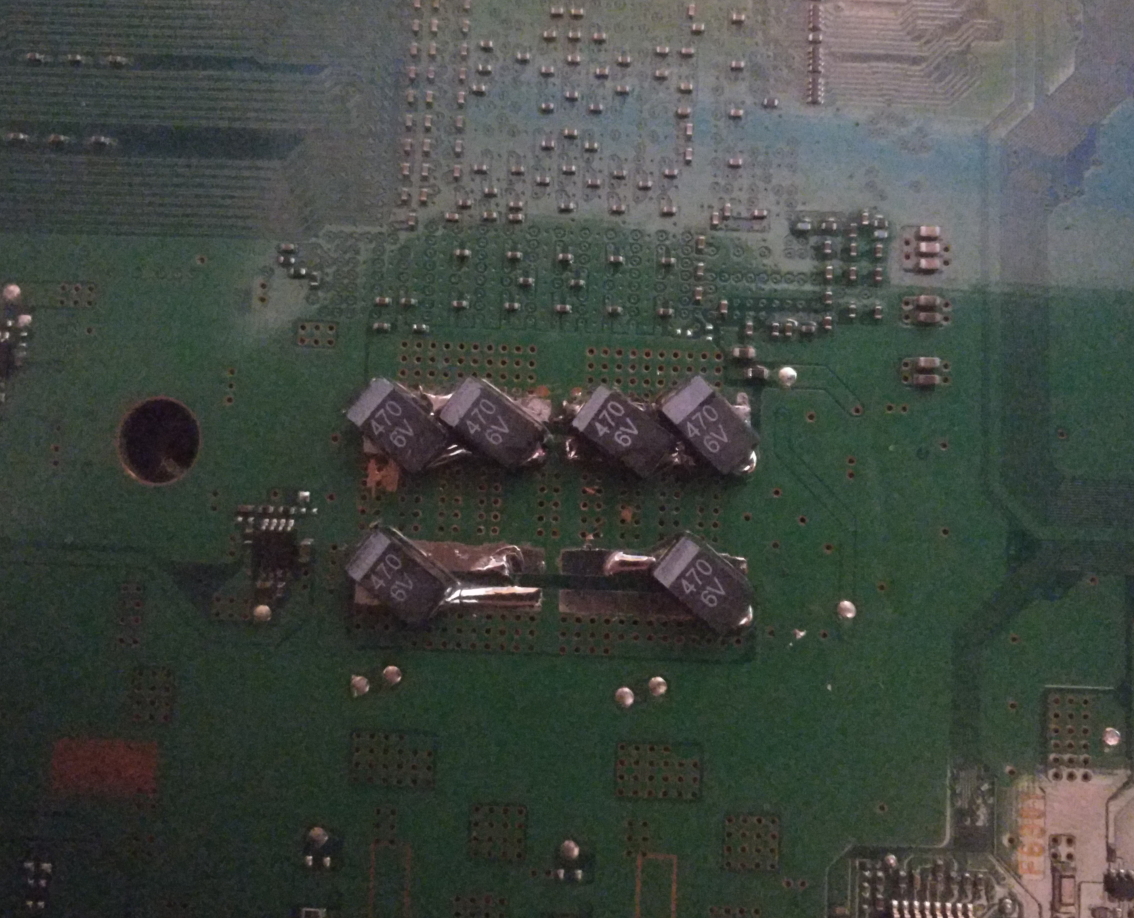
Okay played the GT6 tutorial race on the B00 and got the force shutdown with 3 red beeps red light of death? Anyway decided to open the machine to clear the syscon logs and install the new cpu capacitors properly. While it was open I found the cause of the shutoffs with red beeps have confirmed this was the cause because ive played about 40 minutes of GT6 and it is all running smoothly now.

The cause was me being an idiot please refer to my install picture for the rsx caps look at the bottom two capacitors lmao. I will have to fix this in the CECHH00 also as i'm sure I did the same. Any issues regarding modern warfare 2 seem to be from bad dumps as I dumped my disc to iso and ran that through webman without issues

So for the CECHB00 issues:

- Machine failing to properly shut down and going to red blinking light instead of a solid red one
- Solved by changing Cell capacitors

- Machine force shutting down during game paly with red beeps and flashing red light
- RSX Capacitance too low, solved by correcting my RSX capacitor install

image.png
 
Last edited:
Thank you for a quick and detailed response!

I was planning to measure the old capacitors just to see if they were indeed dead, but I guess I can skip that and just measure the new ones instead; or both, I'll see how much time it will take.

I've ordered the JTAG/Serial just now, should arrive around tuesday, I'll report back how it goes. I also bought M-F DuPont wires, sadly 20cm in lenght but I probably have some usb extender buried somewhere.

I guess that soldering the other side of the DuPont wires directly to PS3 testpoints is the way to go, as usual?

I'll post info here as I make progress, I think that making a separate thread would be pointless.
Okay, finally read your originl issue. Sounds like random freezing. Did it occur only in PS2 games? Or did it happen in PS3 also? And does the console still boot, or are you getting a YLOD on boot now. If so, how long does it take before it happens (from power button press to beeps)?
The usual synthom for faulty NEC/TOKINS is when the PS3 have frequent crashes under big load... or becomes very temperamental for booting, it could happen that refuses to boot at the first presses of the button, but it boots after insisting in it, or it could happen that boots fine if the ambient temperature is comfortable but refuses to boot if the room is cold. This kind of weirdness happens because the capacitors are very sensitive to temperatures

The power supply have his own capacitors btw... so this is not a clear signal of faulty NEC/TOKINS... first thing to try when suspecting about power problems is to replace the PSU and see what happens
So, this wording is misleading. It sounds like you are saying bad nec tokins can be "healed" by heat. That idea has been proven false. Any console that boots after "heating up" is related to the BGA/Bumps.

At this point tho, it's pointless to use these type of indicators to diagnose. We have the SYSCON for diagnosis now, we don't need to revert back to the dark ages before the error codes. That type of observation is useful to build corroborating evidence, but we shouldn't rely on it.

Okay played the GT6 tutorial race on the B00 and got the force shutdown with 3 red beeps red light of death? Anyway decided to open the machine to clear the syscon logs and install the new cpu capacitors properly. While it was open I found the cause of the shutoffs with red beeps have confirmed this was the cause because ive played about 40 minutes of GT6 and it is all running smoothly now.

The cause was me being an idiot please refer to my install picture for the rsx caps look at the bottom two capacitors lmao. I will have to fix this in the CECHH00 also as i'm sure I did the same. Any issues regarding modern warfare 2 seem to be from bad dumps as I dumped my disc to iso and ran that through webman without issues

So for the CECHB00 issues:

- Machine failing to properly shut down and going to red blinking light instead of a solid red one
- Solved by changing Cell capacitors

- Machine force shutting down during game paly with red beeps and flashing red light
- RSX Capacitance too low, solved by correcting my RSX capacitor install

image.png
Yeah, you gotta pay attention to polarity.

I don't wish to throw shade on your accomplishment, but those caps are rated for 6v. That's fine, they'll work just fine under normal operation. However, if the VRM short, the 2.5v caps would see 4-5v applied and act as a fuse, preventing the RSX from burning it out. 6v caps will allow the short voltage to reach the RSX. So 2.5v caps are recommended for an added layer of voltage protection.
 
Back
Top