
You are using an out of date browser. It may not display this or other websites correctly.
You should upgrade or use an alternative browser.
You should upgrade or use an alternative browser.
PS4 [Research]PS2 emulator configuration on PS4
- Thread starter kozarovv
- Start date


MajorDevBuns
Forum Noob
We need to know what region you're playing on, is it substanance or snake eater, as well as specifically what the game is doing, is it getting past the PlayStation 2 logo at least?Dude, have you got any idea why MGS3 is not working yet? I tried to run it but it did not work

zolwikwkurwik
Member
My friend, you just FIXED NO ONE LIVES FOREVER!!!!
Can you explain or point me to how you found these offsets? (if they are :P)
I tested on US and the fpu-accurate-range fix works great. I noticed a lag on the PS2 logo (slow and sound fx noise) but not directly in game. maybe the FPS drops a little on fast movement and heavy scenes but I believe thats normal (played the game before this try with goto level cheats). EDIT: runs best on Jax emu
So I will try your speed suggestion also, maybe some configs and report back ^^
This is sooo great, just WOW, Thank you!
Edit: after some more testing, the lag only seems to appear when loading between scenes for only a moment
Edit2: fpu-accurate-addsub-range maybe works better. no lag on the ps2 boot logo at all
Can you try Quake 3 (PAL/NTSC) with the new Jak emu? BTW where can I get the new emu?
Highly_buggeable
Member
I think it wont work.. AMD Jaguar Architecture + slow clock speeds = slow performanceHow good pcsx2 run on PS4 linux? Can't PS4 pro support pcsx2 at full speed on linux?
We need to know what region you're playing on, is it substanance or snake eater, as well as specifically what the game is doing, is it getting past the PlayStation 2 logo at least?
Take a look:
the game loads, then takes forever to get to the konami logo, then freezes. This is both NTSC versions of MGS3 snake eater and substanance.

kozarovv
Developer
On FAT ps4 is basically ~15 fps on 95% games in native res with speed hacks. PCSX2 is not best in multi threading, and it get more boost from high clocked 2 cores, than from 8 X 1,6 GHz. Anyway, i didn't tested software mode, that can be surprisingly faster, but still I doubt it will be playable.How good pcsx2 run on PS4 linux? Can't PS4 pro support pcsx2 at full speed on linux?
Highly_buggeable
Member
On FAT ps4 is basically ~15 fps on 95% games in native res with speed hacks. PCSX2 is not best in multi threading, and it get more boost from high clocked 2 cores, than from 8 X 1,6 GHz. Anyway, i didn't tested software mode, that can be surprisingly faster, but still I doubt it will be playable.
Okay.. please, let us know if you find something new


Sparkcakes
Forum Noob
@Sparkcakes - FYI, that is the one from Rogue Galaxy v1
So i tried the Jak and Daxter emu files. now i have a freeze before ps2 logo :/
kozarovv
Developer
On "pic1" screen?So i tried the Jak and Daxter emu files. now i have a freeze before ps2 logo :/
@mysis I successfully enabled emulog, and padlog. Still working on GS snapshot commands, and overall "replay data".
https://pastebin.com/K9SkspPx
File is created in /mnt/sandbox/SLUS21255_000/temp0/recordings/slus-21255/emulog_slus-21255.txt (based on your game id from config).
To enable logging you need:
--emulog-file=1
--path-emulog="/tmp/recordings"
Additionally you can add --pad-record=1 for padlog file.
To get files in readable form you need to first FTP there empty files, or emu will create them without read permission for us. Or you can patch emu to create 0777 instead of 0600.
Now need some game that erroring, because log comes from working game.
Probably FPU related. Music still plays? No error?
AUGH! Silent Scope 2 is now being frustrating, so I guess I'll have to try this. So by FTPing empty files, do you have to make an empty .txt file with the same catalog number as the game (emulog_slus-XXXXX.txt) and then put it into the folder in order for it to be readable?
kozarovv
Developer
You need to move old file while game is running, and then create new file. But it's not worth to try unless you patch emu for showing x-debug messages (i still didn't made this).AUGH! Silent Scope 2 is now being frustrating, so I guess I'll have to try this. So by FTPing empty files, do you have to make an empty .txt file with the same catalog number as the game (emulog_slus-XXXXX.txt) and then put it into the folder in order for it to be readable?
SS2 work on 220 bios, and also work on CECH-A bios (220 debug) on pcsx2. Probably issue is different in PS4. If no then you won't fix it by simple commands. Probably you need to patch game to load dummy ilink irx, or something like that.
You need to move old file while game is running, and then create new file. But it's not worth to try unless you patch emu for showing x-debug messages (i still didn't made this).
SS2 work on 220 bios, and also work on CECH-A bios (220 debug) on pcsx2. Probably issue is different in PS4. If no then you won't fix it by simple commands. Probably you need to patch game to load dummy ilink irx, or something like that.
The thing I find weird with this is that games like Time Crisis 3 that have suffered from the same issue on PCSX2 run on the PS4. But then SS2 decides to be stubborn, lol
Seems like this game might be a little bit of a challenge. Unless Sony manages to patch it eventually with a i.Link game being officially released on the PS4 later.
Edit: Gonna test the Dummy IRX file. Just made one, so I'll rebuild the ISO and use that one and see what happens.
Double Edit: The game fails to load past the pic1 wallpaper. Unless I didn't compile the ISO right?
Triple Edit: Yep, nothing's working (unless I'm doing it wrong). Looks like I'll have to try that emulog thing eventually and see if that holds the answer.
Last edited:
kozarovv
Developer
By dummy IRX i mean module that will perform few actions to mimic true module. At the second hand, this even no need to be ilink module issue. PCSX2 ≠ PS2emu, so this can be everything. I remember that game not work also on PS3 software emu, so clampings etc. should be no issue here. No idea.Edit: Gonna test the Dummy IRX file. Just made one, so I'll rebuild the ISO and use that one and see what happens.
Double Edit: The game fails to load past the pic1 wallpaper. Unless I didn't compile the ISO right?
Triple Edit: Yep, nothing's working (unless I'm doing it wrong). Looks like I'll have to try that emulog thing eventually and see if that holds the answer.
thelastice
Forum Noob
Hi,
try adding to config-emu-ps4.txt --ps2-lang = system (only that)but it does not work it stays stuck in pic1
Also try with the files that you attached, an example:
--path-snaps="/tmp/snapshots"
--path-recordings="/tmp/recordings"
--path-vmc="/tmp/vmc"
--path-emulog="/tmp/recordings"
--config-local-lua=""
--config-opt=""
--load-tooling-lua=0
#--path-patches="/app0/patches"
#--path-trophydata="/app0/trophy_data"
#--path-featuredata="/app0/patches"
#--path-toolingscript="/app0/patches"
--ps2-title-id=SLUS-551100
--ps2-lang=system--max-disc-num=1
--trophy-support=0
--gs-uprender=2x2
--gs-upscale=EdgeSmooth
--gs-skip-dirty-flush-on-mipmap=0
--ee-cache-breaks-block=0
--ee-block-validation=none
--ee-regalloc-scalar=0
--fpu-no-clamping=0
--vu-hack-triace=0
--vu0-no-clamping=0
--host-audio=1
--verbose-cdvd-reads=0
--host-osd=0
--host-display-mode=full
--framelimit-mode=normal
freeze in pic1
the game is odin Sphere SLUS-551100 I need the language in Spanish, any suggestions?
try adding to config-emu-ps4.txt --ps2-lang = system (only that)but it does not work it stays stuck in pic1
Also try with the files that you attached, an example:
--path-snaps="/tmp/snapshots"
--path-recordings="/tmp/recordings"
--path-vmc="/tmp/vmc"
--path-emulog="/tmp/recordings"
--config-local-lua=""
--config-opt=""
--load-tooling-lua=0
#--path-patches="/app0/patches"
#--path-trophydata="/app0/trophy_data"
#--path-featuredata="/app0/patches"
#--path-toolingscript="/app0/patches"
--ps2-title-id=SLUS-551100
--ps2-lang=system--max-disc-num=1
--trophy-support=0
--gs-uprender=2x2
--gs-upscale=EdgeSmooth
--gs-skip-dirty-flush-on-mipmap=0
--ee-cache-breaks-block=0
--ee-block-validation=none
--ee-regalloc-scalar=0
--fpu-no-clamping=0
--vu-hack-triace=0
--vu0-no-clamping=0
--host-audio=1
--verbose-cdvd-reads=0
--host-osd=0
--host-display-mode=full
--framelimit-mode=normal
freeze in pic1
the game is odin Sphere SLUS-551100 I need the language in Spanish, any suggestions?
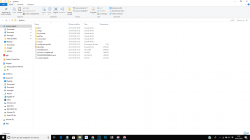
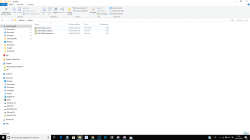
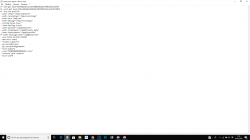
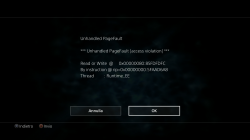
kozarovv
Developer
Game do the same without configs?View attachment 12898 View attachment 12899 View attachment 12900
How can i enable the cli.conf file ? i putted all the files in the folder called "patches" and i changed the game id of all files inside that folder and i changed game id in the "config-emu-ps4.txt" file too, the game starts but it's look like the file is not enable :
View attachment 12901
Hi,
try adding to config-emu-ps4.txt --ps2-lang = system (only that)but it does not work it stays stuck in pic1
Also try with the files that you attached, an example:
--path-snaps="/tmp/snapshots"
--path-recordings="/tmp/recordings"
--path-vmc="/tmp/vmc"
--path-emulog="/tmp/recordings"
--config-local-lua=""
--config-opt=""
--load-tooling-lua=0
#--path-patches="/app0/patches"
#--path-trophydata="/app0/trophy_data"
#--path-featuredata="/app0/patches"
#--path-toolingscript="/app0/patches"
--ps2-title-id=SLUS-551100
--ps2-lang=system--max-disc-num=1
--trophy-support=0
--gs-uprender=2x2
--gs-upscale=EdgeSmooth
--gs-skip-dirty-flush-on-mipmap=0
--ee-cache-breaks-block=0
--ee-block-validation=none
--ee-regalloc-scalar=0
--fpu-no-clamping=0
--vu-hack-triace=0
--vu0-no-clamping=0
--host-audio=1
--verbose-cdvd-reads=0
--host-osd=0
--host-display-mode=full
--framelimit-mode=normal
freeze in pic1
the game is odin Sphere SLUS-551100 I need the language in Spanish, any suggestions?
SLUS-551100 don't exist.. Correct format is XXXX-YYYYY. Your game is probably SLES-55110
Also you messed your config, one line = one command. So --ps2-lang=system--max-disc-num=1 in one line, is wrong.
Game do the same without configs?
Yes , for example i get this problem with Call Of Duty 3 and Harry Potter And The Goblet Of Fire and i know in order to fix this problem i've to put a command line in "cli.conf" file but it is useless for me if i don't know how to enable it :
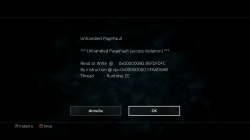
I've tried everything . Maybe there is something wrong in my directories ? For example i don't have the folder "app0" wich is required in order to enable it :
From "config-emu-ps4.txt" file :
Code:
path-patches="/app0/patches
Last edited:
kozarovv
Developer
Is correct path, game will be mounted at app0 path while running."app0"
Is known issue with those games, while solution is unknown (settings, patches, etc.).Yes , for example i get this problem with Call Of Duty 3 and Harry Potter And The Goblet Of Fire
About your issue with GTA3. Are you use official config files? If yes, then make sure that your game is ver 1.60 (check that in system.cnf on disc), because official patches are for this game versions.
If game version is correct, then it mean that on your EMU version is not able to run this game.
Similar threads
-
-
-
PS4 How to play multiplayer (3-4 players) using PSX-FPKG?
- Started by PSXP_Kira
- Replies: 2
-
 PS3 [PS2] Gundam Warriors 2 FPU rounding fix
- Started by Low_Plankton_3329
- Replies: 0