kozarovv
Developer
I will send you pm.Yup, uprender is disabled; same with all the KoF titles, even the official PS2 Classics have it disabled, with upscale set to Point.

I will send you pm.Yup, uprender is disabled; same with all the KoF titles, even the official PS2 Classics have it disabled, with upscale set to Point.
Can you try --vu0-mul0fix-range=0x000,0xff0 ?In the meantime, I just tested clutmerge - and various clamps - on KoF94RB and nothing changed. Nearly every stage is absolutely unplayable. Same with KoF2002UM, though it's not *as* bad as in KoF94RB. Shame too as 2002UM is quite probably the best KoF yet

 I'll try KoF98UM, it's the most recent template I have - from January 2018.
Ok, looks like i messed something then, wait a secWeird, I checked out Jak's eboot.bin in hex and, sure enough "--vu0-mul0fix-range " is there at 0x0052A300.

Yes, there are known lua commands, but i never tested them.Yes , but in Sony Vegas 15 i removed it , now the question is : Can it be fix ?
apiRequest(1.2) -- request version 1.2 API. Calling apiRequest() is mandatory.

local emuObj = getEmuObject(

-- Sound Volume scaling

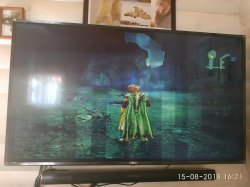
local volumeScale = 0.75Please post picture of your issue.Hello everyone. Can anyone help to fix vertical lines in Lord of the rings:the third age?
Please post picture of your issue.
Tried - no result.Try change:
--gs-uprender=2x2
--gs-upscale=EdgeSmooth
To
--gs-uprender=none
--gs-upscale=none
And one more question. Can i modify this params with no repacking/re-creating pkg file? Maybe it is somewhere in ps4 system i can find...Tried - no result.

Hello everyone. Can anyone help to fix vertical lines in Lord of the rings:the third age?