PS4 [Research]PS2 emulator configuration on PS4


The GOD OF WAR II was initially tested using the CLI configuration of the GOD OF WAR1 on the wiki. The effect is very poor and the number of frames is very low. Replacing the CLI configuration of GOD OF WAR II on the wiki can improve the frame rate, but the audio and graphics problems are very serious, and the configuration needs to be continued.
I need to tell that is really surprising that CLI matter here. Here is CLI from wiki stripped from not working stuff.

Code:
--vu1-jr-cache-policy=newprog
--vu1-jalr-cache-policy=newprog
--vu1-mpg-cycles=1000
--vu1-di-bits=1
--vu1-injection=1
--vu1-opt-flags=2
--ee-block-validation=PageProt
--ee-cycle-scalar=0.8
--ee-kernel-hle=1
--ee-injection-kernel=1
--ee-injection-title=1
--fpu-accurate-mul-fast=1
--fpu-rsqrt-fast-estimate=1
--framelimit-mode=normal
--gs-frontend-opt-mode=2
--gs-optimize-30fps=1
--cop2-di-bits=1
--safe-area-min=1.0

Can you test with this LUA?
Code:
apiRequest(2.2) --make sure we are running latest emu


local emuObj = getEmuObject()
emuObj.SetGsTitleFix( "forceSimpleFetch", "reserved", { texMode=1 } )

-- Wide Screen at boot, 640x448p at boot, speedhack by removing some effects
emuMediaPatch(0x1fc, 12 + 0x6e0, { 0x27bdfee0 }, { 0x03e00008 })
emuMediaPatch(0x1fc, 12 + 0x6e4, { 0x7fb300d0 }, { 0x00000000 })
emuMediaPatch(0x1f8, 12 + 0x720, { 0x27bdff50 }, { 0x03e00008 })
emuMediaPatch(0x1f8, 12 + 0x724, { 0x3c02002d }, { 0x00000000 })
emuMediaPatch(0x2e4, 12 + 0x5b4, { 0x3c04002e }, { 0x24040001 })
emuMediaPatch(0x2e4, 12 + 0x5b8, { 0x8c8486d8 }, { 0x00000000 })
emuMediaPatch(0x40d, 12 + 0x14c, { 0x3c013faa }, { 0x3c013fe3 })
emuMediaPatch(0x40d, 12 + 0x150, { 0x3421aaab }, { 0x34218e39 })
emuMediaPatch(0x3d0, 12 + 0x608, { 0xac4086dc }, { 0xa04986dc })
emuMediaPatch(0x2e4, 12 + 0x5d4, { 0x8ca286dc }, { 0x24020001 })
emuMediaPatch(0x169, 12 + 0x6b0, { 0x27bdff60 }, { 0x03e00008 })
emuMediaPatch(0x169, 12 + 0x6b4, { 0x7fb10080 }, { 0x00000000 })

-- allow to skip movies using X button (included for faster testing)
eeInsnReplace(0x1DD8C8, 0x10400005, 0x00000000)

I added experimental fix for graphic issue. That seems to be caused by upscaller.
It will be really nice to remove fixes from CLI one by one, to check that is really make speed change, because then i can figure out something new.
 
I need to tell that is really surprising that CLI matter here. Here is CLI from wiki stripped from not working stuff.

Code:
--vu1-jr-cache-policy=newprog
--vu1-jalr-cache-policy=newprog
--vu1-mpg-cycles=1000
--vu1-di-bits=1
--vu1-injection=1
--vu1-opt-flags=2
--ee-block-validation=PageProt
--ee-cycle-scalar=0.8
--ee-kernel-hle=1
--ee-injection-kernel=1
--ee-injection-title=1
--fpu-accurate-mul-fast=1
--fpu-rsqrt-fast-estimate=1
--framelimit-mode=normal
--gs-frontend-opt-mode=2
--gs-optimize-30fps=1
--cop2-di-bits=1
--safe-area-min=1.0

Can you test with this LUA?
Code:
apiRequest(2.2) --make sure we are running latest emu


local emuObj = getEmuObject()
emuObj.SetGsTitleFix( "forceSimpleFetch", "reserved", { texMode=1 } )

-- Wide Screen at boot, 640x448p at boot, speedhack by removing some effects
emuMediaPatch(0x1fc, 12 + 0x6e0, { 0x27bdfee0 }, { 0x03e00008 })
emuMediaPatch(0x1fc, 12 + 0x6e4, { 0x7fb300d0 }, { 0x00000000 })
emuMediaPatch(0x1f8, 12 + 0x720, { 0x27bdff50 }, { 0x03e00008 })
emuMediaPatch(0x1f8, 12 + 0x724, { 0x3c02002d }, { 0x00000000 })
emuMediaPatch(0x2e4, 12 + 0x5b4, { 0x3c04002e }, { 0x24040001 })
emuMediaPatch(0x2e4, 12 + 0x5b8, { 0x8c8486d8 }, { 0x00000000 })
emuMediaPatch(0x40d, 12 + 0x14c, { 0x3c013faa }, { 0x3c013fe3 })
emuMediaPatch(0x40d, 12 + 0x150, { 0x3421aaab }, { 0x34218e39 })
emuMediaPatch(0x3d0, 12 + 0x608, { 0xac4086dc }, { 0xa04986dc })
emuMediaPatch(0x2e4, 12 + 0x5d4, { 0x8ca286dc }, { 0x24020001 })
emuMediaPatch(0x169, 12 + 0x6b0, { 0x27bdff60 }, { 0x03e00008 })
emuMediaPatch(0x169, 12 + 0x6b4, { 0x7fb10080 }, { 0x00000000 })

-- allow to skip movies using X button (included for faster testing)
eeInsnReplace(0x1DD8C8, 0x10400005, 0x00000000)

I added experimental fix for graphic issue. That seems to be caused by upscaller.
It will be really nice to remove fixes from CLI one by one, to check that is really make speed change, because then i can figure out something new.

The latest LUA fixes the graphics problem, and now starts to test the CLI configuration one by one, which one affects the speed problem, it takes a lot of time, please wait for my feedback。
 
战神II-GOD OF WAR II_20200418085909.jpg


The white lines on the wall are also a problem。


After a lot of tests, the speed problem is accurate to the following configuration:

--vu1-jr-cache-policy=newprog
--vu1-jalr-cache-policy=newprog
--vu1-mpg-cycles=1000
--vu1-di-bits=1
--vu1-injection=1
--vu1-opt-flags=2


————————————————————————————————————
--ee-block-validation=PageProt
--ee-cycle-scalar=0.8
--ee-kernel-hle=1
--ee-injection-kernel=1
--ee-injection-title=1
--fpu-accurate-mul-fast=1
--fpu-rsqrt-fast-estimate=1
--framelimit-mode=normal
--gs-frontend-opt-mode=2
--gs-optimize-30fps=1
--cop2-di-bits=1
--safe-area-min=1.0
After the configuration does not help
 
Last edited:
View attachment 25414

The white lines on the wall are also a problem。


After a lot of tests, the speed problem is accurate to the following configuration:

--vu1-jr-cache-policy=newprog
--vu1-jalr-cache-policy=newprog
--vu1-mpg-cycles=1000
--vu1-di-bits=1
--vu1-injection=1
--vu1-opt-flags=2

GOW1

--vu1-opt-flags=2
--vu1-di-bits=1

--vu1-mpg-cycles=800
--vu1-injection=1
--vu1-opt-vf00=2
--vu1-jr-cache-policy=newprog
--vu1-jalr-cache-policy=newprog

--ee-block-validation=PageProt
--gs-frontend-opt-mode=2
--fpu-rsqrt-fast-estimate=1

This is getting more, and more interesting. All of that is included in GOW 1 config. So there are 2 options, is vu1-mpg-cycles=800 what make difference between 2 games, or something else that was added to GOW 1 config. Since PCSX2 shows that both games hammering VU1 and VIF1, this can be it.

I marked the same commands with bold, strike thru commands that can't cause difference.
So i need to ask for one more test. Please change --vu1-mpg-cycles=1000 to --vu1-mpg-cycles=800. Because that can be real culprit here.

About white lines, it is probably issue caused by removing shadows. So can be hard to do something with it.
 
GOW1

--vu1-opt-flags=2
--vu1-di-bits=1

--vu1-mpg-cycles=800
--vu1-injection=1
--vu1-opt-vf00=2
--vu1-jr-cache-policy=newprog
--vu1-jalr-cache-policy=newprog

--ee-block-validation=PageProt
--gs-frontend-opt-mode=2
--fpu-rsqrt-fast-estimate=1

This is getting more, and more interesting. All of that is included in GOW 1 config. So there are 2 options, is vu1-mpg-cycles=800 what make difference between 2 games, or something else that was added to GOW 1 config. Since PCSX2 shows that both games hammering VU1 and VIF1, this can be it.

I marked the same commands with bold, strike thru commands that can't cause difference.
So i need to ask for one more test. Please change --vu1-mpg-cycles=1000 to --vu1-mpg-cycles=800. Because that can be real culprit here.

About white lines, it is probably issue caused by removing shadows. So can be hard to do something with it.

Once again, a lot of testing has been done on the configuration:
--vu1-jalr-cache-policy = newprog (has an absolute impact on speed, can be run alone)
--vu1-mpg-cycles = 1000 (According to the wiki, it is to correct the lag and delay of the cut-off CG, I do n't know if it needs to be added)
 
Now the only thing that can be determined is that --vu1-jalr-cache-policy = newprog is helpful. Next I will use --vu1-jalr-cache-policy = newprog separate CLI to test GOW1
 
Here is how pcsx2 do this at default. doJumpAsSameProgram = false;

--vu1-jr-cache-policy=newprog
--vu1-jalr-cache-policy=newprog
--vu0-jr-cache-policy=newprog
--vu0-jalr-cache-policy=newprog

Additionally pcsx2 use:

This one is specially interesting since comment from pcsx2 suggest that 1 = //Makes GoW a lot slower due to extra recompilation time and extra code-gen! So lets try:

--vu0-const-prop=0
--vu1-const-prop=0

So setting that to 0 can be really helpful, assuming that is enabled by default..

Another thing is flag optimization. In pcsx2 doFullFlagOpt = false; and noFlagOpts = false;
That mean they by default use flag optimization, but not aggressive one. This should be that on ps4:

--vu0-opt-flags=1
--vu1-opt-flags=1
--cop2-opt-flags=1

Also seems that pcsx2 use regalloc by default. doRegAlloc = true; is set in code.
This can be little bit tricky as we don't know correct variable names for ps4. I documented only --cop2-regalloc command existence, but not found how to use it (for sure not 1/0).

So here is config that try to mimic PCSX2 VU optiomizations based on microVU_Misc.h file. They use that for EVERY game.


Code:
--vu0-opt-flags=1
--vu1-opt-flags=1
--cop2-opt-flags=1
--vu0-const-prop=0
--vu1-const-prop=0
--vu1-jr-cache-policy=newprog
--vu1-jalr-cache-policy=newprog
--vu0-jr-cache-policy=newprog
--vu0-jalr-cache-policy=newprog
 
Last edited:
Here is how pcsx2 do this at default. doJumpAsSameProgram = false;

--vu1-jr-cache-policy=newprog
--vu1-jalr-cache-policy=newprog
--vu0-jr-cache-policy=newprog
--vu0-jalr-cache-policy=newprog

Additionally pcsx2 use:

This one is specially interesting since comment from pcsx2 suggest that 1 = //Makes GoW a lot slower due to extra recompilation time and extra code-gen! So lets try:

--vu0-const-prop=0
--vu1-const-prop=0

So setting that to 0 can be really helpful, assuming that is enabled by default..

Another thing is flag optimization. In pcsx2 doFullFlagOpt = false; and noFlagOpts = false;
That mean they by default use flag optimization, but not aggressive one. This should be that on ps4:

--vu0-opt-flags=1
--vu1-opt-flags=1
--cop2-opt-flags=1

Also seems that pcsx2 use regalloc by default. doRegAlloc = true; is set in code.
This can be little bit tricky as we don't know correct variable names for ps4. I documented only --cop2-regalloc command existence, but not found how to use it (for sure not 1/0).

So here is config that try to mimic PCSX2 VU optiomizations based on microVU_Misc.h file. They use that for EVERY game.


Code:
--vu0-opt-flags=1
--vu1-opt-flags=1
--cop2-opt-flags=1
--vu0-const-prop=0
--vu1-const-prop=0
--vu1-jr-cache-policy=newprog
--vu1-jalr-cache-policy=newprog
--vu0-jr-cache-policy=newprog
--vu0-jalr-cache-policy=newprog

Okay, I will apply the configuration you issued
 
Ok, i imagine that result on GOW not gonna be some epic speedup, but if that gonna work at all. This can be new default speed hack for many games with similar issues.

Both GOW1 and GOW2 have applied this configuration, but there is no speed increase. Thank you for your hard work. Add the configuration for this game. The only command that can be confirmed now is --vu1-jalr-cache-policy = newprog has an impact on the speed.Repeated audio playback is still a problem
 
Last edited:
Both GOW1 and GOW2 have applied this configuration, but there is no speed increase. Thank you for your hard work. Add the configuration for this game. The only command that can be confirmed now is --vu1-jalr-cache-policy = newprog has an impact on the speed
Ok, i think for now is all we can do. During testing there was no slowdown, so this config can be used as a default safe setting for games that have speed issues. Of course not all games have issues on VU side, but some of them can have them. A lot will depend on game, GOW hammer vu1, other game can be VU0 intensive. Most important is that you was able to track that new default settings. Thank you :)

So this is speedhack that should be safe for every game. In worst case it will just not work as speedhack, but even then should be no harm for game compatibility.

Code:
--vu0-opt-flags=1
--vu1-opt-flags=1
--cop2-opt-flags=1
--vu0-const-prop=0
--vu1-const-prop=0
--vu1-jr-cache-policy=newprog
--vu1-jalr-cache-policy=newprog
--vu0-jr-cache-policy=newprog
--vu0-jalr-cache-policy=newprog

I think i can now move to EE/FPU pcsx2 code, and look there for similar optimizations to create one config that will try to mimic PCSX2 hacks on Ps4. ;)
 
Ok, i think for now is all we can do. During testing there was no slowdown, so this config can be used as a default safe setting for games that have speed issues. Of course not all games have issues on VU side, but some of them can have them. A lot will depend on game, GOW hammer vu1, other game can be VU0 intensive. Most important is that you was able to track that new default settings. Thank you :)

So this is speedhack that should be safe for every game. In worst case it will just not work as speedhack, but even then should be no harm for game compatibility.

Code:
--vu0-opt-flags=1
--vu1-opt-flags=1
--cop2-opt-flags=1
--vu0-const-prop=0
--vu1-const-prop=0
--vu1-jr-cache-policy=newprog
--vu1-jalr-cache-policy=newprog
--vu0-jr-cache-policy=newprog
--vu0-jalr-cache-policy=newprog

I think i can now move to EE/FPU pcsx2 code, and look there for similar optimizations to create one config that will try to mimic PCSX2 hacks on Ps4. ;)

If there is a new configuration, I will provide the test again:smile new:
 
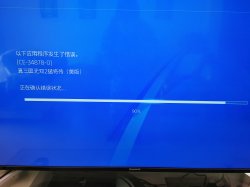
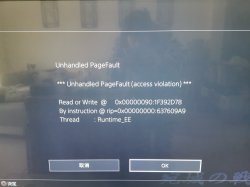
@kozarovv,Hi, can you help me repair Dynasty Warriors 3 Xtreme Legends SLUS_206.17? The problem now is a blue screen crash or EE error when reading a specific level. Japanese version of Dynasty Warriors 3 Xtreme Legends has the same error.


IMG_20200419_114024.jpg

IMG_20200202_152118.jpg
 
@kozarovv,Hi, can you help me repair Dynasty Warriors 3 Xtreme Legends SLUS_206.17? The problem now is a blue screen crash or EE error when reading a specific level. Japanese version of Dynasty Warriors 3 Xtreme Legends has the same error.


View attachment 25436

View attachment 25437
So, first of all i don't know how fix this because i never tested this game so i didn't know that it was affected by a crash, anyway in your pictures i can see two different types of crash (as you explained), this could depend about the version of the emu you are using, because in the first versions of emulators, games shows the pagefault message when they crash, meanwhile in the latest version of the emulators the games don't completely show that message, they just crash with that blue screen.

@kozarovv
Could Rayman 3 and Rayman M (Rayman arena in Usa) crash's be caused by the VPU STAT cfc2?
 
So, first of all i don't know how fix this because i never tested this game so i didn't know that it was affected by a crash, anyway in your pictures i can see two different types of crash (as you explained), this could depend about the version of the emu you are using, because in the first versions of emulators, games shows the pagefault message when they crash, meanwhile in the latest version of the emulators the games don't completely show that message, they just crash with that blue screen.

@kozarovv
Could Rayman 3 and Rayman M (Rayman arena in Usa) crash's be caused by the VPU STAT cfc2?

As you said, this is the error message feedback from two versions of emu. Can the fpu-accurate-range command bring hope in accordance with the repair method of some games on WIKI?
 
Could Rayman 3 and Rayman M (Rayman arena in Usa) crash's be caused by the VPU STAT cfc2?
Kind of. But is more complicated.

Rayman arena (US) sooner or later stuck on
1DE9B0
1DEB94
1DEC00
1DEC54
1DEEA0
1DEEDC
1DF078
1DF0B4
1DF154
Because of sync issues between EE-VU.


@kozarovv,Hi, can you help me repair Dynasty Warriors 3 Xtreme Legends SLUS_206.17? The problem now is a blue screen crash or EE error when reading a specific level. Japanese version of Dynasty Warriors 3 Xtreme Legends has the same error.


View attachment 25436

View attachment 25437
Try new config that i made based on PCSX2 default settings. Maybe is just FPU issue.

Code:
--fpu-no-clamping=0
--fpu-clamp-results=1
--vu0-no-clamping=0
--vu0-clamp-results=1
--vu1-no-clamping=0
--vu1-clamp-results=1
--cop2-no-clamping=0
--cop2-clamp-results=1
--vu0-opt-flags=1
--vu1-opt-flags=1
--cop2-opt-flags=1
--vu0-const-prop=0
--vu1-const-prop=0
--vu1-jr-cache-policy=newprog
--vu1-jalr-cache-policy=newprog
--vu0-jr-cache-policy=newprog
--vu0-jalr-cache-policy=newprog

This is again what they use as a default setting for 99% games.
 
Kind of. But is more complicated.

Rayman arena (US) sooner or later stuck on
1DE9B0
1DEB94
1DEC00
1DEC54
1DEEA0
1DEEDC
1DF078
1DF0B4
1DF154
Because of sync issues between EE-VU.


Try new config that i made based on PCSX2 default settings. Maybe is just FPU issue.

Code:
--fpu-no-clamping=0
--fpu-clamp-results=1
--vu0-no-clamping=0
--vu0-clamp-results=1
--vu1-no-clamping=0
--vu1-clamp-results=1
--cop2-no-clamping=0
--cop2-clamp-results=1
--vu0-opt-flags=1
--vu1-opt-flags=1
--cop2-opt-flags=1
--vu0-const-prop=0
--vu1-const-prop=0
--vu1-jr-cache-policy=newprog
--vu1-jalr-cache-policy=newprog
--vu0-jr-cache-policy=newprog
--vu0-jalr-cache-policy=newprog

This is again what they use as a default setting for 99% games.
The above configuration can start the game, but it cannot fix the crash problem
 
--ee-ignore-segfault=RW is what should get rid of segfault, but even then game can crash. This is just error remover.

Edit: Nevermind, you have different error. No idea.
 

Similar threads

Back
Top