

You are using an out of date browser. It may not display this or other websites correctly.
You should upgrade or use an alternative browser.
You should upgrade or use an alternative browser.
PS4 [Research]PS2 emulator configuration on PS4
- Thread starter kozarovv
- Start date

kozarovv
Developer
patch=1,EE,0019824c,word,3c023f2b try different values for second patch which seems to be zoom, or fov.@kozarovv
patch=1,EE,001472ac,word,3c0243d6
With this widescreen code, the game plot is no longer stuck, but there will be missing graphics, can you help me fix it?
View attachment 25668
3c02 is real code.
3f2b is float 0.667969
Try to find good code that zoom enough, but not freeze game. Maybe:
3f3e
or
3f19
nifengyuexia
Member
The value of 3f19 fixed it, the game no longer freezes, and the missing graphics are also fixed, thank you very muchpatch=1,EE,0019824c,word,3c023f2b try different values for second patch which seems to be zoom, or fov.
3c02 is real code.
3f2b is float 0.667969
Try to find good code that zoom enough, but not freeze game. Maybe:
3f3e
or
3f19

nifengyuexia
Member
Can you help me list all the hexadecimal values of the last two digits of 3f? I want to try more and find a perfect code.patch=1,EE,0019824c,word,3c023f2b try different values for second patch which seems to be zoom, or fov.
3c02 is real code.
3f2b is float 0.667969
Try to find good code that zoom enough, but not freeze game. Maybe:
3f3e
or
3f19
kozarovv
Developer
https://gregstoll.dyndns.org/~gregstoll/floattohex/Can you help me list all the hexadecimal values of the last two digits of 3f? I want to try more and find a perfect code.
Is just float, paste it to that site in single hex. Add 0000 at the end. For example 3f2b0000
nifengyuexia
Member
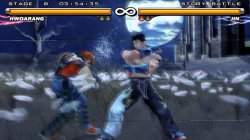
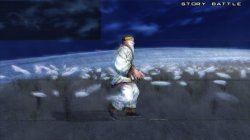
Can someone solve such a problem, I tried multiple ways and nothing worked.
apiRequest (0.1)
local emuObj = getEmuObject ()
emuObj.SetGsTitleFix ("forceSimpleFetch", "reserved", {texMode = 2})
Can be solved, but the quality of the image is degraded, I wonder if there will be other repair methods
nifengyuexia
Member
There is no comparison at all, this effect is too bad. But emuObj.SetGsTitleFix works better, with some slight jitterCheck that make any difference:
--gs-kernel-cl-up="up2x2simple"
iis Cli
kozarovv
Developer
This is upscaling issue for sure, so try some different options. I remember there was similar issue in VP2, i fixed it by that:There is no comparison at all, this effect is too bad. But emuObj.SetGsTitleFix works better, with some slight jitter
--gs-uprender=2x2
--gs-upscale=Point
--gs-kernel-cl-up="up2x2simple"
All of them are required.
kozarovv
Developer
Possible Steambot Chronicles (US SLUS_213.44 only) speedhack. Remove extensive postproccesing. Can have some minor visual effect. But speed up should be HUGE.
Edit, i see that wiki list also some graphical issues, to help i need picture of them. :/
Edit2: Issues were probably because of blur. I removed it. Game is now sharp, and look stunning.
Code:
apiRequest (0.1)
-- postprocessing removal. Speedhack
eeInsnReplace(0x10fdd8, 0x0c042888, 0x00000000)
eeInsnReplace(0x10fea4, 0x0c04adf4, 0x00000000)
Edit, i see that wiki list also some graphical issues, to help i need picture of them. :/
Edit2: Issues were probably because of blur. I removed it. Game is now sharp, and look stunning.
Last edited:
nifengyuexia
Member
Possible Steambot Chronicles (US SLUS_213.44 only) speedhack. Remove extensive postproccesing. Can have some minor visual effect. But speed up should be HUGE.
Code:apiRequest (0.1) -- postprocessing removal. Speedhack eeInsnReplace(0x10fdd8, 0x0c042888, 0x00000000) eeInsnReplace(0x10fea4, 0x0c04adf4, 0x00000000)
Edit, i see that wiki list also some graphical issues, to help i need picture of them. :/
Edit2: Issues were probably because of blur. I removed it. Game is now sharp, and look stunning.
kozarovv
Developer
Fast fix, i reproducted the same issue on PCSX2, is clamping issue on VU.
So CLI:
LUA
That should fix whole issues.
So CLI:
Code:
--fpu-no-clamping=0
--fpu-clamp-results=1
--vu0-no-clamping=0
--vu0-clamp-results=1
--vu1-no-clamping=0
--vu1-clamp-results=1
--cop2-no-clamping=0
--cop2-clamp-results=1LUA
Code:
apiRequest (0.1)
-- postprocessing removal. Speedhack
eeInsnReplace(0x10fdd8, 0x0c042888, 0x00000000)
eeInsnReplace(0x10fea4, 0x0c04adf4, 0x00000000)That should fix whole issues.
nifengyuexia
Member
I think that speed is really good. Wiki list Massive performance and graphical issues.
Geometry, and graphical issues looks like standard clamping issues.
Without configuration, the speed is the sameI think that speed is really good. Wiki list Massive performance and graphical issues.
Geometry, and graphical issues looks like standard clamping issues.
kozarovv
Developer
Ah, ok. I wouldn't know it run at that speed, i probably wouldn't try to fix it since start.Without configuration, the speed is the same

Anyway config should now make game playable, or at least with minor issues.
kozarovv
Developer
Actually is safe to use that CLI, to speed up little bit.
Plus old lua.
Code:
--fpu-no-clamping=0
--fpu-clamp-results=1
--vu0-no-clamping=0
--vu0-clamp-results=1
--vu1-no-clamping=0
--vu1-clamp-results=1
--cop2-no-clamping=0
--cop2-clamp-results=1
--vu0-opt-flags=1
--vu1-opt-flags=1
--cop2-opt-flags=1
--vu0-const-prop=0
--vu1-const-prop=0
--vu1-jr-cache-policy=newprog
--vu1-jalr-cache-policy=newprog
--vu0-jr-cache-policy=newprog
--vu0-jalr-cache-policy=newprogPlus old lua.
nifengyuexia
Member
Sometimes the audio stuttering problem will cause the illusion that the speed is reduced. If most of the game audio is repaired, the speed will increase.Ah, ok. I wouldn't know it run at that speed, i probably wouldn't try to fix it since start.
Anyway config should now make game playable, or at least with minor issues.
nifengyuexia
Member
Without any help, the graphics have not changed, the speed is still the same as when there is no configurationFast fix, i reproducted the same issue on PCSX2, is clamping issue on VU.
So CLI:
Code:--fpu-no-clamping=0 --fpu-clamp-results=1 --vu0-no-clamping=0 --vu0-clamp-results=1 --vu1-no-clamping=0 --vu1-clamp-results=1 --cop2-no-clamping=0 --cop2-clamp-results=1
LUA
Code:apiRequest (0.1) -- postprocessing removal. Speedhack eeInsnReplace(0x10fdd8, 0x0c042888, 0x00000000) eeInsnReplace(0x10fea4, 0x0c04adf4, 0x00000000)
That should fix whole issues.
nifengyuexia
Member
--vu0-const-prop=0Actually is safe to use that CLI, to speed up little bit.
Code:--fpu-no-clamping=0 --fpu-clamp-results=1 --vu0-no-clamping=0 --vu0-clamp-results=1 --vu1-no-clamping=0 --vu1-clamp-results=1 --cop2-no-clamping=0 --cop2-clamp-results=1 --vu0-opt-flags=1 --vu1-opt-flags=1 --cop2-opt-flags=1 --vu0-const-prop=0 --vu1-const-prop=0 --vu1-jr-cache-policy=newprog --vu1-jalr-cache-policy=newprog --vu0-jr-cache-policy=newprog --vu0-jalr-cache-policy=newprog
Plus old lua.
--vu1-const-prop=0
--vu1-jr-cache-policy=newprog
--vu1-jalr-cache-policy=newprog
--vu0-jr-cache-policy=newprog
--vu0-jalr-cache-policy=newprog
Do not use it for games with normal speed. I have tested several games with normal speed, but it will become slow after using this command
kozarovv
Developer
If clamping on VU not help, then only full clamping can maybe help. Not really sure is worth to try. Is not first time when VU on that emu is pain in the assWithout any help, the graphics have not changed, the speed is still the same as when there is no configuration
 Thanks for testing anyway.
Similar threads
-
-
-
PS4 How to play multiplayer (3-4 players) using PSX-FPKG?
- Started by PSXP_Kira
- Replies: 2
-
 PS3 [PS2] Gundam Warriors 2 FPU rounding fix
- Started by Low_Plankton_3329
- Replies: 0