
You are using an out of date browser. It may not display this or other websites correctly.
You should upgrade or use an alternative browser.
You should upgrade or use an alternative browser.
PS4 [Research]PS2 emulator configuration on PS4
- Thread starter kozarovv
- Start date

kozarovv
Developer
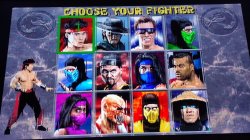
Disable uprender and/or upscalling. This is 2d game so they do nothing anyway.I would like some help, the MK2 and MK3 game have vertical lines, would anyone know how I can fix this?View attachment 33493

nifengyuexia
Member
KOF NEST
SLPS256.61
lua
Some slight enhancements to the game, directly turn on the progressive scan mode, the fonts of each version are not blurred and clearer, KOF99E improves the 3D background clarity, and the other 2D has no changes!
JakV2 emus
SLPS256.61
lua
Code:
apiRequest(1.0)
local eeObj = getEEObject()
local emuObj = getEmuObject()
local patcher = function()

local code_check1 = eeObj.ReadMem16(0x10011C)
if code_check1 == 0x001A then
eeObj.WriteMem32(0x105b04,0x3c060050)
eeObj.WriteMem32(0x105b0c,0x3c070001)
eeObj.WriteMem32(0x105E74,0x24020002)
eeObj.WriteMem32(0x105E78,0x24020002)
eeObj.WriteMem32(0x107900,0x03E00008)
eeObj.WriteMem32(0x107904,0x00000000)
eeObj.WriteMem32(0x107B68,0x03E00008)
eeObj.WriteMem32(0x107B6C,0x00000000)
eeObj.WriteMem32(0x30DFB8,0x34860002)
end
local code_check2 = eeObj.ReadMem16(0x10011C)
if code_check2 == 0x0022 then
eeObj.WriteMem32(0x10098C,0x3c050000)
eeObj.WriteMem32(0x100994,0x3c060050)
eeObj.WriteMem32(0x10099C,0x3c070001)
eeObj.WriteMem32(0x100D04,0x24020002)
eeObj.WriteMem32(0x100D08,0x24020002)
eeObj.WriteMem32(0x101FC0,0x03E00008)
eeObj.WriteMem32(0x101FC4,0x00000000)
end
end
emuObj.AddVsyncHook(patcher)
Some slight enhancements to the game, directly turn on the progressive scan mode, the fonts of each version are not blurred and clearer, KOF99E improves the 3D background clarity, and the other 2D has no changes!
JakV2 emus
Last edited:
nifengyuexia
Member
Tekken 5
SCES532.02
lua
Added PAL480p 60 frame code and Sharp framebuffer code, now the definition is the same as when NTSC turns on 480P mode. The arcade mode Tekken 123 still has image errors, and there will be an area box in the upper left corner of some areas of Tekken 5.
JakV2 emus
SCES532.02
lua
Code:
apiRequest(1.0)
local eeObj = getEEObject()
local emuObj = getEmuObject()
local patcher = function()

local code_check1 = eeObj.ReadMem16(0x1FFEF20)
if code_check1 == 0xB0F0 then
eeObj.WriteMem32(0x4039F0,0x00000001)
eeObj.WriteMem32(0x10213C,0x3C050000)
eeObj.WriteMem32(0x102144,0x3C060050)
eeObj.WriteMem32(0x10214C,0x3C070001)
eeObj.WriteMem32(0x1DF1F0,0x00009400)
eeObj.WriteMem32(0x1DF1FC,0x001BF9FF)
eeObj.WriteMem32(0x1DF218,0x00009400)
eeObj.WriteMem32(0x1DF224,0x001BF9FF)
end
local code_check2 = eeObj.ReadMem16(0x1FFEF20)
if code_check2 == 0x3B70 then
eeObj.WriteMem32(0x261C84,0x34029400)
eeObj.WriteMem32(0x2619F4,0x3C050000)
eeObj.WriteMem32(0x2619FC,0x3C060050)
eeObj.WriteMem32(0x261A04,0x3C070001)
eeObj.WriteMem32(0x36725C,0x001BF9FF)
eeObj.WriteMem32(0x367284,0x001BF9FF)
end
local code_check3 = eeObj.ReadMem16(0x1FFEF20)
if code_check3 == 0xBDF0 then
eeObj.WriteMem32(0x14CBB4,0x3c050000)
eeObj.WriteMem32(0x14CBBC,0x3C060050)
eeObj.WriteMem32(0x14CBC4,0x3c070001)
end
local code_check4 = eeObj.ReadMem16(0x1FFEF20)
if code_check4 == 0x3B70 then
eeObj.WriteMem32(0x15CD74,0x3c050000)
eeObj.WriteMem32(0x15CD7C,0x3C060050)
eeObj.WriteMem32(0x15CD84,0x3c070001)
end
local code_check5 = eeObj.ReadMem16(0x1FFEF20)
if code_check5 == 0x30F0 then
eeObj.WriteMem32(0x1E24F4,0x3c050000)
eeObj.WriteMem32(0x1E24FC,0x3C060050)
eeObj.WriteMem32(0x1E2504,0x3c070001)
end
end
emuObj.AddVsyncHook(patcher)

--Fix lines appearing in some areas
emuObj.SetGsTitleFix( "forceSimpleFetch", "reserved", { texMode=2  } )
Added PAL480p 60 frame code and Sharp framebuffer code, now the definition is the same as when NTSC turns on 480P mode. The arcade mode Tekken 123 still has image errors, and there will be an area box in the upper left corner of some areas of Tekken 5.
JakV2 emus
Last edited:

Bortoloti
Member
I have a problem, I don't know what I'm doing wrong, or which emu to use, I can use lua.config that requires "apiRequest (0.1)", but those that require "apiRequest (2.2)" or anything other than 0.1, the game does not enter and presents an error, could someone help me? what am I doing wrong? Should I use a specific emu for 2.2?
The game I'm trying to fix is Ace Combat Zero: The Belkan War SCES_540.41, and the lua.config is
apiRequest(2.2) -- request version 0.1 API. Calling apiRequest() is mandatory.
-- Wrong sky shader
local emuObj = getEmuObject( )
-- Fix for wrong sky shader
emuObj.SetGsTitleFix( "forceSimpleFetch", "reserved", { texMode=1 } )
emuObj.SetGsTitleFix( "forceSimpleFetch", "reserved", { texMode=2 } )
-- Collision detection fix.
eeInsnReplace(0x131EB8, 0x4B00682C, 0x48498800)
eeInsnReplace(0x131EC8, 0x4B0C682C, 0x4B00682C)
eeInsnReplace(0x131FB8, 0x48498800, 0x484A8800)
eeInsnReplace(0x131EC4, 0x484A8800, 0x4B0C682C)
The game I'm trying to fix is Ace Combat Zero: The Belkan War SCES_540.41, and the lua.config is
apiRequest(2.2) -- request version 0.1 API. Calling apiRequest() is mandatory.
-- Wrong sky shader
local emuObj = getEmuObject( )
-- Fix for wrong sky shader
emuObj.SetGsTitleFix( "forceSimpleFetch", "reserved", { texMode=1 } )
emuObj.SetGsTitleFix( "forceSimpleFetch", "reserved", { texMode=2 } )
-- Collision detection fix.
eeInsnReplace(0x131EB8, 0x4B00682C, 0x48498800)
eeInsnReplace(0x131EC8, 0x4B0C682C, 0x4B00682C)
eeInsnReplace(0x131FB8, 0x48498800, 0x484A8800)
eeInsnReplace(0x131EC4, 0x484A8800, 0x4B0C682C)
Last edited:
nifengyuexia
Member
FlatOut 2
SLUS212.51
LUA
FlatOut 2
SLES540.02
LUA
Thanks to the code provided by mrjaredbeta, I directly ported it to other versions.
Jakx v2 emus
SLUS212.51
LUA
Code:
apiRequest(1.0)
local eeObj = getEEObject()
local emuObj = getEmuObject()

local patcher = function()

----Disable graphics overlay to fix all slowdown + widescreen code
eeObj.WriteMem32(0x3a0498,0x3c013f14)
eeObj.WriteMem32(0x2d4b40,0x3c014010)
eeObj.WriteMem32(0x22e768,0x3C013F8A)
eeObj.WriteMem32(0x2d5B30,0x00000000)
end

emuObj.AddVsyncHook(patcher)
FlatOut 2
SLES540.02
LUA
Code:
apiRequest(1.0)
local eeObj = getEEObject()
local emuObj = getEmuObject()

local patcher = function()

--Disable graphics overlay to fix all slowdown + widescreen code
eeObj.WriteMem32(0x3A1F28,0x3c013f14)
eeObj.WriteMem32(0x2D6650,0x3c014010)
eeObj.WriteMem32(0x234F18,0x3C013F8A)
eeObj.WriteMem32(0x2d7640,0x00000000)
end

emuObj.AddVsyncHook(patcher)
Thanks to the code provided by mrjaredbeta, I directly ported it to other versions.
Jakx v2 emus

Vika23
Senior Member
@nifengyuexia you cool! thanks for ports for ps4!FlatOut 2
SLUS212.51
LUA
Code:apiRequest(1.0) local eeObj = getEEObject() local emuObj = getEmuObject() local patcher = function() ----Disable graphics overlay to fix all slowdown + widescreen code eeObj.WriteMem32(0x3a0498,0x3c013f14) eeObj.WriteMem32(0x2d4b40,0x3c014010) eeObj.WriteMem32(0x22e768,0x3C013F8A) eeObj.WriteMem32(0x2d5B30,0x00000000) end emuObj.AddVsyncHook(patcher)
FlatOut 2
SLES540.02
LUA
Code:apiRequest(1.0) local eeObj = getEEObject() local emuObj = getEmuObject() local patcher = function() --Disable graphics overlay to fix all slowdown + widescreen code eeObj.WriteMem32(0x3A1F28,0x3c013f14) eeObj.WriteMem32(0x2D6650,0x3c014010) eeObj.WriteMem32(0x234F18,0x3C013F8A) eeObj.WriteMem32(0x2d7640,0x00000000) end emuObj.AddVsyncHook(patcher)
Thanks to the code provided by mrjaredbeta, I directly ported it to other versions.
Jakx v2 emus
Bortoloti
Member
FlatOut 2
SLUS212.51
LUA
Code:apiRequest(1.0) local eeObj = getEEObject() local emuObj = getEmuObject() local patcher = function() ----Disable graphics overlay to fix all slowdown + widescreen code eeObj.WriteMem32(0x3a0498,0x3c013f14) eeObj.WriteMem32(0x2d4b40,0x3c014010) eeObj.WriteMem32(0x22e768,0x3C013F8A) eeObj.WriteMem32(0x2d5B30,0x00000000) end emuObj.AddVsyncHook(patcher)
FlatOut 2
SLES540.02
LUA
Code:apiRequest(1.0) local eeObj = getEEObject() local emuObj = getEmuObject() local patcher = function() --Disable graphics overlay to fix all slowdown + widescreen code eeObj.WriteMem32(0x3A1F28,0x3c013f14) eeObj.WriteMem32(0x2D6650,0x3c014010) eeObj.WriteMem32(0x234F18,0x3C013F8A) eeObj.WriteMem32(0x2d7640,0x00000000) end emuObj.AddVsyncHook(patcher)
Thanks to the code provided by mrjaredbeta, I directly ported it to other versions.
Jakx v2 emus
You are amazing, i love this game, it was very good, and the best, no loss of quality, but unfortunately, when entering a race in career mode, after running for a few seconds, if you pause the game, it crashes and a screen blue with error 34878-0, tested it with emu jack 2, and several others above. If I put the CLI to fix the camera problem, the game gives the same error after the ps2 logo. I tested SLES540.02 , SLUS212.51 hangs when loading any race.
Vika23
Senior Member
i bet u not need put cli with cam fix becouse lua already have it but i might be wrong becouse dont test game yet!You are amazing, i love this game, it was very good, and the best, no loss of quality, but unfortunately, when entering a race in career mode, after running for a few seconds, if you pause the game, it crashes and a screen blue with error 34878-0, tested it with emu jack 2, and several others above. If I put the CLI to fix the camera problem, the game gives the same error after the ps2 logo. I tested SLES540.02 , SLUS212.51 hangs when loading any race.
nifengyuexia
Member
Yes, the loading problem is random, sometimes it can and sometimes not, I don't know the reason, I can't solve the crash problemYou are amazing, i love this game, it was very good, and the best, no loss of quality, but unfortunately, when entering a race in career mode, after running for a few seconds, if you pause the game, it crashes and a screen blue with error 34878-0, tested it with emu jack 2, and several others above. If I put the CLI to fix the camera problem, the game gives the same error after the ps2 logo. I tested SLES540.02 , SLUS212.51 hangs when loading any race.
nifengyuexia
Member
hi, @kozarovv, I am trying to use E code together with widescreen code recently, but no matter if you add widescreen or other codes before or after E code, the game will crash. May I ask if the format I added is incorrect? How to write the format?
This is the format I wrote:
This is the format I wrote:
Code:
apiRequest(1.0)
local eeObj = getEEObject()
local emuObj = getEmuObject()
local patcher = function()

--Widescreen patch
eeObj.WriteMem32(0x0C0000,0x3C037000)
eeObj.WriteMem32(0x0C0004,0x2401001C)
end

--Enhance clarity
local code_check1 = eeObj.ReadMem16(0x648A14)
if code_check1 == 0xEC18 then
eeObj.WriteMem32(0x0C0000,0x3C037000)
eeObj.WriteMem32(0x0C0004,0x2401001C)
eeObj.WriteMem32(0x0C0008,0x081B4A8C)
eeObj.WriteMem32(0x0C000C,0xA0610B02)
eeObj.WriteMem32(0x648A18,0x0C030000)
end
end
emuObj.AddVsyncHook(patcher)nifengyuexia
Member
This is just the format I wrote, not the content itself, you misunderstoodYou can remove the widescreen patch from it I think, because the "Enhance clarity" patch does already include the widescreen one.
kozarovv
Developer
hi, @kozarovv, I am trying to use E code together with widescreen code recently, but no matter if you add widescreen or other codes before or after E code, the game will crash. May I ask if the format I added is incorrect? How to write the format?
This is the format I wrote:
Code:
apiRequest(1.0)
local eeObj = getEEObject()
local emuObj = getEmuObject()
local patcher = function()

--Widescreen patch
eeObj.WriteMem32(0x0C0000,0x3C037000)
eeObj.WriteMem32(0x0C0004,0x2401001C)
end <--- Wrong, that finish patcher function making rest of code wrong. You need end only to finish if statements, or to finish function.

--Enhance clarity
local code_check1 = eeObj.ReadMem16(0x648A14)
if code_check1 == 0xEC18 then
eeObj.WriteMem32(0x0C0000,0x3C037000)
eeObj.WriteMem32(0x0C0004,0x2401001C)
eeObj.WriteMem32(0x0C0008,0x081B4A8C)
eeObj.WriteMem32(0x0C000C,0xA0610B02)
eeObj.WriteMem32(0x648A18,0x0C030000)
end
end
emuObj.AddVsyncHook(patcher)
Code:
apiRequest(1.0)
local eeObj = getEEObject()
local emuObj = getEmuObject()
local patcher = function()

--Enhance clarity + WS
local code_check1 = eeObj.ReadMem16(0x648A14)
if code_check1 == 0xEC18 then
eeObj.WriteMem32(0x0C0000,0x3C037000)
eeObj.WriteMem32(0x0C0004,0x2401001C)
eeObj.WriteMem32(0x0C0008,0x081B4A8C)
eeObj.WriteMem32(0x0C000C,0xA0610B02)
eeObj.WriteMem32(0x648A18,0x0C030000)
end  --finish if statement
end  --finish patcher function

emuObj.AddVsyncHook(patcher)nifengyuexia
Member
Vika23
Senior Member
is that for flatout 2?In this case removing end should fix it, but like @Agrippa mentioned you can additionally simplify it by removing that part at all. So..Code:apiRequest(1.0) local eeObj = getEEObject() local emuObj = getEmuObject() local patcher = function() --Widescreen patch eeObj.WriteMem32(0x0C0000,0x3C037000) eeObj.WriteMem32(0x0C0004,0x2401001C) end <--- Wrong, that finish patcher function making rest of code wrong. You need end only to finish if statements, or to finish function. --Enhance clarity local code_check1 = eeObj.ReadMem16(0x648A14) if code_check1 == 0xEC18 then eeObj.WriteMem32(0x0C0000,0x3C037000) eeObj.WriteMem32(0x0C0004,0x2401001C) eeObj.WriteMem32(0x0C0008,0x081B4A8C) eeObj.WriteMem32(0x0C000C,0xA0610B02) eeObj.WriteMem32(0x648A18,0x0C030000) end end emuObj.AddVsyncHook(patcher)
Code:apiRequest(1.0) local eeObj = getEEObject() local emuObj = getEmuObject() local patcher = function() --Enhance clarity + WS local code_check1 = eeObj.ReadMem16(0x648A14) if code_check1 == 0xEC18 then eeObj.WriteMem32(0x0C0000,0x3C037000) eeObj.WriteMem32(0x0C0004,0x2401001C) eeObj.WriteMem32(0x0C0008,0x081B4A8C) eeObj.WriteMem32(0x0C000C,0xA0610B02) eeObj.WriteMem32(0x648A18,0x0C030000) end --finish if statement end --finish patcher function emuObj.AddVsyncHook(patcher)
nifengyuexia
Member
This is just an example and has nothing to do with any game!is that for flatout 2?
EXIA-TI885
Forum Noob
Hello, anyone have a fix fps drop for Tales of Destiny DC? I tried this config.txt
--fpu-accurate-range=0x1C0008,0x1C9000
--gs-use-clut-merge=1
--gs-kernel-cl="clutmerge"
--gs-kernel-cl-up="clutmerge2x2"
its works pretty good, it fixed not working control after exiting the menu and fix graphic bugs, but on menu and battle with full party and many enemies it will runs slow and when using mystic art, other than that the game runs very good, I try to omit "--fpu-accurate-range=0x1C0008,0x1C9000" it fixed all slowdown but control not working when exiting the menu, any solution for this? I really want to play this game on ps4, please help, thank you very much.
--fpu-accurate-range=0x1C0008,0x1C9000
--gs-use-clut-merge=1
--gs-kernel-cl="clutmerge"
--gs-kernel-cl-up="clutmerge2x2"
its works pretty good, it fixed not working control after exiting the menu and fix graphic bugs, but on menu and battle with full party and many enemies it will runs slow and when using mystic art, other than that the game runs very good, I try to omit "--fpu-accurate-range=0x1C0008,0x1C9000" it fixed all slowdown but control not working when exiting the menu, any solution for this? I really want to play this game on ps4, please help, thank you very much.

mrjaredbeta
Developer
What is the problem on PS4? I have a WIP frame rate fix if there is slowdown but no freeze fix yet (if issue is the same as PS3).Any config for Spartan Total Warrior ??
Similar threads
-
-
-
PS4 How to play multiplayer (3-4 players) using PSX-FPKG?
- Started by PSXP_Kira
- Replies: 2
-
 PS3 [PS2] Gundam Warriors 2 FPU rounding fix
- Started by Low_Plankton_3329
- Replies: 0