PS4 [Research]PS2 emulator configuration on PS4

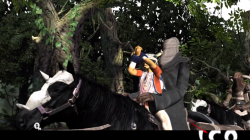
You can add this codes for ICO configs to enable the full height back buffer (game does not use interlacing, but the 2xFSAA). NTSC codes found by @asasega from the PCSX2 forums. I ported them to the PAL version:
ICO NTSC
Code:
-- enable back buffer
eeObj.WriteMem32(0x00274EF8,0x00000001)
eeObj.WriteMem32(0x00274F20,0x00000001)
eeObj.WriteMem32(0x00274F00,0x00001040)
eeObj.WriteMem32(0x00274F28,0x00001040)
ICO PAL
Code:
-- enable back buffer
eeObj.WriteMem32(0x0028F500,0x00001040)
eeObj.WriteMem32(0x0028F528,0x00001040)
eeObj.WriteMem32(0x0028F4F8,0x00000001)
eeObj.WriteMem32(0x0028F520,0x00000001)

local code_check1 = eeObj.ReadMem32(0x0028F50C)
if code_check1 == 0x000FF9FF then
eeObj.WriteMem32(0x0028F50C,0x001FF9FF)
eeObj.WriteMem32(0x0028F534,0x001FF9FF)
end
local code_check2 = eeObj.ReadMem32(0x0028F50C)
if code_check2 == 0x000DF9FF then
eeObj.WriteMem32(0x0028F50C,0x001DF9FF)
eeObj.WriteMem32(0x0028F534,0x001DF9FF)
end

I am not sure if the PAL conditional patches are right, I would prefer to use the eeInsnReplace command. They are needed because of different buffer values in the PAL and NTSC modes, as the game has got a video mode selector.
Maybe you also know 60 fps patch for ico?
 
https://forums.pcsx2.net/Thread-PCSX2-Widescreen-Game-Patches?pid=541310#pid541310

It's the 60 fps code for the NTSC version found by @synce:
Code:
-- 60 fps
eeObj.WriteMem32(0x00274EC4,0x00000001)
PAL port:
Code:
-- 50/60 fps
eeObj.WriteMem32(0x0028F4C4,0x00000001)

EDIT: Could somebody test this PAL config? I think it will be better than the previous one:
Code:
-- 50/60 fps
eeObj.WriteMem32(0x0028F4C4,0x00000001)

-- enable back buffer
eeObj.WriteMem32(0x0028F500,0x00001040)
eeObj.WriteMem32(0x0028F528,0x00001040)
eeObj.WriteMem32(0x0028F4F8,0x00000001)
eeObj.WriteMem32(0x0028F520,0x00000001)

local code_check = eeObj.ReadMem32(0x0028F50C)
if code_check == 0x000FF9FF then
eeObj.WriteMem32(0x0028F50C,0x001FF9FF)
eeObj.WriteMem32(0x0028F534,0x001FF9FF)
else
eeObj.WriteMem32(0x0028F50C,0x001DF9FF)
eeObj.WriteMem32(0x0028F534,0x001DF9FF)
end
 
Last edited:
60 fps code for the JPN version is available on the PCSX2 forums. Regarding the back buffer code, the chances are low, because I do not have that version.
 
https://forums.pcsx2.net/Thread-PCSX2-Widescreen-Game-Patches?pid=541310#pid541310

It's the 60 fps code for the NTSC version found by @synce:
Code:
-- 60 fps
eeObj.WriteMem32(0x00274EC4,0x00000001)
PAL port:
Code:
-- 50/60 fps
eeObj.WriteMem32(0x0028F4C4,0x00000001)

EDIT: Could somebody test this PAL config? I think it will be better than the previous one:
Code:
-- 50/60 fps
eeObj.WriteMem32(0x0028F4C4,0x00000001)

-- enable back buffer
eeObj.WriteMem32(0x0028F500,0x00001040)
eeObj.WriteMem32(0x0028F528,0x00001040)
eeObj.WriteMem32(0x0028F4F8,0x00000001)
eeObj.WriteMem32(0x0028F520,0x00000001)

local code_check = eeObj.ReadMem32(0x0028F50C)
if code_check == 0x000FF9FF then
eeObj.WriteMem32(0x0028F50C,0x001FF9FF)
eeObj.WriteMem32(0x0028F534,0x001FF9FF)
else
eeObj.WriteMem32(0x0028F50C,0x001DF9FF)
eeObj.WriteMem32(0x0028F534,0x001DF9FF)
end

yes lua work but 50/60 FPS broke and make bugs in cutscenes
 
The configs below should switch the 50/60 fps mode on during the gameplay only, turning it off during the cut scenes.
Ico NTSC:
Code:
-- 60 fps
local code_check = eeObj.ReadMem16(0x006325B4)
if code_check == 0x0000 then
eeObj.WriteMem32(0x00274EC4,0x00000001)
else
eeObj.WriteMem32(0x00274EC4,0x00000002)
end
Ico PAL:
Code:
-- 50/60 fps
local code_check = eeObj.ReadMem16(0x0063AA08)
if code_check == 0x0000 then
eeObj.WriteMem32(0x0028F4C4,0x00000001)
else
eeObj.WriteMem32(0x0028F4C4,0x00000002)
end

EDIT: I am not sure if combining the PAL config with back buffer codes together will work. Maybe the "code_check" name will need to be renamed to something else.

EDIT2: Combined configs which should work correctly:
Ico NTSC:
Code:
-- 60 fps
local code_check1 = eeObj.ReadMem16(0x006325B4) -- check if the cut scene is being played
if code_check1 == 0x0000 then
eeObj.WriteMem32(0x00274EC4,0x00000001)
else
eeObj.WriteMem32(0x00274EC4,0x00000002)
end

-- enable back buffer
eeObj.WriteMem32(0x00274EF8,0x00000001)
eeObj.WriteMem32(0x00274F20,0x00000001)
eeObj.WriteMem32(0x00274F00,0x00001040)
eeObj.WriteMem32(0x00274F28,0x00001040)
Ico PAL:
Code:
-- 50/60 fps
local code_check1 = eeObj.ReadMem16(0x0063AA08) -- check if the cut scene is being played
if code_check1 == 0x0000 then
eeObj.WriteMem32(0x0028F4C4,0x00000001)
else
eeObj.WriteMem32(0x0028F4C4,0x00000002)
end
-- enable back buffer (needs a black borders fix in the PAL 50 Hz mode)
eeObj.WriteMem32(0x0028F500,0x00001040)
eeObj.WriteMem32(0x0028F528,0x00001040)
eeObj.WriteMem32(0x0028F4F8,0x00000001)
eeObj.WriteMem32(0x0028F520,0x00000001)

local code_check2 = eeObj.ReadMem16(0x0028F4C0) -- check if the 50 Hz mode is chosen
if code_check2 == 0x0001 then
eeObj.WriteMem32(0x0028F50C,0x001FF9FF)
eeObj.WriteMem32(0x0028F534,0x001FF9FF)
else
eeObj.WriteMem32(0x0028F50C,0x001DF9FF)
eeObj.WriteMem32(0x0028F534,0x001DF9FF)
end
 
Last edited:
The configs below should switch the 50/60 fps mode on during the gameplay only, turning it off during the cut scenes.
Ico NTSC:
Code:
-- 60 fps
local code_check = eeObj.ReadMem16(0x006325B4)
if code_check == 0x0000 then
eeObj.WriteMem32(0x00274EC4,0x00000001)
else
eeObj.WriteMem32(0x00274EC4,0x00000002)
end
Ico PAL:
Code:
-- 50/60 fps
local code_check = eeObj.ReadMem16(0x0063AA08)
if code_check == 0x0000 then
eeObj.WriteMem32(0x0028F4C4,0x00000001)
else
eeObj.WriteMem32(0x0028F4C4,0x00000002)
end

EDIT: I am not sure if combining the PAL config with back buffer codes together will work. Maybe the "code_check" name will need to be renamed to something else.
-- enable back buffer
eeObj.WriteMem32(0x0028F500,0x00001040)
eeObj.WriteMem32(0x0028F528,0x00001040)
eeObj.WriteMem32(0x0028F4F8,0x00000001)
eeObj.WriteMem32(0x0028F520,0x00000001)
-- 50/60 fps
local code_check = eeObj.ReadMem16(0x0063AA08)
if code_check == 0x0000 then
eeObj.WriteMem32(0x0028F4C4,0x00000001)
else
eeObj.WriteMem32(0x0028F4C4,0x00000002)
end

Was apply to previous config with maori-jigglypuff settings and it works for pal but correct work only on 50hz! On 60hz picture forced stretch down! - video
 
Last edited:

Attachments

  • 2021-12-24_094948.png
    2021-12-24_094948.png
    2.1 MB · Views: 105
Final Fix for The Simpsons Hit and Run NTSC

CLI
Code:
--gs-uprender=2x2
--gs-upscale=edgesmooth
--gs-kernel-cl="h2lpool"
--gs-kernel-cl-up="h2lpool2x2"
--gs-progressive=1

--ee-cycle-scalar=2.89
LUA
Code:
-- The Simpsons - Hit & Run (NTSC-U)
-- Widescreen hack by ElHecht
-- ported to PS4
-- emu used=eternal ring v2

local gpr = require("ee-gpr-alias")

apiRequest(1.5)

local eeObj = getEEObject()
local emuObj = getEmuObject()

emuObj.ForceRefreshRate(60)
emuObj.SetDisplayAspectWide()

local patcher = function()
-- 16:9 ver
eeObj.WriteMem32(0x00138a88,0x00000000) -- 10400005
eeObj.WriteMem32(0x0014b360,0x00000000) -- 10400004
eeObj.WriteMem32(0x0014b364,0x00000000) -- 10400004
eeObj.WriteMem32(0x002a0b38,0x00000000) -- 10400004
eeObj.WriteMem32(0x0031c888,0x00000000) -- 10400004
eeObj.WriteMem32(0x0031d674,0x00000000) -- 10400004
---------CHEATS-------------------------
--Have All Levels Complete by Code Master
eeObj.WriteMem32(0x005E6CF0,0x00000006)
eeObj.WriteMem32(0x005E6CF4,0x00000006)
--Have Movie by Code Master
eeObj.WriteMem32(0x005E5E0C,0x00000001)
--Have All Wasp Cameras by Code Master
eeObj.WriteMem32(0x005E5E18,0x00000014)
--Have All Gags by Code Master
eeObj.WriteMem32(0x005E5E2C,0x0000000F)

emuObj.ThrottleMax()
end

emuObj.AddVsyncHook(patcher)
-- Apply light maps texMode=2 (bilinear)  psm= SCE_GS_PSMCT32 (0)
emuObj.SetGsTitleFix( "forceSimpleFetch", "reserved", {tw=8, th=8, psm=0, ztst=1, texMode=2 } )

emu used=eternal ring v2

Works Perfectly! Better framerate and faster load times than original fix!
 
Don't know if this can be fixed here but can someone fix a crash in X-files Resist or Serve when you examine an item it crashes the game? Also Evil Dead Regeneration has audio problems when shooting, chainsaw, and other audio problems. I'm running it on firmware 9.00 Jak v2.
 
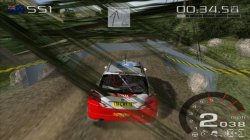
Hello there! Can someone please take a look on WRC Rally Evolved (SCES53247) on ps4? Textures in this game are glitching horribly and I've tried multiple configs and emus to make it actually work. Game is launching fine with ps3 config, but that's it. Could you please help me?
I've even tried patching iso with ps2 patch engine to disable fog, particles etc but it didn't changed anything.
 

Attachments

  • WRC - World Rally Championship - Rally Evolved_20211222095618.jpg
    WRC - World Rally Championship - Rally Evolved_20211222095618.jpg
    860.8 KB · Views: 79

Similar threads

Back
Top