PS4 [Research]PS2 emulator configuration on PS4

Big Mutha Truckers 2 (NTSC):
Format: ISO
SID: SLUS-21086
Issue: Game freezes as soon as starting campaign gameplay. Menus etc seem to work fine.

More emulator tests. I'm not sure how you guys version emulator templates so will just put package version in which emulator files were extracted from.

JakX 1.04
Package: Jak X Combat Racing (CUSA07992) 1.04
  • Game seems fine until start of campaign gameplay at which point it freezes.
  • Performance/behaviour exactly like Jak v2
Star Ocean 1.01
Package: Star Ocean Till The End of Time (CUSA06379) 1.01
  • Game boots without issue. CE-34878-0 error thrown during campaign loading screen.
The more testing i do one this one the more I'm certain that the dev wiki notes for this game (and also 'Big Mutha Truckers') are incorrect.

Definitely think its worth the people here with more experience investigating.
 
Fix for LA Rush NTSC

CLI
Code:
--gs-uprender=2x2
--gs-upscale=EdgeSmooth

--gs-opt-frbuff-switch=1     # this will fix FMVs, but flicker SLIGHTLY in gameplay
--gs-optimize-30fps=1

#--gs-flush-ad-xyz=SafeZWrite
#--safe-area-min=1.0

--host-display-mode=16:9
#emu used=ADK
LUA
Code:
-- LA Rush
-- emu used=ADK

apiRequest(1.0)

local gpr       = require("ee-gpr-alias")

local emuObj      = getEmuObject()
local eeObj       = getEEObject()
   
local patcher = function()
--Gameplay 16:9
eeObj.WriteMem32(0x002e38d8,0x3c013f40) --3c013f80

emuObj.ThrottleMax()
end

emuObj.AddVsyncHook(patcher)
 
Fix for Medal of Honor Vanguard NTSC

CLI
Code:
--gs-uprender=2x2
--gs-upscale=EdgeSmooth
--gs-kernel-cl="h2lpool"
--gs-kernel-cl-up="h2lpool2x2"

--vu0-di-bits=0
--vu1-di-bits=0

--ee-cycle-scalar=2.0

--iop-cycle-scalar=1.0
#--idec-cycles-per-qwc=1000  # [int/multiplier]
--cdvd-sector-read-cycles=4000
#emu used=jakx v2
LUA
Code:
-- Medal of Honor Vanguard
-- Widescreen Hack
-- ported to PS4 Lua
-- emu used=jakx v2

apiRequest(2.2)

local gpr       = require("ee-gpr-alias")
local cpr       = require("ee-cpr0-alias")
local hwaddr     = require("ee-hwaddr")

local emuObj      = getEmuObject()
local eeObj       = getEEObject()
local gsObj       = getGsObject()
local eeOverlay    = eeObj.getOverlayObject()
local iopObj  = getIOPObject()

emuObj.SetDisplayAspectWide()
gsObj.SetDeinterlaceShift(1) 

local WS = function()
--16:9
eeObj.WriteMem32(0x001308b4,0x00000000)
--60fps
--eeObj.WriteMem32(0x2012ED40,0x28420001)
--speed up
eeObj.Vu1MpgCycles(1000)
--fast forward load screens
emuObj.ThrottleMax()
end

emuObj.AddVsyncHook(WS)
----------------------------------------------------------------------------------
 
Fix for 007: From Russia with Love NTSC

CLI
Code:
--gs-uprender=2x2
--gs-upscale=EdgeSmooth
--gs-kernel-cl="h2lpool"
--gs-kernel-cl-up="h2lpool2x2"
--gs-h2l-list-opt=1
--gs-h2l-accurate-hash=1

#--host-display-mode=16:9

--vu1-di-bits=0

--ee-context-switch-cycles=1000

--ee-cycle-scalar=2.0

--iop-cycle-scalar=0.6
#emu used=eternal ring v2
LUA
Code:
-- 007 From Russia with Love
-- emu used=eternal ring v2

local gpr = require("ee-gpr-alias")

apiRequest(1.5)

local eeObj = getEEObject()
local emuObj = getEmuObject()

local patcher = function()
-- Unlock All Characters
eeObj.WriteMem32(0x20A7D358,0xFFFFFFFF)

eeObj.WriteMem32(0x0040560c,0x46140002)
eeObj.WriteMem32(0x00405610,0x27a50030)
eeObj.WriteMem32(0x00405614,0x46010003)
eeObj.WriteMem32(0x00405618,0x3c013f40) --hor val
eeObj.WriteMem32(0x0040561c,0x44810800)
eeObj.WriteMem32(0x00405620,0x4601a503)
eeObj.WriteMem32(0x00405624,0xe7b40030)
eeObj.WriteMem32(0x00405628,0x46020002)
eeObj.WriteMem32(0x0040562c,0x0c0c87e6)
eeObj.WriteMem32(0x00405630,0xe7a00034)
eeObj.WriteMem32(0x00405634,0x7bb00050)
eeObj.WriteMem32(0x00405638,0xdfbf0040)
eeObj.WriteMem32(0x0040563c,0xc7b40060)
eeObj.WriteMem32(0x00405640,0x03e00008)
eeObj.WriteMem32(0x00405644,0x27bd0070)

eeObj.Vu1MpgCycles(500)
emuObj.ThrottleMax()
end

emuObj.AddVsyncHook(patcher)

emuObj.SetDisplayAspectWide()

emuObj.SetGsTitleFix( "forceSimpleFetch", "reserved", { texMode=1  } )
 
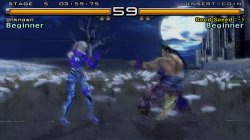
Proper Widescreen and No interlace for Tekken 5 NTSC
LUA
Code:
-- Tekken 5 NTSC
-- Widescreen and No interlace
-- emu used=rogue v1

apiRequest(0.1)

local gpr       = require("ee-gpr-alias")

local emuObj      = getEmuObject()
local eeObj       = getEEObject()

local patcher = function()

eeObj.WriteMem32(0x0032b448,0x3c013f40) -- both fov+
--applies both fov+ only for widescreen mode
eeObj.WriteMem32(0x0032b478,0x3c010015)
eeObj.WriteMem32(0x0032b47c,0xc62dd11c)
eeObj.WriteMem32(0x0032b49c,0x46016b42)
eeObj.WriteMem32(0x0032b4a0,0x46010843)
eeObj.WriteMem32(0x0032b4b8,0x460d1083)
eeObj.WriteMem32(0x0032b4bC,0x460d0843)
--effects fix
eeObj.WriteMem32(0x00257434,0x46161083)
eeObj.WriteMem32(0x00257488,0x46160843)
eeObj.WriteMem32(0x002574e0,0x46160843)
eeObj.WriteMem32(0x00257538,0x46160843)

local code_check1 = eeObj.ReadMem16(0x15D11C)
if code_check1 == 0x8e38 then
eeObj.WriteMem32(0x20257764,0x10000008)
end
local code_check2 = eeObj.ReadMem16(0x15D11C)
if code_check2 == 0xaaaa then
eeObj.WriteMem32(0x20257764,0x45020008)
end
--render fix
eeObj.WriteMem32(0x00222484,0x3c013f2b)
eeObj.WriteMem32(0x00222494,0x44810000)
eeObj.WriteMem32(0x00222498,0x46006302)
--Devil Within Mode by Arapapa
local code_check3 = eeObj.ReadMem16(0x100000)
if code_check3 == 0xfff0 then
eeObj.WriteMem32(0x2041E82C,0x3f400000) --Zoom
eeObj.WriteMem32(0x202ACED8,0x3FDDA51A) --Y-Fov
end
--no interlace for starblade
local code_check4 = eeObj.ReadMem16(0x2F5BD0)
if code_check4 == 0x0104 then
eeObj.WriteMem32(0x202F5BD0,0x34070003)
local code_check5 = eeObj.ReadMem16(0x187FB0)
if code_check5 == 0x0008 then
eeObj.WriteMem32(0x20187FB0,0x34030001)
eeObj.WriteMem32(0x20187FC4,0x34021078)
end
end
--[[
--Workaround
eeObj.WriteMem32(0x2010207C,0x3c050000)
eeObj.WriteMem32(0x20102084,0x3c060050)
eeObj.WriteMem32(0x2010208C,0x3c070001)
eeObj.WriteMem32(0x20102EAC,0x3C0701E0)
--]]
--Intro Mini Game
local code_check6 = eeObj.ReadMem16(0xFFECF4)
if code_check6 == 0x0001 then
eeObj.WriteMem32(0x2010230C,0x34029078)
end
--Framebuffer - Progressive - No interleacing - No black lines HW mode
local code_check7 = eeObj.ReadMem16(0xFFEF20)
if code_check7 == 0x8870 then
eeObj.WriteMem32(0x2010230C,0x34029400)
eeObj.WriteMem32(0x203EF450,0x00000001) -- Official Progressive mode
end
-- Devil W. Game
local code_check8 = eeObj.ReadMem16(0xFFEF20)
if code_check8 == 0x2c70 then
eeObj.WriteMem32(0x2026033C,0x34029400)
end
-- Tek 1 sdtv mode 240p
local code_check9 = eeObj.ReadMem16(0xFFEF20)
if code_check9 == 0x3df0 then
eeObj.WriteMem32(0x2014F454,0x3c050000)
eeObj.WriteMem32(0x2014F45C,0x3C060050)
eeObj.WriteMem32(0x2014F464,0x3c070001)
end
-- Tek 2 sdtv mode 240p
local code_check10 = eeObj.ReadMem16(0xFFEF20)
if code_check10 == 0x6570 then
eeObj.WriteMem32(0x2015E494,0x3c050000)
eeObj.WriteMem32(0x2015E49C,0x3C060050)
eeObj.WriteMem32(0x2015E4A4,0x3c070001)
end
-- Tek 3 sdtv mode 480p extended
local code_check11 = eeObj.ReadMem16(0xFFEF20)
if code_check11 == 0xF370 then
eeObj.WriteMem32(0x201E4F54,0x3c050000)
eeObj.WriteMem32(0x201E4F5C,0x3C060050)
eeObj.WriteMem32(0x201E4F64,0x3c070001)
end

end

emuObj.AddVsyncHook(patcher)

Confirmed! D-Codes are now working! This one was an easy test because this combo d+e code unlocks starblade in arcade history as a side-effect.
You can watch big test if interesting

Arcade History and Demo Gameplay

Some stages still look not so good as on attached pic, but if turn on progressive mode in settings, game looks more better!
 

Attachments

  • Tekken 5.jpg
    Tekken 5.jpg
    758.3 KB · Views: 71
Fix for LA Rush NTSC

CLI
Code:
--gs-uprender=2x2
--gs-upscale=EdgeSmooth

--gs-opt-frbuff-switch=1     # this will fix FMVs, but flicker SLIGHTLY in gameplay
--gs-optimize-30fps=1

#--gs-flush-ad-xyz=SafeZWrite
#--safe-area-min=1.0

--host-display-mode=16:9
#emu used=ADK
LUA
Code:
-- LA Rush
-- emu used=ADK

apiRequest(1.0)

local gpr       = require("ee-gpr-alias")

local emuObj      = getEmuObject()
local eeObj       = getEEObject()
  
local patcher = function()
--Gameplay 16:9
eeObj.WriteMem32(0x002e38d8,0x3c013f40) --3c013f80

emuObj.ThrottleMax()
end

emuObj.AddVsyncHook(patcher)
Playble version of L.A. Rush but have Black screen appearing issue in cutscenes and graphical bugs while gameplay! Works and looks very fine!
 
More emulator tests. I'm not sure how you guys version emulator templates so will just put package version in which emulator files were extracted from.

JakX 1.04
Package: Jak X Combat Racing (CUSA07992) 1.04
  • Game seems fine until start of campaign gameplay at which point it freezes.
  • Performance/behaviour exactly like Jak v2
Star Ocean 1.01
Package: Star Ocean Till The End of Time (CUSA06379) 1.01
  • Game boots without issue. CE-34878-0 error thrown during campaign loading screen.
The more testing i do one this one the more I'm certain that the dev wiki notes for this game (and also 'Big Mutha Truckers') are incorrect.

Definitely think its worth the people here with more experience investigating.
It's true, I don't know who edits the list, the game Fallout - Brotherhood of Steel for example, in the list it says that the NTSC version works perfectly with psychonauts v2 emu, so I decided to test it, the game has so many graphical errors that it's impossible to describe, is that "perfectly"?
 
It's true, I don't know who edits the list, the game Fallout - Brotherhood of Steel for example, in the list it says that the NTSC version works perfectly with psychonauts v2 emu, so I decided to test it, the game has so many graphical errors that it's impossible to describe, is that "perfectly"?

How far do you have to play into fallout to see these glitches?
 
It is probably a general MSCAL timing issue similar to the other Snowblind Engine games:
38135031-568a953e-33ec-11e8-9876-5642f7c94e30.png (640×518) (user-images.githubusercontent.com)
Textures are wrong and do flicker. But I saw the Dark Alliance series is working. Fallout is the same version of engine like the Dark Alliance games (and The Bard's Tale), so it could be tested with the same emulator version the Baldur's Gate games are working.
With Kof 2000 emu Baldur's Gate games works fine
 
Justice League heroes is also working fine with "--vif1-instant-xfer=0" and "--vu1-no clamping=0" to fix graphics and characters

With Kof 2000 emu Baldur's Gate games works fine

It still requires config for graphical issues. More than likely it will require --vif1-instant-xfer=0
 
Justice League heroes is also working fine with "--vif1-instant-xfer=0" and "--vu1-no clamping=0" to fix graphics and characters


It still requires config for graphical issues. More than likely it will require --vif1-instant-xfer=0
yes but with another emu it will freeze on loading screen
 
WIP FIX for Justice League Heroes(Lets see how long it takes to get to reddit)

CLI
Code:
--gs-uprender=2x2
--gs-upscale=EdgeSmooth
--gs-kernel-cl="h2lpool"
--gs-kernel-cl-up="h2lpool2x2"
--vu1-di-bits=0

--vif1-instant-xfer=0  #fixes stage issues

--ee-cycle-scalar=0.2
--iop-cycle-scalar=0.2

--vu1-no-clamping=0  #fixes character SPS

#emu used=eternal ring v2
 
Last edited:
Is the "vu1-no-clamping=0" really needed?

Justice League Heroes does use a newer version of engine, like the Champions series and Combat Elite. The fix might be sufficient for all Snowblind Engine games though.
 
Is the "vu1-no-clamping=0" really needed?

Justice League Heroes does use a newer version of engine, like the Champions series and Combat Elite. The fix might be sufficient for all Snowblind Engine games though.
on ps4 the graphics are totally janky without it. your characters will suffer from SPS without it!

It's true, I don't know who edits the list, the game Fallout - Brotherhood of Steel for example, in the list it says that the NTSC version works perfectly with psychonauts v2 emu, so I decided to test it, the game has so many graphical errors that it's impossible to describe, is that "perfectly"?

@Bortoloti , would you mind trying
Code:
--vif1-instant-xfer=0
--vu1-no-clamping=0
in Fallout Brotherhood of Steel?
 
Last edited:

Similar threads

Back
Top